
What if the biggest factor in your MacBook battery replacement cost isn’t the battery itself? Most users assume they’re paying for a high-tech part, but the real expense often stems from complex assembly designs that force you to replace entire casing sections. It’s frustrating to watch a premium laptop turn into a desktop because it won’t hold a charge. You need your device to be mobile, and you shouldn’t have to guess how much that restoration will cost or how long it will take.
We know you’re looking for a straight answer that respects your time and your data. This guide delivers a transparent breakdown of 2026 pricing for MacBook Air and Pro models. We compare official Apple service, independent repair specialists, and DIY kits to find the best value for your situation. You’ll gain a clear understanding of the turnaround times and risks associated with each option. This allows you to make an informed decision and get your MacBook back to peak performance without the stress.
Key Takeaways
- Recognize “Service Recommended” warnings and physical swelling early to protect your trackpad and internal components.
- Get a clear breakdown of the 2026 MacBook battery replacement cost to avoid overpaying for parts and labor.
- Compare the benefits of official Apple service against the speed and value offered by expert independent repair shops.
- Discover why modern MacBook designs require specialized tools to dissolve industrial adhesives during a professional battery swap.
- Apply the “Rule of 50%” to decide if a repair is worth the investment to gain three to four years of additional laptop life.
Signs Your MacBook Needs a Battery Replacement
Your MacBook is a workhorse, but its battery is a consumable part with a finite lifespan. Throughout the long MacBook history, battery technology has improved, yet chemical aging remains inevitable. When the cells inside your laptop begin to fail, the symptoms range from minor inconveniences to serious hardware risks. Understanding these red flags helps you plan for a MacBook battery replacement cost before a total failure disrupts your workflow. Early detection prevents secondary damage to your trackpad or logic board.
Using System Settings to Check Battery Health
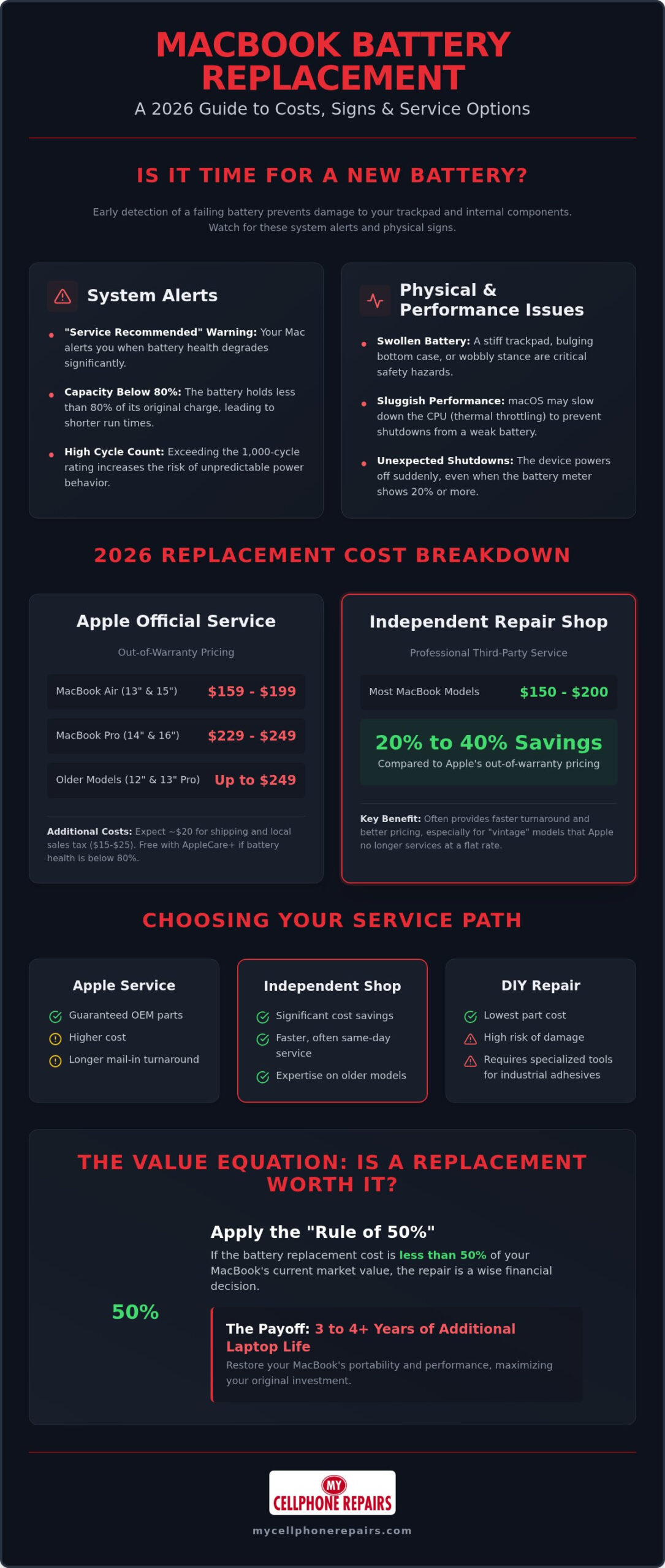
Modern macOS versions provide built-in tools to monitor your hardware health. If you’re running macOS Ventura or later, click the Apple Menu, select System Settings, and navigate to the Battery section. Click the info icon next to Battery Health to see your current status. If the system displays “Service Recommended” or “Replace Soon,” the battery is likely holding less than 80% of its original capacity. While your Mac still functions, you’ll notice significantly shorter runtimes between charges. A cycle count represents one full discharge and recharge of the battery; most modern models are rated for 1,000 cycles before performance degrades significantly. Once you cross this threshold, the risk of unpredictable power behavior increases.
Physical and Performance Warning Signs
Software alerts aren’t the only way to diagnose a failing battery. Watch for physical changes in your laptop’s chassis. A swollen battery is a critical issue caused by gas buildup inside the lithium-ion cells. This often manifests as a trackpad that feels stiff or difficult to click. In extreme cases, the bottom casing may bulge or the laptop won’t sit flat on a desk. This is a safety hazard that requires immediate attention from a professional technician. For broader safety tips on lithium-ion cells, consult The Ultimate Guide to Phone Battery Replacement (2026).
Performance drops are another common indicator of a failing unit. As batteries age, they struggle to provide the consistent voltage required by the processor. To prevent unexpected shutdowns, macOS may implement thermal throttling. This slows down your CPU to reduce power demand. If your Mac feels sluggish during simple tasks, or if it suddenly turns off when the battery percentage shows 20% remaining, it’s time to investigate the MacBook battery replacement cost. Addressing these issues early restores the portability you expect from your device and keeps your internal hardware safe.
MacBook Battery Replacement Cost: 2026 Price Estimates
Calculating the total MacBook battery replacement cost depends heavily on whether you choose official Apple service or a local specialist. Prices have stabilized in 2026, but the transition to M-series chips and more complex “top case” designs has kept labor costs high. You should identify your exact model before requesting a quote, as screen size and internal architecture are the primary price drivers. A professional assessment ensures you aren’t paying for a full assembly when a simple cell swap might suffice.
Apple Official Out-of-Warranty Pricing
Apple sets flat fees for battery service based on the specific model family. For 13-inch and 15-inch MacBook Air models, out-of-warranty costs typically range from $159 to $199. MacBook Pro users should expect higher fees due to larger battery capacities and more intricate internal layouts. A 14-inch or 16-inch MacBook Pro service generally costs between $229 and $249. If you still own a 12-inch Retina MacBook or an older 13-inch Pro model, the flat fee often sits at the $249 ceiling.
These estimates represent the base labor and part cost. Apple frequently adds a shipping fee of approximately $19.95 if you mail your device to a repair center rather than visiting a store. You must also factor in your local sales tax, which can add another $15 to $25 to the final invoice. If your device is covered by active AppleCare+, the service is free of charge, provided the battery health is verified to be below 80% maximum capacity.
Third-Party Professional Repair Pricing
Choosing an independent repair center is a smart way to manage your MacBook battery replacement cost without sacrificing quality. Most professional shops charge between $150 and $200 for a full battery swap. This represents a 20% to 40% savings compared to Apple, especially for older Intel-based models where parts are more widely available. Independent technicians often offer more consistent pricing for “vintage” machines that Apple may no longer support with flat-rate fees.
Beyond the cost savings, professional shops ensure that hazardous materials are properly managed at the end of their useful life. Lithium-ion cells require specialized recycling to prevent fires and recover valuable minerals. For those looking for Professional MacBook Repair Solutions, local experts often provide same-day service that bypasses the long wait times at retail stores. If your laptop is struggling to stay powered, it is worth consulting a specialist for a quick diagnostic to confirm a battery swap is the right move.
Service Comparison: Apple vs. Independent Shop vs. DIY
Choosing the right path for your repair requires balancing speed, cost, and risk. While the MacBook battery replacement cost is a major factor, the method you select determines how quickly you get back to work. You have three primary options, each with distinct advantages and drawbacks. Understanding these differences helps you avoid unnecessary downtime and protects your investment in premium hardware.
Official Apple service is the most expensive route. You receive guaranteed original equipment manufacturer (OEM) parts and a standard 90 day warranty. However, the logistical hurdles are significant. If you can’t visit a retail store, you must use their mail-in service. This process typically takes three to five business days. For many professionals, being without a laptop for a week is a hidden cost that far outweighs the repair fee itself.
Independent repair shops offer a faster, more flexible alternative. These specialists often provide same-day service, allowing you to drop off your device in the morning and pick it up by the afternoon. They use high-quality parts and maintain competitive pricing that is often lower than Apple’s flat-rate fees. Because they focus on local service, they prioritize quick turnarounds to keep your life moving.
The Risks of DIY Battery Swaps
Attempting a DIY repair is the cheapest way to manage your MacBook battery replacement cost, but it’s the highest risk. Modern Retina and M-series MacBooks use industrial-grade adhesives to secure battery cells directly to the top case. Removing these requires specialized solvents and precision tools. If you slip and puncture a lithium-ion cell, it can cause a fire or release toxic fumes. This complexity is why professional Cell Phone Repair Technician Training is essential. Trained experts know how to dissolve these bonds safely without damaging the delicate ribbon cables for the trackpad and keyboard.
Choosing the Right Professional Service
When you look for a third-party shop, prioritize transparency and expertise. A reputable provider should offer a clear warranty on both parts and labor, typically ranging from 90 days to one full year. Ask about their diagnostic capabilities. A true specialist doesn’t just swap parts; they verify that your charging port and logic board are functioning correctly. This level of professional care ensures your new battery reaches its full 1,000-cycle potential without unexpected failures. If your MacBook has suffered additional damage beyond the battery, such as a cracked or flickering display, a dedicated MacBook screen repair service can address both issues in a single visit to restore your laptop completely.
Why Does MacBook Battery Repair Cost So Much?
Many users are shocked when they receive a repair quote that seems to exceed the value of the part itself. The MacBook battery replacement cost is rarely about the price of lithium-ion cells alone. Instead, it reflects Apple’s intricate hardware engineering and the labor required to navigate it. Modern MacBooks prioritize a slim profile, which means components are packed tightly and often fused together. This design choice makes a simple swap much more complex than it was on older, user-serviceable laptops.
Top Case vs. Battery-Only Swaps
Apple’s official repair methodology is the primary reason for high service fees. In most modern models, the battery is secured to the aluminum chassis with industrial-grade adhesive. Apple treats the battery, keyboard, and trackpad as a single integrated unit called the “top case.” When you visit an official service center, they often replace this entire upper shell rather than just the battery. You end up paying for a new keyboard and trackpad even if yours are working perfectly.
Skilled independent technicians offer a more surgical approach. They use specialized heat mats and chemical solvents to carefully dissolve the adhesive bonds. This allows them to remove the failing cells while keeping your original top case intact. While this method requires significant time and precision, it avoids the massive hardware markup associated with a full assembly replacement. It’s a labor-heavy process that demands a steady hand to avoid damaging delicate ribbon cables tucked under the battery.
The Cost of Quality Parts
Not all replacement batteries are equal. High-quality aftermarket options use “Grade A” cells that match the original energy density and cycle life of the factory part. The most critical component, however, is the Battery Management System (BMS) chip. This circuit communicates with macOS to report health, manage thermal levels, and prevent overcharging. Cheap knock-offs often use recycled or low-grade BMS chips that provide inaccurate health data or cause the system to throttle your CPU speed.
Safety is the biggest reason to avoid “no-name” bargain batteries found on discount marketplaces. Using uncertified “no-name” batteries is a significant safety risk because they often lack the thermal protection circuits required to prevent swelling or combustion. Professional shops invest in parts that have been tested for compatibility and safety. If you want a fair price and expert service that protects your device, you can schedule a professional MacBook battery replacement to get your laptop back to peak performance. This ensures you’re paying for a reliable, long-term solution rather than a temporary fix.
Is It Worth Replacing Your MacBook Battery?
Deciding whether to invest in a repair or buy a new machine often comes down to simple math. For most users, the MacBook battery replacement cost is a fraction of the price of a new M-series laptop. A high-quality battery swap can breathe new life into a device that still has powerful internal components. If your screen is clear and your keyboard works perfectly, a new battery often adds three to four years of reliable service to your current setup. This is a sustainable choice that keeps your hardware out of a landfill while saving you thousands of dollars. However, if your Retina display is also showing signs of damage, reviewing a complete MacBook screen repair service guide alongside your battery assessment will help you budget accurately for a full restoration.
Consider the resale value of your hardware. A MacBook with a “Service Recommended” warning is difficult to sell on the secondary market. Buyers typically deduct the full cost of a professional repair from their offer, or they avoid the listing entirely. Replacing the battery before you sell ensures you get the highest possible return on your investment. It transforms a struggling laptop into a high-performing refurbished machine, making it a much more attractive asset for potential buyers.
Repair vs. Replace Framework
Industry experts often suggest the “Rule of 50%” for hardware maintenance. If the total repair invoice exceeds half the current market value of your laptop, it’s time to consider a replacement. For a $1,500 MacBook Pro, a $250 battery investment represents an excellent ROI. However, if your Mac is over a decade old and worth only $300, that same repair might not make sense. You should also audit your other hardware before committing. Check your SSD health and look for any dead pixels on the display. If multiple components are failing, trading in your device is the better financial move. Before making your final decision, it helps to understand the full MacBook screen repair cost alongside your battery quote, so you can budget accurately if more than one component needs attention. For insights into managing your tech budget, you can check our Refurbished iPhone Buying Guide to see how value holds up across different device categories.
Final Recommendation for 2026
Professional third-party repair is the sweet spot for most users in 2026. It offers a safe middle ground between the high premiums of official service and the extreme risks of DIY attempts. You get expert installation and a solid warranty without the long mail-in wait times. Before you head to a shop, always back up your data to iCloud or an external drive. This protects your files during the diagnostic process and gives you peace of mind. Your next step is straightforward. Contact a specialist to get a firm quote based on your specific model. You can Trust My Cellphone Repairs for expert MacBook battery services and get your mobile workstation back in top shape today.
Restore Your MacBook’s Performance Today
Your MacBook is a high-performance tool that deserves a reliable power source. You now understand that the MacBook battery replacement cost is an investment in extending your hardware’s lifespan by another three to four years. By choosing professional service over risky DIY methods, you ensure your device remains safe and your data stays protected. Our expert technicians are trained through our own internal program to handle the most complex M-series and Intel assemblies with precision.
Whether you need a quick diagnostic or a full battery swap, our stores across Maryland, Pennsylvania, New Jersey, Virginia and Michigan are ready to get you back to work fast. If you decide that a repair isn’t the right path, we also offer certified refurbished device options to keep you connected without the new-retail price tag. Book Your Professional MacBook Battery Replacement today to restore your mobility and stop worrying about your next charge. Your laptop still has plenty of productive years ahead; it just needs the right partner to unlock them.
Frequently Asked Questions
How much does Apple charge for MacBook battery replacement out of warranty?
Apple typically charges between $149 and $249 for out-of-warranty battery service. The exact fee depends on your specific model. MacBook Air models usually sit at the lower end of that range, while MacBook Pro models reach the higher end. These flat fees cover the part and labor but don’t include local taxes or potential shipping costs. If you have active AppleCare+ and the battery health is below 80%, the service is free.
Will replacing my MacBook battery delete my data?
A battery replacement doesn’t involve your SSD, so your data remains intact. However, we always recommend a full Time Machine backup before any hardware repair. Unexpected issues can occur during disassembly, especially with delicate internal ribbon cables. Professional technicians prioritize data safety, but having a current backup ensures you’re protected against rare hardware failures or software glitches during the restoration process. It’s better to be safe than sorry with your files.
How long does a MacBook battery replacement take at a repair shop?
Professional independent repair shops often complete a battery swap within the same business day. You can typically drop off your device in the morning and pick it up by the afternoon. In contrast, Apple’s mail-in service usually requires three to five business days. Local turnaround times vary based on part availability and current shop volume. We recommend scheduling an appointment to ensure the fastest possible service for your MacBook and minimal downtime.
Can I use my MacBook while the battery is being replaced?
No, you cannot use your MacBook while the battery is being replaced. The technician must power down the device and remove the bottom casing to access the internal components. Since modern batteries are often glued to the chassis, the repair involves specialized tools and solvents that require the laptop to be completely stationary. You’ll need to plan for a few hours of downtime while the hardware restoration is performed by an expert.
Is it dangerous to replace a swollen MacBook battery yourself?
Yes, replacing a swollen battery yourself is extremely dangerous and carries a high risk of fire or explosion. Swelling indicates that gas has built up inside the lithium-ion cells due to chemical failure. If you accidentally puncture the casing with a DIY tool, the battery can vent toxic fumes or ignite instantly. Professional technicians use specialized safety equipment and disposal protocols to handle these hazardous components without risking your home or personal safety.
Does a new battery make a MacBook faster?
A new battery can improve performance if your system was previously thermal throttling. When a battery can’t provide consistent voltage, macOS slows down the CPU to prevent unexpected shutdowns. This makes your laptop feel sluggish during basic tasks. Once you address the MacBook battery replacement cost and install a healthy cell, the processor can run at its full clock speed again. You’ll notice a smoother experience and much better multitasking capabilities.
How can I tell if my MacBook battery is actually failing or if it’s a software issue?
Check your Battery Health in System Settings to see if macOS recommends service. If you see “Service Recommended” or a maximum capacity below 80%, the hardware is definitely failing. Software issues usually involve specific apps draining power or background processes stuck in a loop. If your Mac stays cool but the percentage drops rapidly, it’s a hardware problem. If it gets hot and fans spin loudly, a software bug might be the culprit.
What is the warranty on a third-party MacBook battery replacement?
Reputable third-party repair shops typically offer a warranty ranging from 90 days to one full year. This coverage should include both the replacement part and the technician’s labor. Always ask for a written warranty statement before committing to the repair. A solid warranty protects you against manufacturing defects in the new battery cells. It also ensures that any issues with the installation, such as loose connections or trackpad alignment, are corrected at no extra cost. At My Cellphone Repairs, all repairs come with a warranty; coverage depends on the part used. Ask your store for details.