
Your MacBook isn’t just a laptop; it’s your livelihood, and a single hairline crack shouldn’t force you into a $2,000 upgrade. We understand the immediate panic that sets in when you see a spiderweb of pixels or a completely blacked-out display. You’re likely worried about the MacBook screen repair cost and whether a specialist repair will actually last. It’s a stressful situation. Official quotes often feel like a down payment on a new car, but you have better options available right now.
We’re here to provide the transparency you need to get back to work. You’ll get a clear, model-by-model breakdown of current pricing to help you decide if a repair or an upgrade makes the most sense for your budget. We’ll also explain the critical differences between glass-only fixes and full LCD assembly replacements. This guide ensures you know exactly how to navigate the 2026 repair landscape and find a reliable alternative to the high-priced Apple Store.
Key Takeaways
- Understand why modern designs require a full display assembly replacement instead of a simple glass repair.
- Compare the MacBook screen repair cost across all current Air and Pro models to find a price that fits your budget.
- Discover how independent repair experts provide a faster turnaround and lower out-of-pocket costs than standard manufacturer services.
- Identify hidden damage like bent frames or hinge failures that could affect your final repair quote.
- Apply the 50% Rule to decide whether restoring your current device is a better value than purchasing a replacement.
The Reality of MacBook Screen Repair Costs in 2026
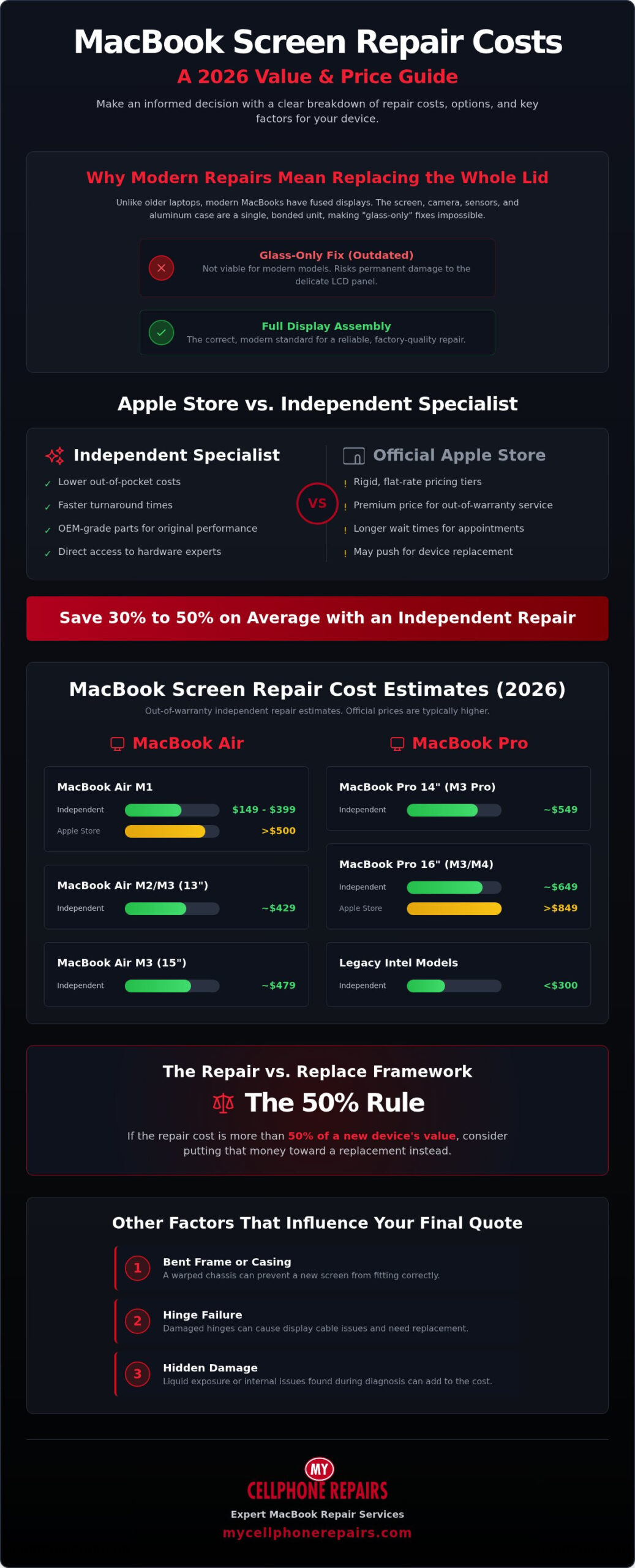
Understanding the MacBook screen repair cost starts with realizing you aren’t just buying a piece of glass. Unlike standard laptops where a technician might swap a simple LCD panel, modern MacBooks use a fused display structure. This design choice makes the device incredibly thin, but it also drives up the price of restoration. If your screen fails, you’re usually paying for a sophisticated piece of hardware that includes the aluminum housing, specialized sensors, and high-density pixels.
Modern Apple Silicon models have introduced even more complexity. Features like ProMotion for high refresh rates and Liquid Retina XDR technology require precision-calibrated components. These parts are tightly integrated into the device’s ecosystem. When you encounter the “Out-of-Warranty” price trap, you’re often paying for this entire ecosystem rather than just a fix for a crack. This makes the choice between professional repair and device replacement a critical financial decision.
Assembly vs. Component Repair: What You Are Paying For
In 2026, manufacturing standards favor “Display Assembly” replacements over component-level fixes. This means the entire top lid of your MacBook usually needs to be replaced as a single unit. The assembly houses the backlight, the FaceTime camera, and ambient light sensors. Because these parts are bonded with industrial-grade adhesives, separating them is risky and often impossible without damaging the delicate LCD. You are paying for a complete, factory-calibrated upper half of your laptop to ensure features like True Tone continue to function correctly after the repair.
The ‘Apple Tax’ and Third-Party Savings
Apple typically uses flat-rate repair tiers for accidental damage. If you don’t have active coverage, these costs can feel like a penalty. Many users look toward the Apple Authorized Service Provider program for official support, but this often comes with a premium price tag. While the Apple Store follows rigid pricing structures, independent specialists offer a more flexible path to lowering your MacBook screen repair cost.
Specialized independent labs focus on sourcing premium, OEM-grade parts that match the original performance of your device. These technicians often have deeper hardware expertise than general retail staff. By choosing a professional MacBook Repair service outside the official retail loop, you can often save 30% to 50% on labor and parts. This approach prioritizes the restoration of your existing hardware without the inflated overhead of a corporate storefront.
Detailed Price Breakdown by MacBook Model and Year
The MacBook screen repair cost varies significantly based on the specific chipset and display technology inside your machine. Newer M-series models command higher prices because of their integrated display assemblies and advanced pixel density. While older Intel models are becoming more affordable to fix as parts become widely available, the latest Liquid Retina XDR panels remain a premium investment. Understanding the specific MacBook screen repair cost for your model helps you decide if a fix is a smart financial move or if it’s time to trade in.
MacBook Air: The Most Affordable Screen Fixes
The M1 MacBook Air is currently the most cost-effective model to restore in 2026. For this budget favorite, independent repairs typically range from $149 to $399. In contrast, official out-of-warranty service can easily exceed $500. Moving up to the M2 and M3 Air models, prices increase due to the redesigned chassis and thinner bezels. An independent shop might charge around $429 for a 13-inch M3 Air, while the 15-inch variant usually sits around $479. These models remain the most repair-friendly options for consumers today.
MacBook Pro: High-Performance Displays, High-Performance Prices
If you own a MacBook Pro 14 or 16-inch, prepare for a higher repair bill. These units utilize ProMotion (120Hz) and Liquid Retina XDR technology. These advanced specs mean the part itself is inherently expensive. For a 14-inch M3 Pro, independent repair estimates often sit around $549. The 16-inch models are the most expensive in the lineup, with independent costs reaching $649 for the latest M3 and M4 generations. Official Apple repairs for these large screens frequently exceed $849, making specialized independent labs a necessary alternative.
Display size exponentially increases the part cost. Moving from a 13-inch to a 16-inch screen adds more than just physical surface area; it requires more backlight LEDs and a more rigid aluminum frame. For legacy Intel-based MacBooks, parts are plentiful, often keeping repairs under $300. However, for high-end M3 or M4 Max configurations, the specialized display controllers drive prices higher. For these premium machines, an independent lab is often the most practical path to an affordable repair. If you need a specific quote for your device, consult with our MacBook repair team to explore your options.
Apple Store vs. Independent Repair: Comparing the Value
Deciding where to take your device depends on your current coverage and how quickly you need it back. If you have active AppleCare+, the MacBook screen repair cost is a flat $99 deductible for accidental damage. This is the only scenario where the manufacturer is the most affordable option. Without this insurance, Apple’s out-of-warranty quotes often trigger sticker shock, as they prioritize full assembly replacements at premium retail rates.
Independent repair labs offer a more balanced approach to value. While Apple typically provides a 90-day limited warranty on their work, professional independent shops offer their own coverage. At My Cellphone Repairs, all repairs come with a warranty; coverage depends on the part used. Ask your store for details. The “OEM-Grade” parts used meet the exact technical specifications of the original screen, including brightness and color accuracy, but without the corporate markup. You get the same visual performance while keeping your repair budget under control.
When to Choose the Apple Store
Stick with the Apple Store if your device is currently covered by AppleCare+. The $99 fee is unbeatable. You should also consider official service for brand new models released within the last six months. In these cases, the third-party supply chain for specialized panels, like the latest M4 displays, may still be catching up. If your laptop has multiple failures, such as a cracked screen and a liquid-damaged logic board, Apple’s tiered flat-rate system might cover both for a single high fee.
When Independent Repair is the Smarter Move
Independent repair is the logical choice for any MacBook older than 12 months that lacks extended insurance. Speed is a major factor here. Apple often requires you to mail your device to a central depot, which can take 5 to 21 days. A specialized independent lab can often complete the restoration in 24 hours or less. This is essential for professionals who can’t afford three weeks of downtime.
For budget-conscious users, independent service removes the “Genius” premium. You pay for the part and the expert labor, not the retail storefront overhead. If you want a functional, high-quality display without the three-week wait, check out our MacBook screen repair service for specialized restoration details. We focus on getting your device back to factory standards with a transparent, no-nonsense process that respects your time and your wallet.
Factors That Influence Your Final Repair Invoice
Your MacBook screen repair cost is rarely a single, static number. While price guides provide a reliable range, the final invoice depends on what a technician finds once they open the housing. A “clean” screen that won’t turn on is often more complex than a shattered one that still displays an image. This happens when internal components like the display controller or the backlight circuit fail independently of the glass. We focus on finding the exact cause so you don’t pay for parts you don’t need.
Secondary Damage Assessment
When a MacBook hits the floor, the impact force travels through the entire device. This often damages the hinges or the delicate EDP cables that carry video data. If the aluminum frame is even slightly warped, a new display assembly won’t fit correctly. Forcing a screen into a bent chassis creates pressure points that lead to immediate failure. This is why a professional diagnostic is the mandatory first step. It identifies if you need a simple screen swap or a more involved chassis alignment. Liquid damage also complicates the quote. If moisture reaches the screen’s connectivity pins, you might need board-level cleaning alongside the hardware replacement. For a full understanding of what to do when water meets your MacBook, our guide to MacBook liquid damage repair covers the critical emergency steps and restoration process in detail.
Part Availability and Market Fluctuations
Supply chain shifts in 2026 continue to affect the price of M-series displays. Technicians generally choose between “New” assemblies and “Pulled” Grade A parts. Pulled parts are genuine components salvaged from devices with unrelated issues. They offer a sustainable way to restore your laptop without the high cost of a brand-new factory part. Choosing these Grade A components is often the best way to manage your MacBook screen repair cost. Since the technician is already inside the machine, it’s a smart time to check other consumables. Review your MacBook battery replacement cost to see if replacing an aging cell now will save you on labor later.
National mail-in services are the standard for 2026. Most professional labs include insured shipping in their service packages to protect your investment. You can avoid emergency “Rush” fees by choosing a shop with a high-volume intake system. While official turnarounds can stretch to 21 days, independent experts usually offer 24 to 48-hour service. If you require overnight restoration, expect a premium for the prioritized labor. Contact our repair specialists to get a transparent breakdown of your specific hardware needs.
Is It Worth Fixing? The Repair vs. Replace Framework
Deciding whether to invest in your current device or buy a new one requires a cold look at the numbers. The 50% Rule is the industry standard for this choice. If your MacBook screen repair cost exceeds half of the device’s current market value, upgrading is often the more logical path. For M-series MacBooks, the high performance of the chipset usually justifies the repair. These machines have a long shelf life, making a screen restoration a smart way to protect a high-value asset.
Think about your tech budget holistically. Sometimes the price of a screen fix is comparable to the cost of a high-quality refurbished iPhone for sale. If you need multiple device upgrades, you have to prioritize. Repairing your laptop is also a vote for sustainability. Extending the life of your hardware by even two years significantly reduces your environmental footprint. It’s the most responsible way to handle technical failures in 2026.
Calculating Your MacBook’s Residual Value
Start by checking current trade-in values on major resale platforms. Be honest about the condition. A cracked screen usually drops the resale value by 60% to 70% immediately. Most trade-in programs will offer only a fraction of the original value for “damaged” units. Use the “Life Extension” math to see the real value. If a repair keeps you from spending $1,200 on a new model for another two years, you’re effectively saving hundreds of dollars in depreciation and upfront costs.
Final Recommendation
For users with M1, M2, or M3 models, professional repair is almost always the best move. These processors remain competitive for demanding tasks and will receive software updates for years to come. If you’re using an older Intel model with other mounting issues like a failing battery, it might be time to move on. For everyone else, restoring your display is a fast, reliable way to get back to work without the massive expense of a new machine. Get a professional MacBook repair quote today to see how we can restore your device to factory standards.
Restore Your MacBook Performance Today
Navigating the MacBook screen repair cost doesn’t have to be a source of technical frustration. You now understand that while modern display assemblies are complex, choosing a specialized independent lab is often the most efficient path forward. By applying the 50% Rule, you can see that restoring your M-series machine is both a sustainable choice and a smart way to protect your digital investment. This guide has provided the transparency you need to avoid the out-of-warranty price trap at the Apple Store.
Our team of specialized MacBook technicians is ready to handle your restoration with precision. We serve customers through stores across Maryland, Pennsylvania, New Jersey, Virginia and Michigan and maintain a transparent 2026 pricing structure to ensure there are no surprises on your final invoice. Don’t let a cracked screen or failing backlight stall your productivity any longer. Get an Expert MacBook Screen Repair Quote today and return your device to its original factory standards. We make the entire process fast and reliable so you can get back to work with confidence.
Frequently Asked Questions
How much does it cost to fix a MacBook screen without AppleCare in 2026?
Out-of-warranty costs depend on your specific model and the display technology inside. MacBook Air models are generally more affordable to fix than the Pro series. High-end Liquid Retina XDR displays found in 14-inch and 16-inch Pro units drive the price higher. Since modern designs require replacing the entire display assembly, you pay for the lid, camera, and sensors as one unit. Specialized independent labs offer a significant reduction in the total MacBook screen repair cost compared to official retail quotes.
Will a third-party MacBook screen repair void my Apple warranty?
A third-party repair does not automatically void your entire Apple warranty. Under the Right to Repair movement, you can choose independent service providers for hardware fixes. However, Apple will not cover the specific third-party part or any damage caused during the installation. If you require future official service, Apple might refuse to touch the modified component. Reputable independent shops provide their own warranties to protect your investment and ensure long-term reliability. At My Cellphone Repairs, all repairs come with a warranty; coverage depends on the part used. Ask your store for details.
Can I just replace the glass on my MacBook screen if the LCD is still working?
No, you cannot replace just the glass on MacBooks manufactured after 2016. Apple uses a fused display assembly where the glass, LCD or LED panel, and aluminum housing are bonded together. Attempting to separate these layers often results in permanent damage to the delicate display controller. To maintain factory standards and features like True Tone, the entire upper lid must be replaced as a single factory-calibrated unit. This ensures all sensors and the webcam function perfectly.
How long does a professional MacBook screen repair usually take?
Professional independent labs typically complete a screen restoration within 24 to 48 hours. This is much faster than the official manufacturer turnaround, which often stretches between 5 and 21 days due to depot shipping requirements. Choosing a national mail-in service with specialized technicians ensures your device is prioritized. Faster turnaround times are essential for professionals who rely on their hardware for daily work. Most independent specialists carry a stock of Grade A parts to minimize wait times.
Does a new MacBook screen include a new webcam and sensors?
Yes, a new display assembly includes the FaceTime camera, ambient light sensors, and the aluminum housing. Because these components are integrated into the lid, they are replaced alongside the screen panel. This integration is one reason why the MacBook screen repair cost is higher than that of standard laptops. Replacing the full assembly ensures that your webcam remains aligned and that sensors for features like Auto-Brightness and True Tone continue to operate as intended.
Is it worth repairing a MacBook screen on a 5-year-old laptop?
It depends on the internal chipset and the overall condition of the device. If you have an M1 model, a repair is usually worth the investment because the performance remains competitive in 2026. For older Intel-based MacBooks, you should apply the 50% Rule. If the repair cost exceeds half the resale value of the laptop, consider upgrading. However, repairing is often a sustainable way to extend the life of a student laptop or a secondary home device.
What is the difference between an OEM screen and a third-party MacBook display?
OEM screens are original equipment manufacturer parts that meet exact technical specifications for brightness and color accuracy. Third-party displays can vary in quality; some budget options offer lower resolution or poor refresh rates. Professional labs use OEM-grade or Grade A pulled parts to ensure your MacBook retains its high-performance visuals. These parts are factory-tested to maintain compatibility with ProMotion and XDR technologies. Always choose a provider that offers a warranty on their hardware and labor.
Why is the 16-inch MacBook Pro screen so much more expensive to fix?
The 16-inch MacBook Pro uses the most advanced display technology in the lineup. These panels feature Liquid Retina XDR with thousands of mini-LEDs for high contrast and brightness. The sheer size of the 16-inch assembly also requires more raw materials and a sturdier aluminum frame. Because these panels are complex to manufacture and calibrate, the part cost is significantly higher than the 13-inch Air or Pro models. This specialized hardware requires expert handling by trained technicians. If your device has also been exposed to moisture, understanding the full scope of MacBook liquid damage repair is essential before committing to a screen replacement alone.