
The bowl of rice in your pantry is actually the worst place for your wet iPhone. While it’s a common “hack,” rice dust and small grains often cause more damage to internal components than the liquid itself. You’re likely staring at a “Liquid Detected” alert and worrying about permanent hardware failure or a phone that won’t charge. It’s a stressful moment, but acting quickly with the right technique can save your device. This guide explains exactly how to get water out of iPhone charging port using safe, technician-approved methods that prioritize your phone’s long-term health.
You don’t need extreme heat or specialized tools to start the drying process correctly. We’ll show you how to clear the moisture alert and what to do if the notification persists after 24 hours. From using gravity to leveraging wireless charging as a temporary workaround, you’ll learn the methodical steps to restore functionality. We’ll also identify the critical warning signs that mean it’s time to seek a professional repair to avoid internal corrosion and keep your 2026 device running smoothly. Follow these steps to protect your hardware and get back to a full charge safely.
Key Takeaways
- Stop using rice or hair dryers immediately. These common myths introduce dust and heat that can permanently damage your 2026 iPhone.
- Discover the safe, gravity-based technique for how to get water out of iPhone charging port without risking hardware failure.
- Learn why you must never ignore the “Liquid Detected” alert and how to properly wait for the moisture to evaporate.
- Identify the visual signs of port corrosion, such as green residue, which indicate it is time for professional charging port repair.
- Understand when to transition from DIY drying to professional services like ultrasonic cleaning to save your device from long-term water damage.
Understanding the ‘Liquid Detected’ Alert and Immediate Safety Steps
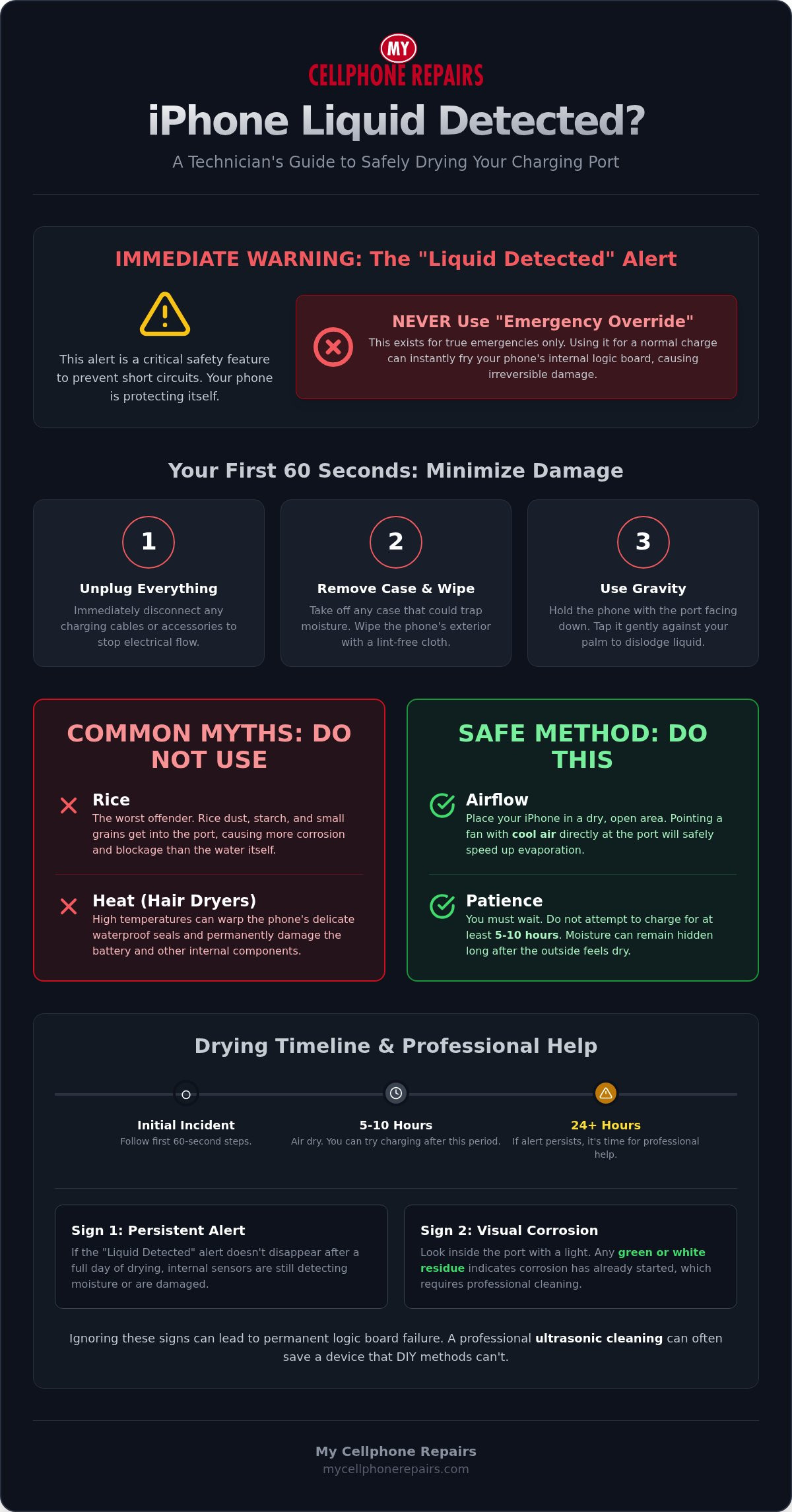
The “Liquid Detected” alert on your iPhone is a critical safety feature designed to prevent permanent hardware failure. When moisture enters the charging port, sensors immediately disable the pins to stop electricity from flowing. Even if your 2026 iPhone model has a high IP Code rating, those protective seals can fail due to age or previous drops. Seeing this alert means the system has already detected a risk of a short circuit. You must stop what you’re doing and address the moisture immediately to avoid long-term damage.
Your first priority is to unplug all cables and accessories. If you leave a cable connected, the pins remain active and vulnerable to rapid degradation. You might see an “Emergency Override” option on your screen. Don’t touch it. This feature exists only for genuine life-or-death situations where you need the phone regardless of the risk of total hardware destruction. Using it for a routine charge can instantly fry the port or the logic board. Power down the device completely to eliminate any internal electrical activity while you figure out how to get water out of iPhone charging port.
Why Electricity and Moisture Don’t Mix
Moisture creates a bridge between the sensitive pins inside your port. When electricity crosses this bridge, it causes a short circuit that can burn out internal components. This process also triggers rapid corrosion that eats away at the gold-plated connectors. Electrolysis is the accelerated chemical breakdown of the metal charging pins that occurs when an electric current passes through liquid moisture. This can happen in minutes, making the port unusable even after it eventually dries.
What to Do in the First 60 Seconds
Speed is vital during the first minute of exposure. Follow these steps to minimize the spread of liquid and protect the internal circuitry:
- Remove any protective cases or external battery packs that might trap water against the port.
- Wipe the exterior of the phone with a lint-free cloth or a microfiber towel.
- Position the phone with the port facing down and tap it gently against your palm to dislodge excess liquid.
This initial response is the foundation of how to get water out of iPhone charging port successfully. Gravity is your best ally here. Keep the port facing downward to encourage drainage rather than letting moisture seep deeper into the chassis. Avoid shaking the phone violently, as this can force water into other openings like the speakers or microphones.
How to Get Water Out of Your iPhone Charging Port (Step-by-Step)
Once you’ve powered down your device, follow a methodical drying process. Hold your iPhone with the charging port facing the floor. Tap the device gently against the palm of your hand to shake out excess liquid. Avoid aggressive shaking, as this can force moisture deeper into the internal seals. This simple step is the most effective way to start learning how to get water out of iPhone charging port without causing further damage.
Next, place your iPhone in a dry area with plenty of airflow. A windowsill with a slight breeze or a room with a ceiling fan works well. You must wait at least 5 to 10 hours before you even think about plugging in a cable. Even if the exterior looks dry, moisture often remains trapped deep inside the connector housing. Finally, check the port for any pocket lint or debris. Wet debris acts like a sponge, holding water against the sensitive metal pins and accelerating corrosion. This methodical approach is the safest strategy for how to get water out of iPhone charging port while protecting the logic board.
Optimizing Airflow for Faster Drying
Use a small desk fan to point cool air directly into the port. This speeds up evaporation significantly. Never use a heater or a hair dryer. High temperatures can warp the waterproof seals and damage the battery. A researcher debunks myths about heat and rice, confirming that consistent, cool airflow is the safest route for electronics. If you’ve waited a full day and the “Liquid Detected” alert remains, you should book a charging port repair to prevent permanent circuit failure.
USB-C vs. Lightning Port Considerations
In 2026, most iPhones use USB-C ports, which are deeper and more complex than the older Lightning design. USB-C ports feature a thin “tongue” in the center where the pins are located. Moisture often gets trapped behind this tongue, making it harder to dry than a hollow Lightning port. Use a bright flashlight to inspect the area. Never insert metal tools, cotton swabs, or paper towels into the port. These items can bend the pins or leave behind fibers that cause a fire hazard when you eventually reconnect power. If you can’t see any liquid but the alert persists, the moisture is likely hidden in the tight space behind the connector tongue.
iPhone Water Damage Myths: Why Rice and Heat Are Dangerous
Misinformation often spreads faster than water in a charging port. When you’re searching for how to get water out of iPhone charging port, you’ll encounter dozens of “hacks” that actually accelerate hardware failure. These methods might seem like quick fixes, but they often turn a minor inconvenience into a total device loss. Understanding why these myths fail is just as important as knowing the correct drying steps.
Compressed air is another common mistake. While it seems logical to blow the water out, the high pressure usually forces liquid deeper into the device’s chassis. This can push moisture past internal gaskets and onto the logic board. Similarly, using cotton swabs or paper towels to “soak up” the moisture is risky. These materials shed tiny fibers and lint that stick to wet pins. Once the port dries, this debris hardens, creates physical obstructions, and can even cause electrical arcing when you eventually plug in a charger.
The Reality of Using Rice
Rice is not an effective desiccant for electronics. It’s actually less efficient than leaving your phone on a counter with a fan. The biggest danger isn’t just the lack of absorption; it’s the starch. When rice gets wet, it releases a fine, powdery starch that turns into a sticky paste inside your charging port. This paste is incredibly difficult to remove and can corrode the sensitive metal connectors. In many cases, we have to professionally extract lodged rice grains that have expanded and wedged themselves into the port. While silica gel packets are slightly better at pulling moisture from the air, they still aren’t a magic fix for liquid trapped inside a connector.
Heat Damage and Waterproof Seals
Using a hair dryer or placing your phone on a radiator is a recipe for disaster. Your 2026 iPhone relies on delicate adhesives and rubber gaskets to maintain its IP68 water resistance rating. Excessive heat melts these adhesives and compromises the seals, making your phone even more vulnerable to future liquid exposure. High temperatures also risk damaging the delicate pins inside the charging assembly and can cause the battery to swell or degrade. If you’re dealing with a different brand, the risks are the same; you can see how Samsung phone water damage repair also prioritizes avoiding heat to protect the screen and battery. Stick to cool, circulating air to ensure you don’t trade a wet port for a melted internal circuit.
Recognizing Permanent Damage: When the Port Won’t Dry
Even if you follow every professional step for how to get water out of iPhone charging port, some damage is irreversible. Moisture often leaves behind microscopic mineral deposits that stay behind after the liquid evaporates. These minerals continue to react with the metal pins, leading to progressive decay. You might notice your phone charging intermittently or displaying “accessory not supported” messages even with an original cable. If you see a green or white crusty residue inside the port using a flashlight, corrosion has already started to eat the hardware.
Ghost charging is a particularly dangerous symptom of permanent damage. This occurs when the phone displays a charging icon even though no cable is connected. It indicates a significant short circuit on the charging assembly or even the motherboard. Don’t assume your phone is safe just because it functions immediately after a drying session. Corrosion is a progressive chemical process. A device that works today can suffer a total port failure in two weeks as the metal pins degrade and eventually lose all conductivity.
The Science of Corrosion
Minerals like calcium, magnesium, and salt are the real enemies of your 2026 iPhone. While the H2O disappears, these conductive solids remain and bridge the gap between sensitive pins. This creates constant electrical stress and heat. The timeline of corrosion varies based on the liquid type; saltwater can destroy a port in hours, while tap water might take days. Professional cleaning is the only way to neutralize these deposits before they permanently destroy the gold plating on the connectors.
Testing Your Port Safely
Use a wireless charger or MagSafe puck while you wait for the port to stabilize. This keeps your device powered without risking an electrical arc inside the wet connector. When you finally perform a dry test after at least 24 hours, use a known-good cable and stay with the device. Watch for excessive heat near the bottom of the phone or a smell like ozone. If the device feels hot or the “Liquid Detected” alert reappears, unplug it immediately. For persistent issues that DIY methods can’t fix, you need expert water damage repairs to neutralize the corrosion and save your hardware.
Professional Repair vs. DIY: Restoring Your iPhone’s Functionality
DIY efforts should have a strict 24 hour time limit. If the “Liquid Detected” alert persists or your phone still won’t charge after a full day, you’ve reached the end of what home techniques can accomplish. Continuing to search for how to get water out of iPhone charging port at this stage often leads to riskier hacks that cause more harm. A professional technician has the diagnostic equipment to see what’s happening behind the connector tongue where air can’t reach.
Technicians use ultrasonic cleaning as a primary restoration tool. This method uses high-frequency sound waves in a specialized solution to implode microscopic bubbles against the metal pins. This action physically strips away the green oxidation and mineral crust that blocks electrical flow. It’s a level of precision that no fan or silica gel packet can match, and it often saves devices that seem completely dead. This process neutralizes the chemical damage before it can spread to the rest of the chassis.
A cost-benefit analysis is essential before proceeding with a repair. If the moisture only affected the charging assembly, a simple port replacement is a fast and affordable way to save a thousand dollar device. However, if the liquid reached the logic board, the repair costs might approach the value of the phone itself. We help you weigh these options so you can make an informed decision about your hardware’s future. Repairing is almost always the better choice for your wallet and the environment.
What a Professional Technician Can Do
Our specialists perform deep-level diagnostics to check for motherboard shorts and battery health. We don’t just guess; we use multimeters and thermal imaging to find exactly where the moisture caused trouble. If the damage extends beyond the port, such as into the display assembly, an iPhone screen repair may be necessary to ensure the entire device is stable. This comprehensive approach prevents the two week failure scenario where hidden corrosion eventually kills the phone.
Choosing a Sustainable Path
Choosing repair over replacement is a win for both your finances and the planet. Restoring your original device prevents unnecessary electronic waste. If the damage is too severe, we recommend looking at a refurbished iPhone as your next step. These certified devices provide the same performance as a new unit at a significantly lower price point. For those watching their budget, exploring budget-friendly refurbished iPhones is a smart way to get a professionally vetted device without the retail markup. Check our Refurbished iPhone: Ultimate 2026 Buying Guide to explore your options. Contact My Cellphone Repairs for a professional diagnostic to secure your device’s long-term health today.
Secure Your Device Against Long-Term Corrosion
Recovering from a liquid event requires patience and the right technique. You now know the risks of common myths like rice or hair dryers and why gravity remains your best tool for how to get water out of iPhone charging port. Acting quickly in the first 60 seconds and allowing at least 24 hours for evaporation are the most effective ways to avoid permanent hardware failure. If you see signs of oxidation or if the “Liquid Detected” alert refuses to clear, don’t wait for the damage to spread to your motherboard.
My Cellphone Repairs offers comprehensive, technician-led water damage restoration for all iPhone models. We provide expert hardware repair and specialized ultrasonic cleaning to neutralize mineral deposits and restore full functionality. Whether you need a simple port replacement or a professional diagnostic, our stores across Maryland, Pennsylvania, New Jersey, Virginia and Michigan are here to help. Get Professional iPhone Water Damage Repair at My Cellphone Repairs and protect your investment today. Your phone is a vital tool; let us help you keep it running perfectly.
Frequently Asked Questions
How long does it take for an iPhone charging port to dry completely?
It takes between 5 and 24 hours for a charging port to dry completely under normal conditions. While the exterior might feel dry after 30 minutes, moisture often remains trapped behind the connector pins. You should leave the device in a dry area with consistent airflow for the full duration. If the humidity is high, it could take longer. Don’t attempt to plug in a cable until the moisture alert has vanished for several hours.
Can I use a hair dryer on a cool setting to dry my iPhone port?
No, you should never use a hair dryer on your iPhone port, even on a cool setting. The high velocity of the air can force water droplets deeper into the device’s internal chassis and past the waterproof seals. This increases the risk of motherboard damage. Stick to natural airflow from a ceiling fan or a small desk fan. These methods are much safer for the delicate internal components of your 2026 device.
Is it safe to use wireless charging if my charging port is wet?
Yes, wireless charging is a safe alternative while you wait for the port to dry. Because wireless charging doesn’t require a physical connection to the internal pins of the port, it doesn’t risk a short circuit. Simply wipe the back of your iPhone to ensure it’s dry before placing it on a MagSafe or Qi charger. This is the best way to stay powered up without interfering with the natural evaporation process inside the connector.
What happens if I charge my iPhone while there is liquid in the port?
Charging a wet iPhone can cause immediate and permanent hardware failure. The electrical current reacts with the liquid to cause electrolysis, which rapidly corrodes the gold-plated pins. This can lead to a short circuit that burns out the charging assembly or damages the logic board. If you ignore the alert, you risk turning a simple drying task into a costly repair. Always wait for the port to be 100% moisture-free before reconnecting power.
Will the ‘Liquid Detected’ alert go away on its own?
The “Liquid Detected” alert should disappear automatically once the sensors no longer detect moisture. This process typically takes a few hours if you follow the correct steps for how to get water out of iPhone charging port. However, if the alert persists for more than 24 hours, it may indicate that minerals or debris are still trapped inside. In these cases, the sensors remain triggered by the conductive residue left behind after the water evaporates.
Does putting an iPhone in rice really work for water damage?
No, putting an iPhone in rice is a myth that can actually cause more harm. Rice is not an effective desiccant and performs worse than open-air drying. Small grains or starch particles can get lodged inside the port, requiring professional extraction. These particles also hold onto moisture against the pins, which accelerates corrosion. Stick to the technician-approved method of using a fan and gravity to clear the port safely and efficiently.
How can I tell if my iPhone charging port is permanently damaged by water?
You can identify permanent damage by looking for specific warning signs. These include a moisture alert that won’t go away, intermittent charging, or “accessory not supported” messages. Visual cues like green oxidation or white crusty mineral deposits on the pins are clear indicators of corrosion. If your phone only charges at certain angles or shows no life when plugged in, it’s time to seek professional charging port repair services to restore your hardware.