
Did you know that the average smartphone battery loses significant capacity in as little as 18 months? By the time your device hits two years, it likely struggles to hold a charge through the afternoon. It’s frustrating when your phone dies at 20% or feels hot to the touch during a simple call. You might think it’s time for a new device, but a professional battery replacement is often the smarter, more sustainable choice. It restores your hardware to its original factory performance at a fraction of the cost of a new flagship model.
We understand the anxiety that comes with device repairs. You worry about data loss or being without your phone for days. This guide clears up that confusion. You’ll learn how to identify the clear signs of battery failure and compare the best repair options available in 2026. We’ll also cover how to handle hazardous issues like swollen batteries and ensure your data stays safe. Follow these steps to reclaim your device’s reliability and stop carrying a portable charger everywhere you go.
Key Takeaways
- Learn how chemical aging impacts your device and why sudden shutdowns are a clear signal for a hardware swap.
- Discover how a professional battery replacement restores factory-level performance and extends your phone’s lifespan.
- Understand the risks of modern glass-sandwich designs and why professional tools are essential for a safe repair.
- Get a clear breakdown of the unique steps required for iPhone and Samsung battery swaps.
- Identify the dangers of swollen batteries and how expert handling ensures your data stays safe during the process.
Understanding the Science of Battery Degradation
Every modern smartphone relies on Lithium-ion (Li-ion) technology to stay powered. These batteries are preferred because they charge quickly and offer high power density. However, they are essentially a collection of chemicals with a limited lifespan. Understanding how lithium-ion batteries work is the first step in realizing that your phone’s declining performance isn’t a software glitch. It’s a physical reality of chemical aging.
Chemical aging occurs as the internal components of the battery wear down over time. As this happens, the battery’s impedance increases. This means it struggles to deliver the quick bursts of power required by your phone’s processor. To prevent the device from crashing, many manufacturers use software to throttle or slow down the CPU. If your phone feels sluggish or apps take longer to open, it’s often because your battery can no longer support peak performance. A professional battery replacement restores this electrical balance, bringing your phone back to its original speed.
Temperature also plays a massive role in how fast your hardware degrades. Lithium-ion batteries are sensitive to extreme heat. Exposing your device to temperatures above 95°F (35°C) can permanently reduce its total capacity. While cold weather might cause a temporary drop in battery life, heat causes actual chemical damage that cannot be reversed without a physical swap.
What is a Battery Charge Cycle?
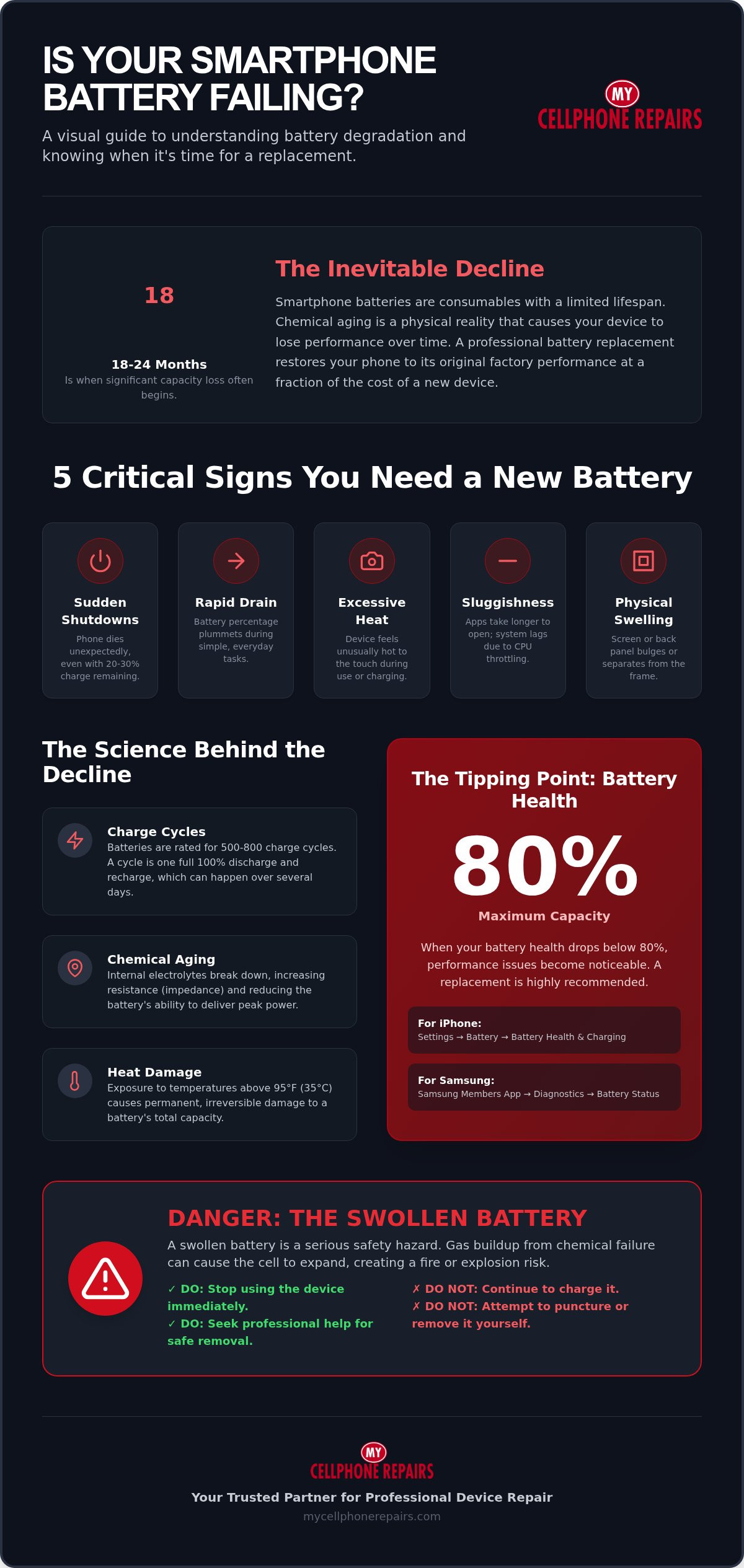
You might think that every time you connect your charger, you’ve used a “charge cycle.” That isn’t how it works. A cycle is completed when you use an amount that equals 100% of your battery’s capacity. For example, if you use 75% of your battery today and then charge it fully overnight, and then use 25% the next morning, you’ve completed one cycle. These cycles are cumulative. Most modern smartphone batteries are rated for 500 to 800 cycles before they drop below 80% of their original health. Once you hit this threshold, you’ll notice the device struggling to last a full day.
Why Modern Batteries Lose Capacity Over Time
The electrolytes inside a battery cell eventually break down. This chemical decay creates a layer of film on the electrodes, which blocks the flow of ions. This is why a three-year-old phone can’t hold a charge like a brand-new one. Fast charging also impacts this timeline. While high-wattage chargers are efficient, they generate significant internal heat. This heat speeds up the chemical breakdown of the battery’s internal structure. Relying on fast charging every day often means you’ll need a battery replacement earlier than someone who uses a slower, cooler charging method.
5 Critical Signs Your Phone Battery Needs Replacing
Identifying a failing battery early prevents sudden downtime and potential safety hazards. While a declining charge is the most obvious symptom, other signs are more subtle. If your device displays any of these five behaviors, a battery replacement is likely necessary to restore reliability.
- Sudden Shutdowns: Your phone turns off while showing 20% or 30% remaining power. This happens because the degraded cells can’t provide enough voltage during high-demand tasks.
- Rapid Percentage Drops: You notice the battery level plummeting during simple activities like checking email.
- Excessive Heat: The back of your phone feels hot during normal use or while charging. Failing batteries generate more internal resistance, which releases wasted energy as heat.
- System Sluggishness: Apps take longer to load, or the screen stutters during scrolling. Manufacturers often slow down the processor to prevent a weak battery from crashing the system.
- Physical Expansion: The screen or back panel begins to bulge or lift away from the frame.
Software Diagnostics and Battery Health Settings
Most modern devices provide built-in tools to check your hardware’s status. iPhone users should navigate to Settings, select Battery, and then tap Battery Health & Charging. Look for the “Maximum Capacity” percentage. This figure represents your battery’s current volume relative to when it was brand new. For Samsung users, the Samsung Members app offers a “Battery Status” diagnostic tool. If your health falls below 80%, it’s time to consider a professional fix. Our experts at My Cellphone Repairs can help you interpret these readings and provide a quick swap if needed.
The Danger of a Swollen Phone Battery
A swollen battery is a serious safety risk that requires immediate attention. This expansion occurs when gas builds up inside the battery cell due to chemical failure or physical damage. You might notice your screen popping out of the frame or a “squishy” feeling when pressing the display. If you see this, stop using the device immediately. Never attempt to puncture a swollen cell, as this can cause a fire or release toxic fumes. Follow the swollen phone battery replacement guide to handle the situation safely. Always adhere to EPA battery safety guidelines when dealing with damaged electronics to protect your home and the environment.
Professional Repair vs. DIY: Risks and Rewards
Deciding between purchasing a brand-new device and opting for a battery replacement is a common dilemma. With flagship phones now frequently exceeding $1,000, extending your current device’s life is the most sustainable and budget-friendly move. However, modern smartphones aren’t built for easy access. The “glass-sandwich” construction uses heavy-duty adhesives that require specific temperatures to soften. If you apply too much heat, you risk damaging the OLED panel. If you apply too little, you will likely crack the glass back during removal.
Professional technicians understand the nuances of hardware longevity. They select parts based on a deep understanding of anode aging mechanisms, ensuring the new cell doesn’t degrade faster than the original factory component. A certified repair also comes with a formal warranty. This protects your investment and ensures the device performs as expected long after the service is complete. Choosing a pro means you aren’t just paying for a part; you’re paying for the specialized tools and calibrated equipment that a home toolkit simply cannot match.
Common Pitfalls of DIY Battery Swaps
The biggest risk in a DIY attempt is physical safety. Puncturing a lithium-ion battery with a metal pry tool can cause a thermal runaway event, leading to fire or toxic smoke. Beyond safety, modern phones are filled with hair-thin ribbon cables. It’s incredibly easy to tear the cables responsible for FaceID, fingerprint sensors, or the display itself. Additionally, once you break the factory seal, your phone loses its IP68 water and dust resistance. Professional shops use specialized gaskets and presses to restore this protection, a step that most DIYers skip.
The Benefits of Choosing a Professional Technician
Expertise is the primary advantage of professional service. Our team benefits from a rigorous cell phone repair technician training program, which ensures every swap follows strict safety and quality protocols. We use precision diagnostic software to verify that the new battery communicates correctly with your phone’s operating system. This prevents the “Unknown Part” warnings that often plague uncertified repairs. Most importantly, a professional swap guarantees data safety. We handle your hardware with the care needed to ensure your photos, messages, and apps remain untouched throughout the process.
The Battery Replacement Process for Different Devices
Every device requires a unique approach. While the goal of a battery replacement is the same, the internal architecture of an iPhone differs significantly from a Samsung Galaxy or a MacBook. Our technicians follow manufacturer-specific protocols to ensure every internal component remains protected during the swap. We treat your hardware with precision, using tools designed for the exact model on our workbench.
iPhone and Samsung Smartphone Battery Services
Modern smartphones are sealed with industrial adhesives to maintain water resistance. We use specialized heat plates to safely soften these seals without damaging the sensitive OLED or LCD panels. For Samsung devices, this is particularly critical. The glass back is fragile and prone to cracking under uneven pressure. Our technicians use suction and precision pry tools to lift the back panel without causing cosmetic damage. You can learn more about our specific Samsung phone repair pillar for detailed hardware insights.
During the swap, we often need to address the Battery Management System (BMS). In many newer models, the battery is digitally paired to the logic board. We use specialized equipment to ensure the new cell communicates correctly with your phone’s software. This step is vital to maintain accurate percentage readings and prevent “Unknown Part” system warnings. Once the new battery is seated, we apply fresh adhesive gaskets to restore the device’s structural integrity and dust resistance. iPhone 14 owners facing these exact challenges can find detailed model-specific guidance in our iPhone 14 battery replacement professional service guide.
MacBook and Laptop Battery Maintenance
Laptop batteries degrade differently than smartphone cells. Because MacBooks are often kept plugged in for long periods, they face constant heat and “trickle charging” stress. This can cause the internal cells to expand even faster than phone batteries. A MacBook battery isn’t a single block; it’s often a series of interconnected cells glued directly to the top case. Replacing them requires careful solvent application to dissolve the glue without touching the delicate trackpad or keyboard electronics underneath.
If your laptop feels sluggish or the fans run constantly, a failing battery might be the culprit. The operating system often throttles the CPU speed when it detects a degraded power source. During our service, we also perform an internal cleaning to remove dust that traps heat. This dual approach ensures your laptop runs cool and fast again. Every repair ends with a rigorous testing phase where we calibrate the new battery by performing a full charge cycle. If you’re ready to restore your device to peak performance, schedule your professional battery replacement today.
Maximize Your Device Lifespan with My Cellphone Repairs
My Cellphone Repairs provides professional hardware restoration at stores across Maryland, Pennsylvania, New Jersey, Virginia and Michigan. We don’t settle for subpar components. Our battery replacement services utilize high-grade parts that meet or exceed original manufacturer specifications. This commitment to quality ensures your device returns to peak performance without compromising safety or longevity. If you suspect your issues might be software-related, consult our battery draining fast fix guide for practical optimization tips. For devices that have reached the end of their functional life, we offer a selection of refurbished iPhones to keep you connected without the cost of a brand-new flagship.
Fast and Reliable Professional Service
Our team approaches every technical crisis with a direct, can-do attitude. We value your time and prioritize efficiency in every repair we perform. We handle more than just simple power issues. Our specialists are equipped to manage complex hardware challenges, including charging port repair and intricate water damage restoration. This level of expertise comes from our rigorous technician training program. Every member of our team is a skilled expert capable of diagnosing and resolving hardware failures that others might deem unfixable. We focus on providing a seamless fix for disruptive problems so you can get back to your day with a reliable device.
Sustainable Solutions for Your Electronics
Repairing your smartphone is a powerful way to support environmental sustainability. Choosing a battery replacement over a new device purchase significantly reduces e-waste and extends the life of high-quality hardware. It’s a responsible choice that benefits both your wallet and the planet. If you’re still debating whether a repair is the right move, review our 5 critical signs guide. It helps you distinguish between common myths and reality. When you’re ready for a resolution, we provide a clear path to get a professional diagnostic and a straightforward quote. Trust our experts to restore your device’s all-day battery life and ensure its long-term safety.
Reclaim Your All-Day Battery Life
Don’t let a dying battery dictate your schedule or limit your productivity. Understanding that chemical aging is a natural physical process helps you make the right choice for your hardware. A professional battery replacement is the most effective way to eliminate sudden shutdowns and restore your device to its original factory speed. It’s a sustainable solution that saves you money and keeps your valuable data secure during the process.
With stores across Maryland, Pennsylvania, New Jersey, Virginia and Michigan, My Cellphone Repairs provides specialized service for iPhone, Samsung, and MacBook devices. Our experts are certified through our rigorous Technician Training Program; this ensures every repair meets the highest quality standards in the industry. We handle everything from simple swaps to complex hardware restoration with efficiency and precision. Stop carrying a portable charger and worrying about finding your next outlet. Restore your device performance with a professional battery replacement today! You deserve a phone that works as hard as you do, and we’re here to help you get there.
Frequently Asked Questions
How long does a professional phone battery replacement take?
Most professional battery replacement services take between 30 and 60 minutes to complete. This timeframe depends on your specific model’s internal complexity and whether the technician needs to recalibrate the management software. Samsung and iPhone models with heavy adhesive seals might lean toward the full hour mark. Our experts prioritize efficiency to get you back to your day as quickly as possible. Scheduling an appointment in advance usually ensures the fastest turnaround.
Will I lose my photos and data during a battery replacement?
You won’t lose your data during a standard battery swap. The repair involves disconnecting the power source, which doesn’t affect the storage chip where your photos and apps reside. However, we always recommend performing a cloud or local backup before any hardware service. This is a standard safety precaution for any technical procedure. Our technicians follow strict protocols to keep your information secure throughout the entire process.
Is it worth replacing the battery on a 3-year-old phone?
Yes, replacing the battery on a three-year-old device is highly cost-effective. A new battery costs a small fraction of a new flagship phone and can extend the device’s usable life by another two years. Since most modern processors remain powerful for five years or more, a fresh power source restores original performance. It’s a sustainable choice that prevents unnecessary electronic waste and saves you from high upgrade costs.
Can a bad battery make my phone run slower?
A degraded battery definitely causes system-wide slowdowns. As a battery ages, its ability to deliver peak power drops significantly. To prevent the device from suddenly shutting down, the operating system throttles the CPU speed. This results in lagging apps and a choppy user interface. A professional battery replacement removes these power constraints, allowing your processor to run at its full intended speed again without performance caps.
Why is my phone battery percentage jumping up and down?
Erratic percentage readings usually indicate a failure in the battery’s internal calibration or high internal resistance. When the chemicals inside the cell degrade, the voltage becomes unstable. Your phone’s software struggles to interpret these fluctuating voltage levels, leading to jumping numbers or sudden drops. This is a clear sign that the hardware can no longer provide a consistent stream of energy and requires immediate professional attention to avoid a total failure.
Does a new battery restore the waterproof seal of my iPhone or Samsung?
A professional repair includes the application of a new adhesive gasket to help maintain water resistance. However, no repair can perfectly replicate the original factory-pressurized seal 100% of the time. While we use specialized presses and high-grade gaskets to protect your device from dust and light splashes, you should avoid submerging any repaired phone. We focus on restoring the structural integrity to keep your hardware safe from daily environmental exposure.
How can I tell if my phone battery is actually swollen?
You can identify a swollen battery by looking for gaps between the screen and the frame. If the display feels squishy or has white spots from internal pressure, the battery is likely expanding. You might also notice the back panel lifting or a slight chemical smell. If you see these signs, stop charging the device immediately. A swollen cell is a fire hazard and needs expert removal by a trained technician.
What is the typical cost of a professional battery swap in 2026?
The cost for a professional battery swap in 2026 varies based on your device model and the quality of the replacement part used. Flagship smartphones with complex glass-sandwich designs typically require more labor than older models with simpler internal layouts. You’ll find that a repair is significantly more affordable than purchasing a new high-end device. We recommend requesting a specific quote to get the most accurate pricing for your hardware needs. If you own an iPhone 14, our detailed iPhone 14 battery replacement service guide provides model-specific pricing insights and what to expect from the 2026 repair process.