
Your Samsung Galaxy S26 just hit the pavement. The screen is dark, your schedule is full, and you can’t afford to wait a week for a mail-in service. It’s a common crisis that usually comes with high costs and the fear of losing your personal data. You need a fast Samsung phone repair solution that respects your time and your wallet. We understand that being without your device isn’t just a minor inconvenience. It disrupts your work, your family connections, and your entire daily routine.
Professional service should be a thirty-minute errand, not a logistical headache. You need transparent, flat-fee pricing and technicians who truly understand the complex OLED technology in your latest Galaxy model. This guide outlines exactly how to get your phone back to peak performance in under an hour. We’ll explore the impact of 2026 Right to Repair laws, the benefits of specialized hardware diagnostics, and how to find expert help at a convenient local spot. Get ready to solve your tech troubles with confidence and speed.
Key Takeaways
- Learn why specialized hardware expertise is critical for handling modern OLED displays and integrated battery systems safely.
- Discover how to secure a professional Samsung phone repair in just 15 to 30 minutes at convenient mall locations.
- Understand the cost benefits of flat-fee pricing models that eliminate hidden diagnostic fees and build price trust.
- Master essential data protection steps, including how to use Samsung Maintenance Mode, before handing over your device.
- Compare service timelines to choose the best balance between official support and immediate, high-quality hardware solutions.
Understanding Professional Samsung Phone Repair
Professional Samsung phone repair is no longer just about swapping a screen. In 2026, Galaxy devices represent some of the most sophisticated mobile hardware on the market. Whether you carry a Galaxy S26 Ultra, a foldable Z-series, or a reliable A-series model, these devices utilize complex internal architectures. Modern repairs require a deep understanding of ultrasonic fingerprint sensors, multi-layered OLED panels, and high-density batteries. Expert service ensures that your device’s hardware integrity remains intact while protecting sensitive internal components from static or physical damage.
The landscape of device maintenance is changing rapidly. The global Right to Repair movement has pushed manufacturers to make parts more accessible, but accessibility doesn’t replace the need for technical skill. While growing legislative efforts and evolving regulations now require manufacturers to provide tools and documentation, the physical act of opening a modern Samsung device remains a high-stakes task. Professional technicians focus on resolving common mechanical failures, such as cracked glass or worn-out charging ports, with precision that home kits can’t match.
Why Galaxy Devices Require Specialized Expertise
When you seek a Samsung phone repair for a Z-Series or S-Series device, you’re dealing with extremely tight tolerances. The internal layouts are packed with delicate ribbon cables and modular components that are easily damaged by an untrained hand. Most modern Galaxy models use adhesive-heavy construction to achieve their water-resistance ratings. Safely entering these devices requires professional heat tools and precision suction equipment to avoid cracking the back glass or damaging the display.
Foldable devices like the Z Fold and Z Flip introduce even more complexity. Their mechanical hinges and flexible screen layers require specific calibration during a repair. Even a standard S26 model features sensitive sensor arrays and under-display cameras that must be handled in a clean, controlled environment to maintain original functionality. Mistakes during these processes can lead to permanent hardware failure or compromised security features.
The Importance of Quality Replacement Parts
Using high-grade components is non-negotiable for a successful repair. High-quality OLED panels are essential for maintaining the touch sensitivity and vibrant color accuracy you expect from a Samsung display. Low-grade alternatives often suffer from “ghost touching” or poor brightness levels. Consider these key components:
- Display Assemblies: High-grade screens ensure the ultrasonic fingerprint scanner and high-refresh-rate panels function perfectly.
- Certified Batteries: Quality replacements prevent overheating and ensure the device holds a charge throughout a busy day.
- Charging Ports: These must meet original voltage standards to support fast charging and reliable data transfer.
Battery quality is especially vital in 2026. As component costs rise due to the ongoing semiconductor demand and the AI boom, some shops might cut corners with inferior cells. At My Cellphone Repairs, we prioritize parts that match original manufacturer specifications to ensure your phone remains safe and efficient for the long term.
Most Common Samsung Phone Repairs and Diagnostics
Identifying the exact failure in your device is the first step toward a successful Samsung phone repair. Most hardware issues fall into five main categories. Screen damage remains the most frequent request, but battery degradation and port failures are close behind. A Federal Trade Commission report highlights that transparent diagnostics are essential for consumer choice, especially as devices become more complex. You deserve to know exactly what’s wrong before any work begins.
Samsung Screen Repair: OLED vs. Glass
Your Galaxy screen has multiple layers. The top layer is Gorilla Glass, designed for impact resistance. Beneath it lies the OLED panel, which creates the image, and the digitizer, which senses your touch. If your glass is shattered but the image is perfect and touch works, you might only need a glass replacement. However, bleeding pixels, vertical lines, or black spots indicate that the OLED panel itself is compromised. Professional technicians use specialized tools to determine if a full assembly replacement is necessary to restore the device to factory standards. For a deeper look at how professionals assess and restore damaged displays, our Samsung screen repair ultimate 2026 guide walks you through every layer of the process. Don’t ignore small cracks; they often lead to total display failure over time.
Signs Your Samsung Battery Needs Replacing
Lithium-ion batteries have a finite lifespan. By 2026, most batteries in older S-series models begin to show significant wear. Watch for these specific warning signs:
- The phone feels unusually hot during light tasks like browsing or charging.
- Your device shuts down suddenly while the indicator shows 10% or 15% remaining.
- The back panel or screen begins to lift, which is a clear sign of a swelling battery.
A swelling battery is a safety hazard. It puts pressure on the internal display and can lead to a fire if punctured. If you notice any bulging, seek professional Battery Replacement services immediately to prevent further damage. Expert diagnostics can confirm if your charging issues are battery-related or caused by the motherboard.
Charging Ports, Cameras, and Water Recovery
Charging port failures often start with a loose connection. You might find yourself wiggling the cable to get a charge. This is usually caused by physical wear or debris buildup. Camera lens repair is another critical service. A single scratch on the rear glass can ruin every photo. Finally, water damage recovery requires an immediate professional cleaning. Even if the phone turns on after a splash, internal corrosion can destroy the motherboard over time. Technicians use ultrasonic cleaners to remove mineral deposits and test each component for electrical integrity. Quick action is the key to a successful Samsung phone repair after liquid exposure.
Samsung Official Support vs. Expert Third-Party Repair
Choosing between official Samsung support and an independent shop often comes down to a trade-off between warranty status and time. Official centers are the right choice for active warranty claims or Samsung Care+ subscribers. However, for out-of-warranty hardware issues, the logistics of official channels can be frustrating. Harvard Business Review research suggests that market competition in repair services can significantly drive down costs and improve consumer access. This is why many users now prefer local Samsung phone repair for immediate results. You get the same technical proficiency without the corporate bureaucracy.
Speed and Turnaround Time Comparison
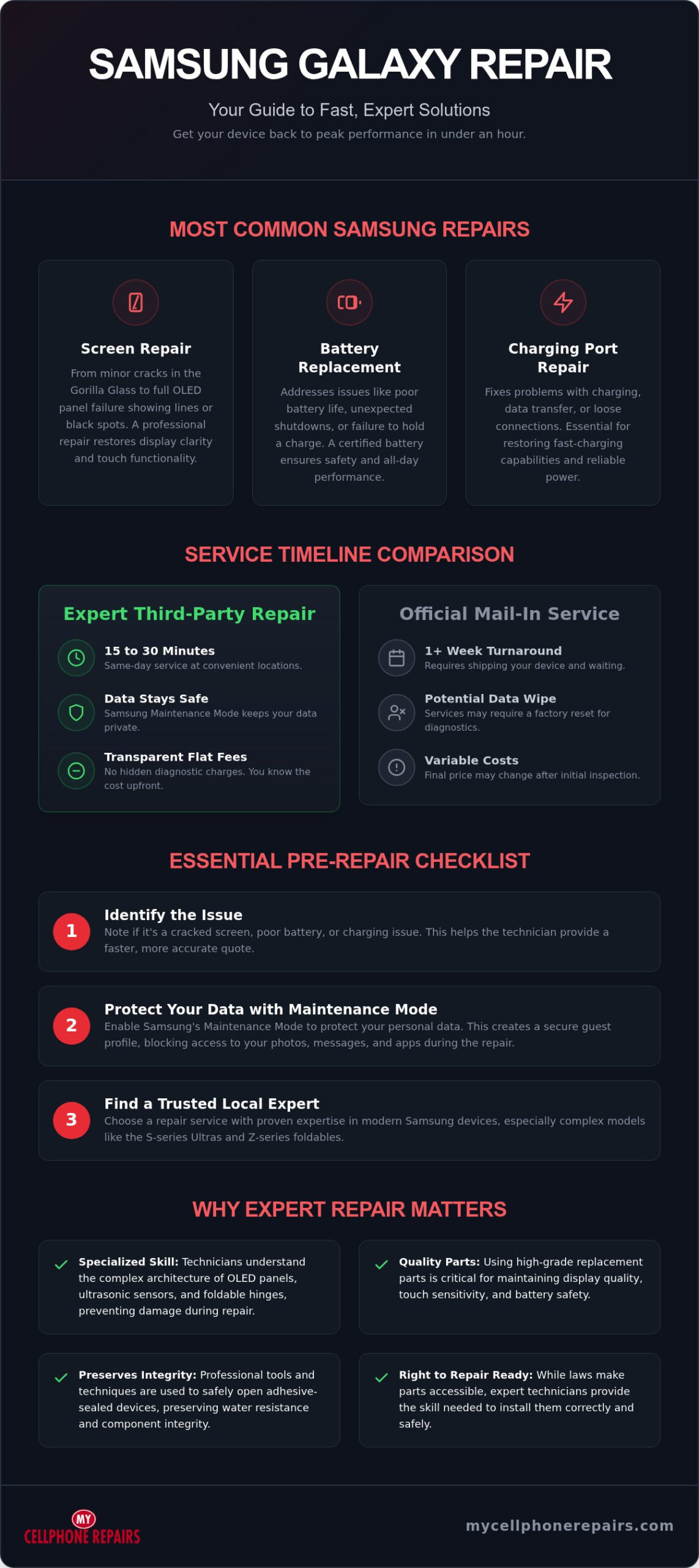
Most official repairs require you to mail your device to a central hub or find a rare authorized walk-in center. This process typically takes five to ten business days. For modern professionals, being without a phone for a week is impossible. Local expert shops operate on a different timeline. Common fixes like screen or battery swaps take between 15 and 30 minutes. You don’t have to deal with shipping labels or wait for a courier. You simply walk in and wait a few minutes while a technician handles the hardware.
Another major hurdle with mail-in service is the requirement to factory reset your device. Official centers often wipe your data as a standard security protocol. This forces you to spend hours backing up and restoring your digital life. Independent shops allow you to keep your data intact. By using built-in features like Samsung Maintenance Mode, you can secure your personal information without deleting it. This saves you an immense amount of setup time after the repair is finished. It’s an efficient way to get back to work with zero data loss.
Cost-Benefit Analysis for Out-of-Warranty Devices
Official OEM pricing is often tiered and can include hidden diagnostic fees or high labor costs that aren’t clear upfront. Independent shops typically use a flat-fee model. This approach is more transparent. You know the total cost before the technician opens the device. When your phone is two or three years old, a high OEM repair quote might make a fix seem illogical. However, a fair, flat-fee Samsung phone repair can extend your device’s life by another two years for a fraction of the cost of a new flagship model.
Mall-based locations add a layer of convenience that official centers can’t match. You can drop off your phone, finish your shopping, and pick up a fully functional device before you leave the building. You also get the benefit of a local warranty. All repairs come with a warranty; coverage depends on the part used. Ask your store for details. If you have a question or a follow-up issue, you can walk back into the same store and speak to the person who fixed your phone. This direct accountability provides peace of mind that a distant service center cannot offer. It turns a tech crisis into a simple, productive errand.
This commitment to professional, local service is a standard you should expect for all your repair needs; My Cellphone Repairs provides that level of expert care for your devices.
Just as phone technicians require precision, many field service professionals use digital tools to manage their workflows; to learn more about our own repair services, visit My Cellphone Repairs.
Essential Steps Before Bringing Your Samsung Phone for Repair
Preparation is the most important step you can take before heading to the shop. It ensures your personal information stays private and helps the technician work more efficiently. While most hardware fixes are straightforward, a few minutes of prep prevents data loss and logistical delays. Follow this checklist to get your device ready for a professional Samsung phone repair.
Start by backing up your data. Use Samsung Cloud or Google Drive for a quick wireless backup of your contacts, settings, and photos. For larger files, connect your device to a physical PC and use the Samsung Smart Switch app. Although technicians strive to preserve your data during hardware swaps, hardware failures are unpredictable. Having a current backup gives you total peace of mind. Next, remove your SIM card and any microSD cards. These small components are easy to lose during the disassembly process. Store them in a safe place at home so you can drop them back in once the fix is complete.
How to Use Samsung Maintenance Mode
Samsung introduced Maintenance Mode to solve the biggest pain point in the industry: the fear of data theft. This feature allows technicians to test the screen, cameras, and speakers without accessing your private messages or photos. To enable it, open your Settings menu and tap Device care. Scroll down to Maintenance mode and tap Turn on. Your phone will restart in a restricted state that hides all personal accounts and files. This eliminates the need for a factory reset. You don’t have to spend hours setting up your phone again after the hardware is fixed. It’s a fast, secure way to handle a Samsung phone repair without compromising your privacy.
Physical Preparation and Accessories
Clean your device before you arrive. Use a soft cloth to remove fingerprints and dust. This helps the technician identify hairline cracks or subtle frame damage that might be hidden by grime. You should also remove any third-party screen protectors. These often interfere with the calibration of new OLED panels or ultrasonic fingerprint scanners. If your screen is shattered, place a piece of clear packing tape over the glass to prevent shards from falling out during transit.
Note your IMEI number by dialing *#06# and writing it down. This acts as your device’s unique fingerprint. Finally, ensure the phone has at least 20% charge. Technicians need power to run initial diagnostics and verify the repair once it’s finished. A charged battery saves you from waiting for the device to power up at the counter. Once you’ve completed these steps, you’re ready for a fast, professional fix. Find your nearest location and book your Samsung phone repair today to get back to peak performance.
Fast, Reliable Samsung Repairs at My Cellphone Repairs
Your time is valuable. At My Cellphone Repairs, we’ve designed our entire service model around efficiency and reliability. We understand the frustration of a broken device, so we’ve removed the hurdles common in the industry. Instead of waiting days for a mail-in center to process your claim, you can get a professional Samsung phone repair in minutes. Our team provides immediate reassurance through expert diagnostics and a clear, capable approach to hardware fixes. We treat your tech crisis with the urgency it deserves.
Transparency is the foundation of our customer relationships. We utilize a flat-fee pricing model for all hardware solutions. This means you know the total cost before we even open your device. There are no hidden diagnostic fees or surprise labor charges. We believe in building trust through honest service and high-quality results. Every repair uses premium parts to ensure your Galaxy device returns to its original performance standards. All repairs come with a warranty; coverage depends on the part used. Ask your store for details. You can leave our shop with the confidence that your phone is truly fixed.
The 30-Minute Repair Promise
Most common hardware issues don’t need to take all day. We focus on a 15 to 30 minute turnaround for screen swaps, battery replacements, and charging port repairs. This rapid pace is possible because we optimize our internal workflows and maintain a deep inventory of parts. We stock high-grade components for all major Galaxy models, including the S-series, Z-series foldables, and A-series devices. Our technicians go through a rigorous cell phone repair technician training program to stay ahead of the latest mobile technology. We focus on a ‘Fix it Right, Fix it Fast’ mentality for every customer who walks through our doors.
Convenient Locations Across Five States
Accessing expert service should be as easy as running a standard errand. We’ve placed our repair centers in shopping malls across Maryland, Pennsylvania, New Jersey, Virginia and Michigan to maximize your convenience. You don’t need to book an appointment weeks in advance. Just bring your device to any of our walk-in locations. This mall-based strategy allows you to finish your shopping or grab a meal while we handle the technical work. Your phone will likely be ready before you finish your errands. It’s a modern, streamlined solution for a fast-paced world. Find a My Cellphone Repairs location near you today! and experience the difference of a service provider that values your schedule as much as you do.
Restore Your Galaxy Performance Today
A broken device doesn’t have to ruin your week. You now have the tools to handle a tech crisis with confidence. High-quality Samsung phone repair is a straightforward process when you prioritize speed and transparent pricing. Professional hardware service restores your OLED display and battery health without the long wait times of official mail-in centers. Remember to use Maintenance Mode to lock your data and select a service provider that offers flat-fee hardware solutions. These simple steps ensure your personal information stays private while your device returns to factory standards.
Don’t settle for long shipping delays or unpredictable costs. You can find expert technicians in convenient mall locations across Maryland, Pennsylvania, New Jersey, Virginia and Michigan. Most common hardware issues are resolved in just 15 to 30 minutes. This efficiency lets you get back to your busy schedule without the stress of being disconnected. Your fully functional phone is just a short trip away. We’re ready to help you solve your hardware problems with precision and speed. Take action now to bring your device back to peak performance.
Get Your Samsung Repaired in 30 Minutes – Find a Store
Frequently Asked Questions
How much does a Samsung screen repair usually cost?
Official industry prices for screen repairs vary based on your specific model and the extent of the damage. High-end OLED panels used in the Galaxy S26 series typically cost more than the displays found in the budget-friendly A-series. We utilize a flat-fee pricing model for all hardware fixes to ensure you have a clear total before any work begins. This approach eliminates hidden diagnostic fees and builds price trust from the moment you walk in.
Will repairing my Samsung phone at a third-party shop void my warranty?
No, choosing an independent professional for a Samsung phone repair does not automatically void your manufacturer warranty under current 2026 Right to Repair laws. New legislation in the US and EU prevents manufacturers from blocking independent repairs or using “parts pairing” to restrict your choices. You have the legal right to seek fast, expert hardware solutions at a local shop without losing your consumer protections.
How long does a Samsung battery replacement take?
A standard battery swap typically takes between 15 and 30 minutes at our mall-based locations. We optimize our internal workflow and maintain a consistent stock of high-grade batteries for all major Galaxy models to ensure a rapid turnaround. This allows you to drop off your device and have it back at peak performance before you finish a quick shopping trip.
Can you fix a Samsung charging port that only works at a certain angle?
Yes, we specialize in Charging Port Repair for devices with loose or inconsistent connections. If your phone only charges when the cable is held at a specific angle, the internal pins are likely worn, bent, or clogged with debris. Our technicians can perform a professional replacement of the port assembly to restore reliable power and data transfer in under an hour.
Is it worth repairing an older Samsung Galaxy or should I buy a refurbished one?
Repairing your current device is often the most economical choice if the rest of the hardware is in good condition. A simple battery or screen fix can extend the life of a flagship phone by another two years for a fraction of the cost of a replacement. If the repair costs exceed the value of the device, we can help you explore other options like our selection of high-quality refurbished phones.
What is Samsung Maintenance Mode and should I use it before a repair?
Maintenance Mode is a built-in software feature that creates a separate user profile for technicians, keeping your personal photos, messages, and accounts hidden. You should always enable this in your “Device Care” settings before bringing your device in for a Samsung phone repair. It provides immediate peace of mind by securing your data without the need for a time-consuming factory reset.
Does My Cellphone Repairs offer a warranty on Samsung screen replacements?
Yes. All repairs come with a warranty, including our Samsung screen repair and replacement services; coverage depends on the part used. Ask your store for details. If you experience any issues with the hardware after the fix, you can visit any of our locations in Maryland, Pennsylvania, New Jersey, Virginia and Michigan for a quick resolution.
Can a cracked Samsung back glass be repaired without replacing the whole phone?
Yes, we can replace the back glass panel as a standalone hardware fix. Many modern Galaxy models use glass rear assemblies that are susceptible to impact damage even if the front screen remains intact. Replacing just the back glass is a fast process that restores the device’s structural integrity and prevents moisture or dust from entering the internal housing. If you’re curious about the skills behind these precise repairs, our cell phone repair technician training program explains how professionals master these techniques.