
Last Tuesday, Sarah discovered her phone was at 1% before her lunch break even started. She hadn’t used any heavy apps. Yet the device felt hot to the touch and the battery percentage dropped by the minute. If you’re searching for a phone battery draining fast fix like Sarah was, you aren’t alone. Whether you’re using the new iOS 27 or Android 17, rapid power loss usually signals a conflict between your software settings and your physical hardware. You need a reliable device that lasts all day.
We know how frustrating it is to carry a charger everywhere just to survive the afternoon. This article identifies the root cause of your power issues and provides the exact steps needed to resolve them. You’ll learn to identify if your battery health has dropped below the critical 80% threshold or if a simple software tweak can save your charge. We’ll walk through 15 actionable steps to determine if your issue is a rogue app, a system setting, or a physically failing battery that needs expert attention.
Key Takeaways
- Learn how to differentiate between normal usage and critical software conflicts by checking your device’s internal usage statistics.
- Identify the specific screen and background settings that act as a phone battery draining fast fix to extend your daily charge immediately.
- Understand how extreme temperatures and non-certified cables cause permanent chemical damage to your phone’s power cells.
- Recognize the warning signs of hardware failure, such as sudden percentage drops or unexpected shutdowns at 20% charge.
- Discover why a 15-30 minute professional battery replacement is a faster, more reliable alternative to struggling with a failing device.
Diagnosing Why Your Phone Battery Is Draining Fast
Every battery has a finite lifespan. You must first determine if your device is suffering from typical age related decay or a critical software conflict. Normal drain occurs gradually throughout your day as you browse or stream. Critical failure looks different. If your device drops from 40% to 10% in minutes, or if it feels physically hot while sitting idle, you likely have a hardware issue or a rogue process. Finding the right phone battery draining fast fix starts with looking at the data your phone already collects.
Ghost apps are a common culprit for sudden power loss. These applications run in the background, syncing data or tracking your location even when you aren’t using them. A single battery cycle is completed whenever you use an amount of power equal to 100% of your battery’s capacity, regardless of how many separate charges that takes. Most modern devices are rated for 500 to 1,000 cycles before the physical hardware begins to degrade significantly. If you have owned your phone for more than two years, you have likely reached this threshold.
Checking Battery Health on iPhone
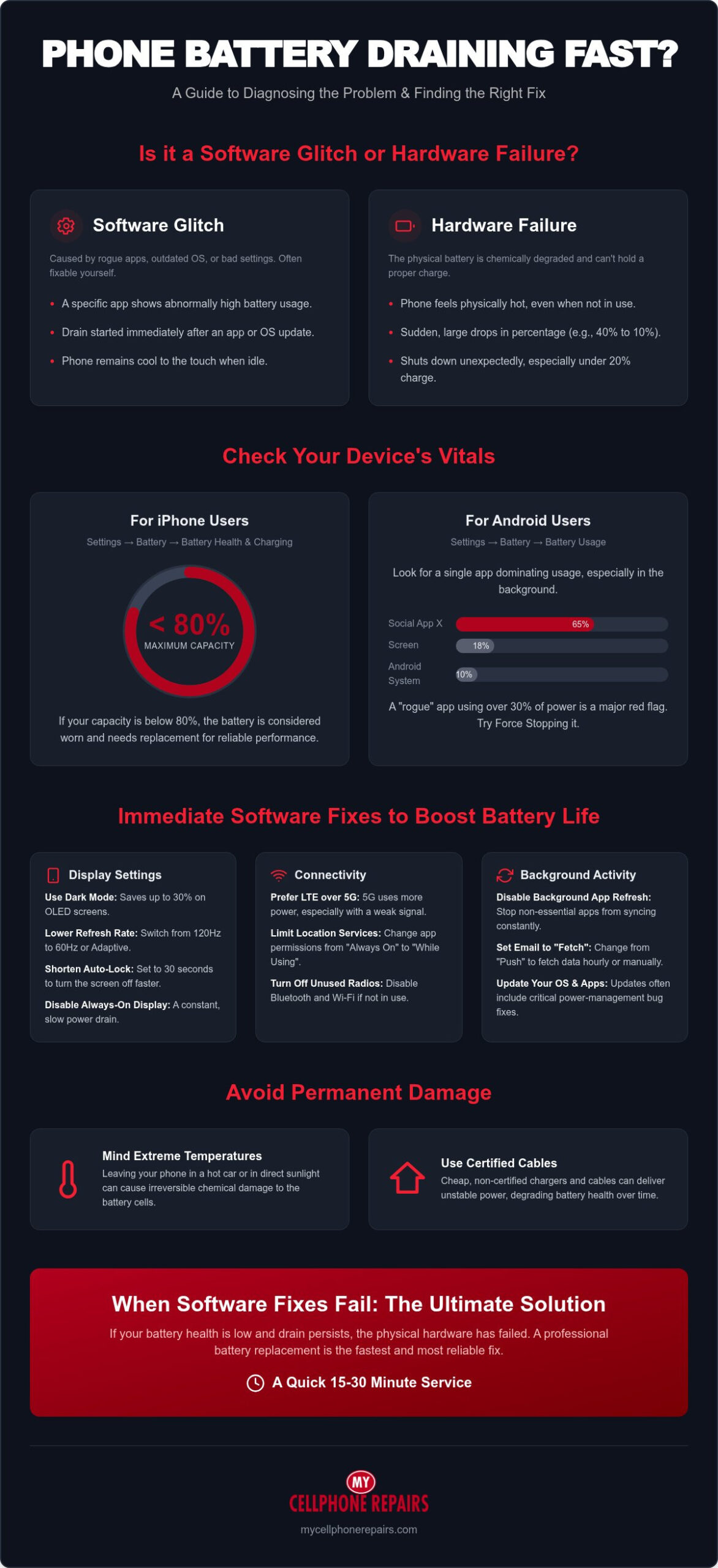
Apple provides clear metrics to help you decide if you need a professional battery replacement. Open your Settings, tap Battery, and select Battery Health & Charging. Look specifically at the Maximum Capacity percentage. If this number is below 80%, your battery is officially worn out and cannot hold a sufficient charge for modern apps. Check the Peak Performance Capability section as well. If you see a message stating that performance management has been applied, your battery can no longer deliver the peak voltage required by the processor. This often leads to unexpected shutdowns. Understanding these signs your phone battery needs replacing early can save you from a total device failure.
Monitoring Battery Usage on Android
Android devices offer a detailed breakdown of power consumption to help you identify the specific phone battery draining fast fix you need. Navigate to the Battery menu in your Settings and review the usage chart. Distinguish between System drain and App drain. If the Android System or Screen is the top consumer, you likely need to adjust your display settings. However, if a specific social media or gaming app is consuming 30% of your power while you aren’t using it, that app is misbehaving. Use the Force Stop button for these specific apps to immediately halt the drain. If the usage remains high across all apps, the physical battery cells are likely failing.
Top Software Fixes for Rapid Battery Depletion
Software settings are the most common cause of power loss. Implementing a phone battery draining fast fix often involves auditing how your device communicates with the world. Start by ensuring your operating system is current. As of July 2026, Android 17 and the iOS 27 beta have introduced refined power-management protocols. These updates often patch bugs that cause background processes to hang and drain power. If you haven’t updated recently, performing this software update is the first phone battery draining fast fix you should try.
Screen and Display Optimization
Your screen is the largest consumer of power. On devices with OLED screens, such as the iPhone 17 or Galaxy S24, switching to Dark Mode can save up to 30% of your battery life. This happens because OLED panels physically turn off pixels to display true black. Beyond colors, you should manage your refresh rate. High-end flagships often default to 120Hz for smooth scrolling, but this consumes significantly more energy than the standard 60Hz. Switch to “Adaptive” or “Standard” refresh rates to see immediate gains.
Additional display tweaks include shortening your Auto-Lock or Screen Timeout timer to 30 seconds. Disable “Raise to Wake” and “Always-On Display” features. These keep the processor partially active and the screen illuminated even when you aren’t using the device. For Samsung users with high-resolution displays, lowering the resolution from WQHD+ to FHD+ reduces the workload on the graphics processor. This small change provides a noticeable boost to daily longevity without sacrificing much visual clarity.
Connectivity and Sync Adjustments
How your phone connects to networks determines how hard the battery works. 5G connectivity is excellent for speed, but it is a major drain in areas with weak signals. If your phone constantly switches between 5G and LTE, it uses excessive power to search for a stable tower. Switch your preferred network type to LTE in your cellular settings to stabilize consumption. Similarly, Bluetooth and Location Services should be audited. Many apps request “Always On” location access when “While Using” is sufficient. Revoke these permissions for non-essential apps to stop background polling.
Data synchronization is the final software hurdle. Email accounts set to “Push” keep your phone in a constant state of readiness. Change these settings to “Fetch” every hour or “Manual” to reduce the frequency of server pings. You should also disable “Background App Refresh” for social media and news applications. These apps often refresh feeds and download ads while the phone is in your pocket. If these software changes don’t stop the drain, it’s likely a hardware issue. A professional battery replacement can restore your phone to factory-standard performance in minutes.
Environmental Factors and Charging Habits
Your physical environment and daily habits are often the missing link when seeking a phone battery draining fast fix. Lithium-ion batteries rely on delicate chemical reactions that are highly sensitive to temperature. While software audits help, they cannot reverse physical damage caused by excessive heat. Keeping your device within a safe temperature range is essential for preserving the long-term health of your hardware. If you frequently subject your phone to thermal stress, no amount of software tweaking will restore its original capacity.
Thermal Management for Your Phone
Heat is the primary enemy of battery longevity. High temperatures accelerate the chemical breakdown inside the battery cells, leading to permanent capacity loss. You should never leave your phone on a car dashboard or in direct sunlight. If you see a “Temperature Warning” screen, turn the device off immediately and move it to a cooler environment. Do not place it in a refrigerator or freezer. Rapid temperature changes can cause internal condensation and permanent water damage.
Charging also generates significant internal heat. Many bulky or rugged protective cases trap this thermal energy against the back of the phone. Remove your case during charging sessions to allow for better heat dissipation. This simple step prevents the battery from reaching the high thermal thresholds that trigger early degradation. If your phone feels hot to the touch while plugged in, it is a sign that the heat is not escaping fast enough.
Smart Charging Practices
How you charge is just as important as when you charge. Modern devices benefit from the “20-80 Rule.” Try to keep your battery percentage between 20% and 80% whenever possible. Allowing the battery to drop to 0% puts significant stress on the cells and can eventually lead to a “deep discharge” state where the battery refuses to take a charge. Conversely, keeping the phone at 100% for extended periods creates high-voltage stress that wears out the chemistry faster.
Enable “Optimized Battery Charging” on your iPhone or “Protect Battery” on your Samsung device. These features learn your daily routine and delay charging past 80% until you actually need the device. Be cautious with daily fast-charging. While convenient, the high wattage generates extra heat that can shorten the battery’s total lifecycle over several hundred cycles. Use a standard charger overnight and save fast-charging for emergencies.
Finally, audit your hardware. Cheap, non-certified third-party cables often lack the necessary voltage regulators to protect your device. These cables can provide inconsistent power or cause “false charging,” where the phone shows a charging icon but the percentage never increases. Check your charging port for lint or debris with a flashlight. A dirty port is a common, overlooked phone battery draining fast fix that requires only a quick cleaning to resolve.
When Software Fixes Fail: Identifying Hardware Failure
Software optimizations have limits. If you have tried every setting adjustment and the drain persists, you have likely reached the hardware wall. This is where a software-based phone battery draining fast fix is no longer possible because the lithium-ion cells have reached the end of their chemical life. Hardware failure is predictable if you know the physical warning signs. Recognizing these symptoms early prevents total device failure and potential safety risks.
The Voltage Collapse Phenomenon
A healthy battery provides a steady flow of power. An aged battery suffers from high internal resistance, causing a “voltage collapse” when the processor demands a burst of energy. This is why your phone might drop from 50% to 10% in a matter of seconds. It’s also why your device might shut down unexpectedly while showing 20% or 30% remaining charge. The battery simply cannot provide the peak voltage required to keep the system running during demanding tasks.
Many users attempt a factory reset to resolve these sudden drops. This will not work for a chemically aged battery. Software cannot fix a physical loss of capacity. If your phone feels sluggish, it may be due to “thermal throttling.” Your device intentionally slows down the processor to reduce power draw and prevent the failing battery from overheating. This is a clear sign that your hardware can no longer support your phone’s operating requirements. If you’re unsure whether these symptoms confirm the critical signs your phone battery needs replacing, reviewing a detailed breakdown of hardware failure indicators can help you make a confident decision.
Physical Battery Inspection
Sometimes the damage is visible from the outside. A failing battery can off-gas, causing the internal pouch to swell. Check for “screen lifting,” where the display panel begins to separate from the frame. You might also notice small gaps in the back panel or a “spongy” feeling when you press on the screen. A swollen battery is a serious fire hazard that requires immediate professional disposal and replacement because the pressurized gas is highly flammable. Do not ignore a screen that appears to be pushing out from the middle.
For older devices with removable backs, you can perform a “spin test” on a flat surface. If the phone spins like a top, the battery is bulging. Modern sealed phones won’t spin, so look for any slight curvature in the chassis instead. Never puncture, squeeze, or press down on a suspected swollen battery. This can trigger a thermal runaway event. If your device shows these hardware symptoms, stop using it and seek a professional swollen phone battery replacement immediately to restore safety and performance.
Professional Battery Replacement: The Ultimate Fix
Software tweaks only go so far. If your battery is physically failing, a professional hardware replacement is the only permanent phone battery draining fast fix. Modern smartphones use strong adhesives and delicate internal ribbons that are easily damaged. Attempting a DIY repair using cheap kits often leads to broken screens, much like how an amateur attempt at watch servicing can be disastrous—which is why specialists like atozwatchrepair.co.uk are essential for such delicate hardware. Professional technicians use specialized tools to open these sealed devices without causing secondary damage. You get a safe, reliable result in a fraction of the time it takes to struggle with a home repair kit.
We provide a 15-30 minute turnaround for most battery swaps. You can drop off your device and have it back before you finish lunch. A flat-fee repair is far more logical than spending $1,000 or more on a new flagship device just because of a worn-out power cell. Your privacy remains protected throughout the entire process. Hardware swaps are strictly mechanical tasks. Our technicians don’t need your passcode to replace a physical battery. You keep your data secure and your peace of mind intact while we restore your device’s power capacity.
Why Choose My Cellphone Repairs?
Our technicians are experts in iPhone, Samsung, and MacBook hardware. We understand the specific architecture of each model, ensuring a perfect fit and seal every time. We use high-quality parts that restore your device to its original factory performance levels. This isn’t just about making the battery last longer; it’s about ensuring the voltage is stable enough to support high-demand apps. Our mall-based locations make the process effortless for busy customers. You don’t have to ship your phone away for weeks. Simply drop your phone off and shop while we handle the technical work. We focus on speed and quality so you can get back to your day without delay.
The ‘New Phone’ Feeling Without the Price Tag
A fresh battery does more than just hold a charge. It removes the performance lag caused by thermal throttling that we discussed in previous sections. When the processor receives steady, reliable voltage, your 3-year-old phone will feel brand new again. Apps will open faster, and the interface will feel snappy and responsive. This simple swap can extend your device’s usable life by another 2 to 3 years. It is the most sustainable and cost-effective way to manage your technology. Don’t let a failing battery force you into an expensive upgrade you don’t actually need. Get a Professional Battery Diagnostic Today and see the difference a fresh cell makes.
Restore Your Phone’s Reliability Today
You don’t have to live with a device that requires constant charging. Identifying the right phone battery draining fast fix depends on whether your issue is a rogue app or a physically worn-out cell. While software adjustments can solve minor issues, hardware failure requires a professional hand to restore factory-standard performance. We’ve covered how to spot these signs, from voltage collapses to physical swelling. Your device is a vital tool that should last through your entire day.
We are ready to help you regain your mobile freedom. Our expert technicians offer a 15-30 minute turnaround for battery swaps on iPhone and Samsung devices. We use a transparent flat-fee pricing model so you know exactly what to expect before the repair begins. Fix Your Battery Drain in 30 Minutes – Visit My Cellphone Repairs. Trust our local experts to get your hardware back to peak health. Get back to using your phone without the constant stress of a dying battery.
Frequently Asked Questions
Why is my phone battery draining so fast all of a sudden?
Sudden battery drain is usually caused by a rogue background process, a recent software update, or physical hardware failure. If you haven’t changed your usage habits, your battery cells may have reached their cycle limit. Most batteries begin to degrade after 500 to 1,000 charge cycles. Check your device’s usage statistics to identify if a specific app is consuming an unusual amount of power.
Can a software update cause my battery to drain faster?
Yes, it’s common to experience temporary drain after installing a major update like iOS 27 or Android 17. Your phone performs intensive background tasks like re-indexing files and optimizing apps for the new operating system. This process usually resolves within 48 hours. If the drain persists longer, the update may have a specific bug or your older hardware is struggling with the new software’s power demands.
Is it worth replacing the battery on an older iPhone or Samsung?
Replacing the battery is almost always worth it when compared to the cost of a new $1,000 smartphone. A fresh battery restores peak performance and adds 2 to 3 years of life to your current device. It’s a cost-effective phone battery draining fast fix that eliminates the need for an expensive and unnecessary upgrade. Much like how a professional tune-up from Fix My Car can keep an older vehicle running efficiently for years, a simple battery swap makes your device feel brand new again.
How much does a professional phone battery replacement cost in 2026?
Costs vary based on your specific model and the complexity of the repair. As of July 2026, official manufacturer prices for flagship models often range from $70 to $119. Third-party certified shops typically offer more competitive rates. Samsung increased parts prices twice in 2026, so checking for current flat-fee pricing is the most reliable way to find a phone battery draining fast fix within your budget.
Why does my phone get hot when it’s charging or being used?
Heat is generated by the chemical reactions during charging and by the processor during intensive tasks like gaming or streaming. Bulky protective cases can trap this thermal energy, leading to significant stress on the battery cells. If your device gets hot while sitting idle, it often indicates a short circuit in the battery or a rogue app consuming excessive CPU resources. Remove your case to help the device cool down.
Will a factory reset fix my battery drain issues?
A factory reset only resolves software-related drain by clearing out corrupted system files and misbehaving apps. It cannot fix a chemically aged or physically damaged battery. Use a reset as a final troubleshooting step after you’ve audited your settings and app usage. If the battery continues to drop rapidly after a full reset, the issue is definitely related to your hardware and requires a physical replacement.
How long does it take to replace a phone battery at a repair shop?
A professional battery replacement typically takes between 15 and 30 minutes. Modern repair shops are optimized for efficiency and keep common parts in stock for popular iPhone and Samsung models. This rapid turnaround allows you to wait for the repair or run a quick errand while the work is completed. It’s a much faster alternative to shipping your phone away to a manufacturer for several days.
What are the signs of a swollen phone battery?
Look for screen lifting, a “spongy” feel when pressing the display, or visible gaps in the phone’s frame. These symptoms indicate that pressurized gases have built up inside the battery pouch due to failure or heat damage. A swollen battery is a serious safety hazard and can lead to a fire. Stop using the device immediately and seek professional swollen phone battery replacement for safe disposal and replacement.