
What if that spiderweb crack on your Galaxy S24 isn’t just a cosmetic flaw? It might be a ticking clock for your device’s internal hardware. Most users assume a shattered display means a total loss or a massive bill. It doesn’t have to be that way. Professional Samsung screen repair is about more than just swapping glass. It’s a precision restoration of an integrated ecosystem that protects your data and your investment.
You likely feel that sinking sensation every time you look at the damage. It’s frustrating to deal with a flickering screen or glass shards that prick your fingers. You want your phone back to its original state without risking further damage or losing water resistance. This guide teaches you exactly how to assess, protect, and execute a repair using professional-grade insights. We’ll cover how to retain your data security and device integrity. You’ll also see why we’re the experts who actually train other technicians in the field. From handling delicate OLED panels to restoring structural seals, we’re covering every step you need for a functional, clear display in 2026.
Key Takeaways
- Learn the immediate safety steps to secure loose glass and prevent internal damage to your device’s sensitive sensors.
- Understand why Samsung’s Dynamic AMOLED 2X technology requires specialized tools and controlled heat for a successful restoration.
- Compare the cost and safety risks of DIY attempts against a professional Samsung screen repair to protect your phone’s battery and water resistance.
- Discover the step-by-step professional diagnostic process that ensures your cameras and connectivity work perfectly after the fix.
- Identify the most effective screen protectors and “raised edge” cases to prevent future cracks on curved Galaxy displays.
What to Do Immediately After Cracking Your Samsung Screen
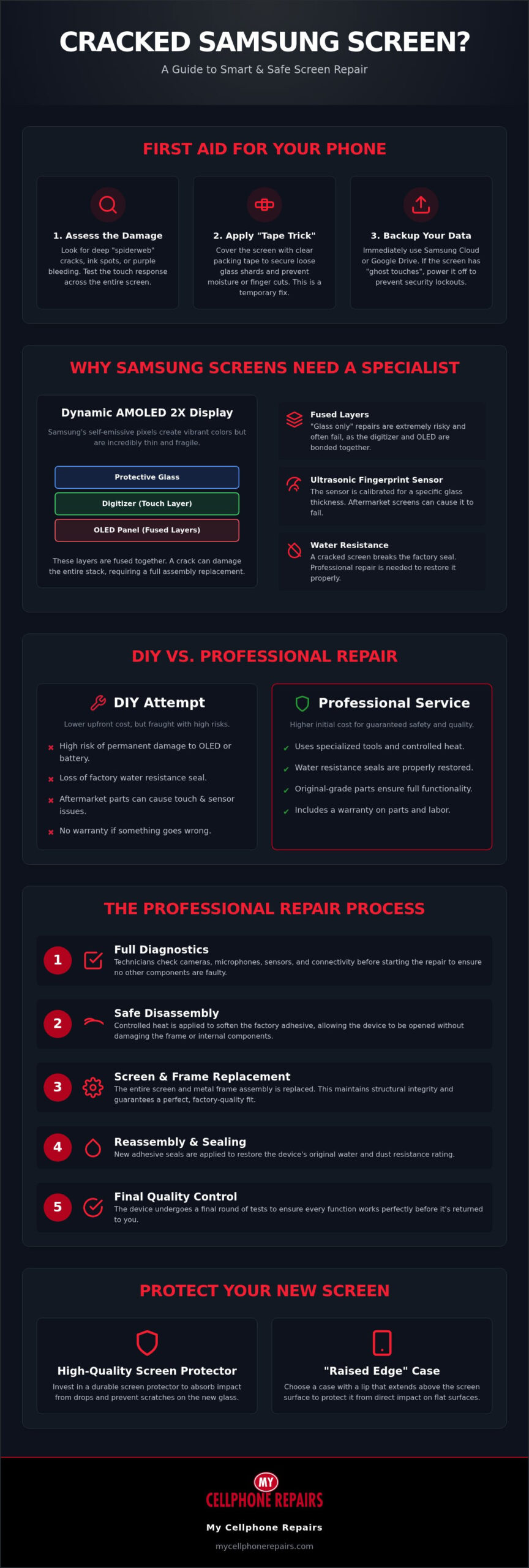
Panic is your worst enemy after a drop. Your priority is stabilization. If you act quickly, you can prevent a simple crack from becoming a total hardware failure. Start by checking the physical state of the phone. Small cracks might seem harmless, but they compromise the structural integrity of the device. This is the moment to decide if you need a professional Samsung screen repair before the damage spreads to internal components.
Assessing the Severity of the Crack
Look closely at the damage under a bright light. A hairline crack is often just cosmetic, but a spiderweb pattern suggests deep structural weakness. Check for “ink spots” or purple bleeding on the panel. These are clear signs of a damaged OLED display technology layer. If you see these spots, the internal display is dying. Test the touch response across the entire surface. If the screen doesn’t respond or “ghost touches” occur, your digitizer is compromised. This makes a repair urgent to avoid permanent data loss.
The “Tape Trick” for Temporary Safety
Loose glass shards can cut your fingers or fall into the phone’s internal components. Grab a roll of clear packing tape. Apply a single, smooth layer over the entire screen. This holds the glass in place and prevents moisture from entering through the cracks. Moisture is a silent killer for electronics, especially if the factory seal is broken. Be careful not to block the front-facing camera or the proximity sensors at the top. This tape is a temporary fix. It buys you time to reach a specialist who understands the precision required for modern hardware.
Back up your data immediately. Cracks often expand due to temperature changes or simple pressure. If the screen goes black, accessing your photos and contacts becomes significantly harder. Use Samsung Cloud or Google Drive to sync your files right now. If the screen is “ghost touching,” power the device down. Erroneous touches can lead to multiple failed password attempts, which might trigger a security lockout or factory reset. Protecting your data is just as vital as fixing the glass.
Stabilizing the phone is the first step toward a successful Samsung screen repair. You’ve secured the glass and protected your data. Now you can evaluate your restoration options without the pressure of an active crisis. We’ve spent years refining these techniques and even operate a technician training program to ensure these standards are met across the industry. Handling a broken device requires a methodical approach to ensure the phone remains functional for years to come.
Understanding Samsung Display Technology: OLED vs. LCD
Samsung’s Dynamic AMOLED 2X is the current gold standard for mobile displays. Unlike traditional LCDs that rely on a backlight, these panels use self-emissive pixels. This allows for the vibrant colors and deep blacks Samsung is known for. It also makes the display incredibly thin. This thinness is a double-edged sword during a Samsung screen repair. The layers are so tightly integrated that a single mistake can ruin the entire component. The complexity of these panels makes Samsung screen repair a task for specialists who understand the hardware’s fragile nature.
The Complexity of AMOLED Screens
Each pixel in an AMOLED panel is an individual light source. When you drop your phone, the impact can rupture the delicate organic layers. This often results in “ink spots” that grow over time or bright green vertical lines. Physical pressure on a cracked OLED usually leads to total screen failure within hours. Aftermarket displays often struggle to replicate the original’s high-end peak brightness or the 120Hz refresh rate. We recommend using original-grade parts to maintain the visual quality you paid for. Samsung moved away from curved-edge screens with the S23 and S24 series, which helps slightly, but the internal tech remains dense and difficult to handle.
Why Precision Matters in Samsung Repairs
The digitizer is the layer that translates touch into data. In modern Galaxy models, this layer is fused directly into the display stack. This is why “glass only” repairs are rarely successful. They require specialized machinery to separate the glass without killing the OLED. Most professionals now replace the screen and the metal frame together. This method ensures the phone’s structural integrity remains intact and prevents the “lifting” issues common with cheap adhesive. Replacing the metal housing alongside the glass provides a factory-quality fit that protects the internal motherboard.
Screen thickness also plays a vital role in biometric security. Samsung’s ultrasonic fingerprint sensors are calibrated for specific glass densities. If a replacement screen is too thick, the sensor won’t read your thumbprint. Improper adhesive use can also block the proximity sensors or the front camera. If you want to ensure your device’s high-end features survive the fix, consider a professional Samsung Phone Repair. Recent Right to Repair legislation has improved access to genuine manuals, but it hasn’t reduced the technical skill required to handle these fragile components. We handle these complex issues every day and even train other technicians to meet these exact standards.
DIY vs. Professional Samsung Screen Repair: A Realistic Comparison
Choosing between a DIY fix and a professional Samsung screen repair is a decision about risk tolerance. Many users see a repair kit online and assume the process is straightforward. It’s not. Modern Galaxy devices are held together by industrial-grade adhesive that requires specific temperatures to loosen. You’ll need a heat gun, heavy-duty suction cups, and specialized prying tools just to get inside. Without these, you’re likely to crack the glass back or mar the metal frame before you even see the display cable.
The “Heat Factor” is the most dangerous part of a home repair. Samsung batteries are lithium-ion and sit directly beneath the display. If you apply too much heat to soften the screen adhesive, you risk damaging the battery cells. A slipped prying tool can puncture the battery casing, leading to a thermal event or fire. Professionals use precision heat plates that maintain a steady, safe temperature. This protects the sensitive internal hardware while we work on the restoration. Understanding OLED vs. LCD technology is helpful here, as OLED panels are significantly more sensitive to heat and pressure than older display types.
Cost analysis often favors the professional route in 2026. A genuine Samsung display assembly is expensive. When you add the cost of high-quality tools and the time spent on the repair, the savings are often minimal. Furthermore, a DIY attempt immediately voids any remaining manufacturer warranty. If you make a mistake, you’re responsible for the cost of a replacement phone. A professional service provides a safety net that a home workbench can’t match.
The Risks of the DIY Path
- Torn Flex Cables: The cables connecting the screen to the motherboard are thinner than a piece of paper. One wrong tug during disassembly ruins the part.
- Loss of IP68 Rating: Restoring the water and dust resistance requires specific gaskets and a pressurized seal that’s nearly impossible to replicate at home.
- DOA Parts: If your mail-order screen is dead on arrival, you’re stuck in a shipping loop. Professionals verify every part before installation.
When to Choose a Professional Service
Expert restoration offers more than just a new screen. We provide a warranty-backed repair, ensuring that your touch response and biometric sensors work perfectly. Our team handles complex multi-point diagnostics to catch hidden issues like motherboard shorts or the need for a Samsung battery replacement. If a drop has also left your device struggling to hold a charge, our technicians can assess whether you need a Samsung charging port repair alongside your screen restoration. If you want a fast, reliable Samsung phone repair that preserves your data and device security, let the specialists handle the hardware. We even operate a technician training program, meaning we set the standards that other shops follow.
The Professional Samsung Screen Repair Process: Step-by-Step
Every professional Samsung screen repair starts with a comprehensive health check. We don’t just dive into the hardware. We test the Wi-Fi, Bluetooth, and cellular connectivity before a single screw is turned. This ensures that any existing issues are documented and that the repair doesn’t interfere with your phone’s primary functions. We also verify the status of the front and rear cameras and the ambient light sensors. This methodical intake process is what separates a specialized service from a quick-fix shop.
Teardown and Internal Cleaning
To open the device, we place it on a precision heat plate set to a specific temperature. This softens the factory adhesive holding the glass back panel. We use ultra-thin prying tools to separate the back without cracking the glass or damaging the wireless charging coil. Once inside, we immediately disconnect the battery to eliminate the risk of an electrical short. We then use compressed air and specialized brushes to remove microscopic glass dust. This step is vital. Stray shards can rattle inside the phone and eventually puncture the battery or damage the motherboard. We take the time to ensure the internal environment is pristine before proceeding.
Most high-quality repairs involve a “screen and frame” assembly. This requires us to transfer your original components into the new housing. We carefully move the vibrator motor, loud speakers, and the motherboard. Handling the battery requires extreme care. We use plastic tools to prevent punctures and avoid the “Heat Factor” risks discussed earlier. Once the components are seated, we apply new, pre-cut gaskets to the frame. This re-sealing process is the only way to restore the device’s protection against dust and moisture. It’s a precision task that demands a steady hand and technical expertise.
Final Testing and Quality Control
After assembly, we run proprietary diagnostic software to calibrate the under-display fingerprint scanner. This sensor is incredibly sensitive to screen thickness and alignment. We also check the front-facing camera for perfect centering to avoid blurry photos or “halo” effects. Finally, we perform a 10-point touch sensitivity test to ensure every millimeter of the new display responds correctly. We don’t return the device until it passes every single one of these checks. If you want your phone restored to factory standards by the team that operates a technician training program, book your Samsung Phone Repair today. Our process ensures your Samsung screen repair is durable and reliable for the long haul.
Protecting Your Samsung Screen from Future Damage
Prevention is the best way to avoid a repeat Samsung screen repair. Once your device is restored to factory standards, you need a defense strategy that matches the high-end nature of your hardware. Most screen damage occurs during simple, everyday drops. You can significantly lower your risk by choosing the right protective layers and handling your device with care. Don’t wait for the next impact to test your protection.
Tempered glass remains superior to liquid screen protectors for impact resistance. While liquid coatings help prevent microscopic scratches, they offer almost no structural support against a hard drop. For curved edges, UV-cured glass is the gold standard. This technology uses a liquid adhesive that fills any small gaps before hardening under ultraviolet light. It creates a seamless bond that doesn’t lift at the corners, which is a common failure point for standard adhesive protectors. This ensures your touch sensitivity and fingerprint scanner remain fully functional.
Your case choice is just as vital as the screen protector. Galaxy Ultra models require “Raised Edge” cases. These designs feature a lip that extends past the screen surface at the top and bottom. This prevents the display from making direct contact with the ground during a face-down fall. Look for cases with “Military Grade” drop-test certifications. These ratings indicate the case can absorb and dissipate the energy of a fall, protecting the fragile OLED panel inside.
Advanced Protection Strategies
Regular maintenance keeps your protection effective. Check the edges of your screen protector every month. If you see lifting or air bubbles, replace it immediately. Dust trapped under the edge acts like sandpaper against your glass. Environmental factors also matter. Avoid leaving your phone on a car dashboard or in direct sunlight. Extreme heat in 2026 can weaken the adhesives that hold your screen and protectors in place. If you work in a high-risk environment, consider carrying a refurbished iPhone as a secondary device. This keeps your primary Samsung safe during heavy labor or outdoor activities.
Choosing the Right Repair Ally
When protection fails, you need a restoration expert. My Cellphone Repairs is the trusted choice for hardware restoration because we understand the internal architecture of every Galaxy model. Our leadership in technician training means we stay ahead of industry trends and tool requirements. We don’t just fix phones; we set the standards for how a Samsung screen repair should be performed. Get your device fixed by the professionals who train the rest of the industry. We’ll ensure your phone returns to you with the clarity and security it had on day one.
Restore Your Galaxy to Factory Standards
Restoring a cracked display is about more than just aesthetics. It’s about preserving the high-end technology that makes your phone a vital tool. You now know how to stabilize a shattered screen and why Samsung’s integrated OLED panels require specialized handling. Choosing a professional Samsung screen repair ensures your biometric sensors and water resistance remain intact. A methodical approach prevents the “Heat Factor” from damaging your battery or motherboard.
We take the guesswork out of hardware restoration. As a Certified Technician Training Center, we don’t just fix devices; we teach the industry how to do it right. You get the benefit of specialized expertise in both Samsung and iPhone hardware. All repairs come with a warranty; coverage depends on the part used. Ask your store for details. Don’t let a broken screen disrupt your productivity or risk your data security any longer. We handle the complex diagnostics so you don’t have to.
Get Your Samsung Screen Repaired Professionally Today to experience a seamless fix. Your phone is a major investment, and it deserves a precision restoration. We’re ready to help you get back to a clear, functional display. Trust the experts who train the pros.
Frequently Asked Questions
How much does Samsung screen repair cost in 2026?
Costs vary based on your specific model and the damage severity. For flagship devices like the Galaxy S24 Ultra, industry averages typically range between $249 and $299 for a full display assembly. Mid-range A-series models are more affordable, often falling between $79 and $149. Foldable devices remain the most expensive to service due to their complex hinge systems. We use high-quality parts to ensure your phone’s value remains intact after the fix.
Will I lose my data during a Samsung screen replacement?
You generally won’t lose your data during a standard hardware fix, but we always recommend a full backup before any service. A Samsung screen repair focuses on the external display and frame, not the internal storage chips. However, if the impact that cracked your screen also damaged the motherboard, data recovery becomes a separate issue. We prioritize device security and ensure your personal information remains untouched throughout the restoration process.
Is it worth fixing a cracked screen on an older Samsung phone?
It’s worth fixing if the repair cost is lower than the device’s current market value and if the phone still receives security updates. For example, the Galaxy S22 series is slated to receive security patches until early 2027, making it a viable candidate for restoration. If the phone is older than five years, the cost of parts might outweigh the benefits. Consider the battery health and performance before investing in new glass.
How long does a professional Samsung screen repair take?
Most professional repairs are completed in two hours or less at a specialized service center. This timeframe includes the initial multi-point diagnostic check, the precision disassembly, and the final quality control testing. While some complex cases involving water damage might take longer, a standard screen and frame replacement is a fast process. We respect your time and aim for a quick turnaround so you aren’t without your device for long.
Can a cracked Samsung screen be fixed without replacing the whole display?
It’s technically possible to replace just the glass, but it’s rarely recommended for modern Galaxy models. Because the digitizer and OLED layers are fused together, separating them requires industrial machinery and carries a high risk of failure. Most experts replace the entire display assembly to ensure factory-level touch sensitivity and visual clarity. This method provides a more durable result and prevents the lifting issues common with glass-only attempts.
Will my Samsung phone still be waterproof after a screen repair?
We use specialized gaskets and pressurized seals to restore as much water resistance as possible, but no repair can perfectly replicate the original factory seal. Most modern Samsung phones have an IP68 rating, which relies on precise internal adhesives. While we follow professional standards to re-seal the device, you should treat the phone as water-resistant rather than fully waterproof. Avoid intentional submersion to protect the internal hardware from potential moisture entry.
What is the difference between an OEM and an aftermarket Samsung screen?
OEM screens are original parts manufactured to the exact specifications of your device, maintaining the same brightness and 120Hz refresh rates. Aftermarket screens are third-party alternatives that are often cheaper but may have slight variations in color accuracy or touch response. For Samsung screen repair, using OEM-grade parts is vital for biometric security. Ultrasonic fingerprint sensors often fail to work correctly with thicker, lower-quality aftermarket glass panels.
Does Samsung Care+ cover cracked screens?
Yes, Samsung Care+ covers accidental damage, including cracked screens, for a specific deductible. For standard Galaxy phones, this deductible is usually $29, while foldable models may range from $29 to $99 depending on the plan. This extended protection can be paid monthly or as a one-time fee. It’s a cost-effective way to manage repair risks, especially for high-end flagship devices with expensive AMOLED displays that are sensitive to drops. If your device also suffers from power delivery issues after a drop, a professional Samsung charging port repair can restore reliable wired fast-charging alongside your screen fix.