
Imagine picking up your phone and noticing the screen is literally peeling away from the frame. It isn’t a drop or a broken clip. It’s a chemical reaction happening inside your device. If your screen is lifting or the back glass is bulging, you likely need a professional swollen phone battery replacement immediately. This isn’t just a cosmetic issue. It’s a serious safety hazard that can lead to fires or permanent hardware failure.
It’s natural to feel anxious about losing your data or facing a massive repair bill. You want your phone back in working order without the risk of it sparking in your hand. We understand that technical frustrations are disruptive. That’s why we’ve built this checklist to guide you through the crisis with expert precision. Our goal is to replace fear with a clear, actionable plan.
You’ll learn exactly how to handle a compromised battery and why 2026 shipping regulations mean you can’t just toss it in the mail. We’ll walk you through the safety steps, the professional replacement process, and how to decide if your device is worth saving. From specialized swaps to refurbished alternatives, here is your path to a safe, functional phone.
Key Takeaways
- Spot early warning signs like screen discoloration or frame lifting to prevent a chemical fire hazard.
- Follow the emergency safety protocol to stabilize your device by immediately cutting power and heat sources.
- Discover why a professional swollen phone battery replacement is essential for safe disposal and hardware restoration.
- Compare the financial benefits of repairing your current phone against the cost of a full device replacement.
- Master simple charging habits and temperature controls to prevent future battery swelling and maximize your device’s lifespan.
Identifying a Swollen Phone Battery: Warning Signs and Risks
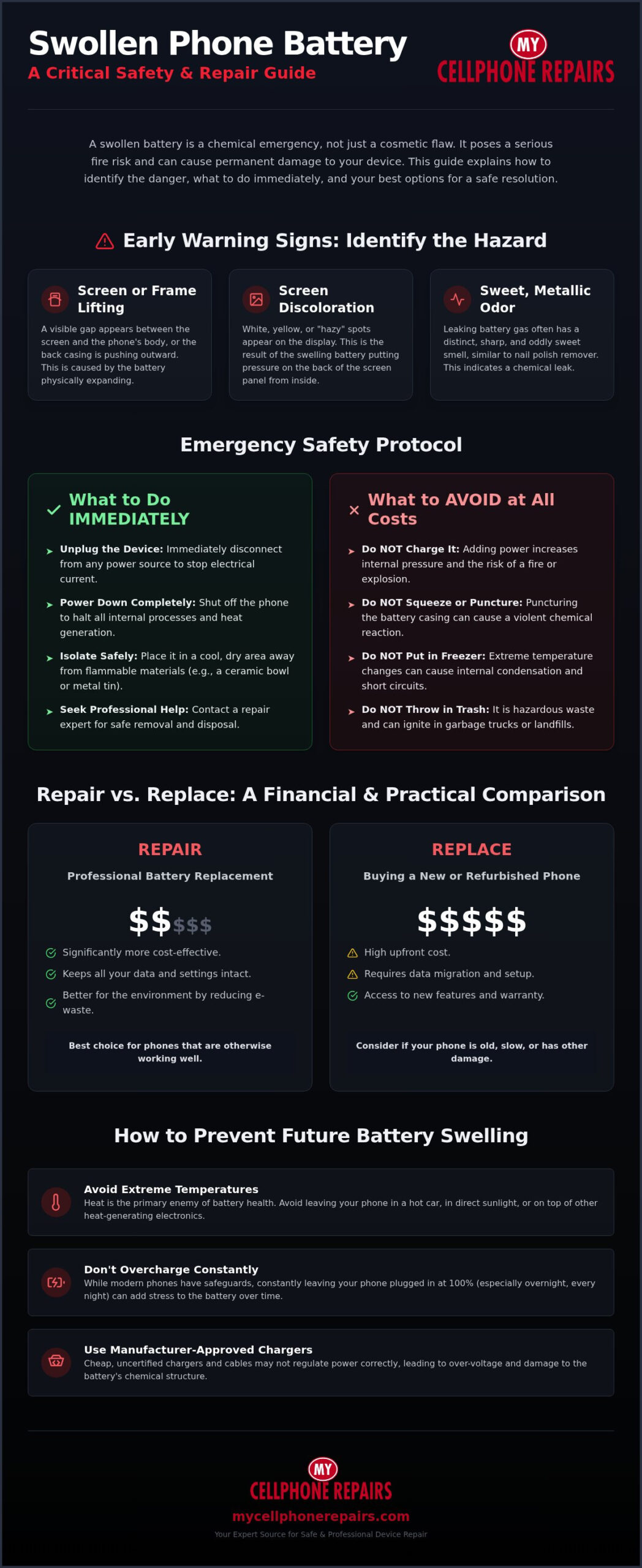
A swollen battery is more than a nuisance; it’s a chemical emergency. This condition occurs when gas builds up inside the cell due to electrolyte degradation. Most modern smartphones use a Lithium-polymer battery, which is designed to be thin and light. However, when the chemicals inside break down, they release flammable gases that have nowhere to go. This causes the battery casing to expand like a balloon. Catching this early is vital before you need a total swollen phone battery replacement.
Look for the “hazy” screen first. You might see white or yellow discoloration on the display, especially near the center of the screen. This happens because the expanding battery is literally crushing the LCD or OLED panel from the inside. Next, check for physical gaps. If your screen is lifting or the back glass is separating from the frame, stop using the device immediately. Finally, trust your nose. Leaking lithium-ion gas often has a distinct sweet, metallic scent. If you smell something like artificial fruit or acetone coming from your charging port, you have a leak. Understanding the full range of signs your phone battery needs replacing can help you catch problems before they escalate to dangerous swelling.
Structural Damage Beyond the Battery
The pressure from a swollen battery doesn’t just stay in the battery compartment. It often stretches internal display ribbon cables to their breaking point. If these cables snap, a simple battery swap turns into a full screen repair. We also see many cases of a warped chassis where the metal frame of the phone actually bends under the internal pressure. While we can often save the frame, extreme warping might prevent a new battery from fitting correctly. Pressure spots on the screen are also a major concern. If the swelling lasted too long, those “bruises” on your display might be permanent, significantly increasing your total repair costs.
Why Batteries Swell: The Science of Failure
Batteries usually fail because of chemical stress or physical age. Overcharging is a common culprit. When you keep a phone plugged in constantly, it can break down the chemical stabilizers inside the cell. Manufacturing defects can also cause premature failure, leading to internal shorts that generate gas. External heat is the final trigger. Leaving your phone in a hot car or in direct sunlight accelerates the breakdown of the electrolyte. Finding a professional for a swollen phone battery replacement is the only way to ensure the device is safely opened without puncturing the pressurized cell, which can lead to an immediate fire.
The Emergency Safety Checklist: What to Do Right Now
Stop what you’re doing. If your phone is plugged in, unplug it immediately. Adding electrical current to a compromised lithium-ion cell increases internal heat and pressure. This is the fastest way to trigger a thermal event. Once the charger is removed, power the device down completely. You must stop all internal electrical activity to prevent further chemical stress. Even background processes generate enough heat to worsen the swelling.
Next, isolate the device. Place it in a cool, dry area away from flammable materials like curtains, paper, or bedding. A metal tin, a ceramic bowl, or a pot with a lid works well as a temporary holding container. Never try to “pop” the battery or squeeze the phone back together. Puncturing the battery casing allows oxygen to react with the lithium. This can cause a violent explosion or a toxic gas release. It’s a high-stakes situation, but you can handle it safely. If you’re unsure about moving the device, seeking a professional battery replacement is the safest next step.
What NOT to Do with a Swollen Cell
Don’t put your phone in the freezer. This common internet myth doesn’t fix chemical gas buildup. In fact, extreme temperature changes cause moisture to condense inside the phone. This leads to short circuits and permanent motherboard damage. You should also never throw a swollen battery in your household trash. These are hazardous waste. They can ignite in a garbage truck or a processing facility, putting workers at risk. Finally, stop using the phone entirely. Even “light” use like checking a text message generates heat that could push the battery over the edge.
Immediate Handling Instructions
If the battery is already leaking fluid or emitting a sweet, metallic smell, wear eye protection and gloves. Avoid skin contact with the electrolyte. If the phone is actively smoking or feels extremely hot to the touch, do not pick it up with your bare hands. Use a non-conductive tool to move it to a fireproof surface outdoors if it’s safe to do so. When you’re ready to transport the device for a swollen phone battery replacement, place it in a sealed container. Keep it in a secure spot in your car away from passenger seats during the drive. Professional technicians have the training to handle these hazardous components safely and ensure a successful swollen phone battery replacement.
Swollen Battery Replacement vs. Buying a New Phone
Deciding whether to fix your device or upgrade is a matter of math. A professional swollen phone battery replacement is a fraction of the cost of a brand new flagship smartphone. If your phone is less than three years old, a battery swap is a high-value investment. It restores the device to its original state without the heavy expense of a new model. You get the same performance you’re used to for a much smaller investment. Repair wins here.
Age plays a critical role. If your phone is more than four years old, you might be reaching the end of its security update cycle. However, if the screen and motherboard are still in good condition, a new battery can add two more years of life. This choice also supports the environment. Repairing a device prevents electronic waste and reduces the carbon footprint associated with manufacturing a new unit. It makes sense for your wallet and the planet.
When Replacement is the Better Choice
Sometimes, the damage goes beyond the power cell. If the expansion has crushed internal display connectors or caused motherboard damage, the repair costs might escalate. If you need a new screen and a battery simultaneously, the total bill could approach the current market value of the phone. In these cases, it’s often smarter to move on. If your current device is outdated or severely damaged, you can buy a refurbished iPhone to get modern performance without the high price of a brand new unit.
The Value of Professional Battery Swaps
A professional repair does more than just stop the swelling. It restores your phone’s peak performance capability. Modern operating systems often throttle the CPU when the battery is degraded to prevent unexpected shutdowns. A new battery removes these limits, making your phone feel fast again. Choosing an expert service also ensures you get a warranty on the part and the labor. For those with Android devices, getting a professional Samsung battery replacement ensures your phone is handled by technicians who understand specific hardware nuances. A swollen phone battery replacement is a fast, reliable way to reclaim your device’s speed and safety.
The Professional Replacement Process: Why Experts Are Essential
Attempting a DIY fix on a pressurized battery is a dangerous gamble. Unlike a standard repair, a swollen phone battery replacement involves handling a volatile chemical cell that is actively expanding. Household tools like metal screwdrivers or knives can easily puncture the outer casing; this leads to an immediate fire. Professional technicians work in controlled environments with specialized equipment to mitigate these risks. Our technician training program ensures every staff member is a master-level expert in handling these hazardous components.
We use precision heat mats to soften internal adhesives at exact temperatures. This allows the battery to release without the need for excessive mechanical force. Once removed, the hazardous lithium waste is isolated and sent through certified disposal channels. We don’t just swap the part; we also perform diagnostic testing on the charging IC and port. This identifies underlying issues that might have caused the swelling in the first place. For a safe and efficient fix, you should always trust a professional battery replacement service.
Precision Removal Techniques
Removing a swollen cell requires a “no-puncture” approach. Master technicians use chemical adhesive softeners to break the bond between the battery and the phone chassis. This prevents the need for prying, which is the most common cause of battery fires. After the battery is out, we carefully clean the internal compartment. We neutralize any electrolyte residue that may have leaked, ensuring the new battery sits in a clean, stable environment. This level of detail prevents long-term corrosion of the motherboard and internal display cables.
Post-Replacement Verification
A successful swollen phone battery replacement ends with rigorous testing. We don’t just close the case and hand it back. Technicians verify battery cycles and health percentages to ensure the new part meets factory specifications. We also calibrate the new battery. This ensures your phone reports an accurate charge percentage and manages power delivery correctly. If you’ve noticed your phone battery draining fast even after a swap, it often points to a calibration or software issue that we resolve during this final phase. This methodical flow guarantees your device returns to you in peak condition.
Preventing Battery Swelling: Best Practices for Device Longevity
Prevention is always safer and more cost-effective than an emergency swollen phone battery replacement. While all lithium-ion batteries eventually degrade, your daily habits determine how they fail. Heat management is the most critical factor. Heat accelerates the chemical breakdown inside the battery, leading to the gas buildup we discussed earlier. Never leave your phone on a car dashboard or in direct sunlight for extended periods. If your device feels hot to the touch during use, give it a break to cool down before continuing. Beyond your personal habits, maintaining a stable indoor climate is vital; if you notice certain rooms are prone to overheating, you can explore HVAC Installation & Repair to keep your electronics safe.
Optimal Charging Habits
Your charging routine is the foundation of battery health. Follow the 20-80 rule: try to keep your battery level between 20% and 80% as much as possible. Keeping a battery at 100% or letting it drop to 0% puts maximum stress on the lithium ions. This chemical tension is what eventually leads to cell degradation. If you use fast charging, be mindful of the temperature. Fast charging generates significant heat, especially in the first 30 minutes. If you have a thick or rugged case, remove it during long charging sessions. These cases act as insulators, trapping heat against the battery and baking the internal components. For a comprehensive overview of all your options and what to expect from the process, the ultimate guide to phone battery replacement covers everything from identifying failure signs to choosing the right repair service in 2026.
Regular Maintenance and Monitoring
Monitoring your device’s health allows you to spot trouble before it becomes a hazard. Check your battery health settings at least once a month. On iOS, go to Settings, then Battery, and look at “Battery Health & Charging.” On Android, check the “Battery” menu in your settings. If your maximum capacity drops below 80%, the battery is chemically aged and more prone to swelling. Familiarizing yourself with the critical signs your phone battery needs replacing can help you act before a degraded cell becomes a dangerous one. Watch for software bugs that cause the phone to run hot for no reason. If you notice a specific app draining power rapidly, delete or update it immediately. If your phone is already in for an iPhone screen repair, ask the technician to perform a quick battery diagnostic. Catching a degrading cell early prevents the need for a swollen phone battery replacement later.
Restore Your Device Safety Today
Dealing with a bulging screen or a chemical smell is stressful. You now know how to spot the early warning signs of gas buildup and how to follow the emergency safety checklist. By choosing a professional swollen phone battery replacement instead of a risky DIY fix, you protect your hardware and your home from fire hazards. Repairing your current phone is a smart, sustainable choice that saves you hundreds of dollars compared to buying a new flagship model.
Our team is ready to help. We employ master technicians who are trained in-house through our specialized program. We follow strict hazardous material safety protocols to ensure every compromised battery is handled and disposed of correctly. Whether you need a swap for an iPhone or a Samsung, we provide a fast turnaround to get you back online quickly. Don’t wait for the pressure to cause permanent motherboard damage or data loss.
Get a Professional Battery Replacement Quote and let us handle the technical details for you. Your phone will be safe, functional, and ready for years of continued use.
Frequently Asked Questions
Is a swollen phone battery dangerous?
Yes, a swollen battery is extremely dangerous because it contains pressurized flammable gases. If the casing is punctured or the internal layers touch, it can trigger a thermal runaway event. This results in a self-sustaining fire that is very difficult to extinguish. You should treat the device as a hazardous object. Never squeeze the phone or try to force the case back together, as this increases the risk of an immediate explosion.
Can I still use a phone with a slightly swollen battery?
You should never use a phone once you notice any signs of swelling. Even light tasks generate heat that can further expand the battery and lead to a fire. Continued use also puts immense pressure on the internal display and motherboard. This can turn a simple battery swap into a much more expensive repair. Power the device off immediately and keep it in a fireproof container until you can get a professional swollen phone battery replacement.
How much does it cost to replace a swollen battery?
The cost varies depending on your specific phone model and the brand. While manufacturer service centers have set rates for out-of-warranty repairs, third-party experts often provide a more cost-effective alternative. You should consider the age of your device and the extent of any structural damage before deciding. Professional shops include the cost of safe hazardous waste disposal and a warranty on the new part, which adds significant value to the service.
Will a swollen battery damage my screen or motherboard?
Yes, a swollen battery will almost certainly damage other components if left unchecked. The internal pressure can crack the LCD or OLED panel from the inside out. It also stretches delicate ribbon cables and can warp the metal or plastic frame of the phone. In some cases, the expansion is so severe that it bends the motherboard, leading to permanent data loss. Acting quickly prevents these secondary, high-cost repairs.
Can a swollen battery explode if I don’t charge it?
Yes, a battery can still fail even if it isn’t plugged into a charger. Swelling is a sign that the internal chemistry has already been compromised. While charging adds heat and speeds up the process, the volatile gases remain inside the casing. Environmental heat or physical stress can trigger a reaction at any time. This is why you must isolate the device and seek a professional swollen phone battery replacement as soon as possible.
How do I dispose of a swollen phone battery safely?
You must never throw a swollen battery in your regular trash or recycling bin. These batteries are hazardous waste and can ignite in garbage trucks or processing facilities. Instead, take the device to a dedicated e-waste recycling center or a professional repair shop. These facilities have specialized containers and protocols for handling damaged or defective lithium batteries. This ensures the chemicals are neutralized and recycled without harming the environment.
Does Apple or Samsung replace swollen batteries for free?
Apple and Samsung typically only replace batteries for free if the device is currently under a standard one-year warranty or an extended plan like AppleCare+. If the swelling is caused by a known manufacturing defect or a specific recall program, they may cover it outside of the warranty period. However, for most users with older phones, this is considered an out-of-warranty repair. It’s best to check your specific coverage status before booking an appointment.
How long does a professional battery replacement take?
A professional battery replacement usually takes less than one hour for most iPhone and Samsung models. Our master technicians are trained to handle the delicate removal process efficiently while ensuring all safety protocols are followed. This includes cleaning the internal chassis and testing the new battery’s health. While the physical swap is fast, the diagnostic checks ensure your phone is safe and performing at peak capacity before it’s returned to you.