
Putting your wet Galaxy in a bowl of rice is the fastest way to ensure it never turns on again. While the internet loves this DIY hack, it actually accelerates internal damage by trapping moisture and introducing starch dust. You’re likely reading this because your phone just took an unexpected dive, and the fear of losing irreplaceable photos is setting in. Professional Samsung phone water damage repair is about more than just drying out the hardware; it’s about stopping a chemical reaction before it destroys your motherboard.
We understand the stress of a black screen and the uncertainty of repair costs versus buying a new device. This 2026 guide provides the critical, immediate steps you need to take to prevent permanent corrosion. You’ll learn why professional ultrasonic cleaning is the only way to safely remove mineral deposits and how specialized technicians ensure data recovery. We’ll walk you through the professional restoration process so you can make an informed decision and get your digital life back on track quickly.
Key Takeaways
- Power down your device and remove the SIM tray immediately to prevent electrical shorts and encourage internal airflow.
- Stop using rice or hair dryers, as these common DIY methods often accelerate corrosion and trap moisture inside the chassis.
- Discover how professional Samsung phone water damage repair uses ultrasonic sound waves to strip away microscopic mineral deposits that cause permanent hardware failure.
- Learn why professional intervention is critical for data recovery, using advanced micro-soldering to repair damaged circuits that standard cleaning can’t reach.
- Understand the long-term benefits of restoration over replacement, guided by experts who set the industry standard for technical training.
Immediate First Aid: What to Do (and Stop) Right Now
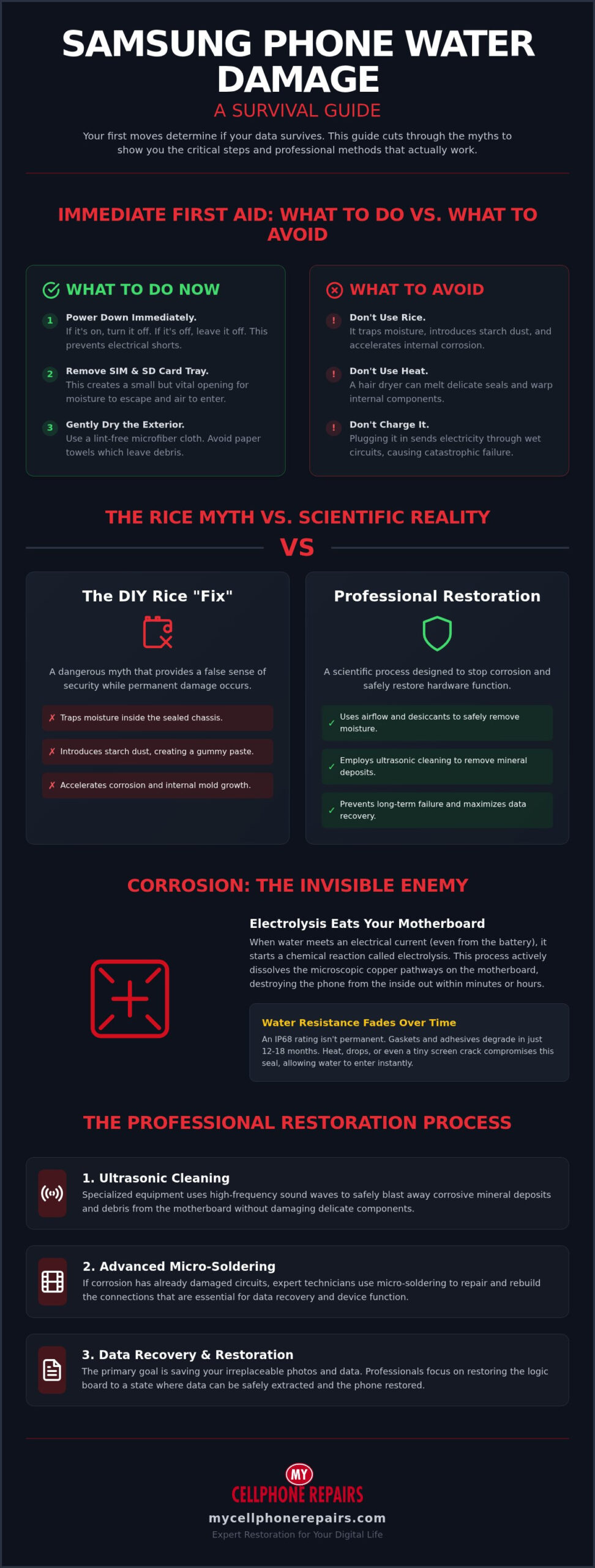
Your first moves determine if your data survives. The moment your device hits the water, a countdown begins. Effective Samsung phone water damage repair starts with immediate containment before liquid reaches the sensitive motherboard components. You don’t need special tools for these first steps, but you must act with speed and precision.
Follow these instructions immediately to stabilize the hardware:
- Power down the device: If the screen is still on, turn it off now. If it’s already black, leave it that way. Electricity moving through wet circuits causes instant, irreversible short-circuits.
- Remove the SIM tray: Use a tool to eject the SIM and SD card tray. This provides a small but vital path for airflow into the internal chassis, which helps moisture escape.
- Dry the exterior: Use a lint-free microfiber cloth to wipe away surface liquid. Avoid paper towels or tissues because they leave behind debris that can clog ports and trap moisture.
- Skip the charger: Never plug a wet phone into a wall outlet or power bank. Even if you think it’s dry, internal moisture can cause a massive electrical surge that fries the CPU or memory chips.
The Danger of the ‘Power On’ Test
It’s tempting to check if your photos are still there by waking the screen. Don’t do it. When liquid meets an active electrical current, it triggers a process called electrolysis. This chemical reaction eats away at the delicate copper traces on your motherboard within minutes. Even if the phone seems to work initially, residual power in the battery continues this decay while the device is “off.” A phone that survives the initial dunk often fails hours later because the internal circuits have literally dissolved. Waiting for a professional diagnostic is the only way to ensure your data remains recoverable.
Water Resistant vs. Waterproof: The IP68 Reality
Most modern Galaxy devices rely on IP water resistance ratings for protection. However, an IP68 rating is not a lifetime guarantee. The rubber gaskets and adhesive seals that keep water out naturally degrade after 12 to 18 months of daily use. Exposure to heat, steam, or dropped impacts further weakens these defenses. Salt water and chlorinated pool water are especially aggressive; they bypass standard seals much faster than freshwater. If your screen or back glass has even a hairline crack, your water resistance is effectively gone. Liquid will enter the device instantly, making professional Samsung phone water damage repair a necessity rather than a precaution.
The Rice Myth vs. Scientific Drying Methods
Stop reaching for the pantry. The common belief that a bowl of uncooked rice can save your device is perhaps the most dangerous piece of misinformation in the tech world. Tech experts have spent years debunking the rice myth, yet it persists. Rice is an ineffective desiccant. It doesn’t have the capacity to pull moisture out from deep inside a modern, tightly sealed Samsung Galaxy. Instead of helping, it often makes the situation worse by creating a false sense of security while corrosion continues to eat your motherboard.
Rice introduces new problems. Fine starch particles and dust from the grains can enter your speakers and charging port. When this dust meets moisture, it turns into a thick, gummy paste that’s nearly impossible to remove. This debris can cause permanent hardware failure long after the water has dried. Similarly, you must avoid blow-dryers. Concentrated heat can melt the internal adhesive seals that provide your phone’s water resistance. It can also warp delicate screen layers or damage the battery. If you need a reliable Samsung phone water damage repair, you must focus on methods that actually work.
Why Rice Actually Slows Down the Drying Process
The physics of drying requires airflow. When you bury a phone in rice, you’re essentially insulating it. This traps moisture inside the chassis, where it settles into tight crevices around the CPU and memory chips. Without moving air, that water has nowhere to go. We’ve seen documented cases where phones left in rice for 48 hours developed internal mold growth and severe electrolysis. This delay gives corrosion a massive head start. By the time you realize the rice didn’t work, the damage is often too extensive for a simple fix.
Safe Air-Drying Techniques
A better alternative is using silica gel packets. These are the “do not eat” pouches found in shoe boxes. Place your phone in a sealed container with several of these packets; they are far more efficient at absorbing moisture than food items. If you don’t have silica, use a cool-air fan. Positioning your phone so the fan blows directly into the open SIM tray slot encourages evaporation without the risk of heat damage. Some users attempt to use 99% Isopropyl alcohol to displace water, which can be effective if done correctly. However, if your device still won’t charge after drying, it’s time to seek a professional charging port repair. The same safe drying principles apply across devices — if you also use an iPhone and encounter moisture in the port, our guide on how to get water out of iPhone charging port covers technician-approved methods to clear moisture alerts safely. Our experts can help you determine if the damage is limited to the port or if you require a full Samsung phone water damage repair to save your data.
Corrosion: The Invisible Enemy Inside Your Galaxy
Water isn’t the primary killer of electronics; the minerals left behind are the real culprits. When your Galaxy gets wet, you aren’t just dealing with H2O. You’re dealing with a chemical reaction that begins the second liquid touches the motherboard. This process is why professional Samsung phone water damage repair focuses on more than just drying the device. If you don’t address the microscopic debris, your phone is living on borrowed time.
Electrolysis is the most aggressive part of this process. If your battery is connected, the liquid acts as a conductor between circuits that should never touch. This creates an immediate electrical surge that dissolves metal components. It’s a rapid decay that can destroy a CPU or memory chip before the exterior of the phone even feels damp. This is also a significant long-term safety and fire risk, as damaged batteries or shorted circuits can become unstable over time.
Many users experience the “Time Bomb” effect. Your phone might work perfectly for a week, leading you to believe you’ve escaped damage. However, corrosion is like a slow-growing crust. It spreads across the logic board until it bridges two critical connections. You’ll know it’s happening if you notice these signs:
- Overheating: The phone feels hot even when you aren’t using it.
- Rapid Battery Drain: The percentage drops quickly because internal shorts are “leaking” power.
- Erratic Behavior: The screen flickers or apps open and close on their own.
- Loss of Signal: Corrosion often hits the antenna connectors first, causing dropped calls or no data.
The Science of Liquid Damage
When minerals like salt, chlorine, or calcium dry on the board, they form conductive “bridges.” These microscopic paths allow electricity to flow where it shouldn’t, causing a “short.” Even if the water is gone, these crusty deposits remain. Electrolytic corrosion is the primary cause of post-liquid device failure, occurring when an electrical current passes through a liquid to dissolve metal components. This reaction happens faster in salt water or pool water, but even tap water contains enough minerals to trigger the decay.
Why ‘Dry’ Doesn’t Mean ‘Fixed’
Removing liquid is only the first step of a successful restoration. If the mineral residue stays on the motherboard, your phone isn’t fixed. Humidity in the air can actually reactivate these old deposits. A rainy day or a steamy bathroom can provide enough moisture to turn that dried crust back into a conductive liquid, starting the corrosion process all over again. Professional Samsung phone repair requires a full teardown. We use specialized solutions to neutralize these minerals and stop the “Time Bomb” before it reaches a critical point.
Professional Restoration vs. DIY Methods
DIY drying methods only address surface moisture. They can’t reach the microscopic residue hiding beneath the metal shields of your Galaxy’s motherboard. Professional Samsung phone water damage repair uses specialized equipment to strip away corrosion at the molecular level. While a toothbrush and alcohol might clean visible areas, they can’t penetrate the Ball Grid Array (BGA) chips that power your device. Our technicians utilize industrial-grade tools to ensure a complete recovery.
Micro-soldering is often the next step if the liquid has already caused a short. This involves using high-powered microscopes to replace individual capacitors and resistors that are smaller than a grain of sand. This precision is vital for data recovery. If your board is unstable, we prioritize stabilizing the hardware just long enough to extract your irreplaceable photos and files. If the restoration is successful, your device returns to full functionality without the need for a costly replacement.
Sometimes, the damage is too extensive. If the cost of motherboard repair plus a new screen exceeds the value of the phone, we offer sustainable alternatives. You might consider purchasing a refurbished iPhone or a similar high-quality device instead. Choosing repair over replacement is a win for your wallet and the environment, but we provide the transparency you need to make the right call. Contact our expert technicians today to get a professional assessment of your device.
The Professional Ultrasonic Cleaning Process
We place the stripped-down motherboard into an ultrasonic cleaner filled with a specialized chemical solution. This machine uses high-frequency sound waves to create millions of microscopic bubbles. These bubbles implode against the board, blasting away corrosion and neutralizing acidity from salt or chlorine. This reaches deep under integrated circuits where manual cleaning fails. Our technicians are trained through our own Technician Training Program, ensuring they use industry-standard methods for every restoration. After the bath, we perform a rigorous diagnostic test to monitor power consumption and ensure no residual shorts remain.
Is It Worth Repairing Your Samsung?
Evaluate the age of your Galaxy before committing to a full restoration. If your device is more than three years old, motherboard repair might not be the most economical path. Liquid damage often affects the display as well, leaving permanent backlight staining or “ink spots” on the OLED panel. If you need both a board fix and a screen, the price can climb quickly. If the repair costs outweigh the device’s value, exploring a refurbished iPhone for sale through our buying guide can help you find a reliable replacement at a fraction of the cost. For more help with this decision, read our guide: Is It Worth Repairing a Cracked Phone Screen in 2026?
Why My Cellphone Repairs is the Expert Choice
Choosing the right partner for Samsung phone water damage repair is the difference between a restored device and a total loss. At My Cellphone Repairs, we don’t just follow industry standards; we create them. Our stores across Maryland, Pennsylvania, New Jersey, Virginia and Michigan make expert-level hardware restoration accessible in the communities we serve. We provide a straightforward, no-nonsense assessment of your device’s health because we respect your time and your investment.
Our facility is equipped with diagnostic tools specifically calibrated for Samsung Galaxy architecture. This allows us to pinpoint microscopic failures in the power management IC or the display connectors that generic shops often miss. We value transparency in every interaction. If a motherboard is too far gone to be reliably fixed, we’ll tell you directly. This honest approach has made us a trusted ally for customers facing technical crises.
The Expert Edge: We Teach the Industry
Our technicians are the elite of the repair world. Every member of our team is trained through our own Technician Training Program. This ensures that every tech follows master-level protocols for handling sensitive motherboard components. We maintain a culture of continuous education, staying ahead of the latest Samsung water-resistance technology as it evolves. This deep technical knowledge allows us to restore devices that other shops frequently label as unfixable.
Our Seamless Repair Journey
Speed is the most critical factor in stopping corrosion. We prioritize a fast diagnostic turnaround to neutralize liquid damage before it becomes permanent. Our process uses only genuine-quality parts for all component replacements, ensuring your Galaxy performs exactly as it did before the accident. Most importantly, we take a data-first approach. We know your photos, contacts, and documents are often worth more than the hardware itself. Our restoration protocols are designed to protect your information at every stage of the Samsung phone water damage repair process.
Secure Your Data and Restore Your Samsung Galaxy
Don’t let a splash turn into a permanent loss. You now know that immediate first aid is critical and that household myths like rice only hide the growing corrosion. True Samsung phone water damage repair requires more than a dry exterior; it demands a deep, molecular cleaning to protect your motherboard and your data. By choosing professional restoration, you’re investing in the longevity of your device and the safety of your irreplaceable memories.
At My Cellphone Repairs, we offer service at stores across Maryland, Pennsylvania, New Jersey, Virginia and Michigan, with a team of experts who lead our industry-standard Technician Training Program. We use specialized ultrasonic cleaning technology to neutralize mineral deposits that standard drying methods miss. Our goal is to provide transparent, efficient results that get you back to your digital life without the expense of a brand-new phone. Stop the chemical decay before it spreads further and trust the specialists who teach the industry.
Get Your Professional Samsung Water Damage Diagnostic Today and let our experts handle the rest. It’s time to give your phone the professional care it deserves.
Frequently Asked Questions
Can a Samsung phone be fixed after being dropped in water?
Yes, a Samsung phone can often be fixed if you follow the correct stabilization steps and seek professional help immediately. The success rate depends on how quickly you power down the device and whether you avoid harmful DIY myths. Professional Samsung phone water damage repair involves disassembling the device to neutralize minerals. Our technicians specialize in these critical hardware fixes, ensuring that even complex motherboard issues are addressed before they become permanent.
How much does Samsung water damage repair cost in 2026?
Repair costs depend entirely on the severity of the corrosion and the specific components affected. A simple diagnostic and ultrasonic cleaning is a cost-effective way to stabilize your device. However, if the liquid has reached the motherboard or damaged the display, the price will reflect the need for micro-soldering or replacement parts. We provide a transparent assessment to help you decide if restoration is more sustainable than buying a new device.
Is my Samsung warranty voided by water damage?
Your standard manufacturer warranty is voided the moment liquid enters the device. Samsung’s warranty specifically excludes liquid damage, even for devices with an IP68 rating. These ratings are for freshwater resistance under controlled conditions and don’t cover real-world accidents. If your internal sensors show moisture exposure, official service centers will charge for the repair. This is why many users choose our expert independent restoration services for more flexible and data-focused solutions.
How long can a Samsung phone stay under water?
Most flagship Samsung devices carry an IP68 rating, which certifies they can withstand submersion in up to 1.5 meters of freshwater for 30 minutes. It’s important to remember that these seals degrade over time due to heat, drops, and daily wear. Salt water, chlorine, and steam can bypass these protections much faster. If your phone is submerged, you should still treat it as a potential hardware emergency regardless of its official rating.
What should I do if my Samsung screen has green lines after water exposure?
Green lines or flickering on your screen are signs of a critical electrical short. You must power off the device immediately to prevent further damage to the display controller or motherboard. This symptom usually means liquid has reached the delicate connectors behind the OLED panel. Continuing to use the phone in this state can lead to a total display failure or a permanent motherboard short, making professional Samsung phone water damage repair an urgent priority.
Does the rice trick really work for Samsung phones?
The “rice trick” is a persistent myth that tech experts strongly advise against. Rice lacks the absorption power to pull moisture from the tight internal architecture of a modern smartphone. Instead, it traps humidity inside the chassis and introduces fine starch dust into your charging port and speakers. This delays the necessary cleaning process, giving corrosion more time to destroy your circuits. Using silica gel or a cool fan is a much safer alternative. The same applies to other devices — our detailed guide on how to get water out of iPhone charging port explains why rice fails and what technician-approved drying methods actually work.
Can I recover photos from a water-damaged Samsung that won’t turn on?
Data recovery is often possible even if your phone won’t power on. Our technicians use advanced micro-soldering techniques to stabilize the motherboard and bypass damaged components. This allows us to access the internal memory chip and extract your photos and files. We understand that your information is often more valuable than the hardware itself. We prioritize data safety throughout the restoration process to ensure your irreplaceable memories aren’t lost to liquid damage.
How do I know if the internal water damage indicator has been tripped?
You can check the Liquid Damage Indicator (LDI) by looking inside the SIM card tray slot with a flashlight. In a dry device, this small sticker is typically solid white or white with pink Xs. If the sticker has turned solid pink, red, or purple, it indicates that moisture has entered the chassis. These indicators are used by technicians to confirm liquid exposure, and once they change color, they cannot be reset to white.