
What if your Samsung Galaxy’s charging problem isn’t the port? A cable that works only at an angle can point to port damage, but compacted lint, a faulty cable or adapter, or a battery issue can cause similar symptoms. Before deciding you need a Samsung Galaxy charging port replacement, check the simpler possibilities and note exactly what happens.
Intermittent charging is frustrating, especially when you rely on your phone every day. A professional diagnosis can distinguish a damaged port from an accessory problem or another charging fault, then clarify whether replacement is the right fix. Avoid forcing the cable or trying to clean inside the port with tools.
This guide covers warning signs, safe checks, what to prepare before service, and how port replacement compares with other repair options. My Cellphone Repairs provides professional Samsung hardware repair, including charging-port repair. Diagnosis is the first step toward a suitable solution.
Key Takeaways
- Intermittent charging, a loose cable fit, or visible port damage can point to a port problem, but none proves replacement is needed.
- Test a compatible, working cable, inspect the charger and outlet, and restart your phone before seeking repair.
- Compare symptom clues to distinguish an accessory issue or obstruction from port damage or another internal charging fault.
- Before a Samsung Galaxy charging port replacement, back up important data and note when charging fails and whether cable position affects it.
- Professional diagnosis can identify the likely cause and guide the next step. My Cellphone Repairs provides Samsung and charging-port hardware repair.
Samsung Galaxy Charging Port Problems: Signs That Point to a Possible Replacement
Charging trouble doesn’t automatically mean the port needs replacing. A worn cable, unsuitable adapter, compacted debris, battery problem, or fault elsewhere in the charging system can produce similar symptoms. Notice what happens and when: those details help a technician diagnose the problem, but they aren’t proof that the port has failed.
Charging-port replacement is a hardware repair that replaces a Galaxy’s charging-port component after diagnosis confirms the port is faulty. Replacement may be appropriate when the connection is damaged or unreliable. A professional assessment helps rule out other causes before repair.
What does a failing Galaxy charging port look like?
Look for patterns. If charging starts normally but stops when the phone moves, the connection may be unstable. A cable that feels loose or no longer sits securely in the opening is another reason to have the port inspected. Don’t test this by repeatedly wiggling the plug. Movement can interrupt contact, but the cable itself may also be worn.
A phone that doesn’t connect to a charger at all may have a port issue, but an accessory or internal fault can cause the same symptom. Look at the opening under good light. Visible damage, such as a bent-looking connector or cracked area, warrants professional attention. Lint or other debris can also prevent a cable from seating fully, but debris alone doesn’t establish that the port is broken. Modern Galaxy phones commonly use USB-C connectors; USB-C technology explains the connector’s design and functionality.
Record whether the phone charges consistently, only at certain angles, or not at all. That description gives a technician a more useful starting point than “it won’t charge.”
When should you stop troubleshooting and seek repair?
Stop if the port looks damaged, the plug won’t seat properly, or charging remains unreliable with compatible accessories you know work. Don’t force the cable into the opening or insert a metal object to scrape out debris. If something appears lodged inside, leave it for professional inspection.
A brief accessory check is reasonable, but persistent symptoms call for diagnosis. This is especially true if the phone connects only when the cable is held at a particular angle or repeatedly disconnects during ordinary use. Those signs justify an inspection, not an automatic decision to replace the port. A technician can assess whether the issue is at the connector or elsewhere in the charging system before recommending hardware work.
My Cellphone Repairs provides Samsung hardware repair, including charging-port repair. Explore its Samsung phone repair services for support with Galaxy devices. The first step is identifying the fault, then choosing a repair that matches the diagnosis.
Before Samsung Galaxy Port Replacement: Rule Out Cable, Charger, and Other Faults
A Galaxy that won’t charge consistently may have a faulty port, but the same symptom can come from a damaged cable, failing power adapter, outlet, battery, or internal charging circuitry. Check simple causes first. These safe checks can narrow down what’s happening, but they can’t confirm an internal hardware fault.
Could the cable or charger be the problem?
Look over the cable for fraying, bent connectors, or other visible damage. Inspect the adapter too. Stop using either accessory if it feels unusually loose or shows wear. Then try a compatible, undamaged cable that works with another device, and test a different power source, such as another outlet. If charging returns, an accessory or power source may be involved. If it doesn’t, that still doesn’t prove the phone’s port is at fault.
Could the battery or charging circuitry be involved?
Yes. A battery problem or internal charging fault can resemble port failure, including slow, inconsistent, or absent charging. Accessory tests at home can’t reliably diagnose these components. For background on how connector design and power delivery affect charging, see technical aspects of USB-C charging connectors. A technician must inspect and diagnose the phone before recommending a Samsung Galaxy charging port replacement.
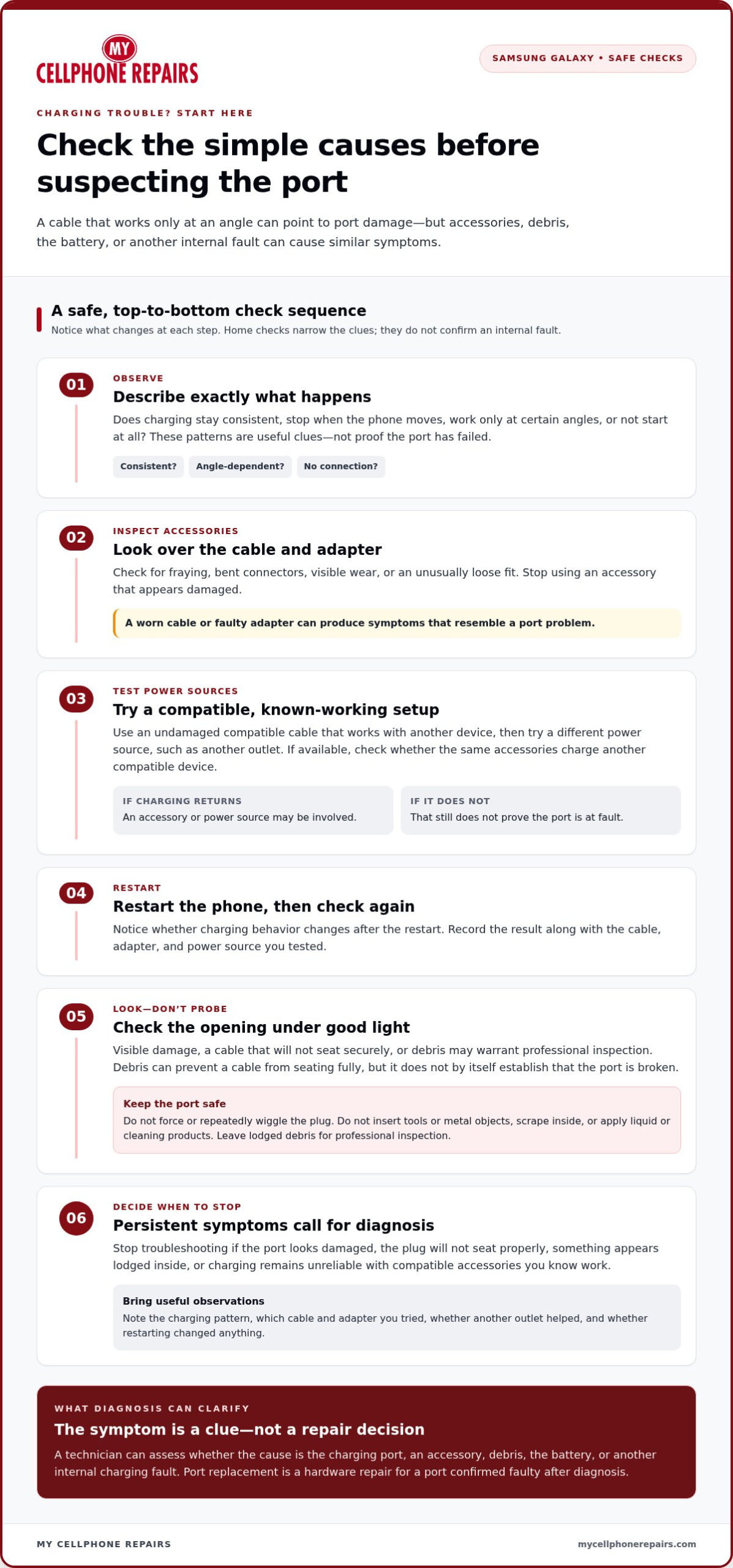
Try these basic checks without putting the port at risk:
- Inspect the cable and adapter, and stop using any accessory that appears damaged.
- Test with a compatible, known-working cable and a different power source.
- Restart the phone, then check whether its charging behavior changes.
- Note whether the same accessories charge another compatible device, if available.
Don’t probe or scrape inside the charging port, and don’t apply liquid or cleaning products. An object or fluid can cause further damage, while forcing a plug may harm the connector. If you see an obstruction, suspect damage, or still can’t charge reliably after checking accessories, stop troubleshooting and arrange professional diagnosis.
Keep track of which cable and adapter you tested, whether changing the outlet helped, and whether a restart made any difference. Share those details during the repair assessment. They give the technician a clearer picture, but the internal cause still needs professional diagnosis. My Cellphone Repairs handles Samsung hardware and charging-port repair. Learn more about professional Samsung charging-port repair.
Samsung Galaxy Charging Port Replacement vs. Other Repair Options
One charging symptom can have several causes, so the right repair depends on what inspection finds. A loose connection might come from the port, an accessory, or an obstruction. Use the clues below to understand the possibilities, not to diagnose the phone yourself. Symptoms guide evaluation, while inspection determines the repair.
| Possible cause | Symptom clues | Safe first check | Appropriate next step |
|---|---|---|---|
| Accessory issue | Charging changes when you swap cables, adapters, or outlets. | Try a compatible, undamaged cable and a different power source. | Replace a faulty accessory if that resolves the issue; seek phone diagnosis if it persists. |
| Debris or obstruction | The plug may not seat fully, or the connection feels blocked. | Look into the port under good light, but don’t insert tools or liquid. | Have the port inspected and safely cleared if needed. |
| Port damage | The connector appears damaged, or charging stays unreliable across known-working accessories. | Stop forcing or repeatedly adjusting the cable. | Arrange professional inspection; replacement may be considered if the port fault is confirmed. |
| Another internal charging fault | Charging remains inconsistent or absent despite working accessories, and the port’s condition doesn’t explain it. | Restart the phone and note any change. | Have a technician assess the battery and charging circuitry. |
When does charging-port replacement make sense?
Replacement makes sense when inspection identifies a damaged or malfunctioning port as the cause. For example, if charging continues to disconnect with compatible, working accessories and the technician finds a port fault, replacing the component may be appropriate. But no single clue, including a loose cable fit or angle-dependent charging, proves the port needs replacement. A Samsung Galaxy charging port replacement should follow diagnosis, not guesswork.
When might another repair or check be more appropriate?
If charging works normally after changing a damaged cable or adapter, the phone may not need hardware repair. If the port looks intact but problems continue, a technician may need to assess the battery or internal charging circuitry instead. These faults can produce overlapping symptoms and aren’t reliably distinguished by accessory tests alone. Professional Samsung repair can help determine which hardware issue, if any, needs attention.
Before choosing a repair, share what you tested and what changed. Include whether another power source helped, whether a restart made a difference, and whether the issue continued with working accessories. That history can guide the assessment, but inspection must establish the cause. My Cellphone Repairs provides Samsung hardware and charging-port repair, with diagnosis as the first step before deciding on replacement.
How to Prepare for Samsung Galaxy Charging Port Repair
A few notes before service make it easier to explain the charging problem and help the technician assess it. They don’t determine the repair in advance. The reported symptoms need to be evaluated before deciding whether the port, an accessory, or another component is involved.
- Back up important data. Save important files and confirm you can access your backup before handing over the phone. A repair is a hardware service, but it’s still wise to protect your information.
- Write down what happens. Note when charging fails, whether it’s constant or intermittent, and whether changing the cable’s position affects the connection.
- Bring relevant accessories. If a particular cable or adapter seems connected to the problem, bring it along so you can describe or demonstrate the behavior.
What information helps explain the charging problem?
Be specific about the pattern. Does the phone fail with every cable, or only one? Does it charge from one adapter but not another? Note whether the problem happens every time or comes and goes. If charging stops when the phone or cable moves, record that too. These details explain the concern without assuming the port is the cause.
Also mention any recent drops, possible liquid exposure, or visible changes around the port. These events may be relevant, but don’t assume they caused the charging issue. If an accessory appears undamaged and is safe to carry, bring it with the phone. Avoid repeating a risky test or forcing a loose connection just to demonstrate the symptom.
How can you prepare your phone and personal data?
Before service, follow the device’s normal security guidance. Use available privacy or repair settings if appropriate for your Galaxy model, and protect your account credentials. Don’t share passwords or verification codes casually. If you’re asked to adjust a setting for diagnosis or service, follow the device’s security instructions and keep control of your sign-in details.
Backups reduce the risk of losing access to important information, but they don’t promise that data can’t be affected during hardware service. Make sure you know how to restore your backup and can access any account needed to use the phone afterward. If you can’t back up because the battery is depleted or the phone won’t stay powered on, mention that when arranging service.
At the assessment, a technician reviews the symptoms and inspects the device before determining the next step. A Samsung Galaxy charging port replacement should only be recommended when diagnosis identifies a port fault. Your notes and accessories provide useful context, but they don’t replace inspection.
For professional Samsung charging-port repair, schedule Samsung phone repair with My Cellphone Repairs.
Get Professional Samsung Galaxy Charging Port Repair from My Cellphone Repairs
Before arranging repair, check your charging accessories safely and make a note of the symptoms. Does charging fail every time, or only sometimes? Does a different working cable or adapter change anything? These details help explain the problem, but they don’t establish which component is faulty. Professional diagnosis is the next step when charging remains unreliable or the port appears damaged.
My Cellphone Repairs provides professional Samsung phone repair, including charging-port hardware repair. The reported behavior guides the assessment, while the repair recommendation depends on what the technician identifies. A cable or adapter issue may not require phone repair. If the charging port is found to be faulty, replacement may be appropriate. If it isn’t, another repair or check may better address the cause.
What to expect from a professional charging-port assessment
Share what you’ve noticed and which accessories you’ve tried. The technician can use that information to assess the charging connection and consider other possible causes. The purpose is to determine whether the port is responsible before recommending work. A Samsung Galaxy charging port replacement should follow a confirmed port fault, not a symptom alone. If the port doesn’t explain the issue, the assessment can help point toward another hardware concern.
For a more useful assessment, be ready to describe:
- Whether the phone fails to charge, disconnects intermittently, or charges only under certain conditions.
- Whether trying a compatible, working accessory or another power source changed the behavior.
- Any relevant changes you noticed, such as a loose connection or visible damage.
You don’t need to identify the failed component before seeking repair. Your observations give the technician a starting point; inspection determines what comes next. Avoid forcing a cable or attempting to probe the port while you wait, since that can complicate an existing connection problem. If you’ve prepared the phone for service, share your notes and any relevant accessory so the symptoms can be understood in context.
Take the next step with My Cellphone Repairs
Choose a clear path: check accessories without forcing the connection, record the charging pattern, and arrange professional assessment if the problem continues. My Cellphone Repairs handles Samsung charging-port and other hardware repair. Diagnosis determines whether port replacement or a different repair is appropriate, without assuming that every charging issue has the same cause.
Start your Samsung repair through expert Samsung phone repair services. A clear description of the issue helps begin the assessment and move toward the right repair for your Galaxy.
Move Forward With a Clear Repair Plan
Charging trouble can make every low-battery warning feel urgent. Choose a safe next step rather than forcing a connection or attempting a repair without the right experience. A professional assessment can turn uncertainty into a repair decision based on the phone’s condition. If a Samsung Galaxy charging port replacement is recommended, it should be because the port has been identified as the fault.
My Cellphone Repairs provides professional Samsung phone repair, including charging-port hardware repair. Bring the details you’ve observed and let the diagnosis guide the next step. The goal is a repair path suited to the problem, not a guess based on one symptom.
Start your Samsung repair with My Cellphone Repairs and take the next step toward dependable charging.
Frequently Asked Questions
How do I know if my Samsung Galaxy charging port needs to be replaced?
You can’t confirm a failed port from symptoms alone. A cable that disconnects with slight movement, won’t seat properly, or fails to connect across different working accessories is a reason to have the phone inspected. Visible damage also warrants professional assessment. A Samsung Galaxy charging port replacement is appropriate only if diagnosis identifies the port as the cause, since similar charging problems can come from other phone components.
Can a bad charging cable make it seem like my Galaxy charging port is broken?
Yes. A frayed cable or damaged plug can interrupt power and mimic a loose or unreliable port connection. If one cable fails but a compatible cable charges the phone consistently, the original accessory may be the issue. Check for visible wear and stop using damaged accessories. If charging still fails with a known-working cable, that narrows the possibilities but doesn’t identify an internal fault.
How long does Samsung Galaxy charging port replacement take?
There isn’t one reliable duration for every Galaxy repair. The time can depend on the model, the fault found during assessment, and what the repair involves. A charging symptom might turn out to need something other than port replacement, so an estimate should follow diagnosis rather than guesswork. Ask for the expected service time once the device and repair need have been assessed, and plan for some time without the phone.
Is it safe to clean a Samsung Galaxy charging port at home?
Limit home checks to looking at the port under good light. Don’t insert pins, tweezers, or other objects, and don’t use liquid or cleaning products inside the opening. These can damage the connector or leave residue. If you can see debris but it won’t come away easily, or the cable still won’t seat correctly, stop and have the port inspected instead of digging into it.
Will replacing a Samsung Galaxy charging port erase my data?
A hardware repair shouldn’t be treated as a data backup, so save important files before service. No one should promise in advance that data will or won’t be affected. Samsung’s Repair Mode is designed to help protect personal data during service on supported devices; availability depends on the device and software. Follow your Galaxy’s security guidance, keep account passwords private, and make sure you can access your backup.
Can a Samsung Galaxy charging port be repaired instead of replaced?
It depends on what inspection finds. If the problem is an obstruction rather than a damaged connector, port replacement may not be needed. If the port itself is damaged or malfunctioning, replacement may be the suitable hardware repair. Other faults, such as a battery or charging-circuit issue, can call for a different diagnosis. A technician can determine the appropriate option after assessing the phone.
What should I do if my Samsung Galaxy only charges when the cable is moved?
Stop repositioning or holding the cable at an angle, since pressure can worsen a damaged connection. Try a compatible, undamaged cable once, without forcing the plug. If the behavior continues, note which accessories you used and arrange professional assessment. Intermittent charging can point to a port issue, but it isn’t proof. My Cellphone Repairs provides Samsung phone and charging-port hardware repair.