
Could one iPhone symptom point to several different problems? A phone that won’t charge, for example, may have a battery issue, a damaged charging port, or another fault. An iPhone diagnostic service helps narrow down the likely cause before you commit to a repair, so you’re not left guessing from symptoms alone.
It’s reasonable to want clear answers before paying for a fix, especially if you’re unsure whether a repair is necessary or concerned about personal data during troubleshooting. Testing can provide useful evidence, but it can’t promise that every fault will be immediately obvious or that no further checks will be needed. A diagnosis should distinguish what the findings support from what still needs investigation.
In this guide, you’ll learn what an iPhone diagnostic can uncover, what to expect during testing, and how the results can point toward a practical next step. We’ll also explain the limits of diagnosis and why the findings need to be considered alongside your symptoms. My Cellphone Repairs handles iPhone screen, battery, charging-port, and water-damage repairs, helping connect diagnostic findings with relevant repair options.
Key Takeaways
- An iPhone diagnostic service uses reported symptoms and relevant checks to narrow down possible causes, not to treat one symptom as proof of a specific failure.
- Keep track of when the issue happens and any recent changes to help focus the assessment.
- Back up important data when possible and follow device-security precautions before troubleshooting.
- Use diagnostic findings to weigh practical next steps instead of assuming a particular part needs replacement.
- Findings may help determine whether screen, battery, charging-port, or water-damage repair is relevant.
What an iPhone Diagnostic Service Can, and Cannot, Tell You
An iPhone diagnostic is a structured assessment that uses your description of the problem and the phone’s condition to narrow down possible causes. It turns a symptom into useful evidence, but it doesn’t mean a technician has already confirmed which part failed or that a repair is automatically needed.
A diagnosis identifies likely causes; a repair decision comes after the findings are assessed and the needed work is clear. That distinction matters. A phone that shuts down unexpectedly, for instance, could have a battery-related fault, a software issue, or another underlying problem. The symptom is a clue, not proof that a particular component has failed.
Different causes can produce similar issues. Hardware wear or damage, settings, software behavior, and exposure to moisture or other environmental conditions may all be relevant. Because iOS is the operating system that runs the phone, software behavior may also matter when investigating unexpected changes. Your symptoms and the device’s condition help guide which areas deserve attention.
An iPhone diagnostic service is most useful when it connects those clues to a sensible next step. A technician can explain what the findings support, what remains uncertain, and whether a repair is appropriate. Diagnosis informs the repair decision, but doesn’t replace it.
When should you seek an iPhone diagnostic?
Consider an assessment if your phone repeatedly shuts down, has trouble charging, shows display problems, or develops an unexpected change in performance. Pay attention when symptoms come and go or when several appear together. For example, intermittent charging combined with sudden shutdowns can be difficult to explain by observation alone.
Record when the issue occurs and whether anything seems to trigger it. An assessment can be especially useful if the problem is getting worse or affects essential functions, such as using the display or keeping the phone powered on. Clear observations help focus the investigation.
What a diagnosis does not guarantee
Testing can narrow down likely causes, but an intermittent fault may not appear during an assessment. A phone might charge normally at one moment and fail later, or a performance issue might occur only under particular conditions. Share those patterns rather than treating one successful check as proof that the problem is gone.
Don’t assume a definitive answer before the symptoms and device condition have been assessed. Findings may point toward a likely issue while leaving some uncertainty about its source or scope. Diagnosis alone also doesn’t guarantee that personal data can be recovered or that a particular repair will resolve the problem. Its practical value is helping you make a better-informed decision based on evidence rather than a guess.
How an iPhone Diagnostic Service Narrows Down the Cause
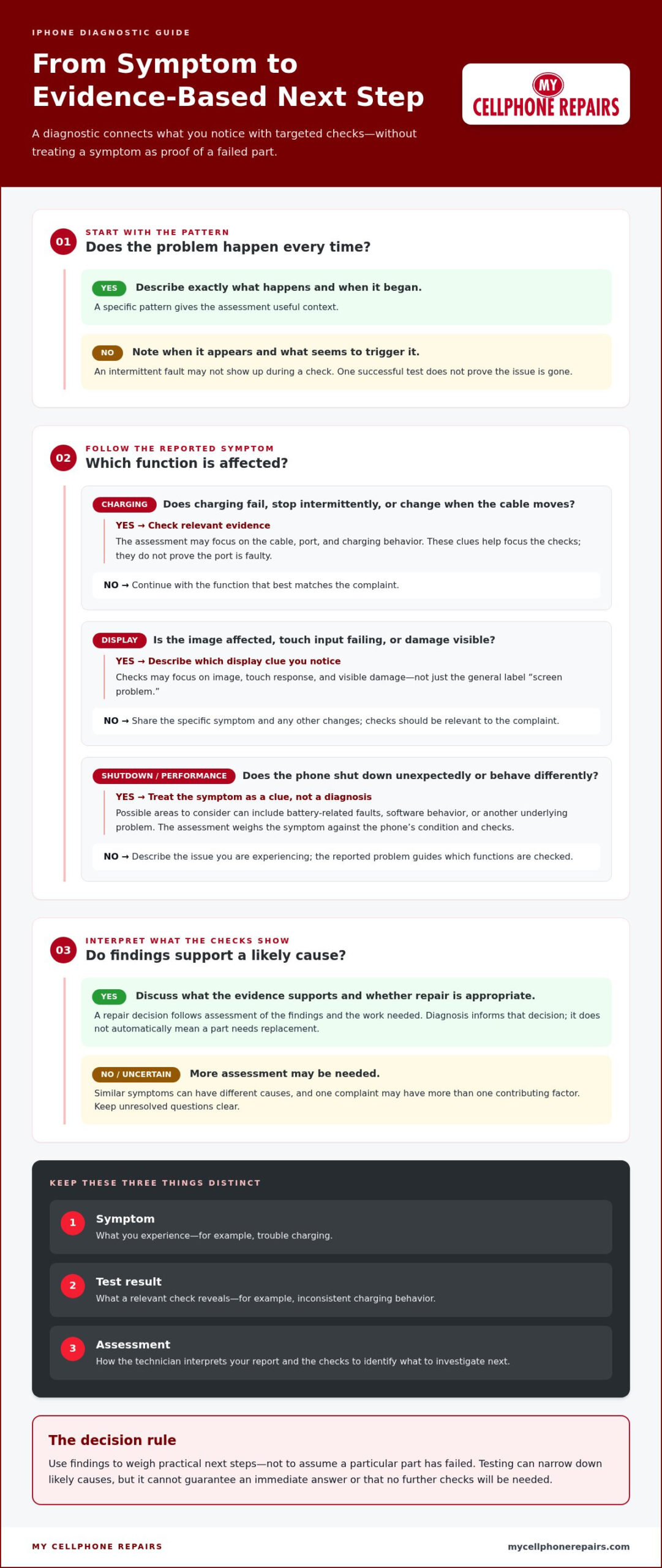
A useful iPhone diagnostic service follows the evidence in stages. The technician starts with your description, checks the phone’s condition, tests functions related to the complaint, and interprets what those checks show. This keeps attention on the reported issue instead of treating every phone as if it needs the same set of tests.
- Describe the symptoms. Explain what’s happening, when it began, and whether it occurs every time or only sometimes. “Charging stops when the cable moves” gives more useful context than “it’s broken.”
- Inspect the device. The technician considers its visible condition alongside your description. Signs of damage or exposure can shape which areas need closer attention.
- Check relevant functions. The checks depend on the symptoms. A charging complaint may lead to checks involving the cable, port, and charging behavior. A display complaint may call for attention to the image, touch response, and visible damage.
- Interpret the findings. The technician compares your report with what they observe and the results of relevant checks. A single complaint may have more than one contributing factor.
- Discuss next steps. Findings can guide a repair recommendation or indicate that more assessment is needed. They inform the decision, but don’t guarantee a particular result.
From symptom history to targeted checks
Think back to when the problem first appeared. Note whether it happens consistently, follows a drop or moisture exposure, or changes with how you use the phone. These patterns help distinguish a repeatable issue from one that appears only under certain conditions.
For charging trouble, explain whether the phone fails to charge, charges intermittently, or responds when the cable is repositioned. That can help focus attention on the cable, port, and charging behavior without assuming the port is faulty. For display concerns, say whether the image is affected, touch input fails, or there’s visible damage. Each detail points to a different area for assessment.
Targeted testing is more useful than replacing parts by guesswork because it ties proposed work to observed evidence.
Interpreting diagnostic findings
Keep three things distinct: the symptom is what you experience, the test result is what a check reveals, and the assessment is the technician’s interpretation of both. For example, a charging issue is a symptom. A check may show inconsistent charging behavior, while the assessment considers possible explanations and what to investigate next.
One complaint can have several contributors. A display problem might involve visible damage and an issue affecting touch response. Findings can support a relevant repair recommendation, but they don’t guarantee that every underlying factor has been identified or that a repair will produce a specific outcome.
Clear findings make the next decision easier. If an assessment points to a hardware concern, iPhone repair support can help connect that finding to an appropriate repair.
iPhone Symptoms and Diagnostic Clues: What the Tests May Reveal
A symptom can help narrow the investigation, but it can’t identify a failed part on its own. The same symptom can have more than one possible cause. A technician considers how the issue behaves, the phone’s condition, and relevant test findings before recommending a next step. The possibilities below are clues to investigate, not remote diagnoses.
| Symptom | Possible areas to investigate | Sensible next step |
|---|---|---|
| Battery runs down faster than expected | Battery condition, usage patterns, or software behavior | Note how quickly the charge drops and whether the change is consistent. An assessment can help distinguish reduced runtime from a confirmed battery fault. |
| Charging is slow or inconsistent | Cable, charging port, battery, or charging behavior | Describe whether charging stops, starts, or changes when the cable is moved. Avoid assuming the port or battery is the cause. |
| Cracked glass, image changes, or touch problems | Visible screen damage, display behavior, or touch response | Describe each observation separately. A crack doesn’t explain every image or touch issue by itself. |
| Problem began after liquid exposure | Possible effects of moisture on internal components or device behavior | Share when exposure occurred and what changed afterward. An assessment can guide the next step, but can’t promise restoration. |
Charging and battery symptoms
Slow or inconsistent charging can involve more than one area. The cable, port, battery, or another factor may need consideration, depending on the pattern. Short battery runtime is also an observation, not proof of a defective battery. Note whether the charge drops quickly during particular activities or whether the phone also shuts down unexpectedly. For repair context, see this phone battery replacement guide.
Display, touch, and liquid-related symptoms
Separate what you can see from what you can feel: note cracks or other visible damage, changes in the image, and areas where touch doesn’t respond. These details help describe the issue without assuming they share one cause. If the phone was exposed to liquid, include that history even if it still appears to work. Findings can guide assessment, but they can’t guarantee restoration. This iPhone screen repair guide covers screen repair context.
Use the symptom list as a starting point for a focused assessment, not as a checklist for replacing parts. An iPhone diagnostic service connects what you’ve noticed with relevant findings, then helps clarify which repair, if any, makes sense. Share changes over time as well as the most obvious symptom. That fuller picture can help keep one visible clue from overshadowing another possible cause.
How to Prepare for an iPhone Diagnostic and Use the Results
A little preparation can make an iPhone diagnostic service more focused and help you understand the findings. You don’t need to identify the fault yourself. Bring a clear description of what the phone is doing, relevant history, and questions about what the assessment can establish. That gives the technician useful context and helps you evaluate possible next steps.
What to note before handing over your iPhone
Before the assessment, write down the exact symptom and how often it occurs. Include when you first noticed it and what seems to make it better or worse. Note relevant recent changes, such as a drop, liquid exposure, prior repair, or software update. Specific observations are more useful than a guess about which part might be faulty.
- Describe what happens, including any message or visible change.
- Record when it occurs and whether it’s consistent or intermittent.
- Note relevant drops, liquid exposure, repairs, or software changes.
- Back up important information when possible, before handing over the device.
- Follow the device-access and security instructions provided for the assessment.
Keep private account details separate from your symptom notes. If a device-access step is needed, follow the instructions you’re given rather than assuming a particular setting or credential is required. A backup is a sensible precaution, but it doesn’t guarantee that data can be recovered if a separate problem affects the phone.
Questions that make the results easier to act on
After the assessment, ask the technician to explain the connection between your complaint and the findings. A useful conversation separates what was observed from what the results suggest. It should also make clear whether the issue was reproduced during testing or remains uncertain, especially if it happens only occasionally.
- Which observations or checks support this assessment?
- What repair, if any, do the findings suggest?
- What is that repair intended to address?
- Could another issue contribute to the same symptom?
- What remains uncertain, and what might need further assessment?
These questions help you understand the basis for a recommendation without treating diagnosis as a promise of a specific outcome. If a fault is intermittent, share your notes again and ask how that pattern affects the assessment. You can then weigh the suggested work against the symptoms and decide whether to proceed, seek clarification, or pause before making a repair decision.
My Cellphone Repairs provides iPhone diagnostic service to connect reported symptoms with practical repair options. Book an iPhone diagnostic service to discuss your device and the next steps.
From iPhone Diagnosis to the Right Repair with My Cellphone Repairs
Diagnostic findings are useful when they guide a repair decision instead of prompting an automatic part replacement. A reported symptom starts the investigation; the assessment helps show whether a hardware issue is supported by the findings and what work may address it. That distinction can prevent a visible clue, such as a cracked screen, from being treated as the explanation for every problem the phone has.
My Cellphone Repairs provides professional iPhone hardware repair, including screen and battery replacements, charging-port repairs, and water-damage restoration. The findings help connect a concern to the relevant type of repair, while the device’s condition and assessment shape the recommendation. No symptom alone proves that a particular repair will resolve every issue.
When findings point to an iPhone hardware repair
If assessment identifies a display concern, screen repair may be relevant. Findings related to poor battery performance may inform a battery replacement decision, while charging behavior and port observations may point toward charging-port repair. If the phone has been exposed to liquid, that history may guide consideration of water-damage restoration. These are possible pathways, not automatic conclusions. The recommendation should reflect the assessment, not just the symptom.
Take the next step with a clear repair plan
Share both the original symptoms and the diagnostic findings when discussing repair. Include what the assessment supports, what remains uncertain, and whether an intermittent issue was present during testing. This context helps keep the repair conversation focused on the problem at hand. My Cellphone Repairs handles iPhone hardware issues through professional repair services, including support for complex concerns.
Before deciding, make sure you understand what the proposed work is intended to address and whether the findings suggest any unresolved issues. A repair recommendation should connect the evidence to a practical next step, without promising a particular outcome or overlooking uncertainty. If the assessment points to a screen, battery, charging-port, or liquid-related concern, use that information to guide the repair discussion.
Bring your findings and symptom history to My Cellphone Repairs to discuss the repair option that best fits the assessment. A clear starting point can make the next decision more straightforward.
Make Your Next Repair Decision with Confidence
You don’t need to arrive with the answer. Arrive with a clear account of what your iPhone is doing, then use the assessment to focus the repair conversation on evidence. A useful iPhone diagnostic service can help replace guesswork with a more informed choice, even when some questions remain.
My Cellphone Repairs provides professional repair services and hands-on technician training in diagnostic techniques. That practical knowledge helps make findings easier to understand and connect them to a suitable next step, without treating a symptom as a guaranteed diagnosis or outcome.
If you’re ready to discuss your iPhone issue and possible repair options, get help with your iPhone repair. Take the next step with a clearer picture and move toward an informed repair decision for your device.
Frequently Asked Questions
Is an iPhone diagnostic service worth it?
Yes, it can be worthwhile when a problem keeps returning or could have several explanations. An iPhone diagnostic service can help you understand whether repair work is supported by the findings before you decide what to do. For example, if charging trouble occurs with more than one cable, share that detail. Ask which observations support the recommendation and what other possibilities remain, so you can weigh the proposed repair rather than approving work based on a guess.
What does an iPhone diagnostic test check?
The checks depend on the complaint, and there isn’t one test that establishes every possible fault. An assessment may include the device’s visible condition and relevant functions, such as charging, display behavior, or battery performance. If an issue affects just one feature, describe what works normally as well as what doesn’t. That contrast gives the technician more context for interpreting results and explaining whether further assessment or repair may be appropriate.
How long does an iPhone diagnostic take?
There’s no fixed duration that applies to every assessment. The time can depend on the device’s condition, the reported issue, and whether the symptom can be reproduced during testing. A visible screen concern may be easier to assess than a fault that appears only occasionally. When arranging service, describe the issue clearly and ask what process to expect. That helps set expectations without relying on a general time estimate that may not fit your phone.
Can an iPhone diagnostic find a software problem?
An assessment may consider whether symptoms could relate to software, settings, or hardware, but it can’t guarantee that every software issue will be identified or resolved through a hardware repair. If a problem began after an update, that timing is useful context, not proof of the cause. Note what changed and whether the issue affects a particular function. The technician can use those details alongside the device’s condition to interpret what the findings suggest.
Will an iPhone diagnostic erase my data?
A diagnostic doesn’t automatically mean your personal data will be erased, but data handling can depend on the issue and any repair steps that follow. Back up important information when possible, then check that the backup completed and that you can access the account needed to restore it. Follow the device-security instructions provided for service. Don’t share account credentials casually, and don’t assume that a particular data outcome is guaranteed.
What should I do before taking my iPhone in for diagnosis?
Write down what the phone does, when the issue began, and how often it occurs. Add relevant details such as a recent repair, drop, liquid exposure, or software change. If the problem appears only with a particular accessory, note which one and under what circumstances. Back up important information when possible, and follow device-security guidance before handing over the phone. These details can help make the assessment more focused.