
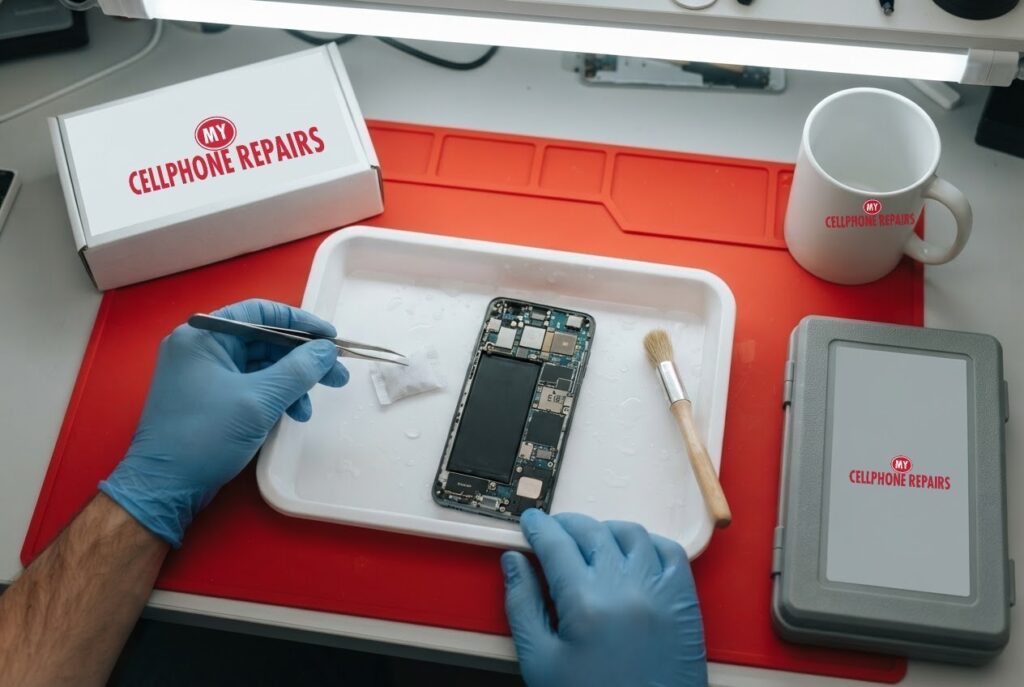
Your OnePlus 12 slips into the sink, gets caught in a downpour, or takes a splash from a drink. The first few minutes matter more than anything else you do later. The short answer: turn it off, do not charge it, dry the outside gently, and give it time. The OnePlus 12 is rated IP65, which covers dust and water jets but not being dropped in water, so a dunk can do real harm. We offer free diagnosis and same day phone repair for most jobs. Below you will learn what IP65 really means, what to do in the first hour, what not to do, and how warranty usually treats liquid damage.
Key takeaways
- The OnePlus 12’s IP65 rating covers dust and jets of water. It is not certified for immersion.
- Turn the phone off, do not charge it, blot the outside, and let it dry for a day or two.
- Skip rice and hair dryers. Rice can leave starch and dust behind, and blowing air can push water deeper.
- OnePlus’s terms exclude liquid damage from warranty, so do not count on free repair.
- Our quick facts: free diagnosis and exact quote, same day for most repairs, 30-day warranty on this repair.
In this article: what IP65 means, the first hour, what not to do, warranty, when to come in, myths vs facts, cost, FAQ.
Is the OnePlus 12 waterproof?
Not in the way many people assume. Android Authority reports that the OnePlus 12 has an IP65 rating, meaning it is dust-tight and can withstand jets of water, but it is not certified for immersion. The article suggests it is fine in heavy rain and probably in the shower, but dropping it in a pool or toilet could damage it.
Android Authority’s explainer on IP ratings makes the difference clear. The first number (6) is dust protection, and the second rates liquids. A 5 means resistance to water jets from any direction. A higher IP68 rating covers immersion, usually 1.5 meters for up to 30 minutes. Sinks, toilets and pools are immersion, so IP65 does not cover them.
What should I do in the first hour if my OnePlus 12 gets wet?
Android Authority’s guide to fixing a water-damaged phone gives a simple order, which matches what our technicians tell customers:
- Turn it off right away and get it out of the water.
- Keep it still. Do not press buttons, poke it or plug it in.
- Remove user-accessible parts such as the SIM, and lay them out to dry.
- Blot the outside with a cloth or paper towel. A vacuum on gentle suction can pull water out without moving the phone much.
- Let it dry for a day or two, preferably several, near an open window or a fan. Silica gel packets can help draw out moisture.
- Test it only when fully dry. Check the microphone, speakers and buttons. If it still fails, see a professional.
Dry the charging port before you plug in a charger or headphones, and never charge a wet phone.
What should I not do to a wet phone?
The same guide lists what to avoid, and it is worth reading twice because the bad advice is everywhere:
- Rice. The article says rice has starch, dust and other small particles that may cause more damage than good.
- Hair dryers. Blowing air can push water deeper into the phone, and the heat can also cause damage.
- Heat in general. Excessive heat can harm the phone.
- Turning it on or charging it. Water and active electronics do not mix well.
The tray in our picture is exactly this idea: a dry, open space, silica gel packets, and patience, with no heat and no charging until the phone has been checked.
Does the OnePlus warranty cover water damage?
Usually not, so check your own region’s terms. OnePlus’s UK terms of sale say the limited warranty does not cover “exposure to liquid, moisture, dampness, sand or dirt, or unusual physical, electrical or electromechanical stress”. OnePlus’s US Warranty Exchange Service terms say a device will not qualify if it has physical damage or liquid damage, and that if a returned device is found with liquid damage, the customer is liable for the cost of the replacement, which the terms list as $1,000.
Those documents cover specific programs and regions, and terms can change, so read the one for your phone. The takeaway is simple: a water-damaged OnePlus is rarely a free fix, and a quick, honest independent diagnosis is a sensible first step. If your phone is still inside a warranty or an insurance plan, ask them before you pay for anything.
How long does a water seal last?
Android Authority’s IP rating explainer notes that water resistance is not permanent. Rubber seals and gaskets can weaken with age, and spills of coffee, soft drinks or champagne can erode them. Ratings are also based on lab conditions, so real-world use may not match. A cracked or damaged phone, or one that was taken apart and reassembled, may no longer be sealed.
That matters for a OnePlus 12 that has been dropped, cracked or opened for a previous repair. Even a rated phone is only as water resistant as its seals are today, and the rating was never about immersion for IP65 in the first place.
Try this first: power off, dry, then restart (OnePlus)
Water changes the rules. If the phone is wet, do not restart it, force restart it or try Safe mode. Power it down, dry it and wait. Once it has fully dried, these steps delete nothing:
- Restart: press and hold Power and Volume Up (or the Power button on older models), then tap Restart.
- Force restart if frozen: on OnePlus 6T and later, hold Volume Up and Power for about 10 seconds. Some models use Volume Down and Power. If it vibrates but the screen stays black, the screen may be damaged.
- Safe mode: open the power menu, touch and hold Power off, then tap Safe mode.
When to stop and come in: the phone will not turn on, it restarts over and over, it gets hot, or the screen or back is lifting (stop charging it). A factory reset will not fix water damage, and it erases everything. Maker’s own steps: OnePlus support: phone won’t turn on or frozen screen.
Full step-by-step guide: How to restart and reset your OnePlus → | All restart & reset guides →
Myths vs facts about water damage
- Myth: My phone has an IP rating, so it is waterproof. Fact: IP65 covers dust and water jets, not immersion.
- Myth: Rice dries a phone best. Fact: The guide warns rice can leave starch and dust behind.
- Myth: A hair dryer speeds things up safely. Fact: Blowing air can push water deeper and the heat can cause damage.
- Myth: If it turns on, it is fine. Fact: We cannot promise that from a photo or a quick test, so a free diagnosis is a good idea after any real soaking.
What does OnePlus water damage repair cost?
Water damage repair varies a lot with how much of the phone was affected, so we never guess. You get a free diagnosis and an exact quote before we start. If the phone is beyond economical repair, we will say so plainly, and we can often help you protect your photos and data. Most repairs are done the same day when parts are available, and repairs come with our 30-day warranty.
Walk-ins are welcome and most stores are open on Sundays. Bring the phone as it is, switched off, and tell us what happened and how long it was wet.
Prevention tips: keep the phone out of sinks and pools, check the SIM tray seal, replace a cracked phone’s screen before it gets wet, use a reputable case, and dry the port before charging after any splash.
We also fix tablets and computers. Spilled something on a laptop? Looking for laptop repair near me or computer repair near me? Bring them in too, and we will give you a free diagnosis.
FAQ
Can a water damaged phone be fixed?
Sometimes. It depends on how much water got in, how long the phone was wet and whether it was charged. Switch it off and bring it in for a free diagnosis.
Phone dropped in water, what to do?
Turn it off, keep it still, blot the outside, skip rice and hair dryers, and let it dry for a day or two. Then book a repair or walk in for a free diagnosis.
Why does my phone keep turning on and off after getting wet?
It can mean water has reached internal parts. Do not keep charging it. Bring it in and we will check it before it goes further.
Sources
- Android Authority: OnePlus 12 IP rating revealed
- Android Authority: IP rating explained
- Android Authority: How to fix a water damaged phone
- OnePlus UK: Terms of sales
- OnePlus US: Warranty Exchange Service terms and conditions
#MyCellphoneRepairs #OnePlus #OnePlusRepair #OnePlus12 #WaterDamage #WaterDamageRepair #PhoneRepair #SameDayRepair #VinelandNJ #GrandRapids
Get it fixed at My Cellphone Repairs: most repairs are done the same day. Walk in or book online.
Book NowPhone frozen or acting up? See our step-by-step restart & reset guides →
Our locations
- Towson Mall825 Dulaney Valley Rd, Second Level, Towson, MD 21204
(410) 828-4404 - Grand Rapids3077 28th St SE, Grand Rapids, MI 49512
(616) 799-6996 - PG Plaza Mall (Hyattsville)3500 East-West Hwy, Mall at Prince George's, Target Entrance, Hyattsville, MD 20782
(301) 559-1105 - Bowie Town Center15630 Emerald Way, Bowie, MD 20716
(240) 614-3600 - Capital City Mall (Camp Hill / Harrisburg area)3604 Capital City Mall Dr, Camp Hill, PA 17011
(717) 919-7868 - Cumberland Mall (Vineland)3849 S Delsea Dr, next to Boost Mobile, Dick's Sporting Goods entrance, Vineland, NJ 08360
(856) 765-5049 - Mondawmin Mall2401 Liberty Heights Ave, Lower Level, Baltimore, MD 21215
(443) 826-7711 - Baltimore Inner Harbor100 East Pratt St, Suite 101, Baltimore, MD 21202
(443) 838-8989 - St Charles Mall (Waldorf)11110 Mall Cir, Waldorf, MD 20603
(301) 645-7755 - Alexandria7650 Richmond Hwy, Alexandria, VA 22306
(703) 341-6789