
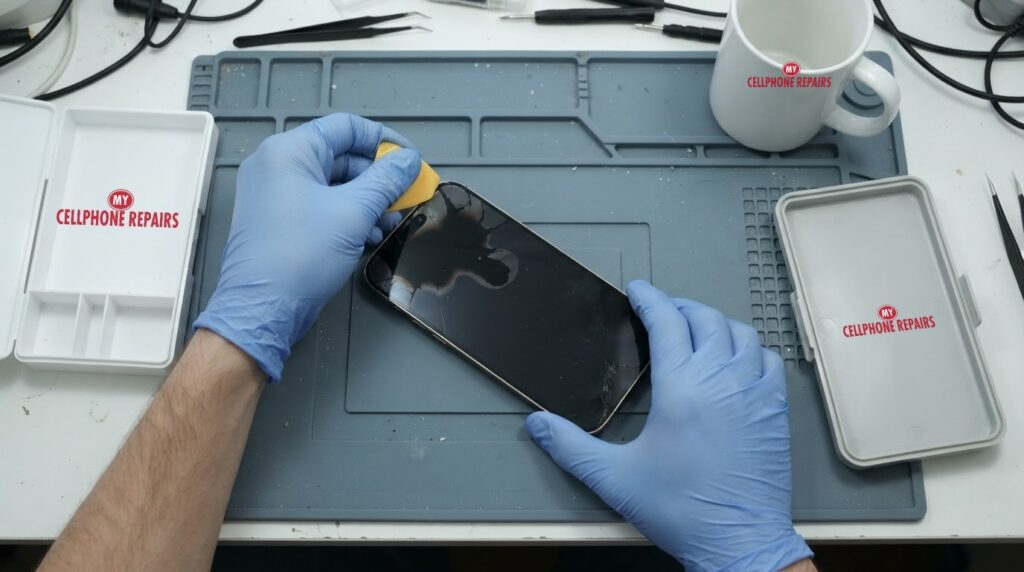
You pick up your iPhone to check a message and there it is: a dark, ink-like patch on the screen that was not there yesterday. Those iPhone screen ink spots are more common than you might think. Maybe it is a small spot in a corner. Maybe it looks like a drop of ink spreading under the glass. This guide explains what those marks usually are, what you can safely check at home, and when to stop and let a technician look. If you want an iPhone screen repair near you, we can diagnose it for free.
Quick facts
- Price: iPhone 15 Pro screen repair from $169 (exact price depends on your model and the screen you choose).
- Time: same day for most repairs, walk-ins welcome.
- Warranty: 30-day warranty on premium (Soft OLED) screens. Budget (Incell LCD) screens have no warranty and no refunds.
- Diagnosis: always free, so you know what is wrong before you pay.
Key takeaways
- A spot that wipes off with a soft cloth is dirt or residue on the glass. A spot that stays is inside the screen.
- Ink-like patches that grow, or that appear after a drop or pressure, usually mean the display itself is damaged.
- Apple says to clean ink and stains off an iPhone quickly, with the phone unplugged and switched off.
- A software restart cannot repair a damaged display, but it is a safe first check.
- The longer a spreading patch is ignored, the more of the screen it can take over, so get it checked early.
In this guide: what the marks are · how to tell surface dirt from damage · what to try first · what a repair involves · myths · FAQ.
What are iPhone screen ink spots and black patches?
Short answer: they are either something sitting on the glass or damage inside the display. The two look similar at a glance, but they behave very differently.
Newer iPhones such as the iPhone 15 Pro use an OLED screen. In plain English, every tiny pixel makes its own light. Because there is no separate backlight, a damaged area can simply go dark, and it often looks like spilled ink. Repair technicians generally explain these patches as damage to the thin layers that make the light, caused by a hit, by pressure on the screen, or by an old crack letting stress spread. Apple has not published a cause for this kind of mark on iPhone OLED screens, so treat any single explanation with some care.
Pressure is a real stress on display layers. A recent teardown of Apple’s folding iPhone, reported by 9to5Mac, pointed to possible stress points that may squeeze the display layers and lead to bright lines. The cause was not confirmed, and that phone is a very different design, but it shows how much damage pressure on a screen can do.
Is it dirt on the glass or damage inside the screen?
Start with the easy test. Apple says to clean your iPhone right away if it touches things like ink, dyes, makeup, dirt, food, oils or lotions. Do it this way:
- Unplug all cables and switch the iPhone off.
- Use a soft, slightly damp, lint-free cloth, like a lens cloth.
- Keep moisture out of the openings, and do not use compressed air.
- Switch the phone on again and look at the spot on a white background.
Apple’s support page on display anomalies says foreign material on the front glass is usually irregular in shape, shows up most on a white background, and can be wiped off with a lint-free cloth. That page is about LCD displays, but the same first check makes sense on any screen. If material is trapped inside the display, Apple says it has to be removed by an Apple Store or an Apple Authorized Service Provider. In other words, a wipe cannot fix it.
Quick rule of thumb: if the spot moves or disappears when you wipe it, it was on the surface. If it stays exactly where it is and the edges look dark and soft, it is inside the screen.
What can I check myself first?
These checks are safe and delete nothing. They will not repair a damaged screen, but they rule out a software glitch before you spend money.
Try this first: restart and force restart
- Restart: hold a volume button and the side button until the power-off slider appears, drag it, then hold the side button to turn the phone back on.
- Force restart (iPhone 8 and later): quickly press and release Volume Up, quickly press and release Volume Down, then hold the side button until the Apple logo appears. It can take more than 10 seconds.
- Look again at the patch after the restart. If it is still there, take a screenshot. If the patch is not in the screenshot, the fault is in the display hardware, not in iOS.
When to stop and come in: the phone will not turn on even after a force restart and 30 minutes on the charger, it vibrates or rings but the screen stays black, it restarts again and again, it gets hot, the back or screen is lifting, or it got wet. Free diagnosis at any of our stores, and most repairs are done the same day.
Full step-by-step guide: How to restart and reset your iPhone →
Maker’s own steps: Apple: Restart your iPhone
A factory reset is not part of this problem. A reset will not fix a hardware fault like an ink patch, and it wipes your phone, so skip it. If you ever do need one, back up first and know your Apple Account password.
What should I not do?
- Do not press on the patch to see if it moves. Extra pressure on a damaged OLED can make the marks grow.
- Do not use harsh cleaners. Apple says not to use products with bleach or hydrogen peroxide, and abrasive materials can wear the screen’s fingerprint-resistant coating.
- Do not keep using a cracked screen with spreading marks. Cracks let dust and moisture in, and glass edges can cut your fingers.
- Do not try to pry the screen off at home. The glass is bonded to the frame, and one slip can damage the cables or the battery.
Myths and facts about ink spots
| Myth | Fact |
|---|---|
| Ink spots will fade on their own. | Damage inside the display does not repair itself, so a patch that stays after wiping needs a technician. |
| A factory reset will clear the patch. | A reset only changes software. It cannot repair damaged display layers. |
| It must be a dead pixel. | A dead pixel is a tiny dot. Apple’s own page describes anomalies as stuck-dark or stuck-bright subpixels, a small fault, not a spreading blot. |
| Any screen protector will stop it. | A protector helps against scratches. It does not protect against a drop or a hard press. |
What does the repair involve, and what does it cost?
The fix is a screen replacement. We check the phone for free first, so you know whether the screen is the only problem. Then we fit a new display, usually the same day. Our price list shows the iPhone 15 Pro screen from $169. Other models differ, so ask us for an exact quote before we start.
Budget vs premium screen: which one?
| Budget (Incell LCD) | Premium (Soft OLED) | |
|---|---|---|
| Look | Darker, lower brightness and resolution | Bright, same resolution as the original |
| Touch and fit | Slower touch, thicker fit | Smooth touch, slim fit |
| True Tone / auto-brightness | Off | Works |
| Warranty | None, no refunds | 30 days (excludes physical or accidental damage and internal discoloration) |
| Best for | Trade-ins, a temporary fix, data recovery | Long-term use |
iPhone 11 and newer may show a “genuine display” notice in Settings after any non-Apple screen. The phone still works normally. If your iPhone came with an LCD (like the XR or 11), ask us for options.
How do I stop it happening again?
- Use a good case with a raised edge so the screen does not take a hit when you drop it.
- Do not keep the phone in a back pocket where your body weight can press on it.
- Wipe off ink, makeup, lotion and food residue as soon as you notice it, using Apple’s cleaning steps above.
- Check small cracks early. A tiny crack is cheaper to fix than a whole screen full of patches.
We also fix tablets and computers. Need tablet repair near me for a cracked iPad or Samsung tablet, or laptop screen repair for a MacBook or Windows laptop? Bring it in with your phone. Diagnosis is always free.
Frequently asked questions
Why does my iPhone screen have a black spot that looks like ink?
Most often it is damage inside an OLED display caused by a drop or pressure. First wipe the screen with a soft, lint-free cloth to rule out surface dirt. If the spot stays, come in for a free diagnosis and exact quote.
Is the black patch on my iPhone screen spreading a problem?
Yes, treat it as damage. A patch that grows is unlikely to stop, so book a repair before it covers more of the display. Same-day repairs are available at most stores.
Can a software update or restart fix ink spots on an iPhone?
A restart is worth trying, but it cannot repair a damaged display. Take a screenshot: if the patch is not in the screenshot, the fault is in the display hardware, not in iOS. Our free diagnosis will tell you for certain.
Sources
- Apple Support: How to clean your iPhone
- Apple Support: About LCD display pixel anomalies
- 9to5Mac: iFixit tears down Apple’s folding iPhone
#MyCellphoneRepairs #iPhone #Apple #iPhoneRepair #iPhone15Pro #ScreenBleeding #DisplayRepair #ScreenReplacement #PhoneRepair #SameDayRepair #TowsonMD #Baltimore
Get it fixed at My Cellphone Repairs: most repairs are done the same day. Walk in or book online.
Book NowPhone frozen or acting up? See our step-by-step restart & reset guides →
Our locations
- Towson Mall825 Dulaney Valley Rd, Second Level, Towson, MD 21204
(410) 828-4404 - Grand Rapids3077 28th St SE, Grand Rapids, MI 49512
(616) 799-6996 - PG Plaza Mall (Hyattsville)3500 East-West Hwy, Mall at Prince George's, Target Entrance, Hyattsville, MD 20782
(301) 559-1105 - Bowie Town Center15630 Emerald Way, Bowie, MD 20716
(240) 614-3600 - Capital City Mall (Camp Hill / Harrisburg area)3604 Capital City Mall Dr, Camp Hill, PA 17011
(717) 919-7868 - Cumberland Mall (Vineland)3849 S Delsea Dr, next to Boost Mobile, Dick's Sporting Goods entrance, Vineland, NJ 08360
(856) 765-5049 - Mondawmin Mall2401 Liberty Heights Ave, Lower Level, Baltimore, MD 21215
(443) 826-7711 - Baltimore Inner Harbor100 East Pratt St, Suite 101, Baltimore, MD 21202
(443) 838-8989 - St Charles Mall (Waldorf)11110 Mall Cir, Waldorf, MD 20603
(301) 645-7755 - Alexandria7650 Richmond Hwy, Alexandria, VA 22306
(703) 341-6789