
What if the bowl of rice on your kitchen counter is actually the biggest threat to your computer right now? You’re likely staring at a dark screen and wondering if your photos, documents, and work projects are gone for good. It’s a gut-wrenching feeling. This is especially true when you’re told a repair might cost more than the laptop is worth. You need a solution that doesn’t involve buying a whole new machine or losing your digital life.
This guide provides the clear, actionable steps for MacBook liquid damage repair that can save your hardware and your data. We’ll walk through the immediate emergency actions you must take right now to stop corrosion. You’ll learn why common DIY myths often cause more harm than good. We also explain how professional restoration can fix what others call “unfixable” by focusing on component-level repairs. From saving your logic board to recovering files from integrated SSDs, we’ll show you the path back to a fully functional MacBook.
Key Takeaways
- Stop corrosion immediately by powering down your device and using the “tent” position.
- Discover why professional MacBook liquid damage repair is the only way to reliably recover data from modern logic boards.
- Learn how ultrasonic cleaning and thermal diagnostics eliminate hidden moisture and corrosion.
- Save money by choosing component-level restoration over the expensive board replacements offered by manufacturers.
- Ensure a risk-free experience by selecting a specialist who offers a “No Fix, No Fee” policy.
Emergency Protocol: What to Do After a MacBook Spill
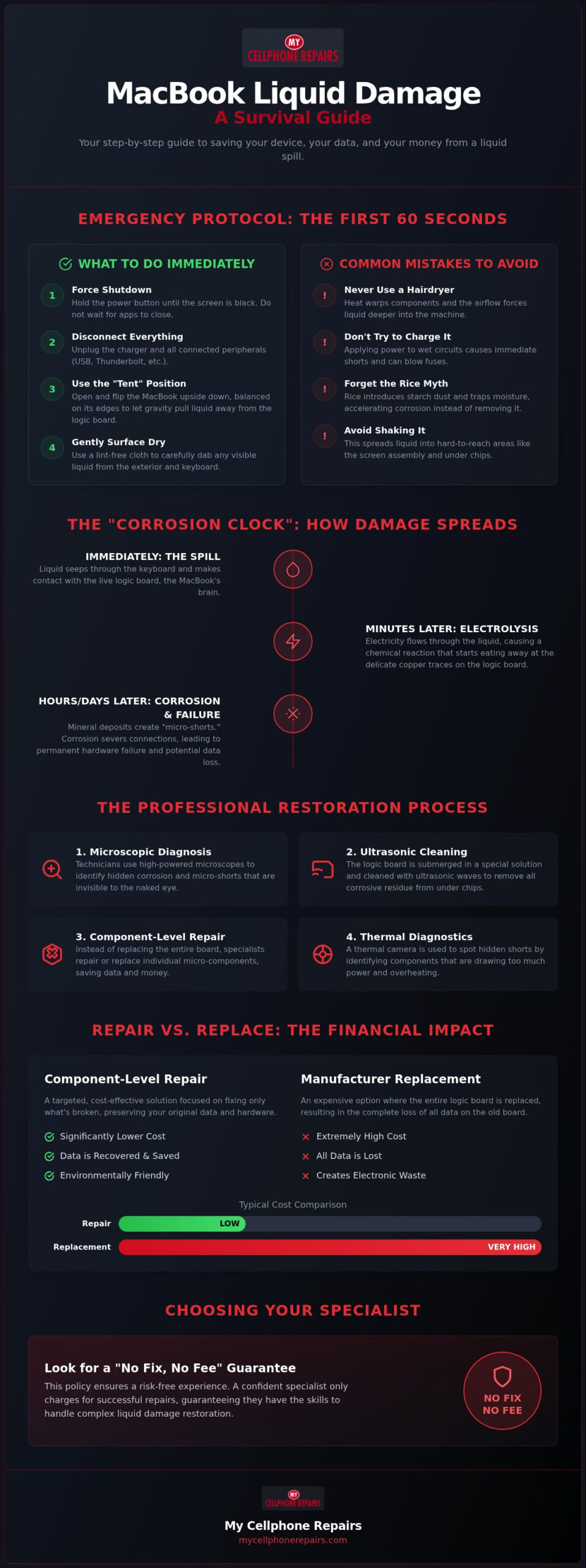
Panic is a natural reaction to a spill, but speed is your only real ally. If you just spilled water, coffee, or wine, your next sixty seconds determine if your laptop survives. You must act before the liquid reaches the sensitive internal circuitry. Follow these steps immediately to mitigate the damage.
- Force a shutdown: Hold the power button down until the screen goes black. Don’t wait for the software to close your apps.
- Disconnect everything: Unplug the charging cable and all USB or Thunderbolt peripherals.
- The Tent Position: Open the lid and flip the MacBook upside down. Balance it on its edges like a tent. This uses gravity to keep liquid from seeping deeper toward the logic board.
- Surface drying: Use a lint-free cloth or paper towel to gently dab any visible liquid on the exterior and keyboard.
Forget the rice myth. Placing a wet device in a bowl of rice is one of the worst things you can do. Rice doesn’t draw moisture out of sealed electronic assemblies. Instead, it introduces fine starch dust that can gum up the keyboard and trap moisture against the internal circuits. This actually speeds up the damage you’re trying to prevent.
The “Corrosion Clock” and Why Minutes Matter
The moment liquid touches a live circuit, a chemical reaction called electrolysis begins. This process rapidly accelerates how electronic components fail by eating through delicate copper traces on the logic board. Minerals in tap water or sugars in soda act as conductors, creating paths for electricity where they don’t belong.
Even if the device stays on or seems to work after a quick wipe, the damage is spreading internally. A MacBook that functions right after a spill is often a ticking time bomb. Professional MacBook liquid damage repair is necessary to stop this hidden decay before the traces are destroyed beyond recovery. The longer the liquid sits, the higher the chance of permanent data loss.
What NOT to Do: Common Mistakes That Kill MacBooks
Avoid these common errors that often turn a repairable spill into a total loss:
- Never use a hairdryer: High heat can warp your keycaps and melt the adhesive holding the screen together. More importantly, the airflow blows liquid deeper into the machine.
- Don’t try to “charge it up”: Plugging in the charger sends a fresh surge of power through wet components. This causes instant shorts and can blow fuses on the logic board.
- Avoid shaking the device: You might think you’re getting water out, but you’re actually forcing it into the screen assembly or under the processor where it can’t evaporate.
How Liquid Damage Affects MacBook Hardware: A Deep Dive
The logic board is the brain of your MacBook. It’s a complex network of thousands of tiny components packed onto a single piece of fiberglass. Because modern MacBooks are so thin, there’s almost no gap between the keyboard and these sensitive circuits. When liquid enters the chassis, the logic board is usually the first thing it hits. This makes it the most vulnerable and expensive part of the entire machine.
These devices often incorporate Liquid Contact Indicators (LCIs) to track moisture exposure. These small white stickers are hidden in various spots inside the case. They turn bright red the moment they touch water or high humidity. Once these sensors trigger, warranty coverage is often denied by the manufacturer. Even if you followed a solid emergency protocol for liquid spills, these red dots tell the story of the intrusion. This is why professional MacBook liquid damage repair focuses on the actual hardware state rather than just the sensors.
The Retina display is also at high risk. The backlight circuit requires significantly more voltage than other parts of the laptop. If liquid hits the display connector, this high voltage can jump to a low-voltage data line. This “arcing” often fries the screen and the display controller simultaneously. You might see a dim image, strange vertical lines, or a completely black screen.
Logic Board Corrosion and Micro-Shorts
Micro-shorts occur when mineral deposits from the liquid create unintended electrical paths. These paths divert power from critical components. Modern M-series and T2 security chips are especially sensitive to these fluctuations. These chips manage power sequencing and encryption. If a short occurs on a data line linked to the M-series processor, the MacBook won’t boot to protect itself from further damage.
Surface cleaning with isopropyl alcohol at home is rarely enough. Liquid often gets pulled under integrated circuits (ICs) through capillary action. You can’t see this hidden corrosion without a microscope. Professional technicians use specialized tools to find and fix these microscopic failures. If you’re worried about your data, you can consult a specialist to assess the board’s health.
Keyboard and Trackpad Failure
Sticky or non-responsive keys are clear signs of internal trouble. Sugars in coffee or soda harden into a glue-like substance. In newer MacBooks, the keyboard is riveted into the top case assembly. This integrated design makes individual key replacement difficult. If your trackpad stops clicking, the liquid may have reached the haptic engine or the battery sitting directly beneath it. For more on general hardware care, read our MacBook repair maintenance guide. Understanding these connections helps you see why a “simple spill” requires a deep-dive inspection.
The Professional Restoration Process: Beyond Surface Cleaning
Restoring a water-damaged device requires more than just luck and a dry cloth. Professional MacBook liquid damage repair starts with a methodical diagnostic phase. We don’t just guess which parts are broken. Technicians use high-precision multimeters to measure voltage rails across the logic board. This helps us find exactly where the power stops flowing. Thermal cameras are also essential. These cameras detect microscopic heat signatures caused by short circuits, allowing us to pinpoint failing components that are invisible to the naked eye.
Once the faults are identified, the board undergoes a deep restoration. This isn’t just a surface wipe. It’s a multi-stage process designed to reverse the effects of electrolysis. After the repair, every device goes through a rigorous testing phase. We stress-test the CPU and GPU. We check every port, the webcam, the keyboard, and the battery’s charging cycle. This ensures your MacBook isn’t just working today, but remains stable for years to come.
Ultrasonic Cleaning Explained
Ultrasonic cleaning is the only way to ensure a permanent fix. High-frequency sound waves create millions of microscopic bubbles in a specialized chemical solution. These bubbles implode on contact with the logic board, a process called cavitation. This physical force reaches deep under Ball Grid Array (BGA) chips where manual brushes can’t go. It effectively strips away oxidation and mineral deposits from coffee or soda. Without this step, hidden corrosion will continue to eat the board from the inside out, leading to failure weeks after the initial spill.
Micro-Soldering and Component Replacement
The core of our restoration work is micro-soldering. This is surgical-level repair on a microscopic scale. Modern MacBooks use components like capacitors and resistors that are smaller than a grain of sand. Replacing these requires steady hands and advanced equipment. Our technicians are highly skilled in these delicate procedures, a level of expertise we cultivate through our own Technician Training Program.
We focus on replacing individual failing parts rather than the entire board. This approach is especially critical for M-series MacBooks where the processor and memory are integrated. We source high-quality replacement components that meet or exceed original specifications. By fixing the board at the component level, we save your original hardware and, more importantly, your data. This precision work is what separates a professional restoration from a temporary patch job.
Repair vs. Replace: Analyzing the ROI of Liquid Damage Fixes
Deciding whether to fix or scrap your laptop after a spill usually comes down to the math. If you walk into a manufacturer’s retail store with a liquid-damaged machine, their quote for a total logic board replacement often exceeds $1,000. For most users, that price tag feels like a nudge toward buying a new device. However, your trade-in value for a water-damaged Mac is effectively zero. Choosing a specialized MacBook liquid damage repair instead allows you to recover your original investment for a fraction of that cost.
In 2026, M2, M3, and M4 MacBooks remain high-performance assets. An M4 MacBook Pro is a significant financial investment that shouldn’t be discarded over a few faulty components. Restoration isn’t just about the hardware, though. It’s about the data. Since modern MacBooks use soldered SSDs, a dead logic board means your files are locked away. Repairing the board is often the only viable path to data recovery because the security chips must be powered and functional to decrypt your files.
There is also an environmental ROI to consider. Every laptop restored is one less piece of e-waste in a landfill. By opting for component-level fixes, you extend the lifecycle of premium hardware and reduce the carbon footprint associated with manufacturing a new machine. It’s a win for your wallet and the planet.
When Is Repair a No-Brainer?
Sometimes the liquid only affects specific modular parts. If your MacBook still boots but the keys are sticky or the trackpad is erratic, the logic board might be completely dry. In these cases, you are only looking at a top case or peripheral fix. Spills often migrate toward the bottom of the case, making a MacBook battery replacement cost a small price to pay to keep a $2,000 machine running. If your primary goal is getting back irreplaceable family photos or critical work documents, repair is always the right choice.
Calculating the Restoration ROI
Think of restoration as insurance for your hardware. Spending a few hundred dollars to protect a $1,500 or $2,500 machine is a smart financial move. If the spill reached the display assembly, you should check the MacBook screen repair cost to see if a combined fix still beats the price of a new M4 model. A professionally restored MacBook also maintains a much higher resale value than a “parts-only” broken unit on the secondary market. If you want to see if your device is a candidate for restoration, start your repair assessment today.
Choosing a Specialist for MacBook Liquid Damage Restoration
Selecting the right repair center is the most critical decision you’ll make after a spill. You need a team that looks past the surface and understands the complex architecture of modern logic boards. A hallmark of a high-quality MacBook liquid damage repair specialist is a “No Fix, No Fee” policy. This policy aligns the shop’s success with your own. It ensures you aren’t paying for a technician’s time if the device is truly beyond restoration. It’s a sign of professional confidence and transparency that protects your wallet during a technical crisis.
A reliable warranty is equally vital. Liquid damage can sometimes cause secondary issues that don’t appear until days after the initial cleaning. A solid warranty ensures the shop stands behind their work and provides long-term peace of mind. At My Cellphone Repairs, all repairs come with a warranty; coverage depends on the part used. Ask your store for details. You should also look for upfront pricing models. Clear, honest communication about costs prevents any surprises when it’s time to collect your restored device.
The My Cellphone Repairs Difference
My Cellphone Repairs operates a specialized diagnostic lab equipped with the latest technology for hardware restoration. Our technicians are trained through our own internal program to handle the microscopic components that many other centers often call unfixable. We place a massive emphasis on data integrity. We understand that while hardware is replaceable, your documents and photos are not. Our stores across Maryland, Pennsylvania, New Jersey, Virginia and Michigan, along with our mail-in service, give customers access to this level of expertise. We’ve designed a streamlined process that makes sending in your device as simple and secure as possible.
Get Your MacBook Back in Action
Ready to start the restoration? Follow a few simple steps to ensure your device arrives safely at our lab. Use a sturdy box with at least two inches of bubble wrap or padding on all sides. If the laptop still powers on, try to run one last cloud backup of your most important files. We pride ourselves on rapid turnaround times for liquid damage assessments, so you won’t be without your computer for long. We’ll keep you updated at every stage of the diagnostic and repair process. Start your MacBook liquid damage diagnostic today.
Restore Your MacBook and Protect Your Data Today
A spill doesn’t have to be the end of your laptop’s story. By acting quickly and following the right emergency steps, you’ve already improved your chances of a successful recovery. Remember that professional MacBook liquid damage repair focuses on fixing the root cause at the component level. This surgical approach saves your data and your hardware without the massive cost of a full board replacement. It’s the most logical choice for protecting your investment in M-series technology.
Our expert technicians are specifically trained in advanced micro-soldering and complex data recovery. With stores across Maryland, Pennsylvania, New Jersey, Virginia and Michigan, plus a mail-in option, professional restoration is within reach. You don’t have to settle for a total loss or a red-dot warranty denial. Trust the specialists who utilize specialized diagnostic equipment to fix what others call unfixable. Take the first step toward a functional device and a fully recovered digital life right now. Your files and your MacBook are worth the effort.
Frequently Asked Questions
Is a MacBook worth fixing after a water spill?
Fixing a MacBook after a spill is almost always worth it for M-series devices. These laptops hold significant market value in 2026. A professional restoration costs much less than buying a new M4 model. It also prevents the total loss of your encrypted data. Since trade-in values for damaged units are zero, repair is the only way to recover your initial investment and extend the machine’s life.
Can Apple tell if I spilled liquid on my MacBook?
Apple technicians can easily detect liquid exposure. They check internal Liquid Contact Indicators (LCIs) that turn bright red when they touch moisture. Even if you use a hairdryer or wait weeks, the chemical change in these sensors is permanent. Most out of warranty repairs at the Apple Store will be quoted as a full logic board replacement once these sensors trigger, regardless of how minor the actual damage is.
How much does MacBook liquid damage repair cost in 2026?
The cost of MacBook liquid damage repair depends on the severity of the corrosion. Minor spills might only require ultrasonic cleaning and a keyboard replacement. More extensive damage involving logic board shorts requires micro-soldering and component replacement. While manufacturer quotes often exceed the value of the laptop, professional restoration focuses on fixing specific parts to keep the total bill much more manageable for the consumer.
Will I lose my data if my MacBook has liquid damage?
Data loss isn’t guaranteed after a spill. Modern MacBooks have soldered SSDs, which makes traditional data recovery difficult if the board is dead. However, specialized technicians can often repair the logic board’s power rails. Once the board is functional again, the security chips can decrypt and access your files. This hardware restoration is frequently the only viable path to getting your important documents and photos back safely.
Does the “rice trick” actually work for MacBooks?
The rice trick is a dangerous myth that often ruins laptops. Rice doesn’t have the suction power to pull liquid out from under integrated circuits. Instead, it introduces fine starch particles into the keyboard and cooling fans. This debris can gum up moving parts and trap moisture against the logic board. This environment accelerates the “corrosion clock” and makes a successful professional restoration much more difficult and expensive to complete.
How long does it take to repair a water-damaged MacBook?
Turnaround times vary based on the extent of the damage found during the diagnostic phase. A typical assessment involves opening the device and inspecting the board under a microscope. If the spill was recent and corrosion is minimal, the cleaning and testing process is relatively fast. Complex micro-soldering repairs on an M3 or M4 logic board may take longer to ensure every circuit is stable and the device passes all quality checks.
Can a MacBook be fixed if it won’t turn on after a spill?
A MacBook that won’t turn on is often still repairable. Liquid usually causes a “short to ground” that triggers the power management chip to shut everything down. This is a protective measure to prevent further damage. Technicians use thermal cameras and multimeters to find the specific capacitor or resistor that failed. Once the shorted component is replaced through micro-soldering, the device can often boot up perfectly with all your data intact.
What is the success rate for professional liquid damage restoration?
Professional restoration has a high success rate when you act immediately. The key factor is how much corrosion has occurred on the logic board traces. If you follow the correct emergency protocol and avoid trying to charge the device, the chances of a full recovery are excellent. Technicians trained in advanced hardware restoration can fix the majority of “dead” units that have been rejected by other standard repair centers.