
You plug your phone in before bed, only to wake up to a dead battery and a frantic morning. We’ve all been there. You find yourself wiggling the cable or propping it up at a specific angle just to get a steady connection. It’s a frustrating cycle. It leaves you anxious about your device dying when you need it most. Many users worry that a faulty port means their hardware is finished. They fear that a charging port repair will cost nearly as much as a new phone.
We understand the stress of technical downtime and the worry of being overcharged. Most port issues are manageable and cost-effective to resolve. This guide provides a clear path to restoring your device. You will learn how to identify debris, troubleshoot connection drops, and determine when to seek professional help. We break down the repair process and help you weigh the cost against a full replacement. You will gain the knowledge to ensure your device charges reliably every time. We also explain how master-level technician expertise ensures a fast, safe fix for your hardware.
Key Takeaways
- Identify the difference between simple debris blockages and internal hardware failures to choose the most effective fix.
- Understand the specific vulnerabilities of USB-C and Lightning connectors to prevent common port damage.
- Learn why standard DIY cleaning tools like toothpicks often cause permanent electrical damage to sensitive internal pins.
- Use the repair-to-value ratio to see why a professional charging port repair is a sustainable alternative to buying a new device.
- Discover how master-certified technician training ensures a fast and reliable restoration of your device’s power system.
Understanding Charging Port Failure: More Than Just a Loose Connection
Your charging port is the essential electrical gateway to your device’s battery. It handles every watt of power that keeps your phone or laptop running. When this gateway fails, your device eventually becomes a useless brick. It’s vital to understand the difference between external debris and internal hardware failure. Debris is usually just pocket lint or dust packed into the opening. Hardware failure is more serious. It involves damaged pins or cracked solder joints that connect the port to the internal circuitry. Knowing which one you’re facing is the first step toward a fix.
Physical wear and tear is the leading cause of port issues. Think about how many times you plug and unplug your cable every year. Each movement creates tiny amounts of mechanical stress. Over time, these stresses add up. The port can become loose or the internal pins can bend. If you need a charging port repair, it’s often because these components have reached their physical limit. A compromised port is more than an inconvenience; it can cause internal short circuits or dangerous overheating during a charge cycle.
Common Symptoms of a Failing Port
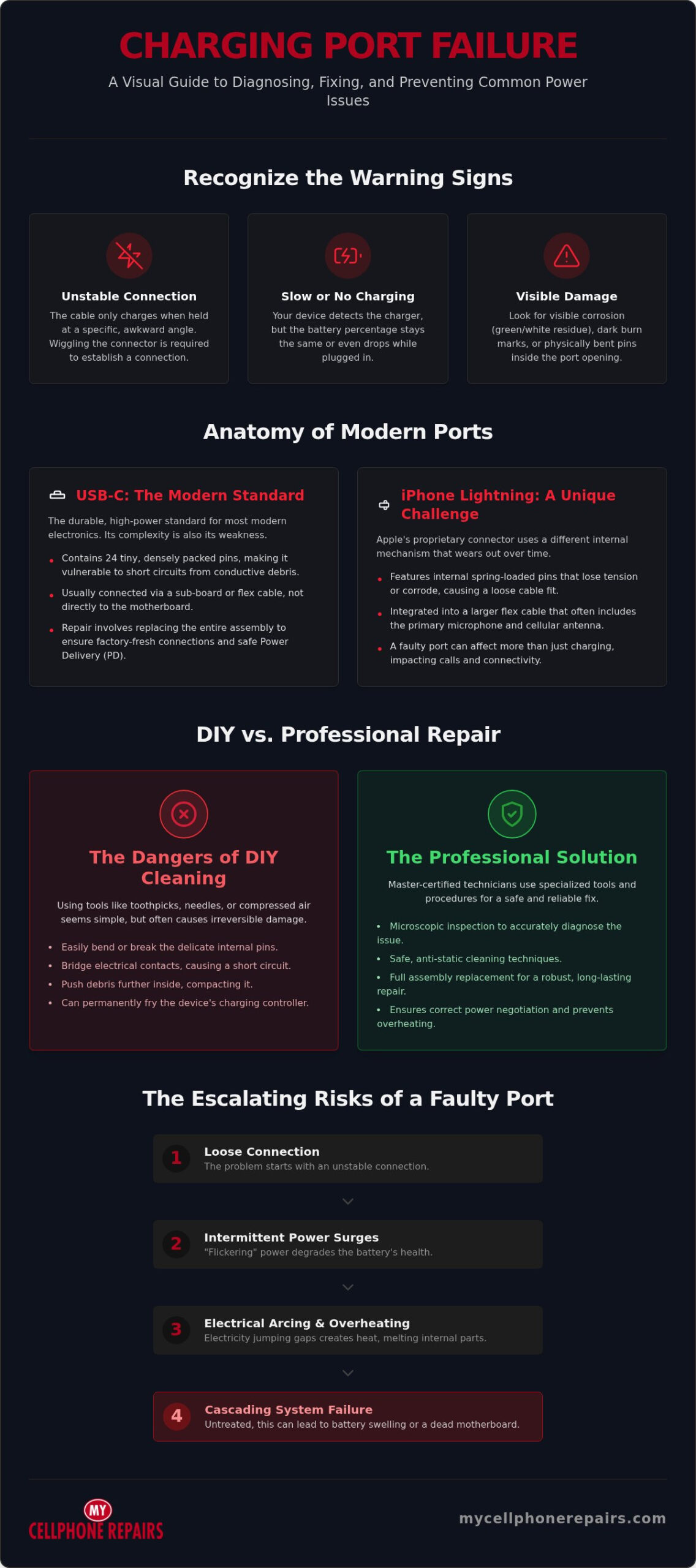
Recognizing the early warning signs can save you from a total device blackout. Look for these specific indicators:
- The charging cable only maintains a connection when held at a specific, awkward angle.
- The device detects the charger, but the battery percentage stays the same or even drops.
- You see visible corrosion, dark burn marks, or bent pins inside the port opening.
If you notice these symptoms, the connection is already unstable. Propping up your phone with a book to keep it charging is a temporary fix. It usually makes the underlying damage worse by putting more pressure on the internal board.
The Hidden Risks of Ignoring Port Damage
Many users ignore a loose port as long as they can still get it to work. This is a mistake that directly impacts your battery’s long-term health. Intermittent power surges from a “flickering” connection cause rapid degradation of your lithium-ion battery. This leads to shorter runtimes and eventual battery swelling. There is also the danger of “arcing.” This occurs when electricity jumps across gaps in a loose connection, creating localized heat. This heat can melt internal plastic or trigger a short circuit. Left untreated, a faulty port can eventually lead to a dead motherboard. Seeking a professional charging port repair early prevents these expensive, cascading failures.
The Anatomy of Modern Charging Ports: USB-C, Lightning, and Beyond
Modern ports are precision-engineered. They handle high-speed data and significant power loads simultaneously. Understanding the architecture of your device helps you see why a professional charging port repair is necessary. Most devices today use either USB-C or Apple’s legacy Lightning connector. Each design has specific failure points that require different technical approaches for a successful restoration.
USB-C: The Modern Standard
USB-C is the current gold standard for most electronics. It’s designed for durability and high power delivery. However, this complexity makes it difficult to fix. A standard USB-C port contains 24 tiny pins in a very cramped space. This high pin density means even a small amount of conductive debris or a slight bend can cause a short circuit. Manual cleaning is dangerous for untrained users. One wrong move with a needle can bridge these pins and fry the charging controller.
Most modern smartphones don’t have the port soldered directly to the main motherboard. Instead, they use a sub-board or a “flex cable.” This is a thin, flexible ribbon that connects the port to the rest of the phone. When we perform a charging port repair, we often replace this entire assembly. This ensures all connections are factory-fresh. It also handles Power Delivery (PD) standards correctly. PD requires precise resistance levels to negotiate high voltages safely. If the assembly is low-quality, it can lead to overheating.
iPhone Lightning Ports: A Unique Challenge
iPhone Lightning ports present a different challenge. Unlike USB-C, where the pins are protected inside a center tongue, Lightning ports have spring-loaded pins inside the opening. These pins contact the exposed gold bars on your cable. Over time, these internal springs lose their tension or become corroded. This is why your cable might feel loose or only work when pushed at an angle.
The iPhone charging port is rarely a standalone part. It’s integrated into a large flex cable assembly. This single part often includes the primary microphone, the loud-speaker contacts, and the cellular antenna. If your port is failing, you might also notice people can’t hear you on calls or your signal is weak. Replacing the full assembly is the only reliable way to restore all these functions. If you’re experiencing these issues, our experts at My Cellphone Repairs can diagnose the exact failure point and provide a seamless fix.
MacBooks have transitioned between MagSafe and USB-C. MagSafe uses magnets to prevent physical damage if someone trips over the cord. USB-C ports on laptops are more versatile but face higher physical stress. Because laptops draw more current than phones, a loose port can generate significant heat. This heat can eventually damage the logic board if the port isn’t replaced promptly. Keeping these ports clean and secure is vital for the lifespan of your laptop’s battery and motherboard.
Professional Repair vs. DIY: Why Cleaning Isn’t Always the Answer
Many people try to save money by digging into their devices with a toothpick. This is the “Toothpick Myth.” While it might remove some surface lint, it often pushes compacted dirt deeper into the corners of the port. This makes the connection even less stable. Even worse is using metal needles or paperclips. These tools are conductive. Touching live electrical pins with metal can cause an immediate short circuit. You risk turning a simple cleaning job into a permanent hardware failure before you even start.
The Risks of DIY Charging Port Repair
Attempting a DIY charging port repair without the right environment is dangerous. Modern devices are packed tightly. One slip of a pry tool can puncture the lithium-ion battery, leading to a thermal runaway event. There is also the invisible threat of Electrostatic Discharge (ESD). A tiny spark of static electricity from your finger can kill sensitive logic board components instantly. Finally, opening the device breaks the factory adhesive seals. Without professional resealing, your phone loses its water resistance entirely.
Professionals handle these risks using specialized equipment. We use anti-static mats and grounded tools to protect the internal circuitry. If the port is just dirty, we don’t dig at it with sharp objects. We use ultrasonic cleaners that utilize sound waves to shake debris loose without physical contact. For actual hardware issues, we utilize micro-soldering stations. These allow us to repair tiny connections under a microscope with perfect precision. This level of detail is impossible to replicate on a kitchen table.
What a Professional Repair Technician Does Differently
Expert service goes beyond just swapping parts. A master technician uses diagnostic tools to measure the exact voltage and amperage intake. This confirms the port is the actual problem and not a failing charging IC on the motherboard. We also have access to high-quality replacement components that meet original specifications. After the charging port repair, we perform rigorous post-repair testing. This ensures your device supports fast-charging standards and data transfer without any drops.
Compare the costs carefully. A professional fix is a fraction of the price of a new flagship device. If a DIY attempt ruins the motherboard, you’ll face a much higher bill or be forced to buy a new phone. Choosing an expert is the most sustainable and cost-effective way to extend your device’s lifespan. It ensures the job is done right the first time without risking your data or your hardware.
Determining the Value: Should You Repair or Replace Your Device?
When your phone stops charging, your first instinct might be to browse for a new model. This is often an expensive overreaction. You need a logical framework to decide if a charging port repair is worth it. We use the “Repair-to-Value” ratio to guide our customers through this decision. If the fix costs much less than the current market value of your device, repairing is the superior financial choice. Most users find that restoring their current hardware is the most efficient path forward.
Modern flagship phones can cost well over $1,000. A charging port repair is a small fraction of that price. Choosing to fix your device extends its lifespan and keeps high-quality hardware in use. It also has a positive environmental impact. Repairing your device directly reduces e-waste. It prevents another piece of tech from ending up in a landfill while saving you hundreds of dollars. Restoration is a sustainable practice that respects both your wallet and the planet.
When Repair is the Smart Choice
In many scenarios, a repair is the only logical step. It saves you from the hassle of setting up a new device and transferring all your accounts. Consider a professional fix in the following situations:
- Your device is less than 3 years old and remains otherwise functional.
- You have critical data, photos, or documents that haven’t been backed up to the cloud.
- The total cost of the repair is less than 30% of the current market value of the phone.
When to Consider a Refurbished Upgrade
Sometimes a single fix isn’t enough to save a failing device. If your phone has multiple hardware failures, such as a faulty port and a cracked screen, the total bill might climb too high. In these cases, spending money on an older model doesn’t make sense. If parts for an obsolete model are hard to find, the cost might exceed the phone’s actual worth.
If a repair isn’t the best path, you don’t have to buy a brand-new, full-price phone. You can buy refurbished iPhone options for a fresh start. These devices are fully tested and certified, offering a like-new experience at a significant discount. It’s a great way to stay within the same ecosystem without the flagship price tag. For a comprehensive breakdown of how to find the best refurbished iPhone for sale at the deepest discounts while avoiding hidden defects, our buying guide walks you through every step. If you’re ready to get your device back in top shape, book your repair service today for a professional assessment.
Expert Charging Port Solutions at My Cellphone Repairs
At My Cellphone Repairs, we take technical authority seriously. We don’t just hire technicians; we build them. Every member of our team is master-certified through our own internal training program. This ensures that your charging port repair is handled by a specialist who understands the intricate electrical pathways of your device. We provide more than a quick fix. We offer a professional restoration backed by master-level expertise that most generic shops simply cannot match.
We start every job with comprehensive diagnostics. This confirms whether the port is the root cause or if there’s a deeper motherboard issue. We use specialized diagnostic tools to measure electrical intake and signal stability. This transparency ensures you only pay for the repairs you actually need. We know you need your device back as soon as possible. Our workflow is designed for fast turnaround times to get you back to your digital life without unnecessary delays. We stock quality-tested parts for Samsung, iPhone, and MacBook devices to ensure your charging port repair lasts for the long haul.
Our Proven Repair Process
Our method is methodical and predictable. We follow a strict protocol to ensure every device leaves our facility in peak condition. This includes:
- Visual inspection and voltage testing upon arrival to pinpoint the exact failure point.
- Precision cleaning or component replacement in a controlled, anti-static environment to prevent internal damage.
- Final multi-point inspection to guarantee charging stability, heat management, and data transfer performance.
This rigorous testing ensures that your fast-charging standards are fully met. We don’t consider the job done until your device passes every electrical stress test in our lab.
Beyond the Port: Complete Device Care
A faulty port often goes hand-in-hand with other hardware issues. If your device has been struggling to hold a charge, we also specialize in battery replacement for comprehensive power health. Our team provides expert Samsung phone repair and iPhone screen repair services to keep your hardware looking and performing like new.
We believe in transparency and empowering our customers. If you’re interested in the technical side of the industry, ask about our cell phone repair technician training. It’s the same path our master-level fixers take to achieve career mastery. Whether you need a professional fix or want to learn the trade yourself, we are your dependable ally in any technical crisis.
Restore Your Device’s Power Today
You don’t have to tolerate the stress of a device that won’t charge. Most connection issues stem from physical wear or internal pin damage that requires specialized tools to fix correctly. Choosing a professional charging port repair is the most sustainable way to protect your hardware and your data. It’s a cost-effective alternative to buying a brand-new flagship phone or laptop every time a small component fails. Restoration is a smart investment in your device’s longevity.
Our master-certified experts are trained through our own Technician Training Program to handle the most complex hardware architectures. Whether you use a Samsung, iPhone, or MacBook, our specialists ensure your power system is restored to factory standards. With stores across Maryland, Pennsylvania, New Jersey, Virginia and Michigan, we provide you with the reliability you deserve. Don’t risk permanent motherboard damage with a DIY attempt. Get the peace of mind that comes with a fast, professional restoration from a trusted source.
Get a Professional Charging Port Repair Quote Today. We’re ready to help you get back to your digital life with a device that works every single time you plug it in.
Frequently Asked Questions
How much does a typical charging port repair cost?
The cost depends on your device model and the complexity of the internal architecture. Some smartphones use a modular sub-board that is straightforward to replace, while others require intricate micro-soldering. Laptop ports often involve more labor due to extensive disassembly. We provide a transparent assessment after a diagnostic check. Choosing a repair is almost always more economical than purchasing a new flagship device from a major manufacturer.
How long does it take to fix a charging port?
Most smartphone port repairs are completed within a single business day to minimize your digital downtime. Laptops and certain tablet models may require more time because they have complex internal layouts and larger cooling systems to navigate. We prioritize a fast turnaround without compromising our multi-point inspection process. Our master-certified technicians work efficiently to ensure your device is back in your hands as quickly as possible.
Can a charging port be fixed without replacing it?
Yes, a port can often be restored if the problem is caused by compacted debris or minor oxidation. Professional cleaning using specialized tools can remove lint and dust that prevent the cable from seating correctly. However, if the internal pins are bent or the solder joints have cracked from physical stress, a full replacement is the only way to ensure a reliable and safe electrical connection for your battery.
What should I do if there is water in my charging port?
Turn off your device immediately and avoid plugging it into a power source. Moisture in the port can cause “arcing,” where electricity jumps between pins and fries the charging controller. Do not use a hairdryer or the “rice trick,” as these methods can push moisture deeper or leave residue. Seek Samsung phone water damage repair or professional water damage restoration to neutralize corrosion and dry the internal components safely before attempting to charge the device again.
Will a new charging port fix my slow charging issues?
A new charging port repair will fix slow charging if the issue is caused by poor pin contact or high resistance in a worn-out connector. A compromised port often limits the amperage your device can pull from the wall. If your device still charges slowly after a port inspection, the issue might reside in the battery itself or the charging cable. We test the entire power path to identify the exact bottleneck.
Can I still charge my phone wirelessly if the port is broken?
Yes, you can use wireless charging as a temporary workaround because it uses an induction coil that is independent of the physical port. This is a helpful solution while you wait for a professional fix. However, a broken port still prevents you from transferring data to a computer or using wired features like Apple CarPlay. It’s best to resolve the hardware issue to maintain the full functionality of your device.
Is it safe to use my phone while the charging port is loose?
It is not safe to use a device with a loose port because the unstable connection can generate excessive heat. Continuous wiggling of the cable puts mechanical stress on the motherboard’s delicate solder joints. This can lead to a much more expensive logic board repair or a permanent short circuit. If your cable doesn’t click into place securely, stop using it and seek a professional assessment to protect your hardware.
Do you offer a warranty on charging port repairs?
All repairs come with a warranty; coverage depends on the part used. Ask your store for details. Our Technician Training Program ensures that every charging port repair is performed by a master-level fixer using quality-tested components. We stand behind our work to give you total confidence in your restored device.