
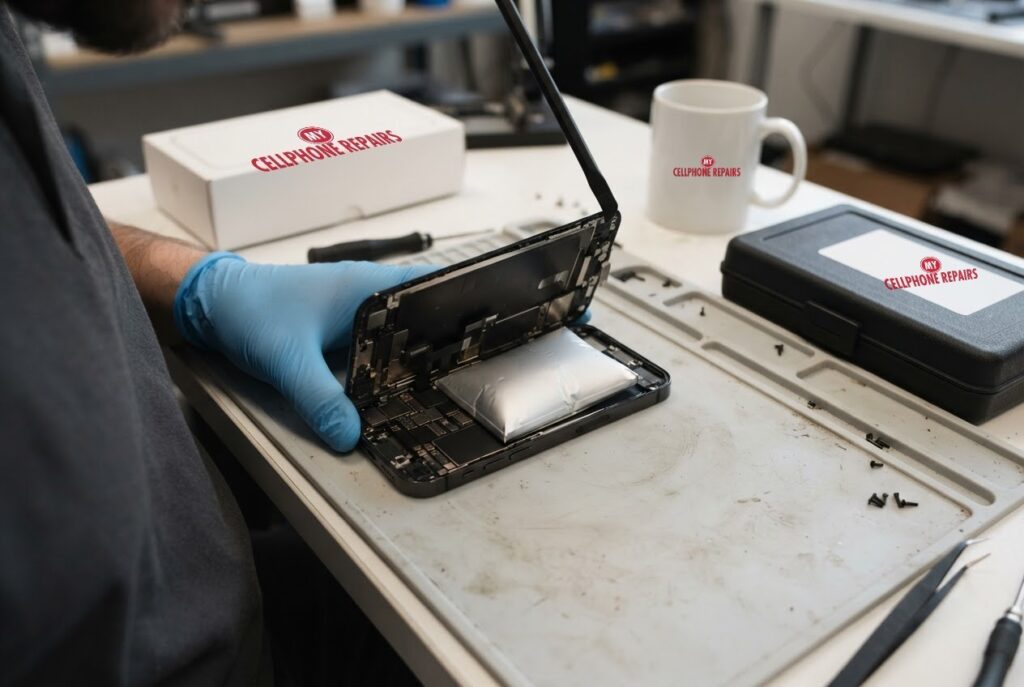
You pick up your iPhone and the screen looks slightly raised at one edge, or the back no longer sits flat on the table. That is not a cosmetic glitch. A swollen iPhone battery is a failing battery, and the safe answer is to stop charging the phone, power it down and have a professional replace the battery. We offer free diagnosis and same day phone repair for most battery jobs, with iPhone 14 battery replacement from $89. Below you will learn the warning signs, why you should never press on a puffed battery, what to try (and what not to try), and what the repair involves.
Key takeaways
- A screen that lifts or pops out of the frame is a classic sign of a swollen iPhone battery.
- Stop charging, power the phone down and do not press on the bulge.
- A swollen battery cannot be repaired or healed. It can only be replaced and recycled.
- Do not try this yourself: puncturing a lithium-ion battery can start a fire.
- Our quick facts: iPhone 14 battery from $89, same day for most repairs, free diagnosis, 30-day warranty on this repair.
In this article: warning signs, what to do right now, why you should not DIY, what causes wear, what to try first, myths vs facts, cost, FAQ.
What are the signs of a swollen iPhone battery?
The clearest sign is a screen that lifts away from the frame or even pops out. 9to5Mac’s guide to swollen batteries on iPhone, Mac and Apple Watch lists this as the sign to look for, and the same problem can show up on iPad too. In our shop we also look for a back glass that rocks on a flat surface, a gap along one edge, or a phone that no longer sits flat when you press one corner.
The battery itself looks like a flat, thin pouch when it is healthy. A swollen one looks puffed up, a bit like a tiny pillow. You will only see that once the phone is open, which is why the outside clues matter so much.
If you notice any of these signs, treat it as urgent but not panic-worthy. The next section shows exactly what to do.
What should I do right now if my iPhone battery is swollen?
Follow the advice in 9to5Mac’s guide, which matches common sense:
- Stop charging the phone and unplug it.
- Power it down.
- Do not press on the bulging screen, casing or battery.
- Do not keep using it while you wait for an appointment.
- Bring it to a professional for replacement and proper recycling, such as an Apple Store, an Apple Authorized Service Provider, or us.
If the phone is in your bag or pocket, take it out and set it somewhere hard and open, away from anything that burns, until you can get to a store. We use this simple rule: if you would be nervous leaving it on a sofa cushion overnight, do not leave it there.
Why should I never fix a swollen iPhone battery myself?
Because removing one is the risky part. A 2019 9to5Mac report explained that Apple stores are barred from servicing swollen batteries in the store, because the chance of an accidental puncture while taking one out is too high a risk. In that same article, the author described a coworker’s DIY attempt to replace a swollen battery in an iPhone 5s, which had a third-party battery. The phone burst into flames, and the author believes the battery was likely punctured. Stamping on the burning phone worked that time, but the author calls it very risky.
The article also points out that lithium-ion fires burn at extremely high temperatures and give off toxic fumes, and that the fire risk rises with batteries, cables and chargers from unknown brands that may not meet the safety standards of Apple and other reputable suppliers.
That is why we recommend professional replacement only. Our technicians use high-quality replacement parts covered by our warranty, and they have the tools and space to handle a swollen battery carefully.
What wears out an iPhone battery in the first place?
Apple explains that all rechargeable batteries are consumable and gradually lose effectiveness. As lithium-ion batteries age, they hold less charge, which lowers battery life and peak performance. Apple also says battery lifespan depends on chemical age, which is shaped by temperature history and charging habits, not just how long ago the phone was made.
Heat is the big one. Apple says the ideal ambient temperature is about 16° to 22° C (62° to 72° F), and that using or charging above 35° C (95° F) can permanently reduce battery lifespan. If it gets too warm, software may limit charging above 80 percent.
Apple’s page does not say that heat or fast charging causes swelling, and neither do we. What we can say is that a worn, heat-stressed battery is a tired battery, and a swollen battery is a battery that is done. Replacing an ageing battery before it reaches that point is the safest approach.
What can I check before I come in?
If your phone is not visibly swollen but you suspect the battery, a few safe checks help. Apple’s charging support page suggests inspecting the cable and adapter for damage, such as breakage or bent prongs, and clearing debris from the charging port before reconnecting the cable. Apple says not to use damaged accessories. It also notes that the phone may feel slightly warm while charging, and that Optimized Battery Charging can pause charging at 80 percent. That pause is normal and is not a sign of a swollen battery.
Try this first: restart and force restart (iPhone)
These steps delete nothing. If your screen is lifting or the case is bulging, skip them: power the phone down, stop charging and come in.
- Restart: on iPhone X or later, press and hold a volume button and the side button until the power-off slider appears, drag it, then hold the side button to turn it back on.
- Force restart (frozen screen): on iPhone 8 and later, press and release Volume Up, press and release Volume Down, then hold the side button until the Apple logo appears.
- Menu names and buttons can differ slightly on older models.
When to stop and come in: the phone gets hot, the screen or back is lifting, it will not charge after 30 minutes on a known good charger, or it restarts over and over. Never factory reset a phone to fix a battery problem: it will not fix hardware and it erases everything. Maker’s own steps: Apple Support: restart your iPhone.
Full step-by-step guide: How to restart and reset your iPhone → | All restart & reset guides →
Myths vs facts about swollen iPhone batteries
- Myth: You can press the bulge flat. Fact: Pressing on it is exactly what you should not do. A swollen battery cannot be healed, only replaced and recycled.
- Myth: A cheap battery online is the same thing. Fact: Unknown-brand batteries, cables and chargers raise the fire risk, according to 9to5Mac’s report.
- Myth: It is fine to keep charging overnight if the phone still works. Fact: Apple’s own guidance for a swollen battery, as summarized by 9to5Mac, is to stop charging and power down.
- Myth: A software reset will fix it. Fact: A reset cannot change a physical battery. If the screen is lifting, the answer is a new battery.
How much does an iPhone battery replacement cost?
Apple’s AppleCare plans cover a battery replacement at no extra charge if the capacity drops below 80 percent, according to Apple’s battery service page. Without that cover, battery service generally costs money, and Apple’s one-year warranty covers battery service but not normal wear. If you are inside a warranty or plan, check that first. If not, or if you need it done today, here are our “from” prices:
| Model | Battery replacement, from |
|---|---|
| iPhone 14 | $89 |
| iPhone 14 Pro | $109 |
| iPhone 15 | $109 |
For other iPhone models you get a free diagnosis and an exact quote before we start. Most battery repairs are done the same day, and the repair comes with our 30-day warranty. Walk-ins are welcome, and most of our stores are open on Sundays.
Prevention tips: keep your phone out of hot cars and direct sun, avoid charging under a pillow or blanket, use reputable chargers and cables, and replace the battery when it has clearly aged rather than waiting for a bulge.
We also fix tablets and computers. Looking for tablet repair near me, an iPad screen repair cost, or laptop repair near me? Bring them in too, and we will give you a free diagnosis. Swollen battery laptop and MacBook problems get the same careful handling.
FAQ
Is a swollen battery in my phone dangerous?
It can be. Puncturing or crushing a lithium-ion battery can cause a fire, so do not press on it or open the phone yourself. Stop charging, power down and bring it in for a free diagnosis.
Where can I dispose of a swollen battery near me?
Do not put it in household trash. Apple stores and authorized providers recycle batteries, and when we replace yours we handle the old one for you. Walk in or book a repair and we will take care of it.
How long does an iPhone battery replacement take?
Most are done the same day. Walk-ins are welcome, so stop by for a free diagnosis and a quote before we start.
Sources
- 9to5Mac: How to handle a swollen battery on iPhone, Mac, Apple Watch
- 9to5Mac: Why Apple doesn’t allow in-store replacement of swollen batteries
- Apple Support: Charge and maintain your iPhone battery
- Apple Support: If your iPhone won’t charge
- Apple: iPhone battery replacement
#MyCellphoneRepairs #iPhone #Apple #iPhoneRepair #iPhone14 #SwollenBattery #BatteryReplacement #PhoneRepair #SameDayRepair #HyattsvilleMD #Baltimore
Get it fixed at My Cellphone Repairs: most repairs are done the same day. Walk in or book online.
Book NowPhone frozen or acting up? See our step-by-step restart & reset guides →
Our locations
- Towson Mall825 Dulaney Valley Rd, Second Level, Towson, MD 21204
(410) 828-4404 - Grand Rapids3077 28th St SE, Grand Rapids, MI 49512
(616) 799-6996 - PG Plaza Mall (Hyattsville)3500 East-West Hwy, Mall at Prince George's, Target Entrance, Hyattsville, MD 20782
(301) 559-1105 - Bowie Town Center15630 Emerald Way, Bowie, MD 20716
(240) 614-3600 - Capital City Mall (Camp Hill / Harrisburg area)3604 Capital City Mall Dr, Camp Hill, PA 17011
(717) 919-7868 - Cumberland Mall (Vineland)3849 S Delsea Dr, next to Boost Mobile, Dick's Sporting Goods entrance, Vineland, NJ 08360
(856) 765-5049 - Mondawmin Mall2401 Liberty Heights Ave, Lower Level, Baltimore, MD 21215
(443) 826-7711 - Baltimore Inner Harbor100 East Pratt St, Suite 101, Baltimore, MD 21202
(443) 838-8989 - St Charles Mall (Waldorf)11110 Mall Cir, Waldorf, MD 20603
(301) 645-7755 - Alexandria7650 Richmond Hwy, Alexandria, VA 22306
(703) 341-6789