
That grinding noise coming from your MacBook isn’t just a minor annoyance; it’s a signal that your hardware is facing a thermal crisis. When your fan fails, your processor can hit temperatures over 100°C, forcing the system to throttle its speed just to survive. You may already be considering a MacBook fan replacement because your laptop is burning your lap and struggling with basic browser tabs. It’s frustrating to watch a premium machine stutter and whir through tasks it used to handle with ease.
A professional repair does more than just stop the noise. It restores the critical airflow your logic board needs to stay healthy and fast. In this guide, you’ll learn how to identify specific symptoms of mechanical failure and understand the long-term risks of continued overheating. We’ll also explain why professional intervention is the safest way to ensure a permanent and safe repair. We will walk through diagnostic error codes, the difference between software spikes and hardware breaks, and the exact steps to get your MacBook running cool and quiet again.
Key Takeaways
- Recognize the difference between normal operation and mechanical failure by identifying specific noises and thermal throttling patterns.
- Understand how dust accumulation creates an insulating layer that chokes your system and leads to permanent hardware aging.
- Evaluate the risks of DIY attempts, including the specialized tools required and the fragility of internal ribbon cables.
- Discover why a professional MacBook fan replacement is the safest way to restore processing speed and ensure long-term thermal health.
- Learn how expert diagnostics and ESD-safe procedures protect your logic board during the repair process.
Is Your MacBook Fan Failing? Identifying the Warning Signs
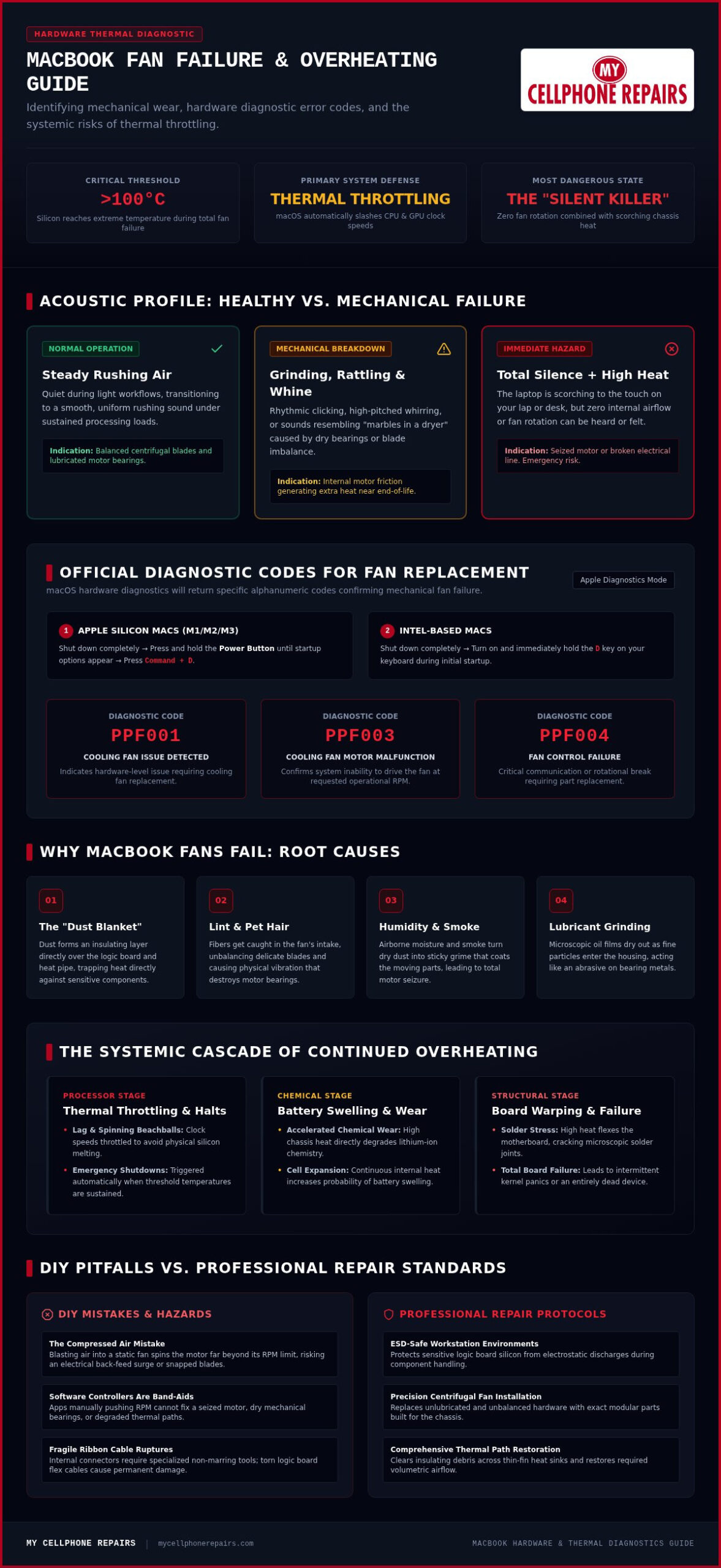
Your MacBook is designed to stay quiet during light tasks, but it shouldn’t stay silent when things get hot. Recognizing the difference between a hard-working fan and a failing one is the first step in protecting your hardware. A healthy fan produces a steady, rushing sound of air. If you hear rhythmic clicking, high-pitched whining, or a sound like marbles in a dryer, you’re likely facing a mechanical failure. The most dangerous scenario is the “Silent Killer,” where the fan stops spinning entirely. If your laptop is scorching to the touch but you hear no air movement, your system is at risk of immediate damage.
Don’t rely on software-based fan controllers to fix these issues. Apps that manualy boost RPM are often just a band-aid for hardware problems. They can’t repair a seized motor or a worn bearing. If your system is struggling, you can run Apple Diagnostics to find the truth. For Apple Silicon Macs, shut down the device, hold the power button until startup options appear, and press Command + D. On Intel Macs, hold the D key during startup. Look for error codes PPF001, PPF003, or PPF004. These codes confirm that a MacBook fan replacement is necessary to restore your cooling system.
Audible Cues: Grinding, Rattling, and Whirring
Mechanical sounds are the most common indicators of bearing wear. When the internal motor loses lubrication or the fan blades become unbalanced due to dust, you’ll hear distinct grinding or rattling. Ignoring these sounds is risky. Physical friction inside the chassis generates extra heat and can eventually cause the fan to seize. A loud fan doesn’t always mean the motor is dead, but it usually signals that the component is near the end of its life cycle.
Performance Issues: Thermal Throttling and Shutdowns
Your MacBook uses active computer cooling mechanisms to maintain its processing speed. When the fan fails, internal temperatures can soar toward 100°C. To prevent the silicon from melting, macOS triggers thermal throttling, which slashes your CPU and GPU clock speeds. You’ll experience significant lag, spinning beachballs, and slow app launches. If the heat continues to rise, the system will perform an emergency shutdown. Frequent overheating also degrades your battery health, as high temperatures cause internal chemical wear. A professional MacBook fan replacement stops this cycle of heat damage and restores your machine’s original performance levels.
The Anatomy of Cooling: Why MacBook Fans Fail
MacBook cooling systems rely on high-precision centrifugal fans to move heat away from the processor. These fans pull cool air through side vents and push it across a thin-fin heat sink. It’s a delicate balance of airflow and pressure. In 2026, even basic productivity apps use more resources than they did five years ago. This puts a constant load on older cooling systems that weren’t designed for today’s software demands. When the fan can’t keep up, the entire thermal architecture begins to collapse.
Dust is the most common enemy of internal hardware. It doesn’t just block the vents; it forms an insulating layer over the logic board and heat pipe. This “dust blanket” traps heat directly against sensitive components. Environmental debris like pet hair or textile lint is even more destructive. These fibers get caught in the fan’s intake, causing the blades to become unbalanced. This imbalance leads to physical vibration, which eventually destroys the motor bearings and makes a MacBook fan replacement unavoidable.
Dust Accumulation and Bearing Wear
The science of fan failure often comes down to friction. Fan bearings are lubricated with a microscopic layer of oil. When dust enters the motor housing, it acts like an abrasive, grinding down the metal and drying out the lubricant. You might be tempted to use compressed air to blow out the debris. This can actually make the situation worse. Blasting air into a static fan can spin the motor at speeds far beyond its design limit, potentially causing an electrical surge or snapping the fragile blades. Humidity and smoke are also major catalysts for failure. They turn dry dust into a sticky grime that binds to the fan’s moving parts, leading to a total seizure of the motor.
The Dangers of Heat to Internal Components
Heat is a systemic threat to your laptop. High internal temperatures are a primary reason users eventually need a battery replacement, as heat causes the lithium-ion cells to degrade and swell. Beyond the battery, extreme heat can cause the logic board to warp. This warping puts stress on microscopic solder joints, which can lead to intermittent crashes or a total “dead” board. The cooling fan is a small, modular part, but it provides the highest benefit for your machine’s lifespan. The FTC report on repair restrictions emphasizes the importance of maintaining these devices through accessible repair options. If your machine is running hot, reaching out to a specialist at My Cellphone Repairs for a diagnostic can prevent these expensive secondary failures.
DIY Repair vs. Professional MacBook Fan Replacement
Many users assume a MacBook fan replacement is a simple weekend project. While online guides make it look easy, they often gloss over the specialized tools and precision required. Apple uses proprietary P5 Pentalobe and various Torx screws that standard toolkits don’t include. Buying high-quality, ESD-safe tools and a reliable replacement fan can quickly approach the cost of professional service. Beyond the tools, a professional repair includes a deep internal cleaning of the heat sink and chassis. DIYers often skip this step, leaving behind the very dust that caused the original fan to fail.
The “buy and hope” nature of third-party parts is another significant hurdle. Professional shops use vetted components and offer warranties that protect your investment. If a DIY part fails or arrives DOA, you’re stuck with the labor and shipping costs all over again. Citing expert advice on laptop overheating and fan maintenance highlights that cooling is a system-wide issue. A pro ensures the entire thermal path is restored, not just the spinning blades.
The Risks of Opening Your MacBook
Modern MacBooks are packed with fragile components that are easy to damage. Electrostatic Discharge (ESD) is a primary concern. One static spark from your fingertip can kill a logic board instantly. We use grounded workstations and anti-static wrist straps to prevent this. Another common pitfall is the “Cable Trap.” The fan is connected via microscopic ZIF (Zero Insertion Force) ribbon cables. These are incredibly thin and brittle. One wrong tug can tear the connector off the logic board, turning a simple fan swap into an expensive micro-soldering job.
Screw mapping is also critical. Apple uses screws of varying lengths, even within the same component. Putting a long screw into a short hole can pierce the logic board, causing permanent traces to short out. This “long screw syndrome” is a frequent cause of death for DIY-repaired MacBooks.
Cost-Benefit Analysis: Time and Tools
When you calculate the real cost of a repair, your time is the biggest factor. A technician can perform a MacBook fan replacement efficiently because they’ve seen every internal revision. Our team stays sharp through our cell phone repair technician training, which covers the complex hardware architecture of both laptops and mobile devices. This expertise allows us to spot secondary issues, like swelling batteries or loose hinges, before they become disasters. Professional service pays for itself by avoiding the “oops” moments that turn a minor fix into a total hardware loss.
The Professional Fan Replacement Process
A professional repair begins long before we open the case. We use thermal imaging and specialized software diagnostics to confirm the exact nature of the cooling failure. This data-driven approach ensures we aren’t just treating symptoms. Once we verify the need for a MacBook fan replacement, we move to a controlled, ESD-safe workstation. Our technicians use grounded mats and anti-static wrist straps to protect your logic board from microscopic electrical surges. Safe disassembly is a methodical process where every screw is mapped to its original location.
After removing the bottom case, we disconnect the battery power flex cable to isolate the board. We then remove the failed fan and inspect the heat sink assembly. Dust often builds up in the thin fins of the heat exchanger, creating a physical block. We perform a deep cleaning using high-purity isopropyl alcohol and compressed air in a controlled environment. This prepares the chassis for the new hardware and ensures the entire airflow path is clear of debris.
Thermal Paste Reapplication
We don’t just swap the fan and close the case. Factory thermal compound dries out after three to five years, losing its ability to transfer heat. If we leave old, brittle paste on the CPU and GPU, a new fan won’t solve your overheating issues. We carefully clean the processor surfaces and the heat sink base using specialized solvents. We then apply a fresh layer of high-performance thermal interface material. This step is critical for maximum heat dissipation. When combined with a new fan, fresh paste can drop your MacBook’s internal temperatures by up to 20°C during heavy use.
Part Sourcing and Quality Standards
The market is flooded with low-quality fans that fail prematurely or produce distracting vibrations. We avoid these “cheap” units in favor of high-performance replacement fans that meet or exceed OEM specifications. Every part we install undergoes a rigorous testing phase. We manually cycle the fan through its full RPM range to check for noise, balance, and airflow efficiency. Finally, we perform a post-repair stress test to simulate heavy workloads. This ensures your machine remains stable and quiet when you need it most. To restore your machine’s cooling performance with expert precision, schedule your MacBook repair with our team today.
Expert MacBook Cooling Solutions at My Cellphone Repairs
My Cellphone Repairs specializes in high-level hardware restoration for customers at our stores across Maryland, Pennsylvania, New Jersey, Virginia and Michigan. We offer a reliable path to recovery for machines facing critical thermal failure. Our technicians are graduates of our own Technician Training Program, which ensures they understand the specific architectural nuances of every MacBook model. This deep expertise allows us to perform every MacBook fan replacement with surgical precision. We respect your time and provide a straightforward service that removes the stress from technical crises.
Sometimes a cooling issue is a symptom of a larger problem. If your fan failure was caused by a spill or environmental exposure, we can combine your service with a MacBook liquid damage repair. We don’t just swap parts; we restore the entire system to its peak operational state. Every journey starts with a comprehensive diagnostic to ensure we target the root cause of your hardware frustration. This methodical approach prevents you from paying for parts you don’t actually need.
Fast Turnaround for Our Customers
We’ve engineered a methodical process for receiving and shipping your device. Once your MacBook arrives at our center, it moves immediately into diagnostics. Speed is a top priority, but we prioritize accuracy above all else. You’ll receive real-time updates through every stage of the repair so you aren’t left guessing. Our multi-state footprint means we keep a robust inventory of high-grade components on hand. This reduces the long lead times often associated with specialized hardware fixes. We ensure the transition from a failing machine to a restored one is as fast and seamless as possible.
Comprehensive Internal Maintenance
A professional MacBook fan replacement provides an opportunity for a complete internal health check. While your machine is open, our experts perform a comprehensive inspection of the battery cells, charging ports, and logic board traces. We look for microscopic signs of wear or potential failure points that a standard DIY cleaning would miss. This professional “tune-up” is essential for maintaining the physical health of your laptop. We apply the same level of precision to MacBooks that we do to high-end iPhone and Samsung repairs. Contact us today to restore your MacBook to its original, quiet performance and secure your machine’s long-term reliability.
Restore Your MacBook’s Performance and Longevity
Ignoring a failing fan is a gamble with your hardware’s future. We’ve explored how mechanical friction and dust lead to thermal throttling, which eventually damages your battery and logic board. Choosing a professional MacBook fan replacement ensures that your device is handled with the correct tools and ESD protection, preventing the common pitfalls like torn ribbon cables or logic board shorts that often occur during DIY attempts. A cool-running machine is a fast-running machine, and keeping the internals clear of debris is the best way to extend its lifespan.
Our team at My Cellphone Repairs provides a seamless restoration experience through our stores across Maryland, Pennsylvania, New Jersey, Virginia and Michigan. Every repair is handled by experts who have completed our specialized Technician Training Program, ensuring they understand the complex architecture of your specific model. We include comprehensive diagnostics with every hardware fix and offer fast, secure shipping options to get your device back to you without delay. Don’t let a noisy fan or a hot chassis slow you down any longer. Your MacBook has plenty of productive years left once its cooling system is restored to factory standards.
Get Your MacBook Running Cool Again – Start Your Repair Here
Frequently Asked Questions
How much does a MacBook fan replacement cost on average?
The total cost for a MacBook fan replacement depends on your specific model and the service provider you choose. Official out-of-warranty repairs at a manufacturer’s depot are generally the most expensive route. Independent professional repair centers offer a more affordable middle ground that bundles high-quality parts with expert labor and diagnostics. While individual fans are available for purchase online, the professional service fee covers the precision work and the peace of mind provided by a repair warranty.
Can I use my MacBook if the fan is making a loud noise?
You can use it for light tasks, but you should avoid heavy workloads until the issue is resolved. A loud, grinding, or rattling noise is a clear warning that the fan’s bearings are failing. Continued use causes the internal temperature to rise, which triggers thermal throttling and slows down your performance. If the fan seizes completely, your MacBook may suffer an emergency shutdown to prevent the processor from sustained heat damage or permanent failure.
Is it possible to just clean the fan instead of replacing it?
Cleaning is effective if your laptop is simply running hot due to dust blockage in the vents. However, cleaning cannot fix mechanical wear. If your fan is making clicking or whirring sounds, the motor or bearings have likely reached the end of their lifespan. A professional technician will inspect the component during a diagnostic. If they find physical damage or bearing play, a full MacBook fan replacement is the only permanent solution to restore quiet operation.
How long does a professional MacBook fan replacement take?
Most professional repair shops can complete the service within one to two business days if the replacement parts are in stock. Our repair service is built for speed, moving your device through intake and testing as soon as it arrives. This is often much faster than the week-long wait times typical of official mail-in programs. We focus on getting your machine back into your hands quickly without sacrificing the accuracy of the hardware restoration.
Will replacing the fan make my MacBook faster?
Yes, restoring your cooling system can significantly improve your laptop’s speed. When a fan fails, macOS intentionally slows down the CPU to reduce heat generation, a process known as thermal throttling. This results in lag and slow app responses. Once a new fan is installed and proper airflow is restored, the processor can run at its full clock speed again. You’ll notice a smoother experience during video editing, gaming, or multitasking once the thermal limits are removed.
Does a loud fan always mean it needs to be replaced?
A loud fan isn’t always a sign of a hardware break. Sometimes a background process or a software glitch forces a healthy fan to run at maximum RPM. You can check your Activity Monitor to see if an app is hogging your CPU resources. However, if the noise has a mechanical quality like buzzing or scraping, it’s a hardware issue. A professional diagnostic will confirm whether you need a software fix or a physical hardware swap to quiet the machine.
What happens if I ignore a rattling fan in my MacBook?
Ignoring a failing fan leads to chronic overheating that shortens the life of your internal components. High heat is a primary cause of battery swelling and logic board warping. Over time, the rattling fan may stop spinning entirely, causing the system to crash during important work. Addressing the problem early is much more cost-effective than waiting for the heat to cause secondary damage to your expensive screen or sensitive internal circuitry.
Can I replace the MacBook fan myself without special tools?
You cannot safely open or repair a modern MacBook without specialized P5 Pentalobe and Torx screwdrivers. Using the wrong tools will strip the proprietary screws and likely damage the aluminum chassis. DIY repairs also carry the risk of tearing fragile internal ribbon cables or causing a short circuit via static discharge. Professional technicians use grounded workstations and precision instruments to ensure the repair is safe, making it the most reliable choice for protecting your investment.