
You check your phone only to realize you missed three important calls because the ringer never sounded. Perhaps you’re struggling to hear a loved one through a muffled earpiece or dealing with distorted audio during a speakerphone meeting. It’s a common frustration that makes a premium device feel broken. You might be searching for an iPhone speaker not working repair, fearing a total replacement or an expensive trip to the manufacturer. In reality, many audio issues are caused by software glitches in iOS 27 or simple debris trapped in the speaker grille.
It’s stressful when your primary tool for communication fails you. You deserve a solution that’s fast, reliable, and straightforward. This guide helps you diagnose the root cause of audio failures and find the right professional solutions to restore crystal-clear sound. We’ll explain the difference between earpiece and loudspeaker issues and show you why hardware restoration is often a 30-minute fix. Our experts even teach these techniques to other technicians, so we know exactly how to handle delicate internal components. Learn how to get your device back to peak performance with a sustainable, affordable alternative to high retail prices.
Key Takeaways
- Learn how to isolate earpiece and loudspeaker failures using the Voice Memos app for a precise diagnosis.
- Identify common software glitches and settings that mimic hardware failure before you commit to a fix.
- Understand why an iPhone speaker not working repair is a more sustainable and cost-effective choice than buying a new device.
- Discover the internal mechanics of your phone’s audio system and how dust or moisture can compromise sound quality over time.
- Gain insights into professional restoration techniques that use high-grade components to return your audio to its original factory standard.
Identifying the Failure: Earpiece vs. Loudspeaker
Before you book an iPhone speaker not working repair, you must pinpoint which component is actually failing. iPhones utilize a sophisticated dual-speaker setup to create a stereo soundstage. The earpiece sits at the top of the display, while the loudspeaker assembly is located at the bottom near the charging port. Understanding the specific iPhone audio hardware configuration helps you determine if you’re facing a simple cleaning task or a complex internal fix.
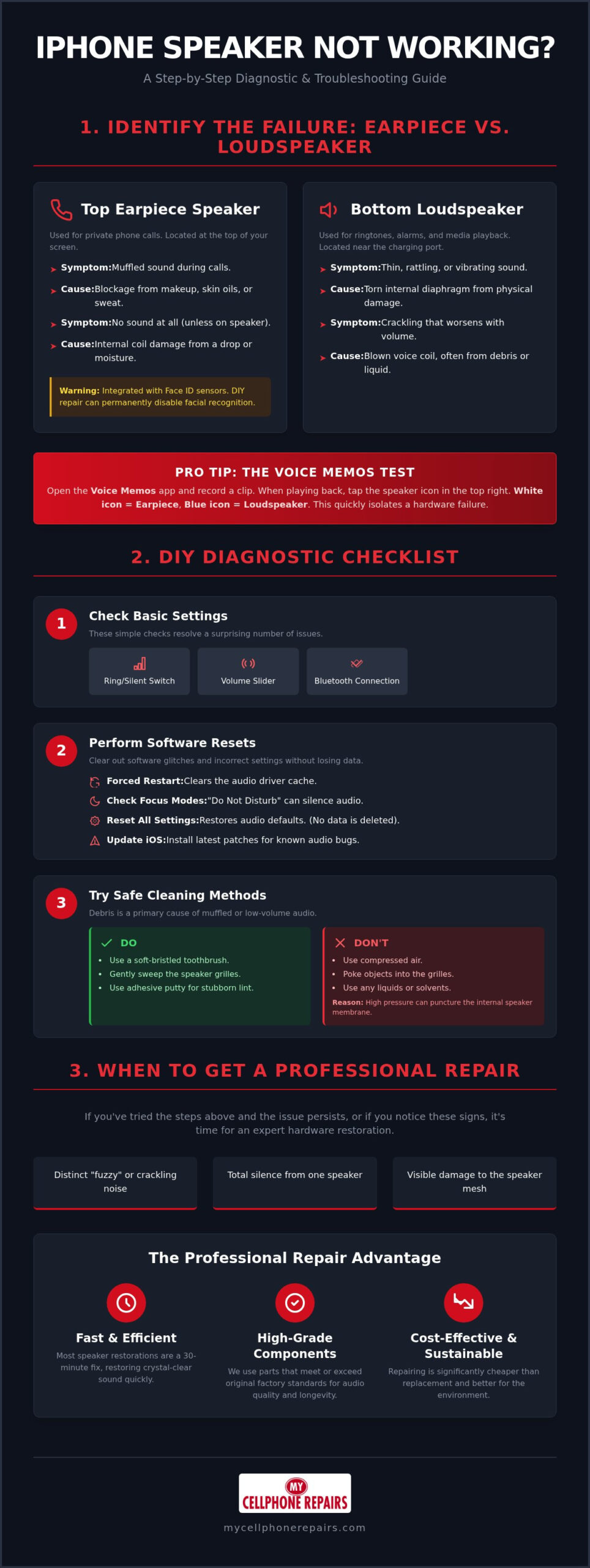
Testing each speaker is a straightforward process. Open the Voice Memos app and record a short clip of yourself speaking. Play it back and look for the speaker icon in the top right corner. When the icon is white, sound comes from the earpiece. When it’s blue, the output switches to the bottom loudspeaker. If one side is silent while the other works, you’ve isolated a hardware failure. Software-muted outputs usually affect the entire system. Conversely, a blown voice coil produces a distinct “fuzzy” or “crackling” noise that worsens as you increase the volume.
The Top Earpiece Speaker
The earpiece is your primary tool for private calls. If you can only hear people when using speakerphone or Bluetooth headphones, this component is likely the culprit. It’s a delicate part. In modern models, the earpiece is integrated with the Face ID sensor array. This means a DIY repair attempt can accidentally disable your facial recognition permanently. We often see earpiece failure caused by makeup, skin oils, or sweat that clogs the fine mesh over time. If the sound is muffled, it’s likely a blockage. If it’s completely silent, the internal coil may be snapped due to a hard drop or moisture intrusion.
The Bottom Loudspeaker Assembly
The bottom speaker handles your ringtones, alarms, and media playback. Because it’s located near the base of the device, it’s highly susceptible to pocket lint, liquid splashes, and metallic dust. To check its health, go to Settings, then Accessibility, then Audio/Visual. Slide the balance slider fully to the left and then the right. This lets you hear the output of each speaker in isolation. If the bottom output sounds thin, vibrates, or rattles, the internal diaphragm is likely torn. Physical damage to the lower mesh grille often leads to permanent hardware failure that requires a professional iPhone speaker not working repair to restore the full frequency range and clear audio response.
DIY Diagnostic Checklist: Steps to Restore Sound
Before booking a professional iPhone speaker not working repair, run through a rapid diagnostic checklist. Many audio failures are logical rather than physical. Start by checking the physical “Ring/Silent” switch on the side of your device. It’s a simple step, but it’s often the culprit for a silent ringer. Next, swipe down to the Control Center. Ensure your volume slider isn’t at zero. Check your Bluetooth icon as well. Your iPhone might be silently routing audio to a pair of AirPods sitting in a nearby bag or another room.
If settings look correct, perform a forced restart. This process clears the audio driver cache and resets the software handshake between the operating system and the hardware. For most modern models, quickly press and release Volume Up, then Volume Down, and hold the Side button until the Apple logo appears. This often resolves glitches in iOS 27 that cause the speaker to “hang” during transitions between apps. If the sound returns but feels weak, you may need to look closer at the physical ports.
Software and Settings Reset
Check your Focus modes next. Features like “Do Not Disturb” or custom “Work” profiles can silence incoming audio without warning. If the problem persists, go to Settings, General, and select Transfer or Reset iPhone. Choose “Reset All Settings.” This won’t delete your photos or messages, but it will return audio configurations to factory defaults. Consumers have a clear right to repair their own products by exhausting these software-based solutions first. Always verify you’re running the latest iOS version, as Apple frequently releases patches for known audio bugs.
Safe Cleaning Procedures
Debris is a leading cause of muffled audio. Use a clean, soft-bristled toothbrush to gently sweep the speaker grilles at the top and bottom of the device. Avoid compressed air at all costs. The high pressure can puncture the delicate internal membrane or drive dust deeper into the voice coil. For stubborn pocket lint, try the “sticky-tack” method. Press a small piece of adhesive putty against the mesh and pull it away quickly to extract buildup. The safe cleaning zone is limited strictly to the external mesh surface; never insert needles or sharp tools into the grille holes. If your audio remains distorted after these steps, a hardware component has likely failed. Our team specializes in professional iPhone hardware restoration to get your sound back to factory quality.
If these DIY steps don’t resolve the issue, it’s time to consider a professional iPhone speaker not working repair. Physical damage to the internal diaphragm or a disconnected flex cable requires expert intervention to prevent further damage to the logic board.
Anatomy of Audio: Why iPhone Speakers Fail
iPhone speakers are marvels of miniaturization. They rely on a permanent magnet, a copper voice coil, and a thin diaphragm to produce sound. When electrical signals pass through the coil, it moves against the magnet. This causes the diaphragm to vibrate and create the audio you hear. However, this delicate balance is easily disrupted. Over time, microscopic dust particles act like sandpaper against the speaker membrane. These grains can eventually puncture the material, leading to the distorted or buzzing audio that often prompts an iPhone speaker not working repair.
Sudden impacts from drops are another common culprit for failure. Even if your screen doesn’t crack, the physical shock can dislodge the internal flex cable connections. These ribbon-like cables carry power and data to the audio assembly. We frequently identify these loose connections during an iPhone screen repair, as the speaker components are often accessed or transferred during the display restoration process. If the cable is torn or the port is damaged, the speaker will remain silent regardless of your software settings.
Logic Board and Audio IC Issues
Not every audio failure starts in the speaker itself. The Audio IC is a chip on the logic board that processes sound and sends it to the speakers and microphones. When it fails, often after a drop that flexes the board, you may lose sound across every app, see the speaker or recording options greyed out, or notice the phone taking unusually long to restart. Because this fault is on the logic board rather than in a replaceable speaker, it needs professional diagnosis and board-level repair; ask your local My Cellphone Repairs store whether it can assess your device.
Water and Environmental Damage
Liquid is the natural enemy of copper wiring. Moisture causes rapid corrosion, which eats away at the delicate voice coil and its connection points. Many people still believe the myth that putting a wet phone in rice will save it. In reality, rice does nothing to stop the internal oxidation of metal components and can even introduce harmful dust into the device. For similar restoration principles regarding liquid ingress, you can check out our MacBook liquid damage guide. Professional intervention is the only way to safely remove corrosion before it causes a permanent short circuit in the audio path.
Repair vs. Replacement: Evaluating Your Options
Deciding whether to invest in an iPhone speaker not working repair or buy a new phone is a common dilemma. Most audio failures are isolated to a single component that costs a small fraction of a new device’s price. Choosing restoration over replacement is a sustainable choice that keeps high-performance hardware in your pocket for longer. In 2026, the secondary market for parts is robust, making it easier than ever to find high-quality replacements that match original factory specs. Repairing your current device also means you don’t have to deal with the hassle of migrating data or setting up a new operating system from scratch.
The lifespan of a repaired iPhone in 2026 is impressive. With a fresh speaker and a clean internal chassis, your device can easily provide several more years of reliable service. This is particularly true if the rest of the hardware is in good condition. If you’ve already invested in a high-capacity model, a simple speaker swap protects that investment. It’s a pragmatic approach that values technical efficiency over the constant cycle of upgrades. Our team focuses on these high-precision fixes to ensure your phone feels and sounds exactly as it did on the day you bought it.
Professional Repair Costs
A professional repair typically combines the cost of the speaker assembly with specialized labor. Unlike manufacturer mail-in programs that can take days or weeks, a local specialist can often finish the job in about 30 minutes. This speed is essential for users who can’t afford to be without their primary communication tool. Always look for a service provider that offers a warranty on hardware. This protection guarantees that the new voice coil and diaphragm will perform reliably under daily use. Because our team also runs a professional technician training program, we maintain a technical standard that ensures every fix is methodical and durable.
The Refurbished Pivot
Sometimes a device reaches a point where the cost of multiple repairs outweighs its current market value. If your iPhone has both a failing speaker and a cracked screen or water damage, it might be time for a change. You can find a high-quality refurbished iPhone for sale that offers a fresh start without the high price tag of a new flagship. These devices undergo rigorous multi-point inspections to ensure every component works perfectly. If your phone is still relatively new but feels sluggish or doesn’t hold a charge, check our battery replacement guide to see if a simple power refresh could save your device from the scrap heap.
Stop struggling with muffled audio and missed calls. Book your professional hardware restoration now to get your iPhone sounding like new again.
Professional Speaker Repair and Restoration Services
When you choose a professional iPhone speaker not working repair, you aren’t just getting a part swap. You’re getting a methodical multi-point inspection process. We examine every link in the audio chain, from the digital-to-analog converter on the logic board to the physical mesh grille. This ensures we solve the root cause, not just the symptom. We use only high-grade, tested components. These parts are specifically selected to match the original sound frequency response of your device. You won’t have to settle for thin, tinny audio after a restoration.
Restoration isn’t complete without rigorous validation. After the hardware is installed, we perform specialized frequency sweeps. We use decibel verification to ensure the output meets factory standards across all volume levels. This precision is what separates a professional restoration from a quick fix. We also prioritize the integrity of your device’s chassis. Every repair includes the application of new water resistance seals. This maintains the internal protection your iPhone had when it was new, protecting it from future environmental damage.
The Technician Training Advantage
Our expertise comes from a unique perspective. We don’t just fix phones; we operate a comprehensive cell phone repair technician training program. Teaching the repair process to others forces our staff to be more meticulous. They understand the “why” behind every screw and flex cable. This deep knowledge is essential for navigating the complex 2026 iPhone hardware architectures. When a technician is an industry leader who trains others, they bring a higher level of care and precision to your personal device.
Quality Assurance and Warranty
Peace of mind is standard with our services. Every iPhone speaker not working repair we perform comes with a warranty; coverage depends on the part used. Ask your store for details. We treat your hardware with the respect it deserves, using specialized tools that prevent cosmetic damage during the opening process. Don’t let a broken speaker limit your communication or enjoyment of media. Restore your audio today with a professional fix that’s designed to last for the remaining life of your device.
Restore Your iPhone’s Audio Performance Today
You now have the knowledge to identify whether your audio failure is a simple software glitch or a complex hardware issue. From isolating earpiece failures to understanding the delicate voice coil mechanics, proper diagnosis is the first step toward a solution. Choosing a professional iPhone speaker not working repair is a sustainable way to extend your device’s life without the high cost of a total replacement.
Our team brings elite technical standards to every restoration. As operators of a Professional Technician Training Program, we ensure our experts are highly skilled in the latest 2026 hardware architectures. We provide expert hardware repair at stores across Maryland, Pennsylvania, New Jersey, Virginia and Michigan, prioritizing speed and precision. If your current device has reached its limit, we also offer certified refurbished iPhones as a reliable alternative to buying a brand-new flagship.
Don’t let distorted sound or missed calls disrupt your day. Trust a specialist who understands the internal anatomy of your device to deliver a lasting fix. Get Your iPhone Speaker Fixed Professionally and enjoy crystal-clear audio once again. Your phone is a vital tool; it’s time to make it sound like new.
Frequently Asked Questions
How much does it typically cost to repair an iPhone speaker in 2026?
Costs depend on the specific model and the extent of the hardware damage. Newer iPhones often have complex earpiece assemblies integrated with Face ID sensors, which requires more labor to replace safely. While a loudspeaker swap is a standard procedure, the total investment is always a small fraction of the price of a new device. You should seek a professional diagnostic to get an accurate estimate based on your hardware version and part availability.
Will a speaker repair affect my iPhones water resistance?
Opening an iPhone breaks the original factory adhesive seal. This naturally compromises the initial water resistance rating. However, professional technicians apply high-grade replacement seals during the reassembly process. This helps restore the internal protection against splashes and dust. While no repaired device is ever fully waterproof, these professional seals provide a necessary layer of defense that DIY repairs often skip entirely. It’s an essential step for long-term hardware durability.
Why is my iPhone speaker sound muffled even after cleaning?
Muffled sound often indicates that debris has moved past the external mesh grille. Fine dust or metallic particles can settle on the speaker diaphragm itself, limiting its movement and dampening sound waves. In other cases, the internal membrane may be torn or punctured. If a deep cleaning doesn’t restore the original volume, you likely need an iPhone speaker not working repair to replace the compromised hardware component and restore full frequency response.
Can a software update fix an iPhone speaker that is not working?
Software updates can resolve audio issues if the problem is rooted in the operating system’s driver. Apple frequently releases patches for iOS 27 to fix bugs that cause speakers to “hang” or fail during app transitions. Before assuming you have a hardware failure, check your settings for any active Focus modes or “Do Not Disturb” overrides. If a forced restart doesn’t help, then a physical hardware restoration is usually the only way to fix the issue.
How long does a professional iPhone speaker repair take?
A professional iPhone speaker repair typically takes between 30 and 60 minutes. This is a relatively fast procedure compared to complex motherboard fixes or mail-in manufacturer services. Technicians can perform the swap quickly because the speaker components are modular and easily accessible once the device is opened. This fast turnaround time ensures you don’t have to be without your primary communication tool for days. It’s a convenient solution for any busy user.
Is it worth repairing the speaker on an older iPhone model?
Repairing an older model is a sustainable choice that extends the hardware’s utility for several more years. If the rest of the phone is in good condition, a speaker swap is a very affordable way to keep it functional. However, if the device has a failing battery or a cracked screen, the costs can add up. In those cases, purchasing a certified refurbished iPhone from a specialist might be a more logical and cost-effective long-term investment.
What is the difference between a blown speaker and an Audio IC issue?
A blown speaker usually produces distorted, crackling, or fuzzy audio. You can still hear sound, but the quality is poor and often vibrates at high volumes. An Audio IC issue is a failure of the sound processing chip on the logic board. This often results in a total loss of audio across all apps and functions. Common symptoms include greyed-out voice memo icons and the phone taking several minutes to boot up after a restart.
Can I still use my iPhone if the earpiece speaker is broken?
You can continue using your device by relying on the bottom loudspeaker, Bluetooth headsets, or wireless earbuds. This allows you to make calls and listen to media without the top earpiece functioning. However, this isn’t a permanent solution for most users because it removes the ability to have private conversations in public spaces. Addressing the failure with an iPhone speaker not working repair restores the versatility and privacy you expect from a premium smartphone device.