
What if the best sign of an Expert MacBook repair shop isn’t a quick promise, but a clear explanation of what’s wrong and how it will be fixed? When your MacBook won’t charge, has a damaged screen, or shows signs of water damage, it’s hard to compare providers if the diagnosis and repair terms are unclear.
It’s sensible to ask questions before handing over your device. Repair can raise concerns about data, parts, future service options, and whether repair is the right next step. A trustworthy provider should explain how it will assess the problem, discuss suitable repair options, and tell you what testing and terms to confirm before work begins.
This guide will help you assess repair expertise and transparency, compare service options, and prepare your MacBook. You’ll learn what to ask about diagnostics, parts, testing, data handling, and repair terms, plus how to decide whether to proceed, seek another assessment, or get more information first.
Key Takeaways
- An Expert MacBook repair shop should explain its diagnosis, proposed repair, and how it will check the device afterward.
- Compare providers by asking about authorization, parts, repair scope, communication, and aftercare for your specific model and issue.
- Use a short checklist to clarify approval steps, data handling, and written repair terms before committing.
- Describe your MacBook’s symptoms clearly so you can judge whether the suggested next step fits the problem.
- My Cellphone Repairs handles MacBook screen, battery, charging-port, and water-damage repairs.
What Makes an Expert MacBook Repair Shop Worth Trusting?
A MacBook problem can interrupt work, study, and everyday tasks. It’s reasonable to want a clear answer before handing over your device. An Expert MacBook repair shop earns trust through a careful diagnosis, a repair plan that fits the fault, and an explanation you can understand, not simply a promise to work fast.
Repair expertise means identifying the likely cause, explaining the evidence and repair options, then recording what was tested after the work. That process helps you compare providers and make an informed choice. It also reflects the consumer choice at the heart of the Right to Repair movement, without assuming every shop offers the same parts, services, or terms.
Which MacBook problems may need professional diagnosis?
Display damage, battery issues, charging faults, and liquid damage are common reasons to seek MacBook repair. Similar symptoms can have different causes, so a description alone may not identify the affected component. Share what happened and what you’ve observed, including any error messages or changes in performance. Avoid opening the device yourself; a professional assessment can help clarify the problem and suitable next steps.
What should a repair provider explain before work begins?
Ask what was inspected and what supports the diagnosis. Confirm the proposed repair, what it does not include, and whether you’ll approve the work before it starts. If inspection reveals another issue, ask how the provider will explain the new findings and get your approval before changing the repair scope.
Also ask what checks will be performed after the repair. The checks should relate to your original complaint. For a charging issue, ask how charging function will be verified. For a display concern, ask which display functions will be checked. Request the repair scope and terms in writing, including any limits or exclusions the provider identifies.
- Diagnosis: What did you inspect, and what points to this fault?
- Repair scope: What work is included, and what requires separate approval?
- Testing: What will you check after the repair, and how will the results be documented?
Specific, consistent answers are more useful than broad assurances. If an explanation is unclear, ask for simpler wording or take time to compare options before committing.
How a Professional MacBook Repair Process Should Work
A clear repair process gives you a chance to understand the issue before work begins and confirm what happens next. Typically, you describe the symptoms, receive an assessment, review repair options, approve the agreed work, then collect or otherwise receive the device. The diagnostic steps and available options depend on the reported fault and what inspection reveals.
What happens during MacBook diagnostics?
Start with a useful symptom history. Note when the problem began, any error messages, recent drops or liquid exposure, and changes in charging behavior. A provider may combine that information with a visual inspection and relevant functional checks. There isn’t one fixed protocol for every fault, so ask what assessment applies to your MacBook and issue.
A good assessment distinguishes confirmed findings from possibilities. A charging problem, for example, may have more than one potential cause. Ask what the inspection has established, what remains uncertain, and whether further checks are needed before a repair option can be recommended. If liquid exposure is involved, review this MacBook liquid damage repair guide for more context.
How should approval and updates work?
Before work starts, review the proposed repair and any stated exclusions. Confirm how the provider will contact you if inspection changes the diagnosis or reveals a different repair scope. Ask whether additional work will require your approval and how that approval will be recorded.
Your approval should come before any work beyond the scope you agreed to. This keeps you in control if new findings affect the recommended approach. The Federal Trade Commission has discussed enforcement against repair restrictions; for your own repair, focus on understanding the provider’s process and terms rather than assuming all shops operate alike.
What should happen after the repair?
Ask which functions will be checked against the original complaint. For display damage, clarify what display functions will be tested. For charging or battery concerns, ask what checks relate to those symptoms. Testing may vary with the repair, so request a clear explanation rather than assuming every device receives the same checks.
Before leaving or accepting the device, confirm what work was completed, what was tested, and whether any limitations remain. Keep the written repair details for reference. If you’re comparing options for a screen, battery, charging-port, or liquid-damage issue, review MacBook repair information from My Cellphone Repairs and ask about the process for your specific model and symptoms.
Independent MacBook Repair Shop or Apple Service: How to Compare
| What to compare | Apple service | Independent repair shop |
|---|---|---|
| Authorization | Check the provider’s Apple service status and the options available for your device. | Ask about the shop’s experience with your model and the specific fault. |
| Parts information | Apple describes Apple-certified repair using genuine Apple parts. | Ask which parts may be used and whether options are available for this repair. |
| Repair scope | Confirm what the service includes and any exclusions. | Request the proposed work in writing, including what is not included. |
| Communication and aftercare | Ask how updates, testing, and applicable service terms are handled. | Ask the same questions, including how changes to the repair plan are approved. |
This comparison is a starting point, not a promise that either route will suit every issue. Apple cautions customers about counterfeit or certain third-party components. Check its guidance for the specific component and repair rather than assuming all independent parts are alike. The Federal Trade Commission’s FTC policy on repair restrictions provides context, but it doesn’t replace checking a provider’s actual service terms.
When should you ask about Apple-certified repair?
If Apple certification or genuine parts matter to you, verify the provider’s status through Apple’s own support information. Apple describes its certified repair options and use of genuine parts. Then compare repair scope, communication, testing, and aftercare directly. A label alone won’t tell you whether a provider handles your particular model and fault.
What should you verify with an independent repair shop?
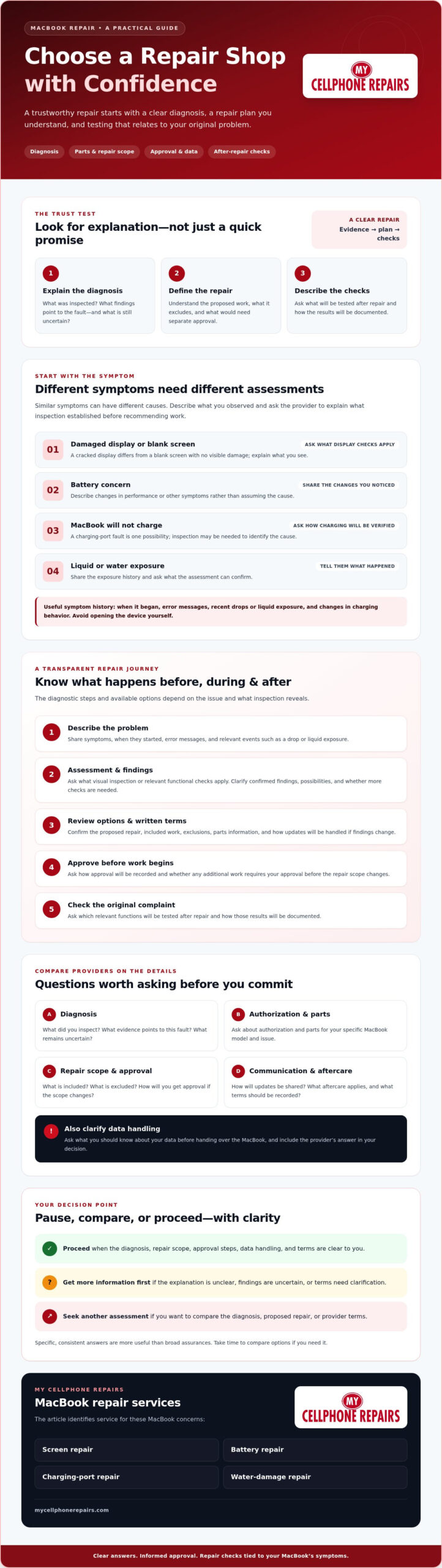
MacBook Repair Shop Checklist: Questions to Ask Before You Commit
Use the same questions with each provider so you can compare answers, not just impressions. A review can offer context about someone else’s experience, but it can’t confirm the diagnosis, parts, data-handling process, or terms for your MacBook. An Expert MacBook repair shop should be willing to address those details clearly.
Questions about diagnosis, parts, and repair terms
Ask what the provider found, what repair it recommends, and whether another option may fit the issue. Get the proposed work and applicable terms in writing before approving it. Confirm whether you’ll be contacted and asked to approve added work before it begins.
- Diagnosis: What did you inspect, and which findings support the proposed repair?
- Parts: What parts may be used for this repair, and can you confirm the options in writing?
- Scope: What work is included, and what is excluded?
- Approval: Will you ask before doing work beyond the agreed scope?
- Testing: Which functions will you check after the repair, and how will you share the results?
- Terms: What repair coverage or warranty terms apply, if any? Can I review them in writing?
Clear answers help you compare providers on the details that matter. If a response is vague, ask for clarification before deciding. Don’t assume a particular part, test, or warranty applies unless the provider confirms it for your specific repair.
Questions about privacy and device handoff
Back up accessible data before service, then follow the provider’s preparation instructions. Ask whether a passcode is needed, why access may be required, and how personal data is handled during the repair. Share only the access the process requires.
Account sign-outs or other preparation steps may depend on the service and MacBook. Check Apple’s official guidance before changing settings, and ask the repair provider what applies to your device. Resolve any questions before handing over the computer.
Keep a copy of the written scope and terms, along with notes about the symptoms you reported. These details give you a useful reference when you collect or receive the device and confirm the completed work. For a repair inquiry, explore MacBook repair services and ask about the process for your model and issue.
Choosing My Cellphone Repairs for MacBook Service: Your Next Steps
Once you’ve narrowed down your options, turn the problem into a clear repair inquiry. My Cellphone Repairs handles MacBook screen, battery, charging-port, and water-damage repairs. Sharing useful details can help the provider understand what you’re experiencing and explain how to proceed. It doesn’t guarantee a particular diagnosis or outcome, so ask what information is needed to assess your specific issue.
Prepare a useful MacBook repair request
Include your MacBook model if you know it, describe the symptoms, and say when they began. Note relevant events, such as a drop, liquid exposure, a change in charging behavior, or previous repair attempts. Be specific: “the display stays black after startup” gives a clearer starting point than “it’s broken.”
Then ask what the provider needs to assess the problem and what the next step involves. If you’re unsure of the model, say so rather than guessing. Keep notes about when the symptoms occur and whether they’re consistent. This context can help the provider understand the issue, though an inspection may still be needed to identify its cause.
Decide whether to repair, seek another assessment, or replace
Base your decision on the confirmed diagnosis, proposed repair scope, and the MacBook’s overall condition. Consider how you use the device and whether the suggested work addresses the problem you reported. If the explanation, parts information, or repair terms aren’t clear, ask for clarification before approving work. You can also seek another assessment if you need more confidence in the diagnosis.
Repair isn’t automatically the right choice in every situation. Compare the information you have and decide whether the proposed work makes sense for your device and needs. An Expert MacBook repair shop should help you understand the available next steps without pressuring you to accept an unclear scope or promising an outcome before assessment.
Ready to ask about a screen, battery, charging-port, or water-damage concern? Contact My Cellphone Repairs about MacBook repair to review your options and confirm service details for your model and symptoms.
Take the Next Step With Confidence
Choosing an Expert MacBook repair shop starts with more than finding someone who will take a look. Share clear symptoms, ask how the diagnosis supports the proposed repair, and compare parts, testing, data handling, and written terms before approving work. If the repair scope changes, ask for an update and confirm any additional work before it begins.
Use the provider’s answers to decide whether repair fits your MacBook’s condition and your needs. If key details remain unclear, pause and ask for an explanation or consider another assessment. A careful decision can help you understand what to expect without relying on broad promises.
My Cellphone Repairs offers MacBook repair for screen damage, battery issues, charging-port faults, and water damage. Review the available options and confirm the service details for your model and symptoms. Explore MacBook repair options with My Cellphone Repairs, then take the next step with confidence.
Frequently Asked Questions
How do I choose an expert MacBook repair shop?
Choose an Expert MacBook repair shop that clearly explains its diagnosis, proposed repair, parts information, testing, and written terms. Ask what the provider inspected and which findings support the recommendation. Confirm whether you’ll approve any added work before it starts. Compare answers for your exact MacBook model and issue, rather than relying on broad claims or reviews alone.
Is an independent MacBook repair shop safe to use?
Should I choose Apple or an independent MacBook repair shop?
Choose based on the service terms and options available for your model and fault. Apple describes Apple-certified repair using genuine Apple parts. An independent provider may offer a different repair scope or parts options, so confirm those details rather than assuming the services are equivalent. Compare authorization, communication, testing, exclusions, and applicable coverage before deciding.
What should I ask a MacBook repair shop before handing over my computer?
Ask what the provider found, what repair it recommends, and whether alternatives are available. Confirm which parts may be used, what the repair includes or excludes, and what testing will follow. Ask whether you’ll approve additional work before it begins. Also clarify data handling, whether a passcode is needed, and which written terms apply to your specific repair.
Can a repair shop fix a MacBook with liquid damage?
A repair shop that handles MacBook water-damage repairs can assess a device after liquid exposure, but the cause and extent of the issue need inspection. Describe when the exposure happened and what symptoms followed. Ask what the assessment can confirm, which repair options may apply, and what limitations remain. My Cellphone Repairs lists water-damage repair among its MacBook service categories, but outcomes depend on the device’s condition.
How long does MacBook repair usually take?
There isn’t one reliable timeframe for every MacBook repair. Timing can depend on the reported fault, what inspection reveals, the repair scope, and factors the provider confirms for your device. Ask for an estimate after the assessment and clarify when you’ll receive updates if the diagnosis or scope changes. Treat any timeframe as specific to that provider and repair, not a guarantee for all cases.
Should I back up my MacBook before repair?
Yes, back up accessible data before service whenever you can. A backup gives you a copy of important files, though it doesn’t replace asking how the provider handles data or whether access to the MacBook is needed. Follow the provider’s preparation instructions, and check official Apple guidance before signing out of accounts or changing device settings. Ask about privacy steps before handing over the computer.