
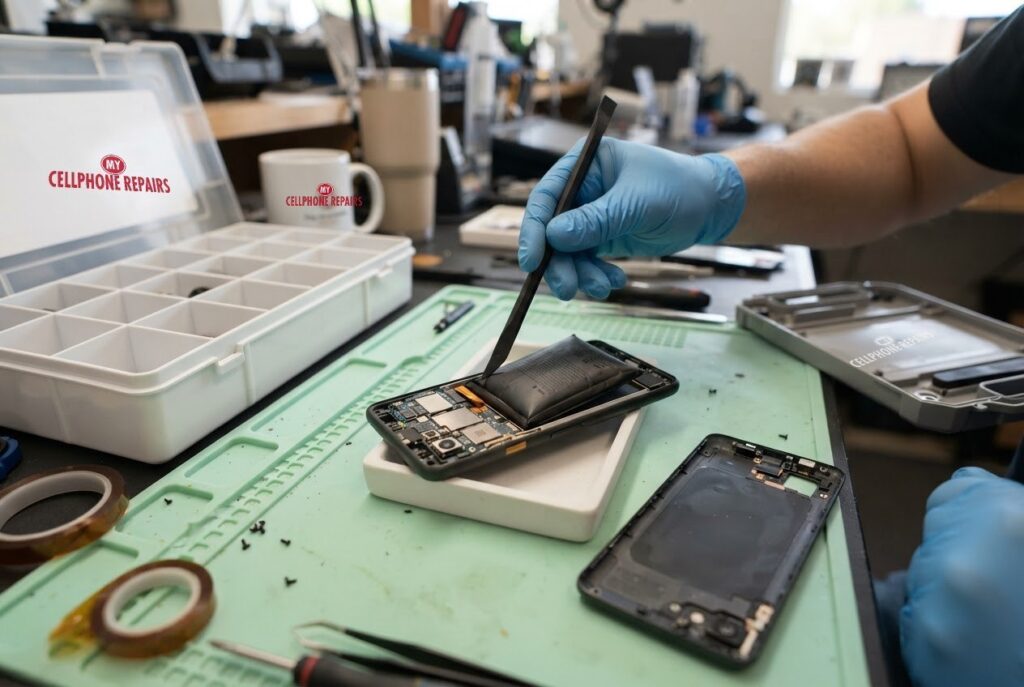
Your phone used to lie flat on the desk. Now it rocks like a tiny seesaw when you tap the screen, and the back looks slightly puffy. A Pixel 9 swollen battery is not something to wait out, so this guide explains the warning signs, what to do right now, and what to never do.
We drew on Android Authority’s guide to swollen phone batteries and Google’s Pixel battery help page. If you think your battery is swelling, we offer a free diagnosis and an exact quote before any work starts. Looking for a phone repair shop near me? Walk-ins are welcome, and we are happy to look at it the same day.
Quick facts
- Price: free diagnosis and an exact quote before we start
- Turnaround: same day for most repairs
- Warranty: 30-day warranty on premium screens and other repairs
- Diagnosis: always free, walk-ins welcome
Key takeaways
- A swollen battery builds up gas inside the cell and pushes on whatever is around it.
- Signs include a wobbling phone, a lifting back cover, a warped shape, a strange smell or faster draining.
- Turn the phone off, do not charge it, and keep it away from anything flammable.
- Do not poke, press or pry it open. Have a professional replace the battery.
- Never put a swollen battery in the household trash.
In this article:
- Why do phone batteries swell?
- What are the signs of a swollen battery?
- What should I do right now?
- Try this first: restart, force restart and Safe mode
- How can I help prevent it?
- Where does a swollen battery go?
- Myths vs facts about swollen batteries
Why do phone batteries swell?
Inside your phone is a lithium-ion battery. According to Android Authority, gas can build up inside it and make it expand. Common causes include manufacturing defects, heat from charging or sun exposure, physical damage and age. Batteries left unused for long periods are also more likely to swell.
Here is the key point: the battery sits right under the back cover and next to the screen. When it grows, it has nowhere to go, so it pushes. That is why a swollen battery can lift the back or make the screen look hazy or raised.
What are the signs of a swollen battery?
- The phone rocks or wobbles when it lies flat.
- Bumps or a warped shape on the back.
- The back cover or screen starts to lift at the edges.
- An odd metallic or sweet smell.
- Slow charging or shorter battery life.
Those signs come from Android Authority’s guide. Some owners of other brands report the same pattern. In a Samsung Community thread, one Galaxy owner described a phone that drained very quickly and kept swelling, and other owners said the same thing happened on their phones. These are owner reports, not a diagnosis, but they match the signs above.
What should I do right now?
- Turn the phone off and keep it off. Android Authority says to do this right away.
- Do not charge it. Charging feeds the cell more energy.
- Put it somewhere safe, on a hard surface away from anything that can burn.
- Do not press, poke or pry it, and do not try to remove the battery yourself.
- Check your coverage. If the phone is under warranty or insurance, use that coverage first.
- Bring it in for a professional replacement. We will check it for free and quote the exact price before we begin.
Try this first: restart, force restart and Safe mode
Try this first: restart and force restart your Pixel
If the back or screen is bulging, skip these steps, switch the phone off and come in. The steps below are for a phone that is only acting up.
- Restart: press and hold the Power button (on some models Power and Volume Up), then tap Restart.
- Force restart (frozen): press and hold the Power button for up to 60 seconds and let go when the “G” logo appears. Deletes nothing.
- Safe mode: open the power menu, touch and hold Restart until “Reboot to safe mode” appears, then tap OK.
- A factory reset will not fix a swollen battery because it is a hardware problem. Only erase the phone for software problems, after a backup and with your Google account password ready.
When to stop and come in: the phone won’t turn on even after a force restart and 30 minutes on the charger, it vibrates but the screen stays black, it restarts over and over, it gets hot or the screen or back is lifting (stop charging it), or it got wet. Free diagnosis at any of our stores, and most repairs are done the same day. Menu names may be slightly different on your model. Maker’s own steps: Google Pixel Help: fix a Pixel phone that freezes
Full step-by-step guide: How to restart and reset your Google Pixel → | All restart & reset guides →
How can I help prevent it?
You cannot stop every defect, but heat is something you can control. Google’s Pixel help page says a Pixel battery drains much faster when it is hot, even when you are not using it, and that this can damage the battery. Google also recommends using the included charger, since other adapters can charge slowly or not at all and can damage the phone or battery. Charging optimization can limit charging to 80 percent, and Adaptive Charging times the finish around when you usually unplug.
Android Authority adds that heat from charging or sun exposure is a known cause, so avoid charging under a pillow or leaving the phone on a sunny dashboard.
Where does a swollen battery go?
Do not throw it in the trash. Android Authority says to take it to an authorized collection or recycling location, and points to call2recycle.org for places near you. It also advises against shipping a swollen battery. When we replace a battery, we handle the old one for you.
What does it cost? We do not post a fixed Pixel 9 battery price online, so the honest answer is free diagnosis and an exact quote before we start. Most battery repairs are done the same day.
Myths vs facts about swollen batteries
| Myth | Fact |
|---|---|
| “It still works, so I can wait.” | Android Authority says a swollen lithium-ion battery can be very dangerous, so stop using it. |
| “I can press it flat.” | Pressing or puncturing a swollen battery is risky. Leave it for a professional. |
| “It is fine to trash it.” | It should go to a recycling or collection point, not household trash. |
Frequently asked questions
Is a swollen battery in my phone dangerous?
Android Authority calls a swollen lithium-ion battery very dangerous. Turn the phone off and bring it in for a free diagnosis.
Where can I dispose of a swollen battery near me?
Use an authorized collection point such as those listed at call2recycle.org, or let us replace the battery and handle the old one.
How long does a battery replacement take?
Most are done the same day. Walk in or book online.
We also fix tablets and computers. Need tablet repair near me or laptop repair near me? Our technicians handle those too, including a swollen battery laptop/MacBook.
Back puffing up? Book a free diagnosis today.
Sources
- Android Authority: what to do if your phone battery is swollen
- Google Pixel Help: get the most life from your Pixel phone battery
#MyCellphoneRepairs #GooglePixel #Pixel #PixelRepair #Pixel9 #SwollenBattery #BatteryReplacement #PhoneRepair #SameDayRepair #FreeDiagnosis #HarrisburgPA #AlexandriaVA
Get it fixed at My Cellphone Repairs: most repairs are done the same day. Walk in or book online.
Book NowPhone frozen or acting up? See our step-by-step restart & reset guides →
Our locations
- Towson Mall825 Dulaney Valley Rd, Second Level, Towson, MD 21204
(410) 828-4404 - Grand Rapids3077 28th St SE, Grand Rapids, MI 49512
(616) 799-6996 - PG Plaza Mall (Hyattsville)3500 East-West Hwy, Mall at Prince George's, Target Entrance, Hyattsville, MD 20782
(301) 559-1105 - Bowie Town Center15630 Emerald Way, Bowie, MD 20716
(240) 614-3600 - Capital City Mall (Camp Hill / Harrisburg area)3604 Capital City Mall Dr, Camp Hill, PA 17011
(717) 919-7868 - Cumberland Mall (Vineland)3849 S Delsea Dr, next to Boost Mobile, Dick's Sporting Goods entrance, Vineland, NJ 08360
(856) 765-5049 - Mondawmin Mall2401 Liberty Heights Ave, Lower Level, Baltimore, MD 21215
(443) 826-7711 - Baltimore Inner Harbor100 East Pratt St, Suite 101, Baltimore, MD 21202
(443) 838-8989 - St Charles Mall (Waldorf)11110 Mall Cir, Waldorf, MD 20603
(301) 645-7755 - Alexandria7650 Richmond Hwy, Alexandria, VA 22306
(703) 341-6789