
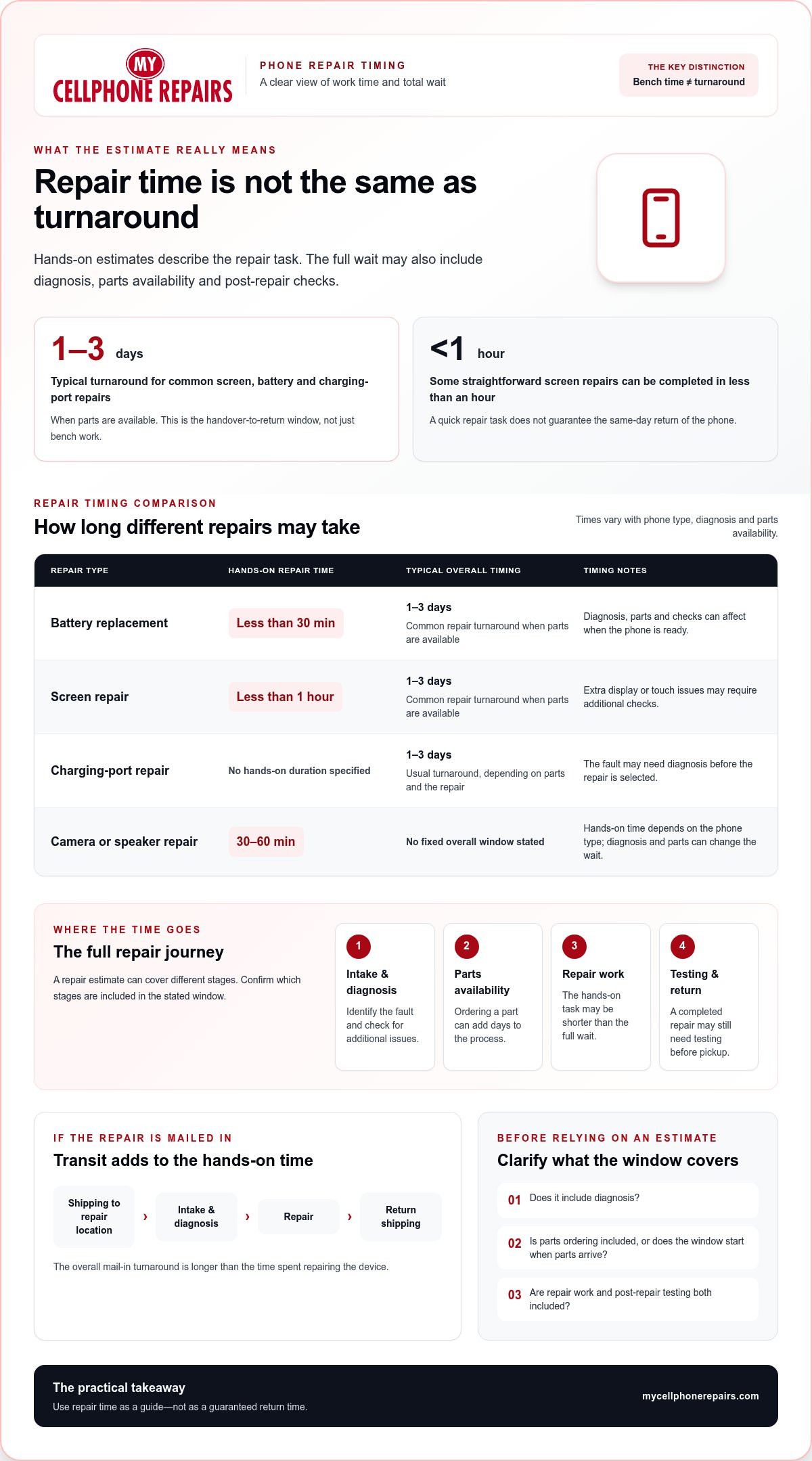
Most common phone repairs take 1-3 days, but some straightforward fixes can be completed in under an hour. How long a professional phone repair should take depends on the repair type, the extent of the damage, parts availability, and whether diagnosis reveals additional issues.
It’s understandable to want a clear return time when your phone is out of action. A battery replacement may take less than 30 minutes, while a screen repair can take less than an hour; ordering a part can add days to the process. The repair itself and the time spent waiting for parts are two different things.
This guide explains how long professional phone repairs may take and why turnaround varies. Damage severity, parts availability, and diagnostic work can all affect the timeline, so understanding these factors helps you know what to expect after an assessment.
Key Takeaways
- Use the repair type as a starting point: straightforward battery or screen work may take less than an hour, while common repairs can take longer overall.
- Separate hands-on repair time from the full turnaround time, which can increase when parts need to be ordered.
- Damage beyond the visible fault can add diagnostic work and affect how long the repair takes.
- Clear symptoms and a thorough assessment help explain the likely repair steps and timeline.
- For Samsung phone repairs, iPhone screen repairs, or battery replacements, My Cellphone Repairs offers services that address these common repair needs.
How long does a phone repair usually take?
Repair timing can vary depending on the type of repair and whether parts are available. Hands-on work may take less time than the full turnaround, so distinguish repair time from the time your device is unavailable when considering how long should a professional phone repair take.
Typical Turnaround for Common Repairs
Typical turnaround is the time from handing over a phone to receiving it back. Common screen, battery, and charging-port repairs can take 1-3 days when parts are available. The estimate helps you plan around work, travel, and access to another device. Ask for the expected completion window and whether it includes diagnosis, parts ordering, and testing.
Battery, Screen, Port, and Camera Repair Times
Hands-on timing varies by repair: a battery replacement may take less than 30 minutes, and a cracked screen repair normally takes less than an hour. Camera and speaker repairs can take 30 to 60 minutes, depending on phone type. Charging-port repairs fall among common repairs that may take 1-3 days. These figures describe typical repair work, not necessarily the full wait.
For charging-port repairs, the usual turnaround can be 1-3 days, depending on part availability and the repair. Camera repairs can take about 30 to 60 minutes, depending on the phone type. A technician may need to diagnose the fault before selecting the repair, so hands-on estimates and return times can differ.
At My Cellphone Repairs, standard device repair times vary according to the fault, parts, and service route. There is no single timeline for every smartphone repair: a screen issue and a fault requiring additional diagnosis involve different steps.
Android and alternative phone repairs at a professional service center also vary by repair type, diagnosis, and parts availability. A battery, screen, or charging-port issue can require different work, so the repair category alone does not establish the full turnaround.
Mail-in phone repair includes shipping to the repair location, intake and diagnosis, the repair itself, and return shipping. Transit adds to the hands-on work, so the overall turnaround is longer than the time spent repairing the device.
Before bringing in your phone, back up its data and note the symptoms. Record when the battery drains, which camera fails, or whether charging stops at a certain cable position. These details help you describe the fault and support diagnosis. Keep your backup separate from the phone, and bring relevant accessories only if they help demonstrate the issue.
Use the repair estimate to clarify what the stated window covers. For example, ask whether a 1-3 day estimate includes a parts delay or only the repair after parts arrive. That distinction helps you plan realistically, especially when the phone is your only device. A completed repair may also require testing, so the workbench time and pickup time aren’t always the same.
Screen replacement and battery-swap timing
A screen or battery repair may involve quick bench work, but the decision involves more than repair time. A cracked display may need replacement, while a phone that drains quickly may need diagnosis to identify the cause. Consider both the repair time and whether restoring the hardware makes sense for the device you rely on.
A cracked or shattered phone screen repair normally takes less than an hour. A typical battery replacement may take less than 30 minutes. Those figures describe the repair task, not every part of the visit. Diagnosis, parts availability, and post-repair checks can affect when the phone is ready. Ask which part of the process an estimate covers.
Screen replacements address visible display damage, but symptoms offer useful clues. A cracked surface with a working display differs from a screen that flickers, shows dark areas, or does not respond to touch. Tell the technician what changed after the impact. That detail helps assess whether the screen is the only affected hardware.
Battery trouble can have more than one cause. A phone that shuts down unexpectedly or loses charge quickly may need a battery assessment. Software behavior can also affect performance, so note when the problem occurs and whether it began after a recent change. These observations help distinguish a battery fault from other issues before repair.
For repair versus replacement, consider the phone’s age, software support, and everyday performance. A device under 3 years old that still receives updates and runs essential apps smoothly may be worth repairing. A phone around 4-5 years old that no longer gets updates, holds a charge, or runs essential apps smoothly is usually not worth repairing.
Compare the repair decision with the phone’s remaining usefulness, not just the visible damage. If a screen replacement restores a device that still meets your needs, repair may extend its useful life. If the phone struggles with essential apps or no longer receives software updates, replacing it may better address the underlying problem. A repair exceeding 20-30% of a comparable new phone’s price can make replacement more financially sensible.
Before approving a repair, write down the symptoms and your phone’s model. Ask whether the estimate covers diagnosis, parts, repair, and testing. For example, confirm whether a screen estimate includes checks for touch response and display function. Clear terms help you assess the repair’s timeline and value alongside the phone’s age and performance.
Damage severity and repair duration
A repair may take longer when damage extends beyond the visible fault. A cracked screen may show glass damage, while display or touch problems can call for additional checks. The technician needs to identify the affected functions before estimating the work. Describe what happened and what changed afterward, such as a blank display following a drop.
One symptom can have several possible causes. A phone that won’t charge, for example, may have port damage or another fault that needs diagnosis. A camera that stopped working after an impact also needs assessment to determine whether the problem is limited to the camera. More affected components can mean more assessment and additional repair steps.
Water damage can complicate the timeline because the extent of the affected hardware needs assessment. A phone that powers on can still have other symptoms, such as unreliable charging or a camera that behaves differently. Describe when the phone got wet and which functions changed. Restoration time depends on the severity of the damage, so visible signs alone do not show its full scope.
Damage can also affect which parts are needed. If an assessment shows that a replacement part must be ordered, the process can take extra days. A cracked screen with additional damage may therefore require more than replacing the visible component. Ask what the estimate includes and whether its timeframe covers parts ordering and testing.
- Screen: Note cracks, dark areas, flickering, or touch problems.
- Camera: Describe whether the image is blurred, blank, or intermittent.
- Water exposure: Share when it happened and what stopped working afterward.
- Charging: Explain whether the phone fails to connect or loses power during use.
These details connect the repair estimate to the actual symptoms. A phone with cracked glass and normal touch response presents different information from one with a blank display. Neither observation establishes the full extent of the damage, but each gives the assessment a useful starting point. Be precise about which functions still work.
Keep warranty paperwork and prior repair records with your notes. If the phone has been repaired before, name the component and explain what changed afterward. For example, noting that the screen was replaced before water exposure gives a clearer repair history than a general report of “screen trouble.” Accurate history helps distinguish a new fault from an earlier issue.
Before approving work, compare the estimated tasks with the symptoms you reported. Confirm whether diagnosis, replacement parts, and post-repair testing are included in the stated timeline. If the assessment uncovers another affected component, the work and completion window may change. A clear account of the damage helps explain why.
How parts availability affects repair time
Repair work usually starts once the required part is available. If a replacement part needs to be ordered, the process can take extra days. That wait is separate from the hands-on repair, so even a short task can result in a longer overall turnaround.
Exact model details matter. Two smartphones from the same brand may use different screens, batteries, or charging ports. A technician needs to identify the device and failed component before matching a part. For example, an iPhone screen request needs the phone’s specific model, not just the brand name.
Diagnosis can affect parts ordering, too. A phone that won’t charge may have a damaged port, but the symptom alone does not identify the part. The technician assesses the fault, determines the necessary repair, then obtains the matching component if it is not on hand. This avoids treating a symptom as a confirmed diagnosis.
Part selection also shapes the repair plan. The part must match the phone and the repair required. “Quality parts” is meaningful only when paired with correct compatibility and a clear explanation of what will be replaced. Ask which component is being ordered and whether the estimate includes the wait for it.
Separate the timeline into stages when discussing an estimate:
- Assessment: Identify the fault and the device model.
- Part sourcing: Determine whether the matching component is available or must be ordered.
- Repair: Complete the hands-on work after the part arrives.
- Testing: Check the repaired function before the phone is returned.
For example, replacing a screen may be a brief task once the correct screen is ready. If the part for that model needs ordering, the wait comes before the repair begins. Ask whether the quoted completion window starts at drop-off or after the component arrives. That makes the estimate easier to understand.
Parts availability can also affect whether a repair proceeds as planned. If diagnosis reveals a second damaged component, the technician may need to identify another part. The estimate may then change because the repair scope has changed, not simply because installation takes longer. Share the phone’s model and symptoms clearly to support accurate assessment and part matching.
Keep “part ordered” and “repair underway” distinct in any update. A delay before installation does not mean the device is already being repaired. Once the required part is available, the remaining steps depend on the repair and the checks needed afterward. This distinction helps you plan for the phone’s full time away.
Phone diagnostics and repair estimates
Diagnostics identify what is broken before repair work begins. A phone that won’t charge could have a damaged port, a battery fault, or another issue. An estimate should connect the reported symptom with the proposed repair, parts, and testing. This makes the timeline easier to understand than a single repair-time figure.
Describe the fault clearly. Say whether charging stops completely, works only at a certain angle, or disconnects during use. For a speaker problem, note whether calls sound quiet or media audio cuts out. Specific symptoms help focus diagnostic checks and keep the estimate tied to the issue you experience.
A technician can assess the device’s relevant functions before recommending work. For example, a phone with a black screen may still produce sound or respond to charging. Those details help distinguish a display problem from a phone that will not power on. If diagnosis finds another affected component, the work and expected completion time may change.
Before approving a repair, look for these details in the estimate:
- Problem identified: Does it describe the charging, screen, camera, or speaker issue?
- Work proposed: Does it explain which repair addresses the fault?
- Parts status: Does it say whether a required part is ready or must be ordered?
- Timeline: Does the stated window include diagnosis, repair, and testing?
These points distinguish hands-on work from the full turnaround. A repair may involve a short installation, while diagnosis or parts ordering adds time before work starts. If an estimate changes after testing, ask which finding altered the plan. For instance, a charging complaint that leads to a different diagnosis requires a different repair scope.
Prepare useful information before dropping off your phone. Note when the fault began, what happened beforehand, and which functions still work. If a computer recognizes the device but its screen stays dark, mention that. Include previous repair history if relevant. A clear report helps the technician reproduce the problem and explain the next step.
Back up your data and understand what the estimate covers before authorizing work. Ask whether post-repair checks include the function that failed, such as charging or speaker audio. This ensures the repair plan addresses both the reported fault and the test that demonstrates the phone is working again.
For help with phone faults that need diagnosis, request phone repair service and describe the symptoms you’re seeing.
My Cellphone Repairs: Samsung Phone Repair
My Cellphone Repairs provides Samsung phone repairs for devices that need professional attention. If your Samsung phone has a screen, battery, or other hardware problem, share the symptoms and any diagnostic findings when arranging service. Clear details help explain the issue and the repair being considered.
My Cellphone Repairs also offers iPhone screen repair, battery replacement, and MacBook repair. Choose the service that matches your device and repair need, then discuss the fault and expected process. A clear estimate helps you understand the planned work and what may affect the turnaround.
For Samsung phone repair or another supported repair, contact My Cellphone Repairs to discuss your device.
Plan your next step with confidence
Before handing over your phone, write down its symptoms and the functions you rely on most. This gives the technician a practical starting point and helps you explain what a successful repair needs to restore. To judge how long a professional phone repair should take, focus on the repair plan, parts status, and testing before return.
Ask for an estimate that separates diagnosis, any wait for parts, repair work, and final checks. A clear timeline helps you arrange a backup device or adjust plans without guessing. If diagnosis changes the proposed work, ask how that affects the completion window. The assessment can change the estimate.
My Cellphone Repairs handles phone and device repair needs. Share the issue and your device’s symptoms to start a practical conversation about the repair.
Contact My Cellphone Repairs to discuss your repair. A clear first step can make getting your device assessed easier.
Frequently Asked Questions
How fast can you fix my smartphone?
My Cellphone Repairs states that typical repairs take 15-30 minutes. To understand how long a professional phone repair should take, consider the fault and work required, then describe the symptoms when arranging service. Note whether the phone powers on, charges, and responds to touch. Customers in Towson, Baltimore County, and Bowie can share those details to explain the issue and discuss the repair process.
What Factors Affect the Speed of Repair?
Repair speed depends on the phone model, fault, required part, and repair steps. Two phones with cracked screens may need different work if one also has a display or touch problem. Explain what happened, which functions changed, and what still works. This helps distinguish visible damage from other symptoms and gives the repair assessment a useful starting point.
How long does a professional phone screen repair usually take?
A cracked or shattered phone screen repair normally takes less than an hour. That describes the repair work itself, not necessarily the full time before you get the device back. Share the phone model and explain whether the display, touch response, or both are affected. If the damage involves more than the screen, the plan may include additional assessment and work.
How long does a phone battery replacement take at a repair shop?
A typical phone battery replacement may take less than 30 minutes. Before arranging service, note the specific symptoms, such as unexpected shutdowns or a battery that drains quickly. That context helps distinguish a battery concern from another performance issue. Ask whether the repair estimate describes hands-on replacement time or the full turnaround, so you can plan for the device being unavailable.
Do phone repairs take longer for water damage or motherboard issues?
Water damage and suspected motherboard faults can require more assessment than an isolated, visible break. Liquid exposure may affect more than one function, while a motherboard concern calls for identifying the problem before selecting repair work. Describe when the issue began and what stopped working afterward. This gives the technician useful context without assuming the first symptom identifies every affected component.
What affects the turnaround time for a phone repair?
The total turnaround reflects every stage, not just the repair task. Diagnosis identifies the fault, parts sourcing provides the required component, repair addresses the issue, and testing checks the affected function. To gauge how long a professional phone repair should take, clarify which stages the estimate includes. For example, a phone needing an ordered component waits before hands-on work can begin.
Can a phone repair shop complete repairs while you wait or the same day?
Some straightforward repairs may be completed while you wait when the required part and repair capacity are available. Same-day service means the device is returned on the day it is dropped off. That timing depends on the repair being handled that day, so it is not the same as a repair-time estimate. Ask what the stated window covers before planning around your phone’s return.
How can I check whether a phone repair estimate includes diagnostic time and parts delays?
Ask for the estimate to separate diagnosis, parts ordering, repair work, and testing. A clear question is: “Does this timeframe start at drop-off, or after the required part arrives?” Also ask whether the estimate changes if testing reveals another fault. These details help you understand when repair work begins and what could alter the planned completion window.