
Paying nearly half the cost of a new laptop for a simple glass replacement isn’t your only option in 2026. A cracked Retina display or a flickering screen is a major disruption to your daily workflow. You’ve likely seen the high quotes from manufacturers and felt the sting of a massive bill. It’s natural to worry about the safety of your data when choosing a MacBook screen repair service. You need a solution that prioritizes part quality and technical expertise without the inflated corporate price tag.
This guide helps you manage the restoration process from start to finish. We’ll show you how to diagnose specific display damage, evaluate current repair costs, and choose a service backed by professional technician training. You’ll gain a clear path to a cost-effective, warranty-backed restoration that puts your laptop back in your hands quickly. Get ready to restore your device to like-new condition with confidence. We’ll walk you through the diagnostic steps and the exact quality benchmarks you should expect from a specialist.
Key Takeaways
- Distinguish between external glass cracks and internal LCD bleeding to identify the exact parts needed for your restoration.
- Compare manufacturer out-of-warranty fees against a professional MacBook screen repair service to secure a more affordable, high-quality fix.
- Follow emergency first-aid steps to protect your keyboard from glass shards and safely back up data when your display goes dark.
- Prioritize providers with a formal technician training program to ensure your delicate internal components are handled by verified experts.
- Evaluate service reputations and warranty terms to guarantee a seamless repair process that returns your laptop to like-new condition.
Identifying Your MacBook Screen Damage: Is It Just the Glass?
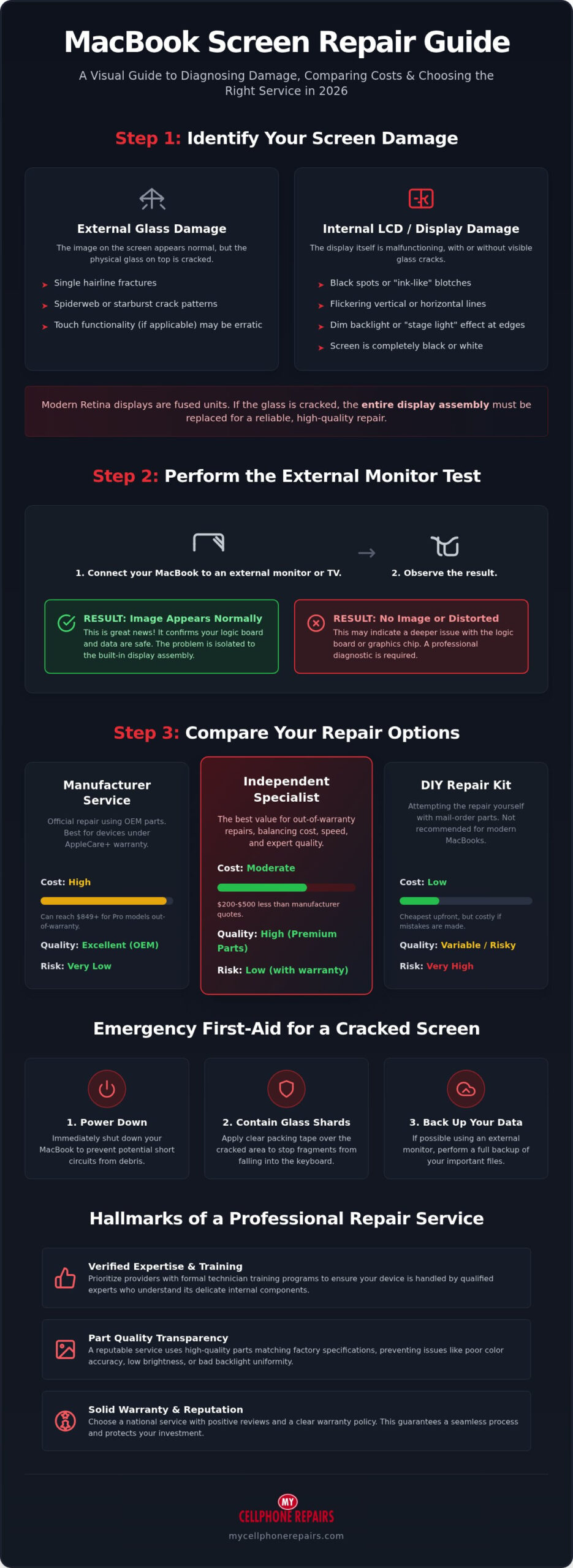
A cracked screen is a visual nightmare, but the type of damage determines your next move. You might see a single hairline fracture or a spiderweb of shattered glass. Sometimes the image looks perfect behind the cracks, while other times the display turns into a mess of ink-like blotches. Understanding these symptoms helps you communicate effectively with a MacBook screen repair service and avoid unnecessary diagnostic fees. Identifying the specific failure helps you set realistic expectations for the restoration process.
Impact damage usually manifests as bleeding LCDs or vertical lines that flicker as you move the lid. If your screen is dim or shows a “stage light” pattern at the bottom, you’re likely facing a backlight failure rather than a broken panel. Dead pixels appear as tiny, unmoving dots of color. In contrast, physical impact damage looks like a starburst pattern originating from a specific point. Distinguishing between these issues is the first step toward a successful restoration. Our experts use these signs to determine if the issue is a simple part failure or a more complex hardware problem.
LCD vs. Glass Damage: What You Need to Know
Modern Retina displays use a fused construction. This means the glass, the LCD panel, and the backlight are bonded into a single unit. In 2026, glass-only repairs are virtually impossible without risking the fragile display underneath. If the glass is cracked, the entire assembly must be replaced to maintain factory-level visual quality. Look for internal bleeding or dark spots that look like spilled ink. These signs confirm the LCD layer is compromised. Vertical or horizontal lines that change when you apply light pressure also indicate internal hardware failure. A skilled computer repair technician understands these nuances and will recommend a full assembly swap for the best results.
The “External Monitor Test” for Self-Diagnosis
Don’t assume your entire laptop is broken just because the screen is dark. Grab an HDMI or USB-C adapter and plug your MacBook into a TV or external monitor. This simple test isolates the problem. If the external screen shows your desktop and files clearly, your logic board and graphics chip are healthy. This is great news. It confirms your data is safe and the issue is strictly limited to the display hardware. If the external monitor is also blank or shows distorted patterns, the problem might lie deeper within the internal circuitry. Use this test to gain peace of mind before seeking help. Our staff undergoes a rigorous technician training program to handle these complex diagnostic scenarios with precision.
Comparing MacBook Screen Repair Service Options in 2026
Choosing a MacBook screen repair service in 2026 requires a balance between cost, speed, and technical mastery. You have three main paths: the manufacturer, an independent specialist, or a risky DIY attempt. If you have AppleCare+, the $99 to $299 deductible makes the official store your best financial move. Without that coverage, however, out-of-warranty costs can be steep. For example, official manufacturer quotes for a 16-inch MacBook Pro display replacement can reach $849. Independent experts typically offer the same level of restoration for $200 to $500 less, making it a smarter investment for a high-value M3 laptop.
The True Cost of MacBook Screen Replacement
Pricing in 2026 reflects the premium nature of modern Retina panels. A MacBook Air 13-inch repair often starts near $479 at official channels, while Pro models scale significantly higher. Repairing an M3-powered laptop is usually 25% to 40% of the cost of buying a new one. This makes restoration a high-value choice compared to purchasing a refurbished device. You keep your data and your familiar hardware for a fraction of the replacement cost. The integrated nature of Apple Silicon means you need a service that understands how these components interact without compromising the logic board. For a detailed model-by-model breakdown of what you should expect to pay, review our comprehensive MacBook screen repair cost price guide before requesting any quotes.
Attempting a DIY repair with a mail-order kit is a gamble that rarely pays off. Modern MacBooks use incredibly thin fused display units and specialized adhesive. A single slip of a screwdriver can destroy the fragile ribbon cables or short out the internal power rails. Most home users lack the calibrated tools and dust-free environments required for a perfect finish. Professional technicians use specialized equipment to ensure the new display sits flush and the internal sensors, like the lid angle sensor, function correctly after reassembly.
Warranty and Part Quality Transparency
Don’t settle for “cheap” parts that sacrifice your visual experience. Low-quality aftermarket screens often suffer from color shifting, lower brightness, or poor backlight uniformity. We prioritize transparency by using parts that meet strict quality standards to maintain your True Tone and ProMotion features. Our experts undergo a dedicated technician training program to ensure every screw and connector is returned to its exact factory position. A solid service warranty should always back your repair, protecting you against future component defects and giving you peace of mind.
Legislative shifts like the Fair Repair Act have made it easier for independent shops to access the tools and parts they need. This competition benefits you through significantly faster turnaround times. While manufacturer repairs often take 5 to 10 business days because they ship units to regional hubs, an independent specialist can often complete the work in 1 to 3 days. If you’re ready to fix your device without the long wait, consider a professional MacBook repair to get back to work quickly.
The Professional MacBook Screen Replacement Process
Restoring a Retina display is a high-stakes technical procedure. A professional MacBook screen repair service doesn’t simply swap parts. It follows a methodical path to ensure the internal hardware remains pristine. The process begins in a controlled, ESD-safe environment. Static electricity is a silent killer for logic boards. Our technicians use grounded mats and anti-static wrist straps to prevent invisible damage to your laptop’s sensitive M-series circuitry. This level of care is why we prioritize our formal technician training program for every staff member.
Safety starts with power isolation. Even when your MacBook is powered down, the battery remains live. The first physical step is always removing the bottom case and disconnecting the battery flex cable immediately. This prevents accidental short circuits when we disconnect the high-density display connectors. We then carefully unroute the antenna cables and the camera ribbon. These components are thinner than a human hair and require a steady hand to avoid tearing. We treat every internal component with the respect its engineering deserves.
Precision Tools Used by Expert Technicians
You can’t fix a modern MacBook with a standard toolbox. Apple uses proprietary Pentalobe and Torx screws that require specific, hardened steel drivers. Using the wrong bit strips the screw heads and turns a simple repair into a nightmare. We also use precision heat management. Controlled heat softens the specialized adhesives holding the internal cables and bezels in place. This allows us to lift fragile ribbons without straining the connectors. Proper cable management is the difference between a repair that lasts years and one that fails in a week.
Final Quality Control and Testing
Once the new display assembly is seated, we begin a rigorous calibration phase. In 2026, a screen replacement isn’t complete until we verify software-hardware synchronization. We test the ambient light sensor and the FaceTime camera for perfect clarity. We also verify that True Tone and ProMotion features function exactly as they did when the laptop was new. This ensures your color accuracy remains professional-grade for photo or video work.
Physical alignment is the final touch. We adjust the hinge tension to factory specifications. Your lid should open smoothly with one finger but stay firmly in place at any angle. Before we close the case, we perform a microscopic inspection. We ensure no dust, debris, or fingerprints are trapped inside the assembly. This fastidious approach guarantees your MacBook returns to you in like-new condition. Our stores across Maryland, Pennsylvania, New Jersey, Virginia and Michigan hold every repair to this same high standard.
Emergency First Aid: What to Do When Your Screen Cracks
Hearing that initial crunch is heart-sinking. Your first priority is damage control. Don’t close the lid immediately if you see loose glass shards. Closing the laptop can press those sharp pieces into your keyboard or trackpad, causing expensive secondary damage. Instead, leave the lid open and assess the situation. If you must transport the device to a MacBook screen repair service, place a thin piece of paper or a microfiber cloth between the keys and the display. This small step prevents “pressure spread” where the crack expands across the entire panel during travel.
Maintain your productivity by switching to a desktop setup. Plug in an external mouse and keyboard so you don’t have to touch the compromised screen. This keeps your fingers safe from glass splinters and prevents further stress on the display assembly. If you can still see a portion of the desktop, move your active windows to an external monitor. This allows you to finish your workday while you coordinate your restoration. Acting fast prevents a small hairline fracture from turning into a total blackout.
The Clear Tape Trick for Cracked Glass
Apply a layer of clear packing tape over the cracked area. This simple trick stabilizes the surface and prevents glass splinters from falling into the hinge or keyboard. It also keeps the panel from flexing further, which can worsen internal LCD bleeding. Never use liquid adhesives or “super glue” on your screen. These chemicals can seep into the backlight layers and ruin any chance of a clean restoration. Tape is a temporary safety measure, not a permanent fix. It ensures the device stays intact until it reaches a professional workshop.
Data Protection and Remote Access
Preserving your files is the next critical move. Connect your MacBook to an external monitor using an HDMI or USB-C cable. If your display is completely black, your laptop might still be fully functional. Trigger a manual backup through Time Machine or sync your desktop to iCloud immediately. If the screen is dead and you can’t log in, try “Target Disk Mode” to mount your MacBook as an external drive on another computer. This is the safest way to pull your work projects before shipping your device for service. If your screen damage was accompanied by any liquid exposure, understanding the full scope of MacBook liquid damage repair steps is critical to stopping corrosion before it reaches your logic board.
While you’re securing your data, check your overall system health. A cracked screen is the perfect time to address other aging components. You can review the current MacBook battery replacement cost to see if a full maintenance overhaul makes sense for your device. Combining these services often saves you time and ensures your laptop feels brand new once it returns from the shop. If you’re ready for an expert restoration, book your MacBook repair today and let our trained technicians handle the rest.
Choosing the Best MacBook Screen Repair Service
Selecting a MacBook screen repair service is a decision that directly impacts your laptop’s longevity. You need a provider that values precision and technical mastery. In 2026, the market is full of options, but technical depth varies wildly. Professional training is the backbone of any successful hardware restoration. Without it, you risk receiving a device with misaligned hinges or trapped dust behind the panel. Always verify a shop’s reputation through verified reviews before handing over your machine.
Transparent pricing is another non-negotiable factor. A reliable service will give you a clear, upfront quote without hidden fees. This honesty builds trust and ensures there are no surprises when you receive your final bill. Understanding the full range of MacBook screen repair cost options across providers helps you benchmark any quote you receive and confirm you’re getting fair value. If you’re using a mail-in service, safety is paramount. Use a double-walled box and at least three inches of padding on all sides. Secure the package with reinforced tape and always opt for a shipping method that includes tracking and insurance. These steps protect your investment during transit.
The My Cellphone Repairs Advantage
Our technician training program ensures every fix meets expert standards. We don’t just hire people; we build specialists. This rigorous education allows our team to handle complex hardware issues that other shops might avoid. We offer comprehensive solutions for MacBooks, iPhones, and Samsung devices, making us a one-stop shop for your household tech. Our commitment is to restore your technology quickly and affordably while maintaining the high quality your professional tools require.
Next Steps to Restore Your MacBook
Ready to get your screen back to its original glory? The process is straightforward and designed to respect your time. Follow this final checklist to prepare your device for professional service:
- Get an instant quote: Use our online portal to see your restoration costs immediately.
- Back up your data: Even though screen repairs don’t touch your SSD, a fresh backup is always a smart safety measure.
- Disable “Find My”: This allows our technicians to run full hardware diagnostics after the repair is complete.
- Package securely: Follow the shipping guidelines mentioned above to ensure a safe journey to our facility.
Restoring your laptop shouldn’t be a source of stress. By choosing a MacBook screen repair service that prioritizes expertise and transparency, you ensure your device stays in peak condition for years to come. We’re here to help you get back to work with a display that looks and performs like the day you bought it.
Restore Your MacBook Performance Today
A cracked screen doesn’t have to end your laptop’s life. Accurately diagnosing damage and acting fast with emergency first aid prevents minor fractures from becoming total hardware failures. Choosing a specialized MacBook screen repair service ensures your Retina display returns to factory-level clarity without the excessive costs found at manufacturer stores. You deserve a professional solution that respects both your time and your budget.
Our stores across Maryland, Pennsylvania, New Jersey, Virginia and Michigan, along with our mail-in repair services, are built for speed and reliability. Every fix is completed by expert technicians trained in-house to handle delicate M-series components with precision. All repairs come with a warranty; coverage depends on the part used. Ask your store for details. Don’t let a broken display stall your progress. Take the next step toward a like-new laptop now. Get a Professional MacBook Screen Repair Quote Now and see how easy expert restoration can be. Your device is a vital tool; we’re here to keep it running perfectly.
Frequently Asked Questions
How much does a MacBook screen repair service cost in 2026?
Costs vary significantly based on your specific model and the provider you choose. In 2026, official manufacturer out-of-warranty repairs for MacBook Air and Pro models typically range from $449 to $849. Independent specialists often provide a more cost-effective MacBook screen repair service. Prices generally fall between $149 and $649 depending on the M-series generation and part availability. Always request a detailed quote to understand the total investment for your specific device restoration.
Can I fix a cracked MacBook screen myself?
You can attempt a DIY fix, but it’s extremely risky for modern Retina displays. These screens are fused units held together with strong adhesives and fragile ribbon cables that tear easily. Without specialized tools and an ESD-safe environment, you risk shorting the logic board or damaging the lid angle sensor. Most home users find that the high cost of specialized tools and the risk of total device failure make professional service the smarter choice.
Will a screen replacement void my Apple warranty?
A third-party screen replacement doesn’t automatically void your entire hardware warranty thanks to consumer protection laws. However, the manufacturer won’t cover any issues caused directly by the unauthorized repair or the third-party part itself. Choosing a reputable provider with a dedicated technician training program ensures the work is done to high standards. All of our repairs come with a warranty; coverage depends on the part used. Ask your store for details.
How long does a professional MacBook screen repair take?
Turnaround times depend on the service model you choose. Manufacturer repairs often take 5 to 10 business days because devices are shipped to centralized regional hubs. In contrast, a professional repair at an independent specialist typically takes 1 to 3 business days. This speed is a major advantage for professionals who rely on their laptops for daily work. You’ll get your device back much faster without sacrificing the quality of the restoration.
Is it worth repairing an older MacBook with a cracked screen?
It’s usually worth repairing if the cost is 25% to 40% of the replacement price. For a high-performance M1 or M2 model, a screen restoration is a smart investment that extends the life of your machine for several more years. If your MacBook is from 2015 or earlier, the repair cost might approach the total value of the device. Consider the health of your battery and logic board before deciding to invest in a new panel.
What is the difference between a Retina display and a standard LCD?
Retina displays feature a much higher pixel density that makes individual pixels invisible to the human eye at normal viewing distances. Unlike older standard LCDs, modern Retina panels are fused units where the glass and the display layers are bonded together. This design provides superior color accuracy and thinner profiles but makes glass-only repairs impossible. Every restoration requires a full assembly replacement to maintain the factory-level visual quality and True Tone functionality for your device.
Can a cracked screen cause other problems with my MacBook?
A cracked screen can lead to serious secondary issues if left unaddressed. Loose glass shards can fall into the hinge mechanism or puncture the delicate keyboard membrane when the lid is closed. Cracks also allow moisture and dust to enter the internal layers of the display. This can eventually cause a total backlight failure. Immediate stabilization with clear tape helps. However, a permanent professional fix is necessary to protect the rest of your hardware.
Do I need to back up my data before a screen repair?
You should always back up your data before any hardware service as a standard safety precaution. While a MacBook screen repair service focuses on the display assembly and doesn’t involve your solid-state drive, handling internal components always carries a minor risk. Use Time Machine or iCloud to secure your files while you can still see the desktop or use an external monitor. This ensures your professional work remains safe throughout the entire restoration process.