
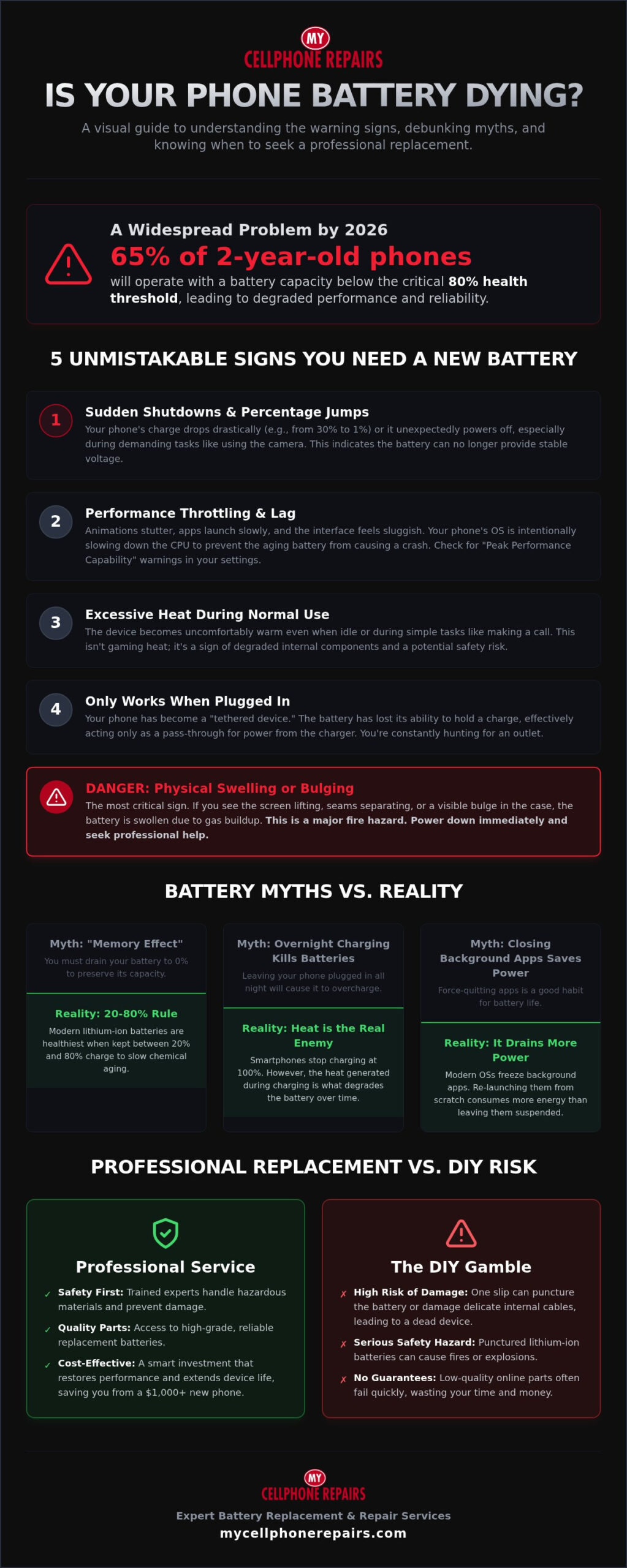
Did you know that 65% of two-year-old phones in 2026 operate with a battery capacity below the 80% threshold? This degradation is a major warning. It is one of the clear signs your phone battery needs replacing, yet many users ignore it until a total failure occurs. You’ve likely felt the frustration of an unexpected shutdown during a critical call. Maybe your device gets uncomfortably hot during basic use. Dealing with a dying battery is stressful. You shouldn’t have to guess if your phone is safe or if you’ll be stranded without a charge.
We’ll help you identify the real warning signs and debunk the myths that lead to wasted money. This guide provides a clear “yes or no” on whether you need a professional swap. You will learn how to navigate the latest health metrics in iOS 26 and Android 16. We’ll also explain why a professional battery replacement is a smarter, more sustainable choice than spending $1,000 on a new device. Let’s look at the technical facts and restore your phone’s reliability today.
Key Takeaways
- Bust common myths about “memory effect” and overnight charging to prolong your device’s lifespan.
- Identify the five critical signs your phone battery needs replacing, from erratic percentage jumps to sudden shutdowns.
- Master the diagnostic menus on iPhone and Samsung to check your precise battery health percentage.
- Spot the physical warning signs of a swollen battery before it becomes a safety hazard to you and your device.
- Discover why professional hardware service is safer and more cost-effective than attempting a risky DIY repair.
Myth vs. Reality: Does Your Battery Really Last Forever?
The “Memory Effect” is a relic of the past. It originated with older nickel-based batteries that required a full discharge to maintain capacity. Modern Lithium-ion batteries don’t suffer from this. You don’t need to drain your phone to 0% before plugging it in. In fact, keeping your charge between 20% and 80% is the most effective way to slow down chemical aging.
Overnight charging is another common concern for users. By 2026, smartphone charging technology has become incredibly sophisticated. Your device won’t “overcharge” or explode just because it stays plugged in while you sleep. Integrated circuits cut the power once the battery reaches 100%. However, heat remains a serious threat. If your phone feels hot while charging, that is one of the subtle signs your phone battery needs replacing soon.
Many users still believe closing background apps saves power. This is actually a mistake. Modern operating systems freeze background apps so they consume zero CPU cycles. When you force close them, the phone must restart the entire process next time you open the app. This creates a spike in power usage that drains your battery faster. Chemical exhaustion is inevitable; every charge cycle moves your battery closer to its end.
The 80% Rule: Why Health Percentages Can Lie
Don’t trust the health percentage blindly. A phone showing 85% health can still be failing. As batteries age, their internal chemical impedance increases. This means the battery struggles to deliver high voltage during demanding tasks. Your phone might throttle performance to prevent a crash, even if the capacity looks acceptable. A Charge Cycle is the use of 100% of battery capacity, not a single plug-in session. If your device feels sluggish, look for other signs your phone battery needs replacing.
Software Updates: Help or Hindrance?
Users often blame new updates for “killing” their battery. While it feels like planned obsolescence, the reality is more technical. New OS features in 2026 demand more from older processors. Additionally, your phone performs “reindexing” after an update. This process organizes files and photos in the background to ensure everything stays searchable. It consumes massive amounts of power for the first 48 hours, leading to temporary drain and heat. It’s not a conspiracy; it’s just your hardware working harder.
5 Unmistakable Signs Your Phone Battery Needs Replacing
Identifying hardware failure requires looking past simple software glitches. One of the clearest signs your phone battery needs replacing is the “percentage jump.” You might see your charge drop from 20% to 1% in a few minutes. This happens because the battery’s internal resistance has increased so much that it can’t report an accurate capacity to the operating system. Similarly, unexpected shutdowns at 30% or 40% indicate that the battery cells are collapsing under the pressure of basic tasks like opening a camera app. These crashes occur because the battery can no longer deliver the burst of voltage required for high-energy functions.
A phone that only lives on a charger is a “tethered” device. This is a final warning. At this stage, the battery is no longer a storage unit; it’s merely a bridge for current. The cells have lost their ability to hold chemical energy. If you find yourself constantly searching for an outlet or carrying a power bank everywhere, a professional Battery Replacement is the most efficient way to restore your freedom and stop the frustration.
Sign 1: Performance Lag and “Ghosting”
Modern smartphones use performance management to hide battery failure. If you notice stuttering animations, choppy scrolling, or slow app launches, your OS is likely throttling the CPU. It limits the processor’s speed to prevent the aging battery from drawing too much current and crashing the system. You can often check this in your settings under “Peak Performance Capability.” If your phone says it is applying performance management, it’s a direct confirmation that your hardware is failing and is one of the definitive signs your phone battery needs replacing.
Sign 2: The Hot Potato Effect
Heat is the #1 killer of lithium-ion longevity. When internal components degrade, they generate excess heat even during idle periods. This is different from the heat generated by a high-end game or 4K video recording. If your phone feels like a hot potato while sitting on a desk or during a simple phone call, it’s a hardware red flag. Damaged cells that overheat pose a safety hazard due to potential thermal runaway. This condition can lead to the battery venting or even catching fire. If you experience idle heat, power down the device immediately and seek expert help.
Beyond the Percentage: Check Battery Health Like a Pro
Stop guessing about your device’s stamina. Modern operating systems in 2026 provide deep insights into hardware degradation. While software can hide issues, these diagnostic tools reveal the technical signs your phone battery needs replacing. You don’t need to be a technician to access this data. Both Apple and Samsung have integrated tools that tell you exactly how much life is left in your cells.
For iPhone users, navigate to Settings, then Battery, and select Battery Health & Charging. Here, you will see the “Maximum Capacity” percentage. This number compares your battery’s current capacity to when it was new. If this number is below 80%, your device is likely struggling. You should also check the “Peak Performance Capability” section. If it says performance management has been applied, your battery can no longer deliver the necessary voltage for high-demand tasks. As part of an iPhone battery replacement, our experts evaluate the entire device health to ensure peak performance.
Interpreting iPhone Battery Health Data
If you see a “Service” warning, it is one of the clearest signs your phone battery needs replacing. This message appears when the capacity drops significantly or the hardware fails a self-diagnostic test. Maximum Capacity tells you how long the charge lasts, but Peak Performance tells you if the phone will stay powered on during a heavy workload. Don’t ignore a service message. Following official battery safety guidelines helps prevent accidents while checking degraded hardware. iPhone 14 users who see this warning should review the iPhone 14 battery replacement professional service guide to understand their specific repair options and what to expect from the process.
Android Battery Diagnostics: The Hidden Menus
Samsung users have a dedicated tool within the Samsung Members app. Open the app, tap Support, then Phone Diagnostics, and select Battery Status. It will provide a simple “Normal,” “Action Required,” or “Weak” rating. For other Android devices, the process is often more manual. You can try entering the dialer code *#*#4636#*#* to access a hidden testing menu. This menu provides raw data on battery voltage and temperature. On newer Android 15 and 16 devices, you can now find the “Battery Cycle Count” in the settings menu. A typical battery begins to show significant wear after 500 to 800 full cycles.
If these built-in tools feel too vague, third-party apps like AccuBattery offer deeper data. These apps monitor your charge and discharge speeds in real-time. They can estimate your actual capacity in milliampere-hours (mAh) rather than just a simple percentage. This data is invaluable for identifying “silent” battery failure that the OS might miss. For a comprehensive overview of all your repair options and what to expect from the process, our ultimate guide to phone battery replacement covers every step in detail.
The Danger Zone: When a Bad Battery Becomes a Safety Hazard
A degraded battery is more than just a nuisance. It can eventually become a physical threat to your device and your safety. One of the most alarming signs your phone battery needs replacing is physical swelling. This occurs when the internal chemical structure breaks down and produces gas. This gas gets trapped inside the battery’s protective casing, causing it to expand like a balloon. You might notice your screen lifting away from the frame or a “spongy” feel when you press on the display.
If you see these physical changes, you need a swollen phone battery replacement immediately. Ignoring a bloated battery can lead to a “thermal runaway” event. This is a chain reaction where the battery generates uncontrollable heat, often leading to fire or smoke. Another warning sign is a distinct chemical odor. If your phone smells like ozone or has a strangely “sweet” metallic scent, the battery casing has likely been breached. This is a critical hardware failure that requires expert intervention.
Identifying Physical Battery Expansion
Physical expansion often starts subtly. Look for a “white haze” or faint pressure marks on your LCD screen. These are caused by the battery pushing against the underside of the display panel. If the screen is visibly lifting, do not attempt to snap it back into place. Never squeeze or press down on a lifting screen. Outgassing is the process where failing cells release flammable vapors; applying pressure could puncture the pouch. If you suspect your battery is growing, it is one of the definitive signs your phone battery needs replacing before it cracks your screen or starts a fire.
Immediate Action Steps for Failing Batteries
Act quickly if your device shows signs of a safety hazard. First, stop charging the device immediately. Fast chargers are especially dangerous for compromised cells because they push high levels of current that generate rapid heat. Power the phone down if it is safe to do so. Store the device in a cool, dry place away from flammable materials like curtains or bedding. Do not throw it in the trash, as this creates a fire risk for waste management. Instead, bring it to a specialist for a safe Battery Replacement. We have the tools to extract failing batteries without causing further damage to your hardware.
Professional Battery Replacement: Why DIY is a Risky Gamble
Modern smartphones in 2026 are engineering marvels. They feature “glass-sandwich” designs held together by industrial-strength adhesives. Recognizing the signs your phone battery needs replacing is the first step toward restoration, but attempting a DIY repair is a high-stakes gamble. Without specialized heat tools, you risk cracking the back glass or severing delicate ribbon cables. Puncturing a lithium-ion cell during removal creates an immediate fire hazard. Professional service is the only safe way to handle these volatile components.
Beyond the physical risks, modern devices use a Battery Management System (BMS) paired to the motherboard. Using a non-certified replacement part can trigger software errors or disable battery health metrics entirely. A professional repair also ensures that your water-resistance seals are replaced correctly. Without these specific gaskets, your phone is vulnerable to liquid damage from the slightest splash. Choosing a battery swap is a sustainable choice that saves you from spending $1,000 on a new device while maintaining factory-level protection. If you own an iPhone 14 that can no longer survive a morning commute without a charger, a professional iPhone 14 battery replacement is a strategic upgrade that restores all-day performance without the risks of a DIY attempt.
The My Cellphone Repairs Difference
Our technicians operate in ESD-safe environments to protect your phone’s sensitive logic board from static discharge. We use high-quality, tested replacement cells that match original manufacturer specifications. Cheap knockoff batteries found online often lack safety fuses and degrade within months. We take pride in our Samsung battery replacement expertise, especially for complex S-series and Z-Fold models. Our team understands how to handle the unique internal layouts of flagship devices without compromising their structural integrity.
Beyond the Battery: Full Device Diagnostics
We don’t just swap the hardware and send you on your way. Every service includes a full diagnostic check of the charging port and motherboard power IC. Sometimes, what looks like a battery failure is actually a software bug or a faulty charging cable. We utilize our phone battery draining fast fix protocols to rule out background processes before opening the device. This thorough approach ensures we solve the root cause of your problem.
If you have noticed the signs your phone battery needs replacing, a professional repair provides the peace of mind you deserve. All repairs come with a warranty; coverage depends on the part used. Ask your store for details. Trusting a specialist keeps your device in peak condition for years to come. We make the restoration process seamless and efficient for every customer.
Restore Your Phone’s Power Today
Your smartphone is a vital tool for daily life. Don’t let a failing battery hold you back from important calls or essential tasks. We have covered how to separate common charging myths from technical reality. You now know that erratic percentages and excessive heat are more than just minor glitches. Identifying the signs your phone battery needs replacing early is the best way to avoid unexpected shutdowns or dangerous safety hazards like thermal runaway.
My Cellphone Repairs is your dependable ally for expert hardware restoration. Our technicians are highly trained in iPhone, Samsung, and MacBook repairs. We provide seamless battery swaps that return your device to peak performance quickly. If you are looking for an upgrade, explore our selection of certified refurbished devices. We also support the industry through our comprehensive training program for the next generation of specialists. Choosing a repair is a sustainable decision that saves you money and reduces electronic waste.
Take the first step toward a reliable charge. Get a Professional Battery Diagnostic and Replacement Today. Give your favorite device a second life and stay connected with confidence throughout 2026.
Frequently Asked Questions
How long should a phone battery typically last before needing replacement?
Typically, a smartphone battery lasts between 2 and 3 years. Most users notice a drop below the 80% health threshold after about 24 months of normal use. Flagship models in 2026 often retain about 82% capacity during this period. If your device struggles to hold a charge before the two-year mark, check for other signs your phone battery needs replacing. Environmental heat and heavy usage can accelerate this timeline significantly.
Can a bad battery cause my phone to run slowly or lag?
Yes, a degraded battery frequently causes performance lag. Manufacturers often throttle the CPU speed to prevent the phone from shutting down unexpectedly when the battery can’t supply enough voltage. You might notice stuttering animations or apps taking longer to open. Replacing the hardware restores the phone to its original speed. This is a common solution for older devices that feel sluggish despite having the latest software updates.
Is it safe to use a phone with a cracked back if the battery is old?
It is risky because a cracked back glass allows moisture and debris to enter the device. If the battery is also old, it may already be prone to swelling. Moisture reaching a compromised lithium-ion cell can lead to corrosion or a short circuit. This increases the risk of fire or total hardware failure. You should address both the glass and the battery to ensure the device remains safe for daily use.
Will replacing my battery delete any of my photos or data?
No, a standard battery swap does not affect your stored data. The battery provides power but does not store your photos, messages, or apps. However, we always recommend performing a full backup to iCloud or Google Drive before any hardware service. This is a standard safety protocol for all professional electronic repairs. Our technicians handle your device with care to ensure your information remains intact throughout the process.
How much does a professional phone battery replacement cost in 2026?
Costs for professional service depend on your specific device and the complexity of the repair. Industry trends in 2026 show that a battery swap is a small fraction of the price of a new flagship phone. Choosing a professional service ensures you receive high-quality parts and expert labor. This investment protects the longevity of your hardware and maintains your device’s water-resistance seals. We provide efficient, expert service for all major brands.
Can I still use my phone if the battery health is at 75%?
You can use the device, but you will experience significant performance issues. At 75% health, your phone will likely require multiple charges per day and may shut down during demanding tasks. This level of degradation is one of the clear signs your phone battery needs replacing to maintain reliability. Continuing to use a heavily degraded battery puts extra stress on the charging port and other internal components over time.
What happens if I ignore a swollen battery for too long?
Ignoring a swollen battery leads to permanent hardware damage and safety risks. The expanding cell can crack your screen or bend the internal motherboard. Eventually, the battery casing may breach, leading to outgassing or a fire. If you notice the back of your phone lifting or the screen appearing spongy, stop using the device immediately. This is a critical failure that requires urgent professional attention to prevent an accident.
Does fast charging damage my battery over time?
Fast charging generates more heat, which is the primary cause of battery wear. While modern phones use Adaptive Charging to manage this, frequent high-speed charging still accelerates chemical aging compared to slower methods. It’s best to use fast charging when you are in a hurry but rely on standard speeds overnight. This simple habit can help you extend the lifespan of your lithium-ion cells by several months in 2026.