
What if your frozen screen isn’t actually broken? It’s a common fear. You try to unlock your device, but your iPhone touchscreen not responding leaves you stuck. You might worry about losing your data or facing a massive repair bill. We understand that technical frustration. Most of the time, an unresponsive screen is a software deadlock or an environmental glitch rather than a total hardware failure. It’s often a problem you can solve in minutes with the right steps.
This guide provides a methodical approach used by professional repair technicians to restore your device. We’ll show you exactly how to diagnose the cause and fix the issue efficiently. You’ll learn the correct force-restart procedures for 2026 models and how to clear simple interference. We also explain when professional restoration is the only safe option for your hardware. Follow these expert steps to get your iPhone working again without the stress of unnecessary costs. Our goal is to provide a clear path to a working phone through expert technical guidance.
Key Takeaways
- Master the specific force-restart sequence for 2026 iPhone models to instantly clear temporary memory deadlocks and software freezes.
- Diagnose if your iPhone touchscreen not responding is a system-wide hardware failure or a simple software glitch by checking for visual artifacts.
- Identify how microscopic cracks in screen protectors or hidden moisture can disrupt touch sensitivity and learn how to clear these environmental barriers.
- Understand when professional restoration is necessary for complex issues like digitizer damage or logic board failures that require specialized microsoldering tools.
- Implement pro-level maintenance habits, such as cleaning charging ports and managing storage, to ensure long-term UI performance and device reliability.
Quick DIY Fixes for an Unresponsive iPhone Screen
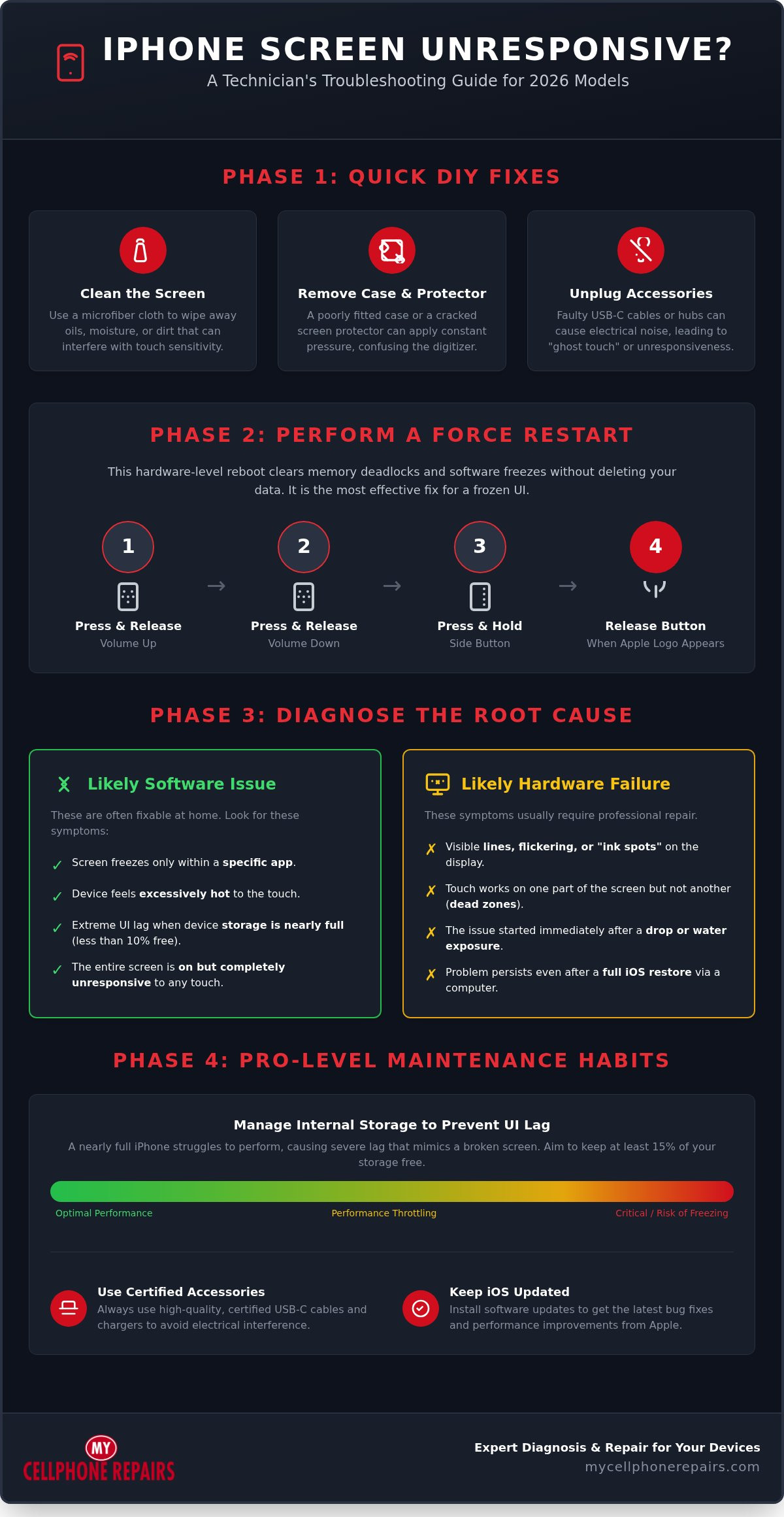
Technical glitches often look like hardware failures when they’re actually just temporary software deadlocks. If you find your iPhone touchscreen not responding, start with the basics before assuming the worst. First, use a clean microfiber cloth to wipe the display. Conductive oils from your skin or moisture can build up and confuse the digitizer. Next, remove your phone case and any screen protectors. Modern displays rely on complex pressure-sensing technology to register your inputs. A poorly fitted case or a microscopic crack in a tempered glass protector can apply constant pressure, which prevents the screen from recognizing your actual touch.
Mastering the 2026 Force Restart
A force restart is the most effective way to clear a frozen UI. It’s a hardware-level power cycle that cuts power to the processor briefly without erasing any of your personal data. Follow these steps for 2026 models:
- Press and quickly release the Volume Up button.
- Press and quickly release the Volume Down button.
- Press and hold the Side button.
- Keep holding until the Apple logo appears on the display, then release.
This process forces the operating system to reboot from scratch. It’s a vital tool for fixing an iPhone touchscreen not responding due to background app crashes or memory leaks that have locked the interface.
The Impact of Third-Party Accessories
Accessories play a major role in device stability. With the 2026 industry standard fully committed to high-speed USB-C, the quality of your peripherals matters more than ever. Faulty charging cables or low-quality USB-C hubs can introduce electrical noise into the device. This interference often results in “ghost touch” where the screen moves on its own, or total unresponsiveness.
Testing your device while it’s completely unplugged is a critical diagnostic step. If the touch functionality returns the moment you remove the charging cable, the accessory is the culprit. We’ve seen many cases where 2026-standard hubs cause the digitizer to fail because they don’t meet the required shielding specifications. Always use certified cables to ensure your screen remains responsive during charging or data transfers. If the screen stays frozen even after unplugging and restarting, the issue likely sits deeper within the software or the hardware assembly itself.
Is It Software or Hardware? Identifying the Root Cause
You must pinpoint where the breakdown occurs. If your iPhone touchscreen not responding only happens in one specific app, it’s a software bug. Force quit the app or check for updates. If it happens everywhere, look for visual clues. Lines, flickering, or dark “ink spots” on the display indicate physical damage to the OLED or LCD panel. Heat also plays a role. If the phone feels hot to the touch, the system throttles performance to protect internal components. This often causes severe input lag that mimics a broken digitizer.
Use the Reachability feature as a diagnostic tool. Swipe down on the bottom edge of the screen to bring the top half within reach. If the top of the screen responds when it’s lowered but not when it’s in its normal position, you have a hardware dead zone. These troubleshooting steps from CNET can help you verify these patterns further. Identifying these zones helps you determine if the issue is a simple glitch or a deeper hardware failure.
Software Glitches vs. Digitizer Failure
Software deadlocks often leave the screen on but unresponsive to any input. You might see the clock frozen or find that physical buttons don’t trigger the UI. In contrast, digitizer failure is usually localized. Touch might work on the left side but fail on the right. If you suspect deep OS corruption, perform a full iOS restore using a computer. This wipes the software clean and reinstalls the firmware. If the problem persists after a fresh install, you likely need a professional iPhone screen repair to restore the hardware assembly.
The Role of Internal Storage
A nearly full iPhone is a slow iPhone. When you have less than 10% of your storage free, the operating system struggles to swap temporary files. This leads to extreme UI lag that feels like a broken screen. If you can’t touch the screen to delete files, use Siri. Tell Siri to “Open Settings” or “Delete the last photo I took.” You can also connect a USB-C keyboard to navigate the menus. Clearing out “System Data” bloat and large video files often restores immediate responsiveness to the touch interface. Keeping your storage lean is a simple way to prevent an iPhone touchscreen not responding during heavy use.
Environmental Factors: Screen Protectors and Moisture
External layers and environmental conditions often trigger a situation where you find your iPhone touchscreen not responding. Your screen relies on a capacitive electrical field to register touch. Anything that disrupts this field, from a hairline crack in a protector to a layer of invisible humidity, can cause total unresponsiveness. We’ve seen many cases where a phone appears broken, but the issue is simply a physical barrier interfering with the digitizer’s sensors.
Moisture is a frequent culprit, even in water-resistant 2026 models. Water resistance is a rating, not a permanent seal. Over time, the adhesives that keep out liquid can degrade. Never use a hairdryer to dry a damp phone. The intense heat can melt the internal adhesives of modern OLED displays, causing permanent damage. If you suspect liquid ingress, follow these expert how to fix water damaged iPhone emergency steps to prevent a short circuit.
Screen Protector Sensitivity Settings
High-quality screen protectors are essential for maintaining the 2026-standard haptic feedback. If your protector has lost its adhesive bond or has microscopic cracks, it can create air gaps. These gaps prevent your finger’s electrical signal from reaching the screen. You can sometimes compensate for this by adjusting your settings. Go to the Accessibility menu and select “Touch Accommodations.” Increasing the “Hold Duration” or “Ignore Repeat” settings can help the device better interpret your inputs through a thick protector. If you see air bubbles or lifting edges, remove the protector immediately to see if it’s the cause of your iPhone touchscreen not responding.
Hidden Moisture and Corrosion
Hidden moisture is often more dangerous than a direct splash. High humidity can cause internal condensation on the digitizer connector, leading to intermittent touch failure. You can check for serious exposure by looking at the Liquid Contact Indicator (LCI). On most models, this is located inside the SIM tray slot. Use a flashlight to peek inside; if the white indicator has turned red, the device has had significant liquid contact.
Forget the myth about using rice to dry a phone. Rice is ineffective and can introduce dust and starch into your charging port. Instead, use silica gel packets or a fan to provide constant airflow. If the touch issues persist after the device is dry, professional water damage repairs are necessary to clean the internal connectors and stop corrosion before it destroys the logic board. Restoration is possible if you act quickly and avoid DIY heat treatments.
Professional Restoration: When DIY Fixes Aren’t Enough
Sometimes software resets and cleaning aren’t enough to solve the problem. If you still find your iPhone touchscreen not responding after a force restart, the issue is likely rooted in the physical hardware. The display is a complex, bonded assembly consisting of the glass, the digitizer, and the OLED panel. A failure in the digitizer layer means the screen can no longer translate your touch into electrical signals. This situation requires a full iPhone screen repair to restore the device to its original factory standards. We focus on efficiency to ensure your device is back in your hands quickly.
The Precision of Professional Repair
Modern iPhone screens are highly sensitive instruments. Technicians use specialized tools to calibrate new displays specifically to your logic board. Attempting a DIY fix is risky. One slip of a plastic pry tool can tear delicate ribbon cables or permanently disable FaceID sensors. Our professional technician training background ensures we handle these components with extreme precision. We don’t just swap parts; we perform a methodical restoration. This approach maintains the integrity of your device’s security features and haptic feedback while preventing further damage.
Logic Board vs. Screen Replacement
Not every unresponsive screen needs a new display panel. Sometimes the breakdown lies deeper within the device. A “dead” touch interface can stem from bent ground pins or a loose display connector on the logic board. In more severe cases, a power IC or backlight chip failure mimics a broken screen. These complex issues, often related to “Touch Disease,” require microsoldering. This is a specialized process of repairing microscopic circuits under a high-powered microscope. A professional diagnostic prevents you from wasting money on a screen replacement when the logic board is the true culprit. Before committing to any repair, understanding the full scope of your options through a detailed phone screen repair vs replacement analysis can help you make the most financially sound decision for your specific device. If you own an iPhone 15, reviewing the current iPhone 15 screen repair cost across official and independent service options can help you budget accurately before seeking a fix.
Professional expertise saves you time and prevents permanent hardware damage. If your screen remains frozen despite your best efforts, trust the experts for a seamless fix. You can rely on our team for a professional iPhone screen restoration that brings your device back to life.
Maintenance and Reliable Alternatives for 2026
Prevention is the most efficient way to ensure your device remains reliable. A frequent but overlooked cause of an iPhone touchscreen not responding is actually debris trapped in the charging port. With the 2026 USB-C standard, even small amounts of lint or dust can cause electrical interference that disrupts the digitizer’s grounding. We recommend using a non-conductive tool or compressed air to clean the port every month. Additionally, you should always keep at least 10% of your internal storage free. This space acts as a vital buffer for the operating system, allowing it to process touch inputs and UI animations without the lag that mimics hardware failure.
Preventing Future Touch Issues
Maintaining your software health is just as vital as physical cleaning. Always install stable iOS updates because they often contain critical patches for UI responsiveness. We suggest avoiding developer beta versions on your primary device, as these frequently suffer from unoptimized touch drivers. Your choice of protection also plays a major role in device longevity. Choose a case with a noticeable raised lip. This design prevents the glass from making direct contact with surfaces during a drop, which protects the delicate digitizer layers from impact shock. Finally, monitor your battery health in the system settings. When a battery degrades, it can fail to provide consistent voltage to the display assembly, leading to intermittent unresponsiveness and “ghost” touches.
There comes a point where the cost of a complex restoration exceeds the actual value of an older device. If your phone has suffered multiple hardware failures or significant logic board damage, choosing a refurbished iPhone for sale is the smart, sustainable alternative. This option is better for the environment and much lighter on your wallet than purchasing a brand-new model from a retail store.
Every device in our program undergoes a rigorous multi-point inspection to ensure total reliability. We verify the digitizer sensitivity, battery capacity, and logic board integrity so you receive a device that performs like new. Comparing the price of a high-end repair to a certified replacement helps you make the most cost-effective decision for your tech needs. Our refurbished iPhone for sale program offers a sustainable upgrade that resolves your iPhone touchscreen not responding issues permanently without the high cost of a new purchase.
Restore Your iPhone’s Performance Today
A frozen screen doesn’t have to mean the end of your device. By following a methodical diagnostic path, you can often distinguish between a simple software deadlock and a genuine hardware failure. Whether it’s mastering the 2026 force-restart sequence or identifying environmental interference from moisture and protectors, you now have the tools to troubleshoot effectively. Most issues are manageable when you approach them with the right technical knowledge and a calm perspective.
When DIY methods fail and your iPhone touchscreen not responding persists, professional intervention is the safest route to restoration. Our team of hardware repair experts, with stores across Maryland, Pennsylvania, New Jersey, Virginia and Michigan, follows rigorous technician training standards to ensure every fix is precise and reliable. If a repair isn’t the most efficient choice for an older model, we also offer high-quality certified refurbished devices as a sustainable upgrade path. Restore your iPhone screen today with our expert repair services and get back to using your device with total confidence. We’re here to provide the specialized support you need to resolve any technical crisis quickly and effectively.
Frequently Asked Questions
Can a software update fix an unresponsive iPhone touchscreen?
Yes, a software update can resolve touch issues caused by operating system bugs or driver conflicts. Apple frequently releases patches designed to optimize UI responsiveness for the latest iOS versions. If your phone allows intermittent touch, check the Settings menu for a pending update. If the screen is completely frozen, connect the device to a computer to perform a recovery-mode update. This process overwrites system files without deleting your personal data.
How do I force restart my iPhone if the screen won’t respond?
To force restart a 2026 model, quickly press and release Volume Up, then Volume Down, and hold the Side button until the Apple logo appears. This hardware-level power cycle is essential when an iPhone touchscreen not responding prevents you from using the standard power slider. It clears the system’s temporary memory and forces a fresh boot. This method is safe and won’t delete any of your photos or personal data.
Will a cracked screen eventually stop responding to touch?
Yes, even a minor hairline crack will eventually lead to total touch failure. Cracks allow moisture and oils to penetrate the display assembly, which corrodes the sensitive digitizer layer over time. Physical stress from pressing on cracked glass also causes the bonded layers to separate. If you notice “dead zones” or erratic behavior after a drop, it’s a clear sign that the hardware integrity is failing and requires a professional screen replacement.
Is it safe to use my iPhone if the screen is glitching or ghost-touching?
It’s not safe to continue using a device that exhibits ghost-touching. When the screen registers phantom inputs, it can accidentally trigger emergency calls, delete important data, or enter the wrong passcode until the device is permanently disabled. If your screen starts moving on its own, power the device off immediately. This behavior usually indicates a failing digitizer or significant electrical interference that requires a hardware diagnostic to resolve safely.
How much does it cost to fix an iPhone touchscreen that is not responding?
Repair costs vary based on the model and the specific cause of the failure. For out-of-warranty service at an independent shop, prices typically range between $99 and $279 for a full screen assembly. If the problem is a loose connector or a software glitch, the cost is much lower. Always seek a professional diagnostic to avoid paying for a new screen when a simpler restoration might solve the underlying hardware or software issue. For a detailed breakdown of what to expect, our guide to iPhone 15 screen repair cost compares official and independent service pricing to help you plan accordingly.
Does water damage always cause the touchscreen to fail immediately?
No, water damage often causes delayed failure rather than an immediate breakdown. While a splash might not stop the screen instantly, liquid reaching internal connectors triggers slow corrosion. This often results in an iPhone touchscreen not responding days or weeks after the initial exposure. If your device has been submerged, power it off and seek professional cleaning. Expert technicians use specialized tools to remove minerals before they permanently destroy the logic board circuitry.
Can a bad battery cause an iPhone screen to stop responding?
Yes, a failing battery can directly impact screen responsiveness. If a battery is old or chemically depleted, it may fail to provide the consistent voltage required by the display assembly during peak performance. Additionally, a swelling battery can press against the back of the display, causing “pressure spots” and digitizer malfunctions. Monitoring your battery health is a critical step in maintaining a responsive UI and preventing physical damage to the screen.
What should I do if my iPhone screen is black but still vibrating or making sounds?
If your screen is black but the phone still vibrates, the display assembly has likely failed while the logic board remains functional. First, perform a force restart to rule out a software “black screen” glitch. If the Apple logo doesn’t appear during the reboot, the backlight or the OLED panel is physically damaged. You’ll need an expert technician to inspect the internal display cables and the power IC to restore the visual output.