
What if that “moisture detected” warning on your screen is actually a software glitch or a bit of pocket lint rather than a hardware catastrophe? It’s incredibly frustrating when you’re trying to head out for work or call family and your phone refuses to take a charge. You’re likely worried about the high cost of a replacement or being stuck without your device for days while it sits in a repair shop. We understand that a dead battery feels like a minor crisis when your life runs on your phone.
This guide will show you exactly how to find a reliable Samsung charging port not working fix by diagnosing the issue safely at home. You’ll learn how to identify the difference between a physical blockage and a deeper hardware failure. We’ll walk through five proven steps, from cleaning techniques to the latest One UI 8.5 software checks, so you can get back to full power quickly. Whether it’s a simple DIY task or a situation that requires a professional hand, you’ll have the knowledge to fix it fast and prevent it from happening again.
Key Takeaways
- Identify if compressed lint or debris is blocking your connection and learn how to remove it safely without damaging the internal pins.
- Use a forced restart or Safe Mode to determine if a temporary software glitch is the true cause of your power issues.
- Learn the specific steps for a Samsung charging port not working fix when dealing with persistent moisture detection warnings or sensor errors.
- Recognize the signs of physical wear, such as loose connections or visible corrosion, that require a professional 15-30 minute repair.
Common Causes of Samsung Charging Port Failure
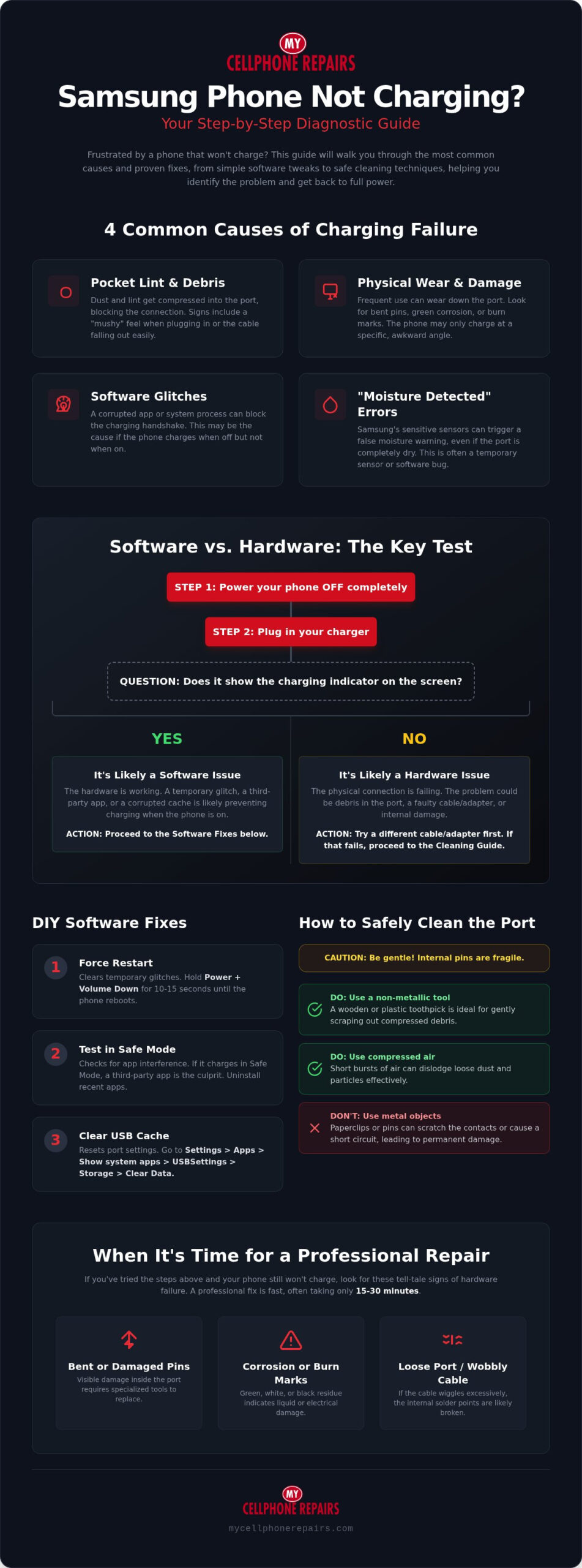
A dead battery is a major disruption. Before you assume your phone is broken, you need to understand why the connection failed. Most issues stem from four main areas: debris, wear, software, or physical damage. Pinpointing the cause is the first step toward a Samsung charging port not working fix that actually lasts.
The Role of Pocket Lint and Debris
Your phone lives in your pocket or bag. Every day, microscopic bits of lint, dust, and fabric work their way into the open port. This seems harmless until you plug in your charging cable. The connector acts like a piston, shoving that loose debris to the back of the port and compressing it into a dense, felt-like layer. Over time, this layer prevents the metal pins from making a clean connection.
Watch for specific warning signs. Does your cable feel “mushy” when you plug it in? Does it fail to make that satisfying “click” sound? If the cable falls out easily or you have to wiggle it to start the power flow, you likely have a debris blockage rather than a hardware failure. This is the most common reason for charging issues in 2026.
Mechanical Wear and Physical Damage
Modern Samsung devices rely on USB-C technology for power and data transfer. While this standard is durable, it isn’t invincible. Frequent insertion and removal of cables eventually wear down the internal tolerances. If you often use your phone while it’s plugged in, the constant tension on the cable can strain the internal pins or even crack the solder joints on the printed circuit board (PCB).
Visible damage is a clear indicator. Use a bright light to look inside the port. If you see bent pins, green corrosion from liquid exposure, or dark burn marks, the hardware has failed. In these cases, a simple cleaning won’t work. You’ll need professional intervention to replace the port assembly entirely. These physical failures often manifest as a phone that only charges at a specific, awkward angle.
Software vs. Hardware: How to Tell
Sometimes the port is fine, but the software is confused. A corrupted USB setting or a background app can block the charging handshake. To test this, try charging the phone while it is completely powered off. If it takes a charge while off but refuses while on, you’re likely facing a software glitch or a corrupted cache loop.
The “Moisture Detected” warning is another common software-related hurdle. Samsung’s sensitive sensors might trigger this alert even if the port is dry. If the icon persists after the port has had time to air out, it suggests a sensor error or a software bug. Identifying these nuances early saves you time and prevents unnecessary repair costs. Knowing these causes helps you choose the right Samsung charging port not working fix for your specific situation.
Software Fixes for Samsung Charging Issues
Software glitches often mimic hardware failure. If you’ve verified the port isn’t physically damaged, your phone’s operating system might simply be refusing to recognize the charger. This is a common hurdle with recent One UI updates. A forced restart is your quickest first move. Hold the Power and Volume Down buttons simultaneously for 10 seconds. This forces the system to reboot and can clear temporary cache loops that prevent charging immediately.
Testing in Safe Mode
Third-party apps can sometimes interfere with the USB controller. Safe Mode is a diagnostic environment that runs only essential system software. To enter Safe Mode, power down your device completely. Press and hold the Power button until the Samsung logo appears, then immediately hold the Volume Down button until the phone finishes booting. You’ll see “Safe Mode” displayed in the bottom corner of the screen.
Plug in your charger while in this mode. If the device starts drawing power, you know a recently installed app is the culprit. You can then restart normally and uninstall apps one by one to find the offender. This process is a vital part of any Samsung charging port not working fix because it rules out hardware issues without requiring a factory reset.
Clearing the USB Settings Cache
The system service responsible for managing your port can occasionally crash or store corrupted data. You can reset this service manually to restore functionality. Go to Settings, then Apps, and tap the “Filter and sort” icon to toggle on “Show system apps.” Search for “USBSettings” and select it. Tap Storage and then Clear Data. This resets the port sensors and logic without deleting your photos or messages.
System updates also play a critical role in device health. As of July 2026, Samsung has released One UI 8.5, which includes 57 security patches and various hardware stability fixes. Check your settings for available updates to ensure your USB controller is running the latest firmware. Sometimes a persistent “Moisture Detected” error is simply a bug that a quick patch will resolve. If you’ve tried these steps and still see no progress, ensure you safely clean your charging port to be certain debris isn’t the root cause. If the software is stable but the problem persists, the experts at My Cellphone Repairs can provide a professional diagnostic to identify deeper hardware faults.
How to Clean a Samsung Charging Port Safely
Cleaning your device is often the most effective Samsung charging port not working fix available. It costs nothing and takes less than five minutes. However, you must be extremely careful. One wrong move can turn a simple cleaning task into an expensive hardware replacement. While the official Samsung troubleshooting guide suggests basic checks, physical cleaning requires a more focused, delicate touch to avoid internal damage.
Always power down your device completely before you begin. You are working around live electrical contacts. Even though the battery is low, a small amount of residual power remains. Powering off reduces the risk of an electrical short while you work inside the port.
The “No Metal” Rule
Online tutorials often show people using sewing needles or safety pins to scrape out lint. This is dangerous advice that you should ignore. Metal is a conductor. If your metal tool touches two pins simultaneously, you can short-circuit the 5V charging pins and fry the motherboard. This turns a minor debris issue into a total device failure instantly.
Scratches on the delicate gold plating of the pins are another major risk. Once that plating is damaged, the pins become susceptible to rapid corrosion and poor data transfer. Use non-conductive tools instead. A wooden toothpick or a cut-down plastic dental flosser works perfectly. These materials are soft enough to protect the pins but firm enough to dislodge stubborn grime.
Step-by-Step Cleaning Process
Find a room with excellent lighting and grab a bright LED flashlight. Shine the light directly into the port to locate the debris. You’re looking for that compressed layer of lint we discussed earlier. It usually settles at the very bottom of the port, behind the center assembly.
Insert your plastic or wooden tool gently. Focus your movements on the floor of the port. Samsung ports feature a center “tongue” where the actual pins live. Never scrape this center assembly directly. Instead, work around the edges to hook the lint and pull it outward. Avoid using excessive force; the debris should come out in small clumps once you hook it correctly.
Once you have removed the bulk of the debris, use short bursts of compressed air to clear out remaining dust. Do not blow into the port with your mouth. Your breath contains moisture that can trigger the very moisture sensors you’re trying to avoid. Finish the job by using a soft-bristled brush to sweep away any lingering particles from the edges of the port opening.
Fixing the Samsung “Moisture Detected” Error
Samsung’s moisture sensors are incredibly sensitive. They are designed to protect your device from a catastrophic short circuit by blocking power. However, these sensors often trigger a “false positive” warning due to high humidity, steam from a shower, or even pocket sweat. If your screen shows a water drop icon, the phone will stop all wired charging immediately. This is a common hurdle when searching for a Samsung charging port not working fix, as the phone thinks it’s saving itself from damage even when the port is visually dry.
Drying Techniques That Work
Forget the old advice about using a bowl of rice. Rice is a poor desiccant and introduces fine dust and starch into your port. This debris can cause even more connectivity issues later. Instead, use silica gel packets. These are the small pouches found in shoe boxes or electronics packaging. Place your phone in a sealed container with several of these packets for a few hours. They absorb humidity much more effectively than food items.
If you’re in a hurry, use a hair dryer on the “Cool” setting only. Never use heat. High temperatures can damage the adhesive holding your screen in place or warp the internal components. Aim the cool air directly into the port for two to three minutes. Ensure the port is completely dry before you attempt to plug in a cable again. Even a tiny amount of residual humidity will re-trigger the sensor and restart the lockout timer.
Bypassing the Warning
Sometimes the warning is simply a software loop. If you’re certain the port is bone dry, try the boot-up bypass. Power the phone off completely. Plug in your charger and immediately turn the phone on. Often, the system will start the charging handshake before the moisture sensor service fully loads during the boot animation. This is a temporary emergency measure. It doesn’t fix the underlying sensor issue, but it can get you enough power to finish your workday.
Don’t forget to inspect your charging cable as well. Moisture can hide inside the USB-C connector head rather than the phone itself. Try a completely different, high-quality cable to rule this out. If the error remains across multiple cables after thorough drying, the internal sensor may be corroded or stuck in a bugged state. You can find more details through Expert Samsung Phone Repair Services to see if your sensors need a professional reset. For a permanent Samsung charging port not working fix, the team at My Cellphone Repairs can diagnose and resolve these sensor bugs in under 30 minutes at our retail locations.
When to Seek Professional Samsung Charging Port Repair
Sometimes a home remedy isn’t enough. If your phone only charges when you prop it up with a book or hold the cable at a specific angle, the internal hardware is failing. This isn’t a software issue. It’s a sign that the solder joints connecting the port to the motherboard are cracked. Mechanical stress from frequent use often causes the port to feel loose or “wiggle” when the cable is inserted. If the connector doesn’t sit firmly, the internal mounting brackets have likely snapped. This physical instability eventually leads to a total loss of power.
Another clear sign is the loss of fast charging capabilities. If your device takes six hours to reach a full charge while using the original Samsung block and cable, the data pins inside the port are likely damaged. These pins handle the high-speed “handshake” between the phone and the charger. When they fail, the phone defaults to a slow, safe speed to prevent overheating. Similarly, if you see green residue or white crust inside the port, corrosion has set in. If you’ve tried every Samsung charging port not working fix mentioned earlier without success, it’s time for professional intervention.
However, if your phone is an older model and the repair costs are mounting, you might find it more beneficial to sell it for cash; Phones4cash LLC offers a straightforward buyback process for smartphones and other electronics.
The My Cellphone Repairs Advantage
We provide a fast, reliable alternative to mailing your device to the manufacturer. Our technicians offer a 15-30 minute turnaround time at our national retail locations. You don’t have to be without your phone for days while waiting for a shipping box. Every technician completes a certified training program specifically for Samsung hardware. Our team specializes in the Samsung charging port not working fix for all modern Galaxy models. We also use a flat-fee pricing model for total transparency. You’ll know the exact cost before the repair begins.
What to Expect During a Port Replacement
Replacing a charging port is a precision task that requires specialized tools. Our technicians carefully disassemble the phone to reach the charging daughterboard. This is a dedicated component in most Samsung models that houses the USB-C port and microphone. We install a high-quality, certified replacement part to restore full functionality. Our diagnostic process ensures we aren’t just treating a symptom but solving the root cause. We check the battery health and the charging IC on the mainboard to confirm the new port will function perfectly. After the repair, we verify that fast charging, data transfer, and microphone quality all meet original factory standards. Visit a My Cellphone Repairs location for a fast, flat-fee fix today.
Restore Your Device to Full Power Today
Solving a charging failure doesn’t have to be a multi-day ordeal. You now have the tools to identify compressed debris, reset the USB cache, and bypass moisture sensor glitches safely. These methods provide a reliable Samsung charging port not working fix for most common daily issues. Always use non-conductive tools to protect the delicate internal pins from permanent electrical damage and avoid using heat on the port.
If the hardware is physically worn, loose, or corroded, a professional touch is the safest choice. Our expertly trained technicians use certified parts and follow a transparent, flat-fee pricing model. You don’t have to wait days for a manufacturer to mail your phone back or worry about hidden costs. You can get your Samsung charging port fixed in 30 minutes or less! We provide a 15-30 minute turnaround at our retail locations to get you back to work and family immediately. Your device is in good hands and will be back to full strength in no time.
Frequently Asked Questions
How much does it cost to fix a Samsung charging port in 2026?
The cost of a Samsung charging port repair depends on your specific Galaxy model and the extent of the damage. Most professional repair shops utilize a flat-fee pricing model to ensure transparency and avoid hidden charges. This approach is often more cost-effective than manufacturer mail-in programs, which typically include diagnostic fees. Choosing a local expert ensures you pay for the specific hardware needed without unnecessary markups.
Can I use alcohol to clean my Samsung charging port?
You can use 99% isopropyl alcohol sparingly to remove stubborn grime or sticky residue from the port. Never use 70% rubbing alcohol because the higher water content can lead to internal corrosion on the delicate pins. Apply a tiny amount to a soft-bristled brush rather than pouring it into the device. Always power down the phone before cleaning and let the port air dry completely for ten minutes before plugging in a cable.
Why does my Samsung phone say moisture detected when it is dry?
This error often stems from a software loop or high humidity rather than direct liquid contact. Pocket lint can also trap microscopic amounts of sweat that trigger the sensitive sensors. Clearing your USB settings cache or rebooting in Safe Mode are effective steps for a Samsung charging port not working fix when dealing with persistent false positives. If the warning remains for more than 24 hours, the internal sensor likely requires a professional hardware reset.
Is it better to repair the port or use wireless charging instead?
How long does a professional charging port repair take?
An expert technician can complete a Samsung port replacement in 15 to 30 minutes at a retail location. This is much faster than mailing your device to a manufacturer service center, which often takes a week or more. Local repairs prioritize a quick turnaround so you can get back to your routine with minimal disruption. Professional service also includes post-repair testing to ensure fast charging and data sync work perfectly before you leave.
Will a broken charging port cause my battery to drain faster?
A damaged port won’t directly drain your battery, but it can cause inconsistent power flow that leads to overheating. If the connection is loose, the phone may repeatedly start and stop the charging cycle, which puts unnecessary stress on the battery cells. This inefficiency can lead to long-term capacity loss. Finding a permanent Samsung charging port not working fix prevents these electrical irregularities from damaging your battery’s overall lifespan and performance.