
Professional phone repair takes more than spotting a damaged part. A mobile repair technician course for beginners can introduce device disassembly, fault diagnosis, operating-system installation, and data backup and recovery. A clear learning sequence builds practical skills, from recognizing device components to diagnosing common problems.
Hands-on practice matters because repair work involves careful testing and reassembly, not just watching a demonstration. Training can also introduce screen and touch-panel issues, water-damage repair, and differences between Android and iOS devices.
This guide explains what beginner training can cover in Towson and what practical sessions may involve. It also compares online and in-person formats, explains where advanced topics such as micro-soldering fit, and shows how My Cellphone Repairs’ Technician Training Program can support your next step.
Key Takeaways
- Learn how training builds from basic device identification and safe disassembly to troubleshooting and reassembly.
- See how repair skills can apply across phones, tablets, smartwatches, and laptops.
- Understand what structured online instruction can add beyond free tutorials, including guided lessons and opportunities for support.
- Explore operating-system installation, update troubleshooting, and data backup and recovery as part of a broader repair skill set.
- Get a clearer picture of where practical repair work ends and advanced topics, such as micro-soldering, begin.
Repairing phones, tablets, smartwatches, and laptops
Beginner repair training builds practical skills across device types. It starts with identifying a fault, then moves through disassembly, component checks, repair, and testing.
Repair Foundations and Tool Use
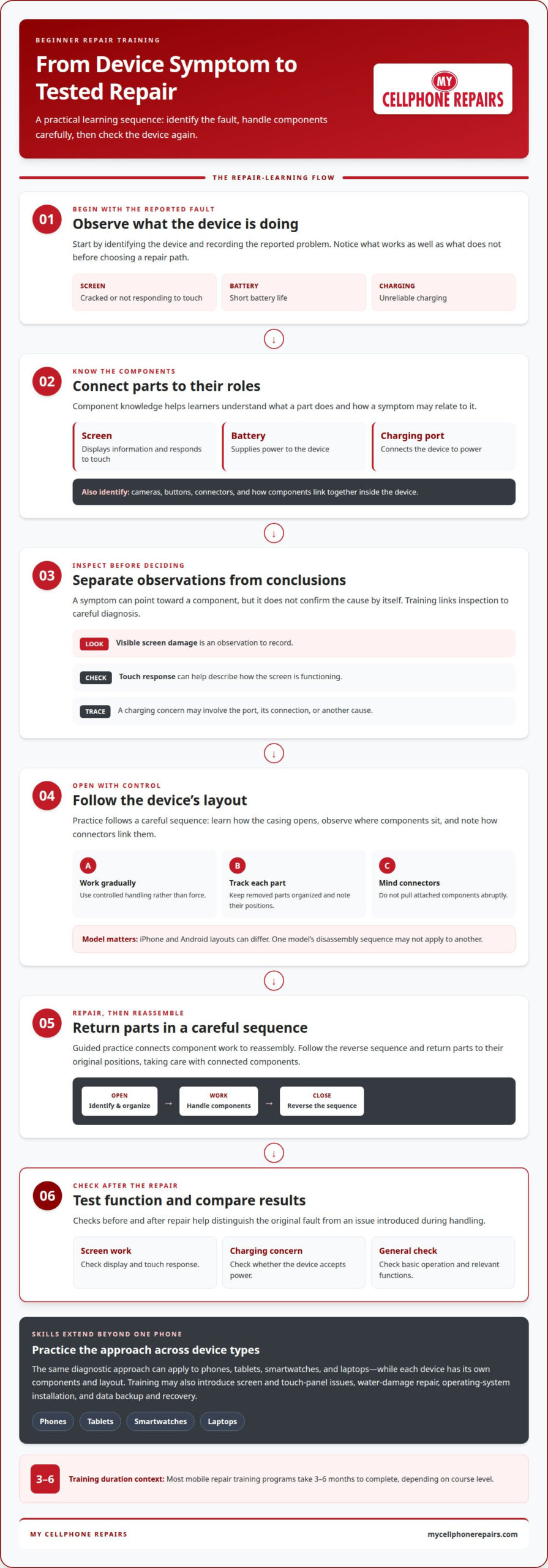
A strong foundation begins with recognizing common parts and understanding their roles. The screen displays information and responds to touch, the battery supplies power, and the charging port connects the device to power. Training links these components to symptoms such as a cracked screen, short battery life, or unreliable charging.
Tool practice focuses on controlled handling and choosing the right tool for each task. Students learn how tools support inspection and component work without relying on force. A structured lesson connects each tool to a repair step, then checks whether the device functions as expected.
Safe Phone Disassembly and Reassembly
Disassembly training teaches a careful sequence for opening a device and keeping parts organized. Students learn where screws and connectors belong, how to identify components, and why attached parts should not be pulled abruptly. Layouts vary by device, so an iPhone and an Android phone offer distinct examples.
Reassembly follows the reverse sequence, then comes testing for screen response, charging, and basic operation. Training should include checks before and after a repair. Comparing the results helps distinguish an original fault from an issue introduced during handling.
The same diagnostic approach applies to tablets, smartwatches, and laptops, though their components and layouts differ. A tablet may need screen or touch-panel troubleshooting; a laptop repair may involve checking its display or power-related symptoms. Smartwatch repairs call for attention to compact components. Practicing across devices helps beginners recognize what transfers between models and what requires device-specific instruction.
Free online cell phone repair training can introduce repair terms and show how devices are handled. But the free online cell phone repair training course has 0 hours of video content. That makes it important to distinguish a course label from the actual learning format. Look for lessons that explain diagnosis, demonstrate repair sequences, and include opportunities to practice. Video viewing alone doesn’t show whether a learner can identify a fault or reassemble a device correctly.
Licensing, certification, and business requirements depend on state and local rules and the services performed. Training topics alone do not establish one requirement for every phone repair technician in the United States.
Most mobile repair training programs take 3-6 months to complete, depending on course level. The time needed depends on the program’s scope and the practice it includes.
Training can prepare beginners for repair-shop technician roles or independent repair work. Entry-level salary depends on the role, location, employer, and skills used. Practice diagnosing screen, battery, and charging faults can help shape the work a technician is ready to take on.
Beginners can learn iPhone and Android screen, battery, and charging-port repairs through guided diagnosis, component identification, supervised practice, and functional testing. Training should connect each symptom to the relevant part, then check whether the repair restored normal operation.
Device disassembly and component identification
Disassembly training teaches technicians to understand a device’s internal layout before replacing parts. A phone is made up of connected components, not one sealed object. The screen, battery, charging port, cameras, buttons, and connectors each have distinct roles. Students learn how symptoms can point to one component while others remain functional.
A useful practice session follows a clear sequence. The instructor identifies the device and reported fault, then demonstrates how its casing opens. Students observe how components sit inside and how connectors link them. They learn to organize removed parts and note their original positions, making reassembly easier to follow and helping prevent mix-ups.
Component identification relies on visual inspection and matching observations to symptoms. A cracked screen may show visible damage, while a touch fault can affect the display’s response. A charging problem may involve the port, its connection, or another cause. Training teaches students to separate observations from conclusions and record what the device does before choosing a repair path.
Different models have different internal layouts. An iPhone and an Android phone may place connectors and components differently, even if both have screens, batteries, and cameras. Students learn not to assume that one model’s disassembly sequence applies to another. Model-specific instruction matters because similar-looking components may connect differently or sit in different positions.
Practice also covers careful handling when opening and closing a device. The instructor demonstrates how to work gradually, track each removed part, and avoid pulling connected components. Students learn to recognize when a component remains attached, then follow the reverse order during reassembly. The process includes checking that the device powers on and relevant functions respond.
Testing connects component knowledge to diagnosis. For a screen replacement exercise, a technician checks display and touch response after reassembly. For a charging-port concern, testing focuses on whether the device accepts power. A camera-related symptom calls for checking camera operation. These examples show why taking a mobile repair technician course for beginners includes both part identification and functional checks.
Good instruction makes the reasoning visible. Students see how a symptom leads to inspection, how inspection narrows down possible components, and how testing evaluates the result. This sequence builds skills beyond memorizing part names and helps beginners explain their work with specific observations instead of guesses.
Screen repairs offer a clear example of this process, from identifying display damage to checking operation after work. iPhone Screen Repair connects that component-level learning with a common phone repair.
Every step of testing helps confirm whether the repair has addressed the issue. Mobile repair training can include practice disassembling, testing, and reassembling devices safely. Android and iOS are identified as the two main operating systems used in mobile phones. Training may also cover flashing or reinstalling operating systems, malware removal, device unlocking, update errors, and data backup and recovery. These topics extend component knowledge into software-related diagnosis and support.
Online training compared with free tutorials
Online lessons, in-person courses, and free tutorials offer different learning experiences. Compare how each format explains repair work, supports practice, and answers questions.
Course Formats for Beginners
A mobile repair technician course for beginners may combine recorded lessons, live expert sessions, and community support. These features let learners review demonstrations and ask questions. Free tutorials can introduce a single task, such as identifying a damaged screen, but their depth and teaching approach vary. The free online cell phone repair training course has 0 hours of video content.
In-person courses may provide real devices, professional tools, and one-on-one practical guidance. This format suits learners who benefit from direct instruction while practicing. A mobile repair technician course for beginners is more useful when it connects diagnosis with guided repair work, rather than relying on demonstrations alone.
Which online and in-person mobile repair courses are best for beginners? Look for clear instruction, relevant practice, and useful feedback. Online lessons allow review at a flexible pace, while in-person training can offer direct device practice.
Course Costs
Mobile phone repair course costs in the United States vary by format and course content. Live instruction, access to practice devices, tool use, and learning materials can affect the fee. Compare what teaching and practice are included, not just the course title.
How much do mobile phone repair courses cost in the United States? There is no single price for every program. Course scope, format, practical access, and support affect the amount charged.
Before choosing a course, find out what its fee covers. Recorded lessons differ from supervised device practice. A class introducing soldering may also cover different material from a course focused on routine component replacement. Those differences help explain why course fees vary.
Hands-On Practice and Certificates
Some in-person courses include practice with real devices, repair tools, and individual guidance. Online courses may offer live expert sessions, but demonstrations and supervised practice are different experiences. A screen-repair lesson can show the process, while hands-on practice lets students apply the instruction.
Do mobile repair courses offer hands-on practice or recognized certificates? Some provide practical training, and some issue certificates. Recognition depends on the certificate’s issuer and the skills it represents.
For beginners, look for lessons tied to observable tasks, such as identifying a fault and assessing a repair result. Training can introduce soldering as an advanced skill, but completing a course alone does not establish a particular income or job outcome. The format and practice opportunities help determine which program fits your goals.
Operating-system installation and data recovery
Software problems can resemble hardware faults, so training covers both. A phone that freezes during startup may need software troubleshooting, while a phone that will not charge points toward a different diagnostic path. Technicians learn to identify the reported symptom, test relevant functions, and decide whether operating-system work fits the problem.
Operating-system lessons may cover reinstalling or flashing software, resolving update errors, and removing malware. The instructor explains the purpose of each task and how it differs from replacing a physical component. A failed update may interrupt normal startup, while a damaged charging port is a hardware issue. Diagnosis helps distinguish the two.
Installation training focuses on preparation, compatibility, and checking the result. Students learn why the correct operating-system files and device model matter. They also study how technicians document a device’s condition before software work. After installation, they assess whether it starts properly and its main functions respond.
Data recovery is separate from reinstalling an operating system. Training can cover backup planning, recovery options, and how to explain the process to a device owner. A phone with missing photos presents a different case from one with a failed update. Technicians learn to understand the goal before choosing an approach.
Backup lessons help connect prevention with repair work. Students learn to identify whether a usable backup exists and what information needs protection. Recovery practice can include examining why files became inaccessible and which options may apply. The training should make clear that reinstalling software and recovering personal files are distinct tasks.
Course material may also introduce device unlocking and malware removal. These topics require accurate problem identification before action. An update error, unwanted software, and a forgotten access code are different issues. Technicians learn to classify the reported problem, explain the relevant service, and check the device afterward.
Good instruction includes decision points, not just button sequences. Students should understand when reinstalling an operating system addresses a symptom and when hardware diagnosis comes first. Charging trouble is a useful example: software checks may help investigate device behavior, but they do not replace inspection of a faulty port. Repair training connects each action to the observed fault.
For beginners, practical value comes from learning a consistent workflow: identify the issue, select the appropriate software or recovery task, then evaluate the result. Training also builds clear communication about backups, missing files, and update problems. These skills help technicians explain what a process addresses without confusing data recovery with a standard operating-system installation.
What does a beginner mobile phone repair technician course teach?
A beginner course combines diagnosis, repair practice, and service skills. Students learn to connect a reported problem with a likely cause. A phone that will not power on needs a different assessment from one with a cracked display. Training builds a repeatable process: gather symptoms, inspect the device, identify possible faults, and test the result.
Some courses introduce water-damage repair. Students learn to assess affected devices and understand why liquid exposure can cause several symptoms. A phone may have trouble charging, displaying images, or starting up. Training connects inspection findings with repair decisions instead of assuming one visible symptom explains every fault.
Micro-soldering and chip-level repair may also appear in course material. These advanced topics involve work on small electronic components. Beginner training can introduce the nature of this work and help students distinguish it from common component replacement. That distinction matters when assessing a damaged board or deciding whether a repair matches their current skills.
Technical work is only part of the curriculum. Some courses cover customer service, repair-shop management, online marketing, and promotions. Customers may describe symptoms without knowing the cause. Students learn to ask focused questions, explain the diagnostic process clearly, and communicate what a repair addresses.
Business topics can include repair pricing and shop operations. Training may explain how technicians organize incoming devices, record reported problems, and track work through completion. Marketing lessons can cover how a repair business describes its services to local customers. These topics help learners understand the work around a repair, not just the physical task.
Practical lessons may use real devices, professional repair tools, and one-on-one guidance. Students apply a lesson to a specific device, then discuss what they observe with an instructor. A water-damage exercise, for example, can connect inspection, diagnosis, and repair planning. Hands-on learning helps students see how course concepts relate to actual repair work.
Course depth varies by level. Beginners can focus first on routine diagnosis and common repairs, then build toward specialized areas such as micro-soldering. A useful learning path makes these stages clear, distinguishes introductory skills from advanced techniques, and connects each topic to tasks a technician may encounter.
Choose training that matches the skills you want to develop, from device assessment to repair-shop practices. Explore beginner repair training as a next step toward building those skills.
Choosing a course means checking whether its practical work matches its level. Mobile repair courses may teach water-damage repair and micro-soldering or chip-level repair, but listing a topic does not show how much practice it involves. Compare the course topics with the skills you want to develop and look for a clear distinction between introductory work and specialized repair.
In-person mobile repair courses may let students work on real devices, use professional repair tools, and receive one-on-one practical guidance. These elements connect inspection and repair planning with hands-on activity, while giving students an opportunity to discuss questions during practice. Alongside diagnosis and customer communication, practical experience can provide a broader picture of repair work.
My Cellphone Repairs: Technician Training Program
My Cellphone Repairs offers a Technician Training Program for aspiring repair specialists. It is a natural next step if you want to build practical knowledge after learning what beginner training can cover. The business also handles Samsung Phone Repair, iPhone Screen Repair, and MacBook Repair, connecting technician training with familiar device categories.
Consider the program when you’re ready to develop repair skills with a professional training provider. If you want to discuss the Technician Training Program, contact My Cellphone Repairs.
Take the Next Step Toward Repair Work
Turn your interest into a focused learning plan. Choose the device types and repair tasks you want to understand first, then build toward more complex work as your skills develop. A mobile repair technician course for beginners can organize that progress, while steady practice helps make each concept useful at the workbench.
My Cellphone Repairs connects technician training with real repair categories, including Samsung Phone Repair, iPhone Screen Repair, and MacBook Repair. This link between learning and practical device work helps illustrate how foundational skills apply across different equipment.
Set a clear goal for your training, such as understanding phone diagnostics or preparing for repair-shop work. Then take the next step at a pace that fits your plans. Discuss your training goals with My Cellphone Repairs and move forward with a clearer direction.
Frequently Asked Questions
What prerequisites or tools do beginners need for a mobile repair course?
Beginners can start without previous repair experience; a willingness to practice is a useful starting point. In-person courses may provide access to professional repair tools and real devices during lessons. Before training, focus on understanding basic device parts and following instructions carefully. A screen, battery, and charging port serve different functions, so learning to identify each component helps you follow demonstrations.
What safety risks and precautions are involved in mobile phone repair?
Incorrect handling can damage device components, connectors, or the screen. Training should demonstrate careful handling and a controlled process for opening and reassembling phones. Follow the instructor’s tool guidance, keep removed parts organized, and do not force a connector or component. If a repair step is unclear, pause and ask the instructor for guidance before continuing. Supervised practice helps beginners build careful habits before working independently.
What career options and entry-level salaries are available after mobile repair training?
Training can prepare beginners for repair-shop technician roles or independent repair work. Entry-level salary depends on the role, location, employer, and skills used.
Get it fixed at My Cellphone Repairs: most repairs are done the same day. Walk in or book online.
Book NowPhone frozen or acting up? See our step-by-step restart & reset guides →
Our locations
- Towson Mall825 Dulaney Valley Rd, Second Level, Towson, MD 21204
(410) 828-4404 - Grand Rapids3077 28th St SE, Grand Rapids, MI 49512
(616) 799-6996 - PG Plaza Mall (Hyattsville)3500 East-West Hwy, Mall at Prince George's, Target Entrance, Hyattsville, MD 20782
(301) 559-1105 - Bowie Town Center15630 Emerald Way, Bowie, MD 20716
(240) 614-3600 - Capital City Mall (Camp Hill / Harrisburg area)3604 Capital City Mall Dr, Camp Hill, PA 17011
(717) 919-7868 - Cumberland Mall (Vineland)3849 S Delsea Dr, next to Boost Mobile, Dick's Sporting Goods entrance, Vineland, NJ 08360
(856) 765-5049 - Mondawmin Mall2401 Liberty Heights Ave, Lower Level, Baltimore, MD 21215
(443) 826-7711 - Baltimore Inner Harbor100 East Pratt St, Suite 101, Baltimore, MD 21202
(443) 838-8989 - St Charles Mall (Waldorf)11110 Mall Cir, Waldorf, MD 20603
(301) 645-7755 - Alexandria7650 Richmond Hwy, Alexandria, VA 22306
(703) 341-6789