
Your MacBook stops charging the night before a deadline. The fix may sound simple, but when will you have it back? The macbook repair turnaround time depends on more than the symptom. Diagnosis, parts availability, repair complexity, and final testing all shape the timeline.
It’s reasonable to want a clear answer before handing over a device you rely on. There isn’t one timeline that fits every repair: a battery or screen replacement follows a different process from an intermittent fault that needs deeper investigation. An unexpected finding can also change the repair plan.
This guide explains what affects MacBook repair time, how common repair routes compare, and what information can help clarify expectations. You’ll also learn why parts delays or additional damage can extend a repair, and how to prepare your MacBook to reduce avoidable downtime. A clear diagnosis and an understanding of the steps involved make it easier to plan what comes next.
Key Takeaways
- The macbook repair turnaround time depends on the fault, diagnostic findings, parts, and final verification.
- Hands-on repair time and total elapsed time are different. Intake and parts coordination can add to the wait.
- Compare repair routes by their process, timing uncertainty, and the effort each requires from you.
- Record symptoms, recent changes, and troubleshooting steps to help clarify the diagnosis.
- Back up accessible data and follow device-specific account and privacy guidance before repair.
MacBook repair turnaround time: why there is no single answer
The macbook repair turnaround time depends on the fault, how quickly it can be diagnosed, whether the required parts are available, and how much testing is needed after the repair. A straightforward hardware issue may need less active work than an intermittent fault that takes time to reproduce and trace. Either way, workbench time is only part of the total wait.
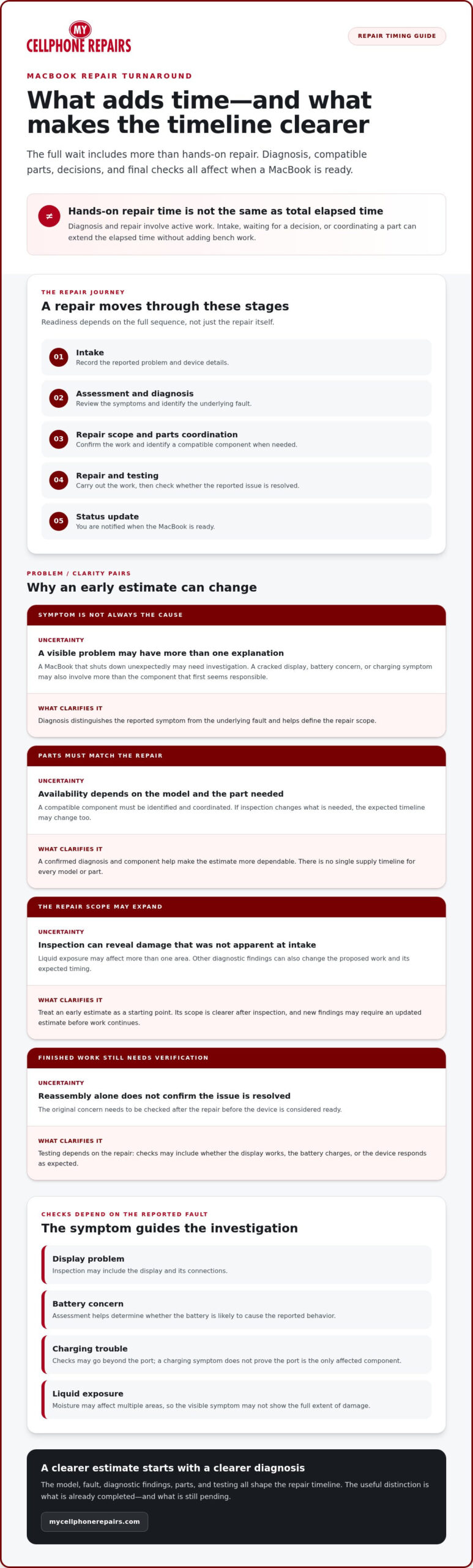
Turnaround time covers the full repair journey, from intake and diagnosis to parts coordination, repair, testing, and notification that the MacBook is ready. It is not simply the time spent on the repair itself. Intake, your decision about the proposed work, or waiting for a compatible component can add elapsed time without adding hands-on repair time.
An early estimate is a useful starting point, not always a final timeline. It reflects the information available at that stage. A technician may need to inspect the MacBook before the cause and repair scope are clear. The Right to Repair movement discusses access to parts, tools, and repair information, all of which shape the broader repair landscape. For an individual repair, the model, fault, and specific part still matter.
What does MacBook repair turnaround time include?
The repair process usually moves through several stages. Intake records the reported problem and device details. An initial assessment helps identify the symptoms, followed by diagnosis to determine what is causing them. Once the repair scope is understood and the next step is approved, the technician carries out the work, tests the MacBook, and provides an update on its status.
These stages affect readiness in different ways. Diagnosis and repair involve active work. Waiting for a customer decision or coordinating a part adds elapsed time, but not hands-on repair time. Testing matters too: checking whether the original problem is resolved helps establish whether the device is ready to return.
Why a quick estimate is not always a final timeline
A symptom does not always point to one failed component. For example, a MacBook that shuts down unexpectedly may need more investigation than the symptom alone suggests. Inspection can uncover additional damage or diagnostic questions that were not apparent at intake. That can change both the repair plan and its expected timing.
Parts add another variable. A compatible component must be identified and coordinated, and availability can differ by model and repair. If findings change the scope, the estimate may need updating before work continues. Ask what the current estimate covers and what new findings could change it. That gives you a more useful planning point without treating an early estimate as a guaranteed completion date.
How diagnosis, parts, and testing shape MacBook repair time
A reliable repair scope starts with identifying the component causing the problem. A cracked display may point to a screen issue, but symptoms alone do not always show whether another part is affected too. The same applies to a battery that will not hold charge or a MacBook that will not charge. Diagnosis helps distinguish the visible symptom from the underlying fault before the repair plan is settled.
An estimate becomes more dependable as diagnostic findings become clearer and the required parts are confirmed. If inspection uncovers another issue, or a compatible component needs to be sourced, the expected timeline may change. That is why the macbook repair turnaround time cannot be judged by the apparent simplicity of a symptom alone.
How the problem type changes the repair process
Different concerns call for different checks. A screen problem may involve inspecting the display and its connections. Battery concerns require determining whether the battery is likely to cause the reported behavior. Charging trouble can call for checks beyond the port, since a charging symptom does not prove that the port is the only affected component.
Liquid exposure can make the repair scope less obvious. Moisture may affect more than one area, so a visible symptom may not show the full extent of the damage. If liquid is involved, see this MacBook liquid damage repair guide for relevant next steps.
Why repair testing belongs in the turnaround estimate
Completing a repair is not the same as confirming that the reported issue is resolved. After the work, technicians should check the symptom that brought the MacBook in. Depending on the repair, relevant checks may include whether the display works, the battery charges, or the device responds as expected. The appropriate checks depend on the fault and repair, rather than on one universal protocol.
Testing takes time, but it supports a dependable handoff. Focusing only on bench speed can leave uncertainty about whether the original concern has been addressed. Verification gives the repair process a clear endpoint: the device has been assessed after the work, not simply reassembled.
Parts compatibility matters as well. The correct component must match the MacBook and the repair scope. Sourcing can affect elapsed time, especially if initial findings change what is needed. There is no single supply timeline for every model or part, so a useful update should distinguish work already completed from steps still pending.
For MacBook hardware issues, professional MacBook hardware repair can help turn symptoms into a clearer diagnosis and repair plan. Share what you have noticed, including any changes in behavior, so the assessment can start with useful details.
MacBook repair options compared: timing, certainty, and trade-offs
Repair routes differ in how a fault is assessed, how parts are handled, and how much coordination falls to you. The right comparison is not simply which option gives the shortest estimate. Consider what the estimate includes, how the repair scope is established, and whether the process includes checks after the work.
Repair speed alone is an incomplete measure. A useful comparison also considers diagnostic clarity, parts readiness, verification, and the effort required from you. These factors affect the macbook repair turnaround time, but no route is automatically fastest for every MacBook and fault.
| Repair route | Diagnostic clarity | Parts dependency | Testing | Customer coordination |
|---|---|---|---|---|
| Professional repair | A technician assesses symptoms and identifies the repair scope. | Depends on the fault and availability of a compatible part. | Can include checks related to the reported issue after repair. | Share symptoms, review findings, and respond to updates or decisions. |
| Manufacturer service | Assessment follows the manufacturer’s service process for the device. | Depends on service requirements and parts handling. | Follows the service process; confirm what the repair includes. | May involve arranging service, preparing the MacBook, and tracking progress. |
| Self-repair | Relies on your ability to diagnose the fault accurately. | You identify and obtain a suitable part. | You’re responsible for checking whether the issue is resolved. | You manage research, tools, parts, repair work, and troubleshooting. |
Professional repair versus manufacturer service
Professional repair and manufacturer service can differ in intake, diagnostic steps, parts handling, and how updates are provided. The exact process depends on the service route and the MacBook’s issue. Compare the stated timing with the repair scope: does it account for assessment, parts coordination if needed, and post-repair checks? A clear explanation of what happens next can make planning easier than a bare estimate.
When self-repair can create more uncertainty
Self-repair puts diagnosis and coordination in your hands. The process depends on your repair experience, suitable tools, and access to a compatible part. If the initial diagnosis is wrong, replacing a component may not resolve the symptom. An unfamiliar repair can also introduce additional damage. Factor in the time needed to research, source parts, complete the work, and verify the result.
For professional MacBook hardware repair, My Cellphone Repairs can assess the reported issue and explain the repair scope. Share the symptoms and any prior troubleshooting to provide useful context. Whichever route you consider, weigh the full process and clarity of its next steps, not just the first timing estimate.
How to plan around your MacBook repair and reduce avoidable delays
You cannot control every factor in a repair, but you can make the assessment more straightforward. A clear description helps the technician understand what to investigate. Preparing key details also makes it easier to discuss the repair scope, possible next steps, and how the macbook repair turnaround time may affect your plans.
What to prepare before handing over a MacBook
Before repair intake, gather the information you can access safely. Do not try to reproduce a fault if doing so could risk your data or worsen the problem. If your MacBook is still usable, back up important files first. Follow current Apple guidance for account access and device preparation, since steps can vary by device and situation.
- Note the model information. Record the MacBook model or other identifying details available to you. This can help clarify which parts and repair steps may apply.
- Describe the symptoms. Write down what happens, when it began, and whether the issue is constant or intermittent. Include any error messages exactly as they appear.
- List recent changes. Mention a recent drop, liquid exposure, new accessory, update, or other change that happened before the problem started. Include details even if you are unsure they are related.
- Record troubleshooting attempts. Note what you have already tried and what happened next. This prevents repeated guesswork and gives the technician useful context.
- Back up accessible data. If the MacBook works well enough, save important files before service. If it will not start or is not safe to use, do not force it just to make a backup.
- Share practical constraints. Explain any deadline or essential work affected by the repair. This helps frame the conversation, though it does not guarantee a particular completion time.
How to get a clearer repair estimate
Give specific information rather than a broad label such as “won’t work.” For example, say whether the MacBook powers on, what appears onscreen, whether charging behavior changed, and when the symptoms occur. For impact or liquid exposure, describe what happened and when. Accurate details guide the initial assessment without assuming they reveal the full fault.
Discuss what the estimate includes. Ask which stages it covers, what could change the repair scope, and how updates will be shared if findings or parts needs change. A preliminary estimate may be refined after inspection, so treat it as a planning guide rather than a fixed promise. Clear communication can reduce avoidable back-and-forth, even though it cannot remove diagnostic or parts-related uncertainty.
Use these details to prepare for MacBook repair services and make the intake conversation more focused. A symptom record, backup where possible, and clear expectations give the repair process a practical starting point.
Get a clear next step for your MacBook repair
There is no single estimate that fits every MacBook. The repair scope and expected timing depend on four connected factors: the fault, what diagnosis reveals, whether the required parts are ready, and the checks needed to verify the repair. A clear estimate should reflect the work involved, not a universal turnaround figure applied to every device.
My Cellphone Repairs handles MacBook hardware repairs, including screen and battery replacements. The aim is to understand the issue and explain a practical repair path without promising a completion time before the scope is clear. That gives you a better basis for planning around work, study, or other commitments that depend on your MacBook.
What to expect when you start a repair
Start by describing what the MacBook is doing, when the issue began, and any relevant history, such as a recent impact or liquid exposure. Those details give the technician a useful starting point. Diagnosis then helps identify the appropriate repair scope. If the findings change what work is needed, the expected timing may change too.
Think of the estimate as a sequence of milestones, not just a return date: assessment, confirmed scope, parts coordination if needed, repair, and verification. Ask what stage the device is at and what needs to happen next. That makes an update more useful, especially if the original symptoms do not reveal the cause right away.
Choose a repair plan that fits your needs
Consider the repair scope, communication, and testing together. A quick estimate may be less useful if it does not explain what it covers or how the repair will be checked. It is reasonable to ask how diagnosis shapes the plan, what factors could affect timing, and how you will receive an update. Those questions help set practical expectations without turning an estimate into a guarantee.
If you rely on your MacBook daily, share that constraint at intake. It will not change what the device needs, but it helps make the discussion relevant to your plans. Keep important files backed up when possible, and use your symptom notes to describe the issue clearly. These steps cannot control parts availability or uncover every fault in advance, but they can help avoid preventable confusion.
The macbook repair turnaround time becomes clearer as the diagnosis and repair scope take shape. Focus on what is known, what remains to be checked, and what the next update will cover. That is a more dependable way to plan than relying on a general timeframe that may not match your MacBook’s issue.
Start with My Cellphone Repairs for professional MacBook repair. Share the symptoms and relevant history to take the next step with a clear, practical conversation about the repair process.
Move forward with a practical repair plan
Before arranging a repair, think about what you need your MacBook for and how you will manage essential tasks while it is being assessed. A little planning can take pressure off the timing decision. The macbook repair turnaround time becomes clearer as the repair scope takes shape, so leave room for the plan to adjust if diagnosis reveals something unexpected.
You do not need to know the technical cause before starting. Share the symptoms you have noticed, explain any practical deadlines, and use the repair discussion to understand the next step. A clear process is more useful than a rushed promise, especially when you rely on your MacBook for work, study, or personal tasks.
My Cellphone Repairs provides MacBook hardware repair, with a practical focus on understanding the issue and the work involved. Explore MacBook repair services and take the next step when you are ready. A clearer plan helps you move ahead with your priorities in view.
Frequently Asked Questions
How long does a MacBook screen repair take?
A MacBook screen repair can take different amounts of time depending on the model, the damage, and whether another component is affected. A cracked display with no other apparent symptoms may have a clearer repair scope than a screen problem following a hard impact. The macbook repair turnaround time also depends on having a compatible replacement and completing checks after the repair. An assessment gives a more useful estimate than the symptom alone.
Can a MacBook be repaired the same day?
Some repairs may be completed the same day, but that is not a timeline to assume in advance. The fault needs to be understood, the required part must be available, and the repair process must allow for appropriate checks. A problem that appears straightforward can take longer if inspection uncovers another issue. Plan around the estimate for your specific repair rather than making work or travel plans based on a general same-day expectation.
Does MacBook liquid damage always take longer to repair?
No. Liquid damage does not automatically mean a longer repair, but the extent and location of exposure can make the work less predictable. A MacBook might show one symptom while moisture has affected other components too. If liquid has been spilled, shut the device down if it is safe to do so, disconnect power, and avoid repeatedly turning it on to test it. Share what spilled and when during the repair assessment.
Will my MacBook data be erased during a repair?
Not every hardware repair requires erasing data, but no repair should be treated as a promise that files will remain untouched. Some service steps or troubleshooting may involve erasure, and a MacBook that will not start can make backup difficult. Back up important files before service if you can. Follow current Apple guidance for your device, and keep passwords private unless specific, official instructions explain a secure account step.
Do MacBook parts affect repair turnaround time?
Yes. The right part must be compatible with the specific MacBook and the diagnosed fault. A part’s availability can affect the repair schedule, and inspection may reveal that a different component is needed than first expected. If your model is older or the repair scope changes, allow for the estimate to be updated. Ask whether the current timing assumes the required part is ready or still needs to be coordinated.
What should I do before sending my MacBook for repair?
Back up accessible files, note the device’s model and serial information, and save any error messages you can still access. Follow Apple’s current device-preparation and account guidance, since steps vary by model and service situation. Remove accessories you do not need to include, such as a sleeve or external drive, unless repair instructions say otherwise. Do not share your account password in a note or message. Keep a record of what you hand over.
Can I use my MacBook while waiting for a repair?
It depends on the fault and whether continued use could worsen it or risk your data. A cosmetic issue may not affect basic use, while unexpected shutdowns, overheating, liquid exposure, or charging problems can make continued operation risky. Follow the repair instructions for your situation. If you need files before service, back them up while the MacBook is stable rather than relying on it to remain usable until the repair begins.