
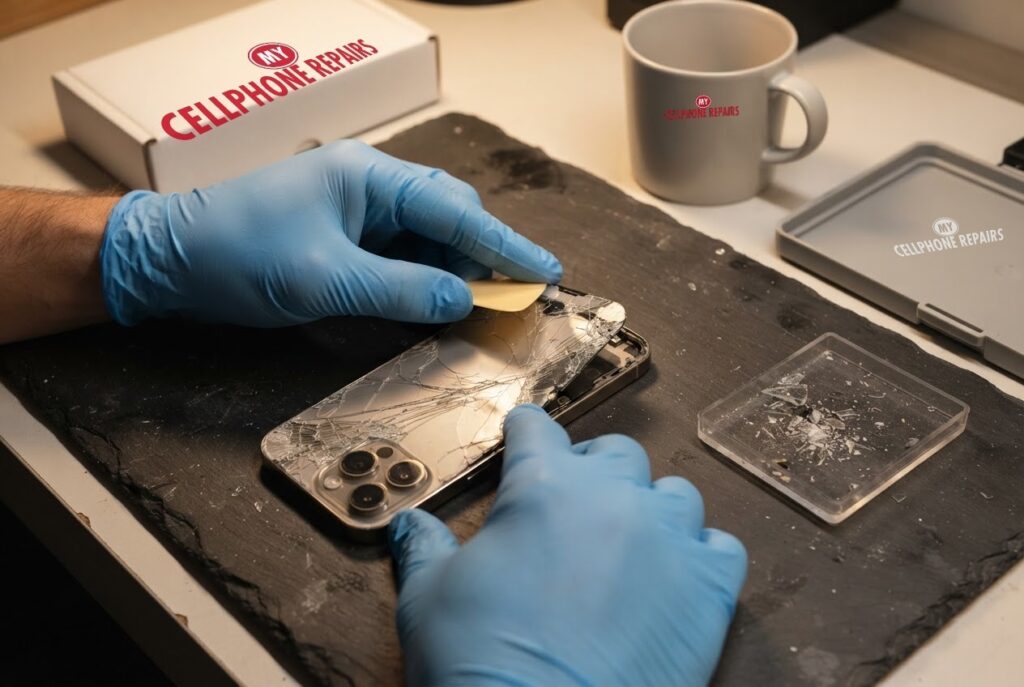
You pull your iPhone out of your jeans and feel it before you see it: a rough, spidery line across the back. The screen is fine, the phone works, and you are left wondering whether this is just a cosmetic scar or a real problem. If you are dealing with an iPhone 15 Pro cracked back glass, the honest answer is that it depends on where the crack is and what it touches.
This guide covers why the back glass cracks, whether a crack affects wireless charging, MagSafe and the camera, how to handle the shards safely until you can get it fixed, and how Apple itself replaces the glass. Looking for an iPhone repair near you? Our diagnosis is always free, and most repairs are done the same day.
Key takeaways
- The iPhone 15 Pro has a removable glass back, which Apple credits to a “new internal chassis architecture” that lets the glass be replaced on its own.
- Early drop tests reported that the rounded titanium edges can pass impact into the glass, so a hard drop can crack the back even when the frame looks fine.
- A crack near the camera or the charging area deserves a quick check. Apple warns that poorly done back glass work can cause slow or faulty wireless charging.
- Cracked glass can cut. Cover it with clear tape, avoid pressing on it and do not pick at shards.
- Our quick facts: iPhone 15 Pro back glass repair from $129, free diagnosis, same day for most repairs, 30-day warranty on repairs.
Why does the back glass on an iPhone 15 Pro crack?
Glass is hard but brittle, and a sharp knock to a corner or edge can start a crack that spreads. The back of your iPhone is a large, flat sheet of glass, so a drop onto a hard floor, or even a hard squeeze in a tight pocket, can be enough.
There is also a design story. The iPhone 15 Pro swapped the stainless steel frame of the iPhone 14 Pro for a slightly beveled titanium one, with an internal aluminum plate. After launch, a widely shared drop test by the YouTube channel AppleTrack compared the two phones. According to 9to5Mac, the 15 Pro glass began to shatter about halfway through the test, with cracks starting in the corners. The article suggests the 14 Pro’s flat steel band absorbed more shock, while the rounded titanium edges passed more impact into the glass, though it adds that drop tests are “notoriously unscientific.”
Does a cracked back glass affect wireless charging, MagSafe or the camera?
It can, but a small crack does not automatically mean trouble. Here is how to think about each part.
Wireless charging and MagSafe. Apple explains that MagSafe magnets provide alignment for faster, more efficient charging, and that the charger should sit on a flat surface clear of metal or other foreign material. A cracked glass back does not change the magnets, but loose chips or a raised edge can stop the charger sitting flat. Apple’s own repair manual for this model also warns that improper back glass replacement can cause slow or faulty wireless charging. So if your charging has become slow or keeps stopping since the crack, mention it when you bring the phone in.
The camera. The rear camera lenses sit in the back glass area. A crack through the camera cut-out is more serious than a hairline near the bottom edge. Apple’s manual notes that a contaminated camera needs a replacement camera. Take a photo of a plain wall. If you see smears or specks, stop using the camera and come in.
How do I handle a cracked back glass safely?
Until you can get to a repair shop, a few simple habits protect your hands and the phone. Apple’s repair manual tells technicians to wear cut-resistant gloves and safety glasses with side shields around broken glass.
- Cover the crack. Put clear, wide tape over the damaged area to keep loose pieces in place.
- Do not pick or peel. Pulling at flaking glass makes the crack bigger and can cut your fingers.
- Use a snug case to hold the glass together.
- Watch the battery. If the phone gets hot or the glass looks puffed out, stop charging it and come in right away. Apple’s manual says to stop if the battery is dented, punctured or damaged.
Try this first: restart and force restart (iPhone)
These steps delete nothing. Menu names can differ slightly by model and iOS version.
- Restart: press and hold a volume button and the side button until the power-off slider appears, drag it, then hold the side button to turn the iPhone back on. Or go to Settings > General > Shut Down.
- Force restart (frozen screen), iPhone 8 and later: quickly press and release Volume Up, quickly press and release Volume Down, then press and hold the side button until the Apple logo appears (it can take more than 10 seconds).
- Then place the iPhone on your charger and check that wireless charging starts again.
When to stop and come in: the phone will not turn on after a force restart and 30 minutes on the charger, it gets hot, restarts by itself over and over, or the back or screen is lifting (possible swollen battery: stop charging it). A factory reset will not fix a cracked back glass, so back up and skip it. Maker’s own help: Apple Support: force restart iPhone.
Full step-by-step guide: How to restart and reset your iPhone → | All restart & reset guides →
How is an iPhone 15 Pro back glass replaced?
Because the glass back is a separate part, the whole phone does not need to be replaced. Apple’s Self Service Repair manual for the iPhone 15 Pro describes the process, and it gives a good picture of why this is a job for trained hands and the right tools.
- The technician removes the two security screws next to the USB-C port.
- The phone is warmed in a heated fixture to soften the adhesive, and a suction cup lifts the glass. An adhesive cutter then cuts through the glue.
- The flex cable and connector cover are detached, and the old adhesive is cleaned out of the frame.
- New adhesive goes on, the cable is reconnected, the glass is pressed into place and new screws are fitted.
- Apple’s manual also lists a back glass sanding procedure as required for this model, and a System Configuration step after the repair.
The manual says improper handling or replacement can cause malfunctions, slow or faulty wireless charging, injury or damage, which is why we do not recommend a home attempt with a hair dryer and a kitchen knife.
After a back glass replacement on an iPhone 15, Apple says the repair is finished with Repair Assistant, which installs calibration data. You can look for it in Settings > General > About > Parts & Service History, where a “Restart & Finish Repair” option appears if it is needed. Apple says you need Wi-Fi, a battery above 20 percent and the latest iOS.
Should I repair a cracked back glass or live with it?
Both are reasonable choices, depending on the crack.
- You can wait a little if the crack is small, away from the camera, the glass is firmly in place and nothing is loose. Tape it, use a case and plan the repair.
- Repair soon if the crack runs through the camera area, pieces are flaking, wireless charging has become unreliable, or you notice cuts on your fingers.
- Check coverage first. Apple says AppleCare+ covers unlimited repairs for drops and spills, while the standard one-year warranty does not cover accidental damage. If you have AppleCare+, ask Apple about the cost before you pay anyone else.
- Selling or trading in? Ask us for a quote before you decide.
Myths vs facts about back glass cracks
- Myth: If the screen is fine, the phone is fine. Fact: A back crack can affect wireless charging and the camera area, so it is worth a check.
- Myth: A titanium frame means the glass cannot crack. Fact: Early drop tests suggested the rounded titanium edges can pass shock into the glass, so the back can still crack.
- Myth: A factory reset can fix a cracked back. Fact: A reset changes software, not glass.
- Myth: The whole phone has to be replaced. Fact: Apple credits a new internal design for letting the back glass be replaced on its own.
How much does iPhone 15 Pro back glass repair cost?
Our listed price for iPhone 15 Pro back glass repair is from $129. The iPhone 15 Pro Max back glass is also from $129. We always start with a free diagnosis and an exact quote before we start, because a crack that also reaches the camera or frame can change the job. Most repairs are done the same day, they carry our 30-day warranty, and walk-ins are welcome. Most of our stores are open on Sundays.
If the same drop also cracked the front, our listed iPhone 15 Pro screen price is from $169, and we can quote both jobs together. We also fix tablets and computers: looking for tablet repair near me, an iPad screen repair cost or laptop repair near me? Bring them in for a free diagnosis too.
FAQ
Can back glass be replaced on the iPhone 15 Pro?
Yes. Apple says the back glass on the iPhone 15 Pro and Pro Max is designed to be replaced on its own. Ask us for a free diagnosis and exact quote.
Is a cracked back glass dangerous?
The main risk is cuts from sharp edges, plus possible damage if the crack reaches the camera or the battery area. Cover it with clear tape and book a free check.
Will a cracked back stop wireless charging or MagSafe?
Not always, but chips or a raised edge can stop the charger sitting flat, and Apple warns that poor repairs can cause slow or faulty wireless charging. Walk in or book a repair and we will test it.
Sources
- Apple Support: iPhone 15 Pro back glass repair manual
- Apple Support: use Repair Assistant to finish an iPhone repair
- Apple Support: how to use your MagSafe Charger with iPhone
- 9to5Mac: first iPhone 15 Pro drop test
- NotebookCheck: iPhone 15 Pro durability in early drop and bend tests
#MyCellphoneRepairs #iPhone #Apple #iPhoneRepair #iPhone15Pro #BackGlass #BackGlassRepair #CrackedBackGlass #PhoneRepair #SameDayRepair #Towson #Baltimore
Get it fixed at My Cellphone Repairs: most repairs are done the same day. Walk in or book online.
Book NowPhone frozen or acting up? See our step-by-step restart & reset guides →
Our locations
- Towson Mall825 Dulaney Valley Rd, Second Level, Towson, MD 21204
(410) 828-4404 - Grand Rapids3077 28th St SE, Grand Rapids, MI 49512
(616) 799-6996 - PG Plaza Mall (Hyattsville)3500 East-West Hwy, Mall at Prince George's, Target Entrance, Hyattsville, MD 20782
(301) 559-1105 - Bowie Town Center15630 Emerald Way, Bowie, MD 20716
(240) 614-3600 - Capital City Mall (Camp Hill / Harrisburg area)3604 Capital City Mall Dr, Camp Hill, PA 17011
(717) 919-7868 - Cumberland Mall (Vineland)3849 S Delsea Dr, next to Boost Mobile, Dick's Sporting Goods entrance, Vineland, NJ 08360
(856) 765-5049 - Mondawmin Mall2401 Liberty Heights Ave, Lower Level, Baltimore, MD 21215
(443) 826-7711 - Baltimore Inner Harbor100 East Pratt St, Suite 101, Baltimore, MD 21202
(443) 838-8989 - St Charles Mall (Waldorf)11110 Mall Cir, Waldorf, MD 20603
(301) 645-7755 - Alexandria7650 Richmond Hwy, Alexandria, VA 22306
(703) 341-6789