
Repair skills are only part of the launch plan. Starting a business after a phone repair course means putting your training into practice, completing the necessary setup steps, and preparing to serve customers. A course gives you a practical foundation, but you still need a plan for how the business will operate.
You’ve invested time in learning to diagnose and repair phones. Now you need to connect those skills to a workable business by choosing a setup and deciding which repairs you’re equipped to handle.
This guide covers choosing a business structure, approaching registration, and applying your training as you prepare to launch. It also explains how to build confidence through practice, plan your initial services, and move from course exercises to customer work. Take each step deliberately to give your technical skills an organized start.
Key Takeaways
- Choose a business setup that fits the repairs you plan to offer and how you want to serve customers.
- Build a startup budget around your tools, parts, workspace, and operating costs. The U.S. Small Business Administration recommends adding a buffer of about 10% for unexpected expenses.
- Plan your registration steps around your business structure, name, and location, since local requirements can vary.
- Use practice repairs to turn course skills into a repeatable process before taking on customer devices.
- Start with a focused repair offering, then expand as your skills, workflow, and business needs develop.
Why Start a Phone Repair Business?
In the United States, startup costs depend on your business model. Starting a business after a phone repair course means matching your skills and planned services to a realistic setup.
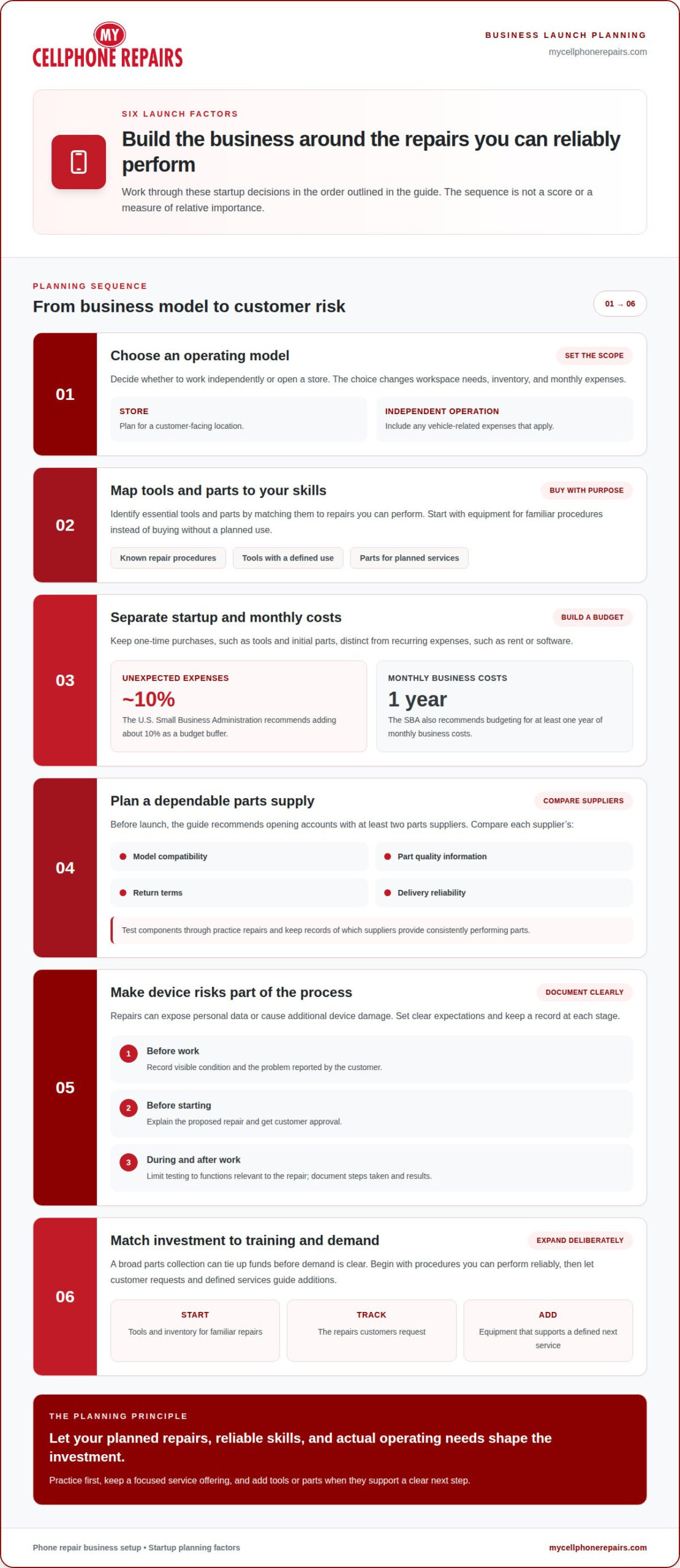
- Choose an operating model. Decide whether you’ll work independently or open a store. Each option changes your workspace needs, inventory, and monthly expenses. For example, a store requires a customer-facing location, while an independent operation may need vehicle-related expenses. List the setup you’re considering before estimating costs, so your budget reflects its actual needs.
- Identify essential tools and parts. Use these estimates to map tools to the repairs you can perform, rather than buying equipment without a planned use.
- Estimate startup and monthly costs. Separate one-time purchases, such as tools and initial parts, from recurring expenses, such as rent or software. The U.S. Small Business Administration recommends adding a buffer of about 10% to a business startup budget for unexpected expenses. It also recommends budgeting for at least one year of monthly business costs.
- Plan your parts supply. A new phone repair business can find reliable suppliers by opening accounts with at least two parts suppliers before launch. Compare their model compatibility, part quality information, return terms, and delivery reliability. Test components through practice repairs and keep records of which suppliers provide parts that perform consistently.
- Account for customer and device risks. Phone repairs can expose personal data or cause additional device damage. Record the device’s visible condition and reported problem before work begins. Explain the proposed repair, get customer approval, and limit testing to functions relevant to that work. Document the steps taken and results, so both the repair process and customer expectations stay clear.
- Match investment to your training. For starting a business after a phone repair course, select tools and inventory that fit the procedures you can perform reliably. A broad parts collection can tie up funds before demand is clear. Start with equipment for familiar repairs, track what customers request, and add tools or parts when they support a defined next service.
Business fundamentals and shop setup
Choose an operating model before selecting a location or investing in more equipment. When setting prices, account for parts, labor, overhead, and repair complexity. Use a written repair agreement to record the quoted work, customer approval, warranty terms, and any limits.
- Choose the work setting. Decide whether to operate from home, rent a retail counter, or work inside an existing repair shop. Each option changes your customer flow, workspace needs, and recurring expenses. A storefront needs room for intake, secure device storage, repairs, and customer pickup. A home setup needs a clearly separated, organized work area.
- Map a practical customer workflow. Write down each stage, from intake to pickup. For example, record the reported problem, inspect the device’s condition, explain the proposed repair, and obtain approval before starting. After the repair, test relevant functions and document the result. A consistent process helps technicians avoid missed steps as work grows.
- Assess a shop location carefully. Check local demand, access, visibility, rent, and nearby repair options before committing to a lease. Repair-store owner Matt Rubio recommends considering cities with populations of 50,000 to 100,000 and no comparable business within about 50 miles. Treat this as one location perspective, not a guarantee of demand. A local customer base and manageable costs matter too.
- Consider employment at an established shop. Working for another repair business can help you see how technicians handle intake, customer updates, parts ordering, and quality checks. Observe how a screen repair moves from diagnosis to testing and pickup. Use that experience to identify workflows worth adapting, while keeping your own business plan, service scope, and customer policies distinct.
- Choose software around daily tasks. Repair shop software can organize customer records, repair status, estimates, and inventory. Start with the tasks that currently take the most manual effort. Compare features against your workflow before paying for tools you may not need.
- Write clear pricing and warranty policies. Explain what the quoted price covers, which parts are included, and what could change if diagnosis reveals another issue. State warranty coverage and exclusions plainly in the agreement. Keep a signed or recorded approval before repair work begins, and give the customer a copy of the completed terms.
- Review the setup as demand develops. Track repair volume, repeat issues, parts delays, and customer wait points. The roadmap places the choice to keep a home operation, open a kiosk or retail counter, or hire a technician in months 9-12. Use that checkpoint to assess your workflow and costs before expanding. For practical phone repair business setup ideas, connect each choice to the repairs you plan to perform.
Starting a home-based or mobile repair business
- Choose a model that matches your work. A mobile model adds travel and the need to carry equipment between appointments. Decide whether customers will bring devices to your workspace or whether you plan to travel. That choice shapes your daily schedule, storage needs, and service workflow.
- Set up a dedicated repair area. Choose a stable work surface with good lighting and enough room to separate devices, tools, and parts. Keep screws and small components organized during each repair. Store customer devices away from household activity, and label each device with its repair status. A clear work area makes it easier to resume a job without mixing parts.
- Keep initial inventory focused. Start with about one week’s worth of inventory rather than stocking parts for every phone model. Choose components that match the repairs you have practiced and expect to handle. For example, if you focus on screen work for a particular model, organize its compatible parts separately. Review usage regularly, then replenish proven items instead of guessing at demand.
- Plan mobile appointments around a repeatable process. Before traveling, confirm the device model, reported issue, and likely repair scope. Pack the tools and parts needed for that job, plus a way to keep small components secure. At the appointment, record the device’s condition and explain the planned work before beginning. This reduces avoidable trips and helps keep each repair organized.
- Practice hands-on repairs before taking paid jobs. Use the first four weeks to practice repairs before working on paying customers’ devices. Repeat each procedure until you can identify its parts, follow a consistent sequence, and test the result. Include common tasks such as opening a device carefully and reconnecting components correctly. Keep notes on mistakes and adjustments, so each practice session builds usable skill.
- Build a simple customer handoff. For home appointments or mobile visits, use the same intake and completion steps. Record the reported problem, obtain approval for the planned repair, and explain any change before proceeding. At pickup, describe the work performed and demonstrate relevant functions. A consistent handoff helps customers understand what was done and gives you a clear record of each job.
- Track whether the model works. Record travel time, repair time, parts used, and repeat issues for each job. For a mobile operation, group appointments by area when practical and allow enough time for diagnosis and testing. For a home setup, note which workspace steps slow repairs down. Use these records to refine your schedule, inventory, and training priorities before expanding your workload.
Business registration, licenses, and DBA filings
- Choose a structure before filing. Decide how you want to own and operate the business before completing registration forms. Your choice affects which records and tax details you’ll need to manage. Write down whether you’ll work alone or with co-owners, and whether you’ll operate from home or a shop. Use those details to research the available structures in your state.
- Check requirements where you’ll operate. Contact the relevant state, county, and city offices for requirements that apply to your location and repair activities. Keep a list of each office, the forms it requires, and any deadlines it provides. Requirements can differ between jurisdictions.
- Separate business registration from trade-name filings. A DBA, or “doing business as” name, lets a business use a trade name. If your shop’s public name differs from its legal name, check whether your state or local jurisdiction requires a DBA filing. For example, record the chosen name and the jurisdiction’s filing instructions before advertising under it.
- Confirm permits for your workspace. A home-based business and a retail repair shop may face different local requirements. Ask the city or county office responsible for business permits about your specific address and operating model. Record the office’s instructions. Don’t assume that registering a business name also covers every permit or local approval your workspace may need.
- Keep registration records together. Save copies of submitted forms, receipts, approvals, and official correspondence in one business folder. Record the filing date and the agency responsible for each document. If you register a DBA separately, keep that record beside your main registration paperwork. Organized records make renewals and future business changes easier to track.
- Separate business and personal recordkeeping. Set up a consistent way to record repair income, parts purchases, and operating expenses. Keep receipts linked to the relevant transaction, such as replacement parts for a completed screen repair. Clear records help you review business performance and prepare accurate financial information for your tax and accounting process.
- Understand what training does and doesn’t establish. A phone repair course can document your practical learning, but it doesn’t replace business registration or local approvals. No degree or industry certification is legally required to operate a phone repair business in the United States, though local business licenses and permits may be required. Keep course records with your business documents, and handle each local filing separately.
Phone repair business training
- Turn course skills into a training plan. List the cell phone repair tasks you can perform, then mark which need more practice. Separate familiar work, such as basic device inspection, from procedures that still feel uncertain. This skill map helps you choose a focused first service range instead of accepting repairs beyond your current ability.
- Practice one repair procedure at a time. Use a non-customer device to rehearse each repair sequence from setup through reassembly. Keep screws and components organized, and note where the process becomes difficult. Repeating the same procedure helps reveal whether a mistake came from diagnosis, tool handling, or an unclear sequence.
- Train diagnosis before replacing parts. For a phone that will not charge, check the reported symptoms and inspect the port before assuming a component has failed. Record what you observe and the tests you perform. This builds a habit of identifying the cause before choosing a repair, reducing avoidable part swaps.
- Keep a repair practice log. For each exercise, write down the device model, reported fault, steps taken, parts handled, and test results. Add a short note about any mistake and how you corrected it. Reviewing these records helps you spot recurring gaps and choose the next skill to strengthen.
- Build a consistent quality check. After practicing a screen replacement, test relevant functions such as display response and touch input. Check that the device is reassembled correctly and that no tools or loose components remain. Use the same final checks after each practice repair, so quality does not depend on memory.
- Practice explaining the repair clearly. Describe a sample diagnosis in plain language: state the symptom, the likely repair, and what you would test afterward. Then rehearse explaining when further inspection could change the repair plan. Clear explanations help customers understand the work and give you practice setting expectations before taking paid jobs.
- Set limits based on demonstrated ability. Choose initial repairs you can complete reliably, and record procedures that still require supervision or more practice. For example, if you can replace a screen but struggle to diagnose board-level faults, keep those tasks outside your initial scope. Expand only as repeated practice builds consistent results.
- Use guided instruction to close specific gaps. Bring a clear training goal, such as improving diagnosis or learning a repair sequence, rather than trying to master every device at once. Connect each lesson to a practice task and record the result. Continue building hands-on phone repair skills as you prepare to serve customers.
My Cellphone Repairs: Samsung Phone Repair
My Cellphone Repairs handles device repairs while you focus on building your business. Services include Samsung Phone Repair, iPhone Screen Repair, MacBook Repair, and Battery Replacement. These services address hardware issues, rather than business registration or startup planning.
As you apply your training, a damaged device may need work beyond your current experience. A Samsung phone with a hardware issue or an iPhone with a damaged screen may need a dedicated repair service. That lets you keep your business plans moving while the device receives attention.
Contact My Cellphone Repairs if you need help with a Samsung phone, iPhone screen, MacBook, or battery repair.
Build your next step with confidence
Starting a business after a phone repair course can open a new professional path. Keep early decisions focused: accept jobs that match your skills, refine your process with experience, and expand when your business is ready. Consistent work and thoughtful choices matter more than trying to offer every service from the start.
For repairs beyond your current scope, My Cellphone Repairs offers Samsung Phone Repair, iPhone Screen Repair, and MacBook Repair. You can use these services when a device needs attention while you continue developing your business.
Contact My Cellphone Repairs to discuss a repair. Keep building your skills one careful step at a time.
Frequently Asked Questions
How much money can you make fixing phones?
A solo technician completing three to five repairs daily may generate approximately $240-$400 in gross daily revenue before parts and overhead. That figure is revenue, not take-home income. Parts, rent, software, taxes, and unpaid administrative time affect what remains. Track completed jobs and their direct costs separately, then review your results over time to see whether your workload supports the business expenses.
Should I offer all brands or focus on just Apple and Samsung?
Begin with the brands and models you can diagnose and repair consistently. A focused service list can simplify training, inventory planning, and repair procedures. You might start with common iPhone and Samsung models, then add another brand when customers request it and you can source compatible parts. Evaluate models individually, because parts and procedures can differ within the same brand.
When should I think about expanding beyond phone repair?
Consider expanding when your workflow is steady and customer demand points to another device category. Review recurring requests, the skills involved, access to parts, and the effect on your current turnaround process. Tablet and MacBook repairs may require different tools and practice. Add one service at a time, then assess whether it suits your expertise and capacity.
What equipment and tools are needed to start a phone repair business?
Plan for precision screwdrivers, opening tools, tweezers, a work mat, organized parts storage, and suitable lighting. Board-level repairs may call for a soldering or rework station. Choose tools based on the devices and procedures you plan to handle. Tie each purchase to a specific repair task, and learn to use the tool safely before working on customer devices.
What licenses, permits, and insurance does a phone repair business need?
The United States does not require a degree or industry certification to operate a phone repair business, though local licenses and permits may apply. Requirements depend on where and how you operate. Treat insurance as a separate risk decision: consider customer devices, inventory, tools, and premises, then choose coverage that suits those risks and applicable local requirements.
How do I register an LLC or other business structure for a phone repair shop?
Choose a business structure, then follow the filing process for your state and location. An LLC and a sole proprietorship are different structures; filing a trade name or DBA does not form an LLC. Keep copies of formation records and related filings. Before submitting forms, confirm that the business name and operating details match the structure you selected.
How much can phone repair technicians charge for common repairs?
Set each quote based on the device model, damage, parts, labor, and testing required. Repair prices vary by case and are provided after a quote request. For your own business, calculate direct parts and labor costs, then include overhead when setting a sustainable rate. Explain the approved work and any possible changes before starting, rather than promising a fixed charge before diagnosis.
Is it better to start a mobile phone repair service, home-based shop, or storefront?
Choose a setup based on customer access, workspace, security, and travel demands. A home-based shop reduces customer travel logistics but needs an organized area to receive and secure devices. A mobile model requires travel planning and portable equipment. A storefront can accommodate walk-ins but brings location and operating commitments. Select the approach that fits your workflow and local demand.
Get it fixed at My Cellphone Repairs: most repairs are done the same day. Walk in or book online.
Book NowPhone frozen or acting up? See our step-by-step restart & reset guides →
Our locations
- Towson Mall825 Dulaney Valley Rd, Second Level, Towson, MD 21204
(410) 828-4404 - Grand Rapids3077 28th St SE, Grand Rapids, MI 49512
(616) 799-6996 - PG Plaza Mall (Hyattsville)3500 East-West Hwy, Mall at Prince George's, Target Entrance, Hyattsville, MD 20782
(301) 559-1105 - Bowie Town Center15630 Emerald Way, Bowie, MD 20716
(240) 614-3600 - Capital City Mall (Camp Hill / Harrisburg area)3604 Capital City Mall Dr, Camp Hill, PA 17011
(717) 919-7868 - Cumberland Mall (Vineland)3849 S Delsea Dr, next to Boost Mobile, Dick's Sporting Goods entrance, Vineland, NJ 08360
(856) 765-5049 - Mondawmin Mall2401 Liberty Heights Ave, Lower Level, Baltimore, MD 21215
(443) 826-7711 - Baltimore Inner Harbor100 East Pratt St, Suite 101, Baltimore, MD 21202
(443) 838-8989 - St Charles Mall (Waldorf)11110 Mall Cir, Waldorf, MD 20603
(301) 645-7755 - Alexandria7650 Richmond Hwy, Alexandria, VA 22306
(703) 341-6789