
Technical skill alone won’t keep a new phone repair business on track. Common mistakes new phone repair businesses make often start with rushed diagnosis or repair work that hasn’t been properly learned. The fallout can include repeat repairs, wasted parts, damaged devices, and lost customer confidence.
It’s natural to focus on completing repairs quickly and keeping parts in stock. But speed and inventory won’t make up for unclear updates, inconsistent repair standards, weak data-security practices, or gaps in technician training. Building reliable skills and choosing where to specialize can prevent small oversights from becoming costly business problems.
This article explains how to avoid mistakes in diagnosis, customer communication, inventory tracking, repair quality, device safety, and data security. It also covers technician training and specialization, including why one person may not be equipped to handle every device and repair type. Use these practical steps to strengthen repair habits, reduce avoidable rework, and build customer trust from the start.
Key Takeaways
- Use a consistent diagnostic process and clear customer updates to reduce misunderstandings and avoidable repeat work.
- Track small parts and device-specific components carefully so inventory errors don’t lead to delays or repair problems.
- Set repeatable repair standards to support professional service and more reliable results.
- Protect devices and customer data by treating safe handling and data security as part of every repair.
- Build technician skills through ongoing training, and focus repair work where the team has the right expertise.
Accurate diagnosis and customer communication
A dependable repair starts with identifying the fault before selecting a part or promising a result. Clear updates then keep customers informed while their device is assessed and repaired.
Accurate Repair Diagnosis
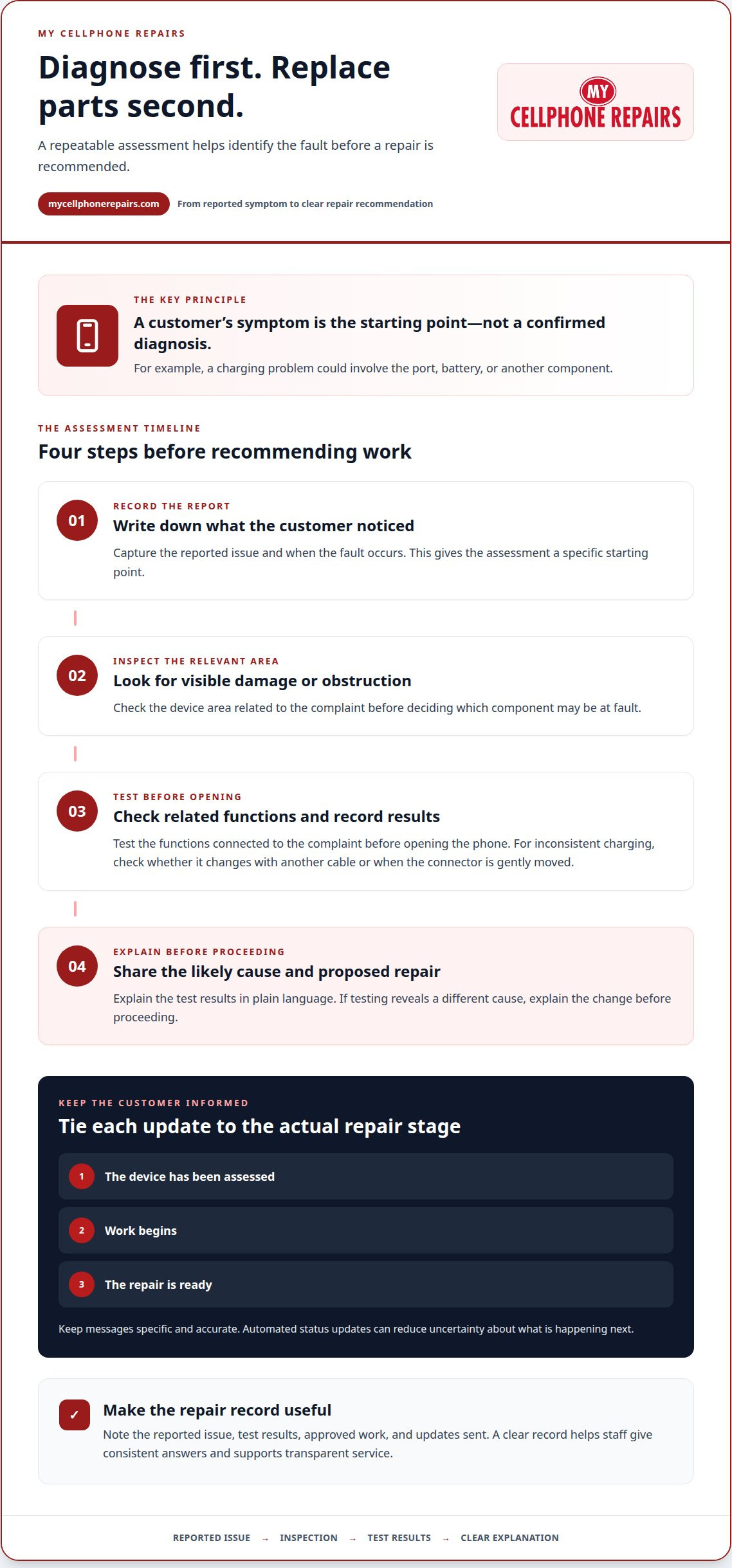
Accurate diagnosis means identifying the cause of a phone’s problem before choosing a repair. A customer may report a charging issue, for example, but the fault could involve the port, battery, or another component. Treating the first symptom as a confirmed diagnosis can lead to an ineffective repair, extra work, and frustration for both the customer and technician.
Use a repeatable assessment instead of jumping straight to part replacement. Record the reported symptoms, inspect the device, and test the functions related to the complaint. If a phone charges inconsistently, note whether the problem changes with another cable or when the connector is gently moved. Explain the test results before recommending work.
- Write down the customer’s description, including when the fault occurs.
- Inspect the relevant device area for visible damage or obstruction.
- Test related functions and record the results before opening the phone.
- Explain the likely cause and the proposed repair in plain language.
Customers also need to know what happens next. Repair staff can spend hours answering calls about repair status. Automated status updates can reduce uncertainty by telling customers when a device has been assessed, when work begins, or when the repair is ready. Keep every message specific, accurate, and tied to the actual repair stage.
Building Customer Trust
Customer trust means confidence that a repair business will explain the problem honestly, handle the device carefully, and communicate clearly. That confidence shapes reputation: customers who understand the diagnosis and receive timely updates have a clearer basis for recommending the business. Vague promises or unexplained delays, by contrast, can make even a successful repair feel unreliable.
Local marketing and retention work best when they reinforce a good repair experience. Give customers a clear explanation of the diagnosis, provide status updates, and invite feedback after pickup. Phone repair shops can send automated review-request texts a few hours after a successful device pickup. A prompt, respectful response to feedback can also show prospective customers how the business handles concerns.
Make communication part of the repair record. Note the reported issue, test results, approved work, and updates sent. If testing reveals a different cause, explain the change before proceeding. These records help staff give consistent answers, prevent conflicting messages, and build a reputation based on transparent service rather than unsupported promises.
Unprofessional conduct in phone repair can erode customer trust and put reputable businesses at a disadvantage.
Small-parts and serialized inventory tracking
An effective inventory system links each part to its device, supplier, and repair outcome. Without that record, a technician may install an incompatible component, misrepresent a part’s quality, or waste time finding stock.
Serialized components need particular attention. A replacement part that isn’t properly serialized or paired with a phone can trigger software locks or error messages. Before ordering, record the device model and component requirements. At intake, match the part to the repair ticket. After installation, log the part identifier and test the affected functions. This creates a traceable record if follow-up is needed.
- Record each part’s model compatibility, supplier, and stock location.
- Track serialized parts by identifier, not only by general part name.
- Link the installed component to the device’s repair record.
- Update quantities after installations, returns, and failed inspections.
Part selection also affects affordability and customer expectations. Cheap, unreliable aftermarket parts can cause dissatisfaction and repeat repairs. At the other extreme, using only premium parts can raise operating costs and make a shop less competitive. Compare parts for compatibility, consistency, supplier support, and suitability for the repair. Explain the quality options plainly, without presenting a lower-cost part as equivalent when it isn’t.
Pricing and warranty tiers should match the part and the work performed. State what each tier covers, including the part category, repair scope, and warranty limits. Keep those terms consistent across estimates, invoices, and staff explanations. A clear written distinction helps customers understand their options before approving a repair. The shop’s price depends on the case and is given after a quote request; part type, device model, and repair complexity affect it.
In the United States, consumer protection and data privacy obligations can depend on state law, the warranty offered, and how customer information is handled. Use clear written warranty terms, protect customer information, and follow applicable federal and state requirements.
Independent shops can compete with manufacturer-authorized providers through clear estimates, attentive communication, and repair options suited to the device and customer. Reliable inventory supports that promise by helping prevent avoidable delays and repeat work.
When a part fails inspection or a repair reveals a defect, isolate it from usable stock. Record the supplier, part identifier, device model, and failure symptoms. Then follow the supplier’s return process and document the outcome. For device owners who need a repair, explore phone repair services.
Keep rejected components separate from parts available for installation, and record whether each is awaiting supplier review, return, or disposal. Use these records to compare suppliers and decide which options to keep in stock. An unreliable low-cost part can leave customers dissatisfied and lead to repeat repairs that harm the business’s reputation. Relying only on premium parts can increase repair costs and reduce competitiveness. Review repair outcomes, compatibility, and supplier support before changing purchasing choices.
Consistent repair practices and professionalism
Professionalism shows in both the repair process and the way a business operates. A clear operating model, location-specific compliance checks, and repeatable work standards help prevent costly oversights.
Licenses, Permits, and Insurance
Licenses, permits, and insurance requirements or protections depend on the location and business. The United States has no single checklist that applies identically to every phone repair business. Requirements can vary with state and local rules, business structure, and premises. Identify what applies before signing a lease or opening a kiosk.
Insurance needs can also vary between a storefront, kiosk, and mobile operation. Consider risks involving customer devices, tools, inventory, premises, and employees when evaluating coverage. Keep business records and policy documents organized. Don’t assume another repair shop’s setup applies to your location.
Storefront, kiosk, or mobile service? Choose a model suited to your customer base, budget, and ability to protect devices and parts. A storefront provides a fixed intake and work area; a kiosk may suit a smaller footprint, while mobile service adds travel and device-handling considerations.
How much does startup cost? There’s no single reliable figure for every U.S. repair business. The budget depends on location and setup, tools, initial parts inventory, insurance, and any required permits or licenses. Estimate those actual needs rather than copying another shop’s total.
Consistent Repair Standards
Consistent repair standards are documented methods technicians follow for each device and repair type. They matter because staff should use the same careful process across shifts, from intake through testing. A written checklist can cover inspection, workbench setup, repair documentation, and post-repair testing, so the process doesn’t depend on memory.
Professional conduct reinforces those standards. Record the device’s condition at intake, keep work areas organized, and explain delays or changes clearly. A technician should pause when a repair is beyond their current skill rather than improvising on a customer’s phone.
- Use a repair record for the reported fault, device condition, and work completed.
- Keep tools and parts arranged so technicians can identify the correct item.
- Test the functions affected by the repair before returning the device.
- Document unusual results and pass them to the next technician.
Review recurring issues as a team. If a loose connector repeatedly leads to a return visit, examine the work steps and testing method. A brief staff review can reveal whether the cause was an unclear procedure, missing training, or unsuitable part. Update the checklist when the process changes, then ensure every technician follows the revised version.
Device damage, data security, and safety risks
Incorrect phone repairs can damage devices, compromise customer data, and create safety risks. A rushed opening, misplaced screw, or careless handling can turn a repairable fault into a bigger problem. Treat device protection and information security as part of the repair process, not as separate administrative tasks.
Small tools matter. Beginners are advised to avoid massive, cheap 138-in-1 screwdriver kits because their metal bits can strip delicate phone screws. A stripped screw can make access harder and complicate later repairs. Select tools that fit the device fastener, inspect their condition, and stop if a bit slips instead of applying more force.
Follow a controlled work routine for every device. Before opening a phone, record its condition and the customer’s reported issue. Keep screws and components organized by location. Don’t place removed parts on the screen or mix components from different devices. These habits help prevent accidental damage and make it easier to retrace the repair if something goes wrong.
- Keep each device and its removed parts in a clearly identified work area.
- Use the correct tool for each fastener and replace worn or slipping bits.
- Pause when resistance, damage, or an unexpected internal condition appears.
- Test the functions affected by the repair before returning the phone.
Customer data also needs deliberate handling. A phone can contain messages, photographs, account access, and personal documents. Limit access to information unrelated to the repair. Don’t browse files or open apps without a repair-related reason. Keep intake notes focused on the fault, and restrict repair records to staff who need them for the job.
Explain data-related steps before work begins. Tell the customer what access or device functions the repair may require, and give clear instructions for any action they need to take. Never promise that data will remain untouched if the repair process could affect it. Clear expectations help prevent disputes and maintain customer confidence.
Safety depends on recognizing when a repair should pause. If a device is visibly damaged or behaves unexpectedly during disassembly, stop and reassess rather than forcing the next step. Keep the bench clear, use tools carefully, and ensure technicians know how to escalate unfamiliar conditions. A written stop-work rule gives new staff a practical boundary.
For water-damaged phones, don’t assume visible moisture means only one component needs attention. Record the observed condition and assess the device before choosing a repair path. Consistent handling helps prevent avoidable damage, protects customer information, and limits rework and reputation problems.
Technician skills, training, and specialization
Training and specialization affect a repair business’s ability to deliver reliable work across its service range. The practical takeaway is to develop skills deliberately and match each repair to a technician’s demonstrated ability.
One technician may not master every device and repair type. Screen replacement, charging faults, and board-level diagnosis require different knowledge and procedures. Assigning every job to the same person can create gaps, especially when a repair exceeds that technician’s experience. A business can hire specialists, invest in broader training, or limit its services to work the team can handle well.
Phone models, internal designs, and security measures change quickly. A procedure that worked on an earlier model may not suit a newer device. Treat training as ongoing work, not a one-time onboarding task. Make time to review updated repair methods, practice unfamiliar procedures, and discuss difficult jobs before assigning them independently.
- Map each repair type to the skills it requires.
- Let technicians take jobs that match their current training.
- Use supervised practice before assigning unfamiliar procedures alone.
- Review repeat repair issues to identify training gaps.
Consistent training also protects a shop’s reputation. Inadequate preparation and inconsistent practices can lead to unreliable repairs and weaken confidence in the repair industry. A written skills record can show which procedures a technician has practiced, which jobs need supervision, and where further instruction would help. Use it to guide assignments, not as a substitute for careful review.
Hiring and retaining qualified technicians can be challenging. Create a workplace where technicians can ask for help, share useful techniques, and flag repairs beyond their experience. For example, a technician handling a device model for the first time should have a clear way to pause and seek guidance. This reduces pressure to guess and supports better decisions.
Specialization can be a sound business choice. A shop focused on familiar devices and repair categories can refine its processes and training around those jobs. Expanding into another category makes sense when the team has developed the required skills, tools, and procedures. Don’t treat a long service list as proof of capability.
A Technician Training Program can help aspiring repair specialists build foundational skills. Training should connect instruction with careful practice and established repair standards. Assign work that reinforces learning, and review progress by observing procedures and repair outcomes.
Make training part of daily operations. Before assigning a complex repair, identify the technician’s relevant experience and the job’s specific demands. If a knowledge gap appears, provide supervision or assign the work to someone more experienced. Explore technician training to strengthen practical repair skills and support a more capable team.
My Cellphone Repairs: Samsung Phone Repair
My Cellphone Repairs provides Samsung Phone Repair for customers whose devices need professional attention. If a repair issue is disrupting daily use, choose a service focused on practical hardware fixes rather than attempting unfamiliar work yourself.
Choose a service that fits your device and problem. Options include iPhone Screen Repair, MacBook Repair, and Battery Replacement. A clear description of the symptoms and device can help establish the repair need and next steps.
For help with a Samsung phone or another listed device, contact My Cellphone Repairs.
Turn Repair Knowledge Into a Confident Next Step
A reliable repair experience starts with support suited to the device and problem. For customers, the next step is simple: describe the issue clearly and choose a repair service that fits their phone or computer. For new business owners, keep improving your processes as your skills develop. Common mistakes new phone repair businesses make can become useful lessons when each repair leads to more deliberate decisions.
My Cellphone Repairs offers Samsung Phone Repair, iPhone Screen Repair, and MacBook Repair. These services give customers practical options when a damaged device needs professional attention. Whether you’re dealing with a phone problem or need help with a laptop, start by describing what’s happening.
Contact My Cellphone Repairs today to discuss the repair you need. Take the next step with clarity and move forward with confidence.
Frequently Asked Questions
What are the most common mistakes new phone repair businesses make?
Common mistakes new phone repair businesses make include accepting jobs beyond staff skills, ordering parts without tracking compatibility, and setting unclear customer expectations. Each can cause rework, wasted inventory, or disputes. Shops serving Towson, Baltimore County, Hyattsville, College Park, Cumberland, Vineland, Harrisburg, Kentwood, or Bowie can use local repair patterns to guide stocking and technician development. Review completed jobs regularly to catch recurring problems early.
How should a new phone repair shop price labor, parts, and diagnostics?
Build each estimate from the repair’s labor, part type, diagnostic work, and device-specific complexity. Show those components clearly so customers understand what they’re approving. Shops may apply a diagnostic fee toward the repair total when customers proceed. Set a consistent policy for when diagnostics are charged, how part options affect the quote, and what the written warranty covers. Keep estimates and invoices aligned, and explain changes before doing additional work.
How can phone repair businesses find reliable parts suppliers and avoid counterfeit parts?
Evaluate suppliers using traceable invoices, clear return procedures, and consistent part documentation. Start with limited orders, inspect incoming parts, and test compatibility before relying on a new source for routine repairs. Record the supplier, model compatibility, and part identifiers with each purchase. If packaging or identifiers differ between shipments, set the stock aside and compare it with earlier records before installation. Don’t treat a low quote alone as proof of value.
How can a phone repair business prevent device damage, data loss, and customer disputes?
Use a documented handoff to record the device’s visible condition, reported fault, approved work, and customer instructions. Keep the record with the repair ticket, then add test results and any changes in scope. If a repair reveals another fault, pause and explain the finding before proceeding. Limit access to customer information to what the repair requires, and keep communication records so staff can answer questions consistently.
Get it fixed at My Cellphone Repairs: most repairs are done the same day. Walk in or book online.
Book NowPhone frozen or acting up? See our step-by-step restart & reset guides →
Our locations
- Towson Mall825 Dulaney Valley Rd, Second Level, Towson, MD 21204
(410) 828-4404 - Grand Rapids3077 28th St SE, Grand Rapids, MI 49512
(616) 799-6996 - PG Plaza Mall (Hyattsville)3500 East-West Hwy, Mall at Prince George's, Target Entrance, Hyattsville, MD 20782
(301) 559-1105 - Bowie Town Center15630 Emerald Way, Bowie, MD 20716
(240) 614-3600 - Capital City Mall (Camp Hill / Harrisburg area)3604 Capital City Mall Dr, Camp Hill, PA 17011
(717) 919-7868 - Cumberland Mall (Vineland)3849 S Delsea Dr, next to Boost Mobile, Dick's Sporting Goods entrance, Vineland, NJ 08360
(856) 765-5049 - Mondawmin Mall2401 Liberty Heights Ave, Lower Level, Baltimore, MD 21215
(443) 826-7711 - Baltimore Inner Harbor100 East Pratt St, Suite 101, Baltimore, MD 21202
(443) 838-8989 - St Charles Mall (Waldorf)11110 Mall Cir, Waldorf, MD 20603
(301) 645-7755 - Alexandria7650 Richmond Hwy, Alexandria, VA 22306
(703) 341-6789