
A black screen after logic board repair doesn’t always mean your MacBook has failed completely. If your MacBook isn’t working after a logic board repair, check whether it powers on, test it with an external display, and consider a battery disconnect and reconnect only if you have the right tools and experience. Reconnecting the battery has restored a screen in some reported cases.
It’s frustrating to get your MacBook back after a major repair and still face a blank screen, charging trouble, or no response. These symptoms can have different causes, so replacing the logic board again may not be the right first step.
Here, you’ll learn what to check, how a reset or battery reconnection may help, and what the results can tell you. You’ll also see when further repair may make sense and when replacement may be a more practical option.
Key Takeaways
- Start with basic power checks and note exactly what happens, such as whether the MacBook starts, charges, or shows an image.
- A battery disconnect and reconnect may restore a display, while SMC or NVRAM reset steps depend on the MacBook model.
- Test with an external display and check other functions to help distinguish a screen issue from a broader startup problem.
- Third-party repair can affect Apple warranty coverage, so understand the implications before arranging further work.
- Compare the repair estimate with replacement value: a repair below 50% may make sense, while a cost near or above 70% can favor replacement.
Warranty implications of third-party repairs
A logic board repair by an independent shop can affect manufacturer warranty coverage. Third-party repairs may affect official warranty terms, so handle a MacBook that may still have coverage carefully. If it stops working after repair, record the symptoms before authorizing more work. Note whether it powers on, charges, displays an image, or responds to the keyboard. These details help keep the next diagnosis focused on the fault you’re seeing.
Should you return to the repair shop or seek an assessment from an authorized service provider? Start with the shop that performed the repair, because it can review its work alongside the reported fault. Alternatively, My Cellphone Repairs or another authorized service provider can provide a separate assessment, particularly if standard manufacturer coverage may still apply or you want information about certified service.
Before returning the MacBook, gather the repair receipt, any written diagnosis, and messages describing the original fault. Note the repair date and when the new problem appeared, and keep those records together. For example, if the MacBook powered on when you collected it but developed a black screen later, note when that change occurred and whether an external display works. A clear timeline helps distinguish a fault that appeared immediately from one that developed after further use.
Ask the original shop to explain what it repaired and tested. Request a written description of the current symptom and the next diagnostic step. Don’t authorize additional work until you understand its scope and how it relates to the earlier repair. If the shop identifies a display-connection issue, ask how it reached that diagnosis. If it identifies another logic board fault, ask what evidence supports the finding.
Standard warranty status and a shop’s repair terms are separate matters. Read the paperwork for the specific repair rather than assuming it follows original manufacturer coverage. If you contact official support or a certified service center like My Cellphone Repairs, explain that a third-party logic board repair has already taken place. Give the repair date and describe the current fault accurately. Don’t describe a new symptom as though the MacBook had never been opened.
- Keep the repair receipt and written diagnosis.
- Record when the new fault began and what the MacBook does.
- Ask the original shop to document its testing and proposed next step.
- Use a certified assessment when you need separate service information.
These steps create a useful record before you decide on another repair. They can also help distinguish a repair-related concern from a separate fault without assuming every failure has the same cause.
Disconnecting and reconnecting the battery
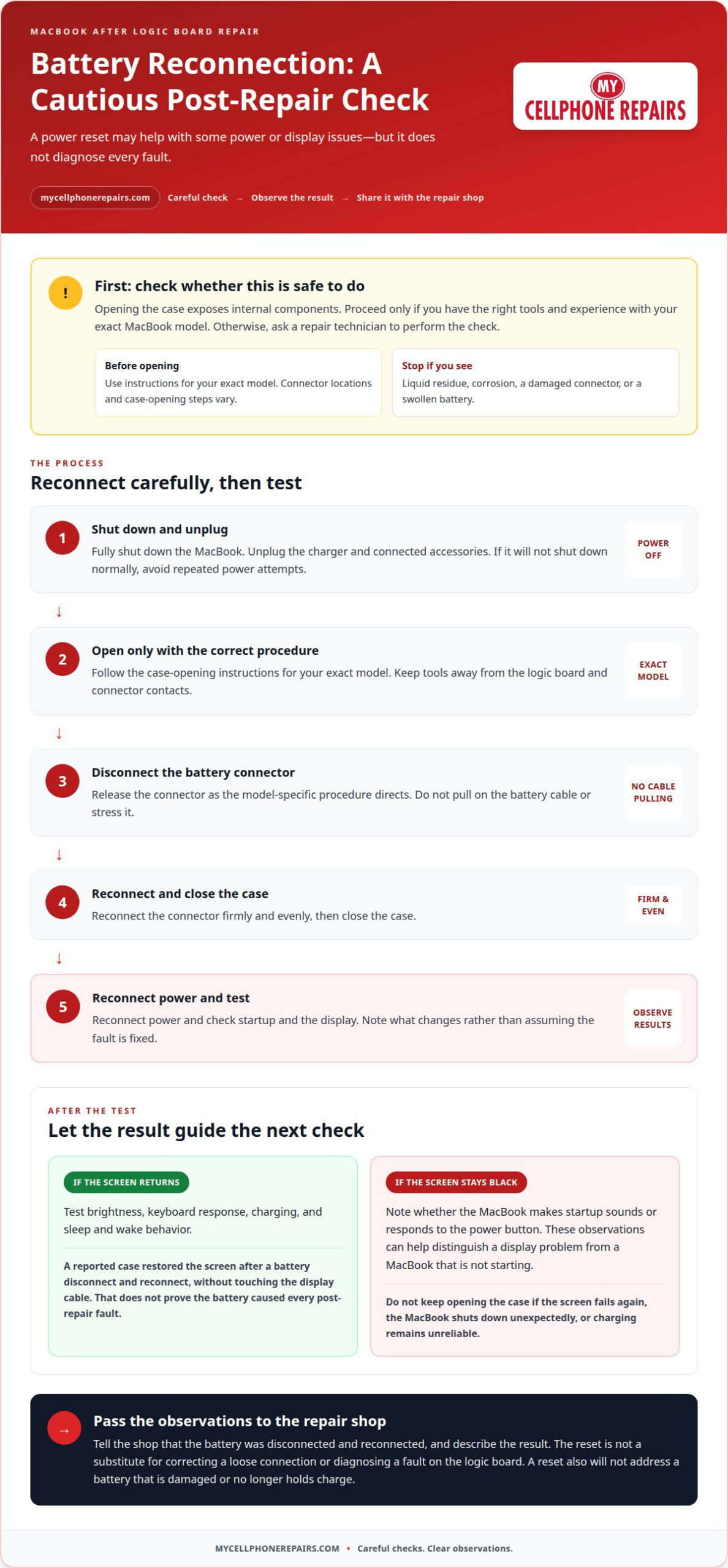
Reconnecting the battery may help clear a power or display issue after repair. In one reported case, disconnecting and reconnecting the battery restored the screen without touching the display cable. This makes a power reset worth considering, but it doesn’t prove the battery caused every post-repair fault.
Start with the MacBook fully shut down. Unplug the charger and connected accessories. If it won’t shut down normally, avoid repeated power attempts. Opening the case exposes internal components, so proceed only if you have the right tools and experience with your model. Otherwise, ask a repair technician to perform the check.
Battery connector locations and case-opening steps vary by MacBook model. Use instructions for your exact model, not a guide for a similar-looking computer. Keep tools away from the logic board and connector contacts. Don’t pull on the battery cable; release its connector as the model-specific procedure directs. Stop if you see liquid residue, corrosion, a damaged connector, or a swollen battery.
- Shut down the MacBook and unplug its charger.
- Open the case only with the correct model-specific procedure.
- Disconnect the battery connector carefully, without stressing its cable.
- Reconnect the connector firmly and evenly, then close the case.
- Reconnect power and test the MacBook’s startup and display.
After reconnecting the battery, note what changes. If the built-in screen returns, test the brightness, keyboard response, charging, and sleep and wake behavior. If the screen stays black, note whether the MacBook makes startup sounds or responds to the power button. These observations can help distinguish a display problem from a MacBook that isn’t starting.
A successful restart is useful evidence, but it doesn’t complete the diagnosis. If the screen fails again, the MacBook shuts down unexpectedly, or charging remains unreliable, don’t keep opening the case. Tell the repair shop that the battery was disconnected and reconnected, and describe the result. That detail can help focus the next inspection on the battery connection, display path, or another component.
If the battery is damaged or no longer holds charge, a reset won’t address the underlying issue. A technician can assess whether MacBook battery replacement is the appropriate repair. Avoid treating a battery reset as a substitute for correcting a loose connection or a fault on the logic board.
Rossmann Group says a liquid-damaged MacBook logic board may be unrepairable if corrosion has destroyed multiple PCB layers or critical BGA pads beyond reconstruction. In that situation, a battery reset may not resolve the board damage.
SMC and PRAM/NVRAM resets
SMC and PRAM/NVRAM resets address settings and power-management behavior, not physical damage to the logic board. They may help when a MacBook behaves differently after repair, such as not responding to the power button or showing unexpected display settings. First identify whether your Mac uses an Intel processor or Apple silicon, because the reset options depend on that distinction.
On Intel MacBooks, the System Management Controller (SMC) manages functions such as power, charging, and thermal behavior. A reset may help if the MacBook won’t respond as expected to charging or power controls. The exact procedure varies by model, including whether it has a T2 chip. Use the steps for your specific MacBook model. Don’t apply a key sequence from a different model.
PRAM and NVRAM store certain settings a Mac uses during startup. On an Intel MacBook, resetting NVRAM may help if startup choices, sound, or display settings behave incorrectly. It won’t reconnect a loose display cable or repair a failed board component. If the screen stays black after a reset, treat that as diagnostic information, not proof that the reset failed or fixed the underlying cause.
Apple silicon MacBooks use a different startup and power-management design. Don’t assume Intel SMC or NVRAM reset instructions apply. Start with a normal shutdown and restart. If the MacBook can’t restart normally, record what appears on screen and how it responds to the power button. That information is more useful than repeating reset attempts without knowing which procedure fits your model.
Use this sequence to keep the result clear:
- Find the MacBook model and processor type in its documentation or repair paperwork.
- Choose the reset procedure that matches that exact model.
- Connect the appropriate power adapter, then perform the reset once.
- Restart and note whether startup, charging, keyboard response, or display behavior changes.
- Share the result with the repair technician if the fault remains.
A reset may clear a temporary settings or power-state issue, but it cannot confirm that a logic board repair is sound. For example, if a MacBook starts but its built-in display remains black, the display path still needs diagnosis. If it won’t power on, or the same fault returns after restarting, avoid trying unrelated reset combinations. Record the model and symptoms, then focus the next assessment on the hardware and connections involved in the repair.
Testing the complete MacBook after repair
After logic board repair, test startup, display, charging, and connected devices. Record each symptom so the diagnosis can focus on what fails.
Black Screen and Boot Failure
A black screen can come from a display-path fault, a startup problem, or another hardware issue. A MacBook may start even when its built-in screen stays dark. In one reported case, the display worked for about 15 minutes after logic board replacement, then went black. The MacBook still worked through an HDMI external display, pointing attention toward the built-in display path.
Why might a MacBook show a black screen or fail to boot after logic board repair? A display connection or component fault can leave the screen black, while a startup or power fault can prevent booting. Note whether an external display shows an image and whether the MacBook responds to input.
Loose Battery, Display, and Flex Cables
Could a loose battery, display, or flex cable cause problems after logic board repair? Yes. A poorly seated battery connector can affect power, while a display or flex-cable connection can interrupt the built-in image or related functions. Record which features fail, such as charging, the internal screen, or startup, rather than opening the case and disturbing connections.
Look for patterns before returning the MacBook. An image on an external monitor but not the built-in display points to a different symptom than a machine that won’t start at all. Share the exact result with the technician to help guide an inspection of the affected connections and components.
Test the MacBook in a consistent order. Connect the charger, press the power button once, and observe its response. Check the built-in screen, keyboard, trackpad, sound, charging, and any ports you use. If the internal screen stays black, test an external display. Record whether the problem appears immediately or after the MacBook has been running for a while.
Can data be recovered if a MacBook stops working after logic board repair? It depends on the storage design and the condition of the original board. On models with soldered storage, replacing the logic board can mean losing stored data. T2 and Apple silicon security features tie storage encryption to specific logic boards, so a simple chip swap won’t recover it. Tell the repair technician if the files matter before authorizing board replacement.
What are the risks of repeatedly powering on or charging a MacBook after a failed logic board repair? Repeated attempts won’t identify the cause and can make the symptoms harder to document. Stop testing after a clear failure, record the charger and startup behavior, and share those details with the technician before further work.
What should I do first if my MacBook won’t turn on after a logic board repair?
Start with a controlled check, not repeated power attempts. Note whether the MacBook shows a charging light, makes a sound, or responds to the power button. These observations help distinguish no power from a startup failure or a blank screen. Keep your repair receipt and note when the problem began.
Follow this sequence before arranging further work:
- Disconnect accessories, including external drives, hubs, and displays.
- Check the charger, cable, and outlet for visible damage or a loose connection.
- Connect the charger directly to the MacBook and press the power button once.
- Wait for a clear response, then record sounds, screen changes, or signs of charging.
- If the screen stays black, test an external display if one is available.
If your MacBook is not working after logic board repair, describe exactly what happens. For example, “no image, but the keyboard responds” is more useful than “it’s dead.” Note whether the MacBook starts briefly and shuts off, remains silent, or shows an image only on an external display. Include the charger you used and whether the symptom changes when it’s connected to power.
Don’t open the case to reseat a connector unless you have the right tools and model-specific repair experience. The logic board area contains delicate components, and extra handling can complicate diagnosis. Stop if you see liquid residue, corrosion, a damaged connector, or a swollen battery. Photograph visible external damage without touching internal parts.
Contact the shop that performed the repair with your symptom notes. State when the MacBook was returned, when the failure appeared, and what happened during your controlled check. Ask for the next diagnostic step and a written explanation of any proposed work. If the MacBook starts only with an external display, report that exact result rather than calling it a complete startup failure.
Protect your files before approving another logic board replacement. On MacBook models with soldered storage, replacing the board can mean losing data stored on it. T2 and Apple silicon security features also tie storage encryption to specific logic boards, so simple chip swapping isn’t a straightforward recovery method. Tell the technician that data preservation matters before further hardware work begins.
Repeatedly pressing power or reconnecting a charger won’t identify the fault. It can also make the symptom pattern harder to describe. For a MacBook not working after logic board repair, make one careful observation, preserve the repair paperwork, and arrange a focused MacBook repair assessment if the computer remains unresponsive.
My Cellphone Repairs: Samsung Phone Repair
My Cellphone Repairs offers MacBook Repair for power, display, and other hardware problems after logic board work. Bring the repair history and describe what happens when you press the power button, connect the charger, or test an external display. Clear symptoms help focus the assessment on the remaining issue.
If the battery itself is damaged or failing, Battery Replacement may be relevant. My Cellphone Repairs also offers Samsung Phone Repair and iPhone Screen Repair for those separate device needs.
Contact My Cellphone Repairs to discuss your MacBook, or visit mycellphonerepairs.com.
Choose the next step with confidence
If your MacBook is not working after a logic board repair, base your next decision on what you need the computer to do. A useful diagnosis should connect the current symptoms to a clear repair plan. Before authorizing more work, decide whether your priority is restoring everyday use, resolving a specific fault, or weighing repair against replacement. That goal keeps the discussion practical and focused.
Bring the repair history and symptom notes to the discussion. Ask what the proposed work is intended to fix and how the result will be tested. Clear answers make it easier to compare the repair plan with your needs without committing to steps that don’t address the problem.
My Cellphone Repairs offers repair support for MacBooks, alongside phone services for Samsung and iPhone devices. If you’re ready to discuss the next step, contact My Cellphone Repairs for help. A focused assessment can help you move forward with a clearer plan.
Frequently Asked Questions
Making the Decision: Repair or Replace?
Compare the repair estimate with the MacBook’s replacement value and your needs. Logic board repair generally makes sense when it costs under 50% of replacement value. Replacement becomes more reasonable when repair costs approach or exceed 70% of replacement value. Between those thresholds, weigh the computer’s condition, expected use, and data needs. For models with soldered storage, include the risk of losing stored data when considering board replacement.
How can I diagnose a MacBook that has no power after logic board repair?
To distinguish a power failure from a display-only problem, record what the MacBook does during startup. Note whether it responds to the power button, shows any sign of charging, or starts and then shuts down. Include the charger used and whether the symptom changes when power is connected. Give those observations and the repair paperwork to the technician so the assessment can focus on the reported failure.
How do I reset the SMC or NVRAM on a MacBook after logic board repair?
Use the reset procedure that matches the MacBook’s processor and exact model. Intel models may support SMC and NVRAM resets, but the steps vary, including on models with a T2 chip. Apple silicon uses a different startup and power-management design, so don’t use Intel key combinations automatically. Check the model-specific procedure, perform the appropriate reset once, and note which behavior changes afterward.
What error codes or diagnostic tests can identify problems after MacBook logic board repair?
No single error code identifies every post-repair fault. A useful diagnosis combines the symptoms with hardware checks, such as inspecting the display cable and logic board for corrosion. If corrosion is present, cleaning may be considered; persistent display problems may require a separate display assessment. Share any exact on-screen message with the technician, and ask how each test result supports the proposed repair.
Is a MacBook logic board repair covered by a repair warranty or consumer protection law?
Third-party repairs generally void Apple warranties, so don’t assume Apple coverage remains unchanged after independent logic board work. The repair shop’s written terms are separate from Apple’s warranty. Keep the receipt and diagnosis, then read the terms for the specific repair. Consumer protection coverage depends on the circumstances and applicable rules; don’t treat a repair receipt or warranty statement as a complete answer to that separate legal question.