
A trustworthy MacBook repair choice starts with a clear estimate, not just a tempting headline price. Knowing how to find a trustworthy MacBook repair service means comparing the proposed work and service terms, not looking at the total alone. For hardware issues not covered by standard manufacturer warranties, independent repair shops can set their own competitive fees and provide customized estimates tailored to your specific device problems.
It’s reasonable to want a clear cost before handing over your MacBook. The cost depends on the model, fault, parts, and work involved. My Cellphone Repairs provides repair pricing after a quote request. This guide explains how to assess estimates for MacBook, MacBook Pro, and MacBook Air repairs, what details to compare, and how to understand a repair service’s terms. You’ll also learn how to assess the repair process and choose a service that fits the problem.
Key Takeaways
- Compare repair estimates by the work proposed, parts, and service terms, not just the total.
- For AppleCare-covered Mac service, the service fee is the same at Apple and Apple Authorized Service Providers.
- Read guarantee terms closely so you understand what repair work they cover and for how long.
- Look for review patterns that speak to communication, estimate clarity, and how problems are handled.
- Check a technician’s relevant Mac repair experience and credentials when weighing your options.
MacBook, MacBook Pro, and MacBook Air repairs
Before handing over a MacBook, back up important files and sign out of sensitive accounts when possible. Never share your Apple Account password, and remove private files you don’t need on the device.
MacBook, MacBook Pro, and MacBook Air repairs can involve different parts and diagnostic steps, so identify your exact model and symptoms first.
Technician Qualifications and Certifications
Look for experience with your specific MacBook type and the repair involved, such as a screen, battery, or charging fault. Ask what training or credentials the technician holds, who issued them, and whether they apply to Mac repairs. A certificate alone doesn’t show how a technician will handle your model. Ask for a plain explanation of the diagnosis and proposed work.
Third-Party Repair and Part Risks
Replacement-part quality and repair work can vary. A poorly matched part may not fit or function as expected, while careless work can cause additional damage. Ask whether the estimate uses genuine or third-party parts, whether parts are new or refurbished, and what coverage applies to the repair. Get those details in writing before approving the work.
Make the handoff specific. Open “About This Mac” to record the model name and chip information, then describe the fault in practical terms. For example, note whether a MacBook Air shuts down during startup or a MacBook Pro screen flickers after waking. Include when the problem began and any recent drop, liquid exposure, or software change.
For a useful diagnosis, share what you have already tried. If the MacBook still starts, note any error message and whether the issue happens with a charger connected. Don’t attempt a repair that could worsen the damage. A clear symptom history helps the technician distinguish a battery issue from a charging problem or another fault.
Before taking your MacBook for repair, prepare it for the handoff: back up files, remove accessories, and photograph its exterior condition. Keep the charger only if the technician needs it to reproduce a charging symptom. Record the device’s serial number privately for your own records.
Compare the proposed repair with the symptom. If the keyboard fails but the estimate focuses on an unrelated component, ask for the diagnostic reasoning and what tests support that recommendation. Request an itemized description of parts and labor, plus the process for approving extra work. A clear explanation helps you judge whether the repair addresses the problem you reported.
For persistent startup trouble, visible screen damage, battery problems, or liquid exposure, stop using the Mac if continued use appears to worsen the fault. Describe the issue accurately rather than guessing at the failed component. These steps help you assess how to find a trustworthy MacBook repair service and make an informed decision before authorizing work.
Repair estimates and fees
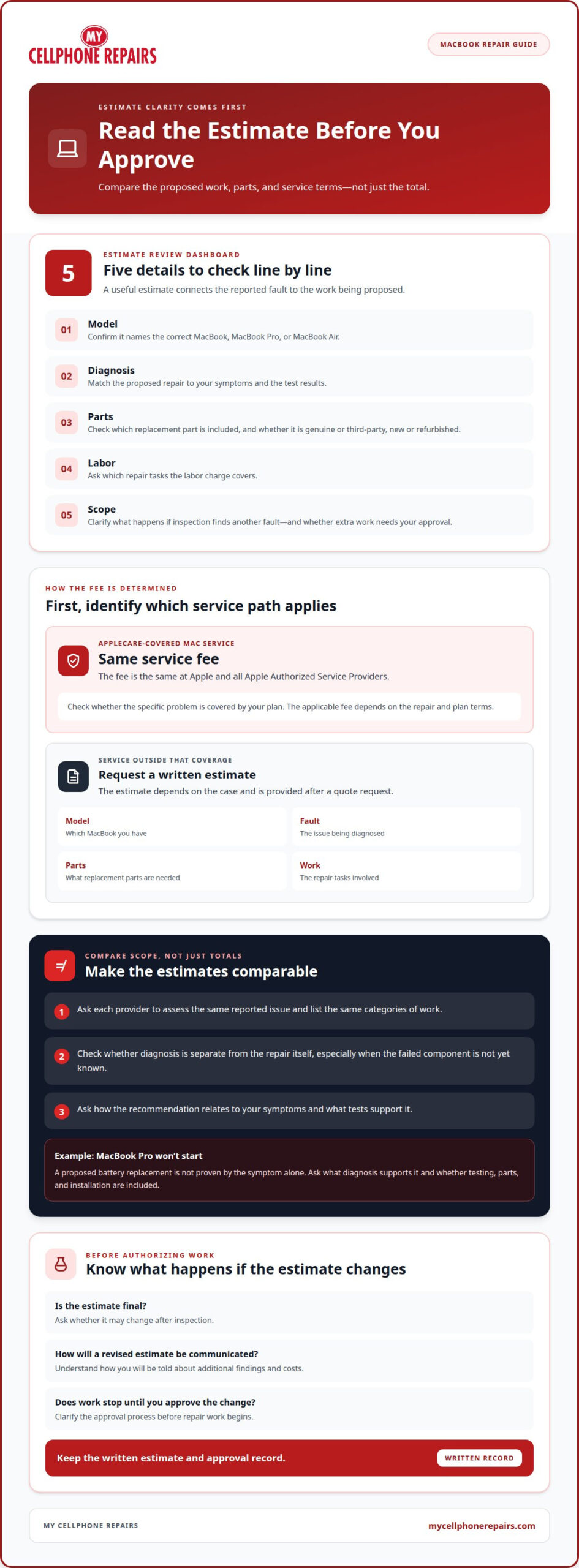
For Mac service covered by an AppleCare plan, the service fee is the same at Apple and all Apple Authorized Service Providers. Apple Authorized Service Providers can set their own service fees and provide their own estimates for other service. First, establish whether the repair is covered by your plan or priced as separate service.
AppleCare+ coverage depends on the repair and plan terms. Check whether the specific problem falls under your coverage, then compare the applicable service fee rather than assuming every repair has the same cost. For service outside that coverage, request a written estimate before approving work. The price depends on the case and is provided after a quote request; the model, fault, required parts, and repair work determine the estimate.
A useful estimate should identify the proposed work. Review each line and ask how it relates to the reported fault. For example, a MacBook with a charging problem may need diagnosis before the technician can identify the failed component. The estimate should distinguish diagnostic work from the repair itself and explain whether additional work requires your approval.
- Model: Confirm the estimate names the correct MacBook, MacBook Pro, or MacBook Air.
- Diagnosis: Match the proposed repair to the symptoms and test results.
- Parts: Check what replacement part the estimate includes.
- Labor: Ask which repair tasks the labor charge covers.
- Scope: Clarify what happens if inspection reveals another fault.
Compare estimates by scope, not by total alone. One quote might include diagnosis and replacement work, while another might describe only the suspected repair. Ask each provider to assess the same reported issue and list the same categories of work. That gives you a useful comparison without relying on an industry average or an unexplained figure.
Before approving an estimate, ask whether it is final or subject to change after inspection. Find out how the provider will communicate a revised estimate and whether work stops until you approve the change. Keep the written estimate and approval record. These steps help prevent confusion if the final work differs from the first proposal.
For example, if a MacBook Pro won’t start, don’t treat a proposed battery replacement as proven solely by the symptom. Ask what diagnosis supports it and whether the estimate covers testing, parts, and installation. A clear explanation connects the reported problem, the recommended repair, and the requested fee. If those elements don’t align, pause before authorizing the work.
Repair service guarantees
A useful MacBook repair warranty states in writing what repair work it covers and how to make a claim. It should identify the replaced part or completed service, the coverage period, exclusions, and the remedy available if the same fault returns. There is no single warranty term to assume across repair providers, so compare the actual written terms.
Ask for the warranty document before authorizing work, then keep it with the repair receipt. Check that both records identify your MacBook and the repair performed. A receipt that only says “computer repair” may not clarify whether coverage applies to a replaced display, battery, or charging component.
Separate parts coverage from workmanship coverage. Parts coverage concerns the replacement component; workmanship coverage concerns the installation or repair process. A clear document explains whether each is covered and what happens if a part fails or the original symptom returns. For example, a display warranty should say whether it covers the replacement display and installation.
Read exclusions closely. Terms may distinguish a fault related to the original repair from new accidental damage, liquid exposure, or an unrelated component failure. The wording should explain those boundaries plainly. If a MacBook’s keyboard stops working after a screen repair, the warranty should make clear how the shop assesses whether the issue relates to its work.
- Coverage: Match the warranty to the exact repair and replacement parts.
- Period: Find the start and end dates or stated coverage duration.
- Remedy: Identify whether the provider will inspect, redo, or otherwise address covered work.
- Exclusions: Note conditions that can void coverage, such as later damage.
- Claim steps: Record whom to contact and which documents to present.
Also check whether the warranty follows the repaired MacBook or applies only to the person who paid. Confirm whether you need the original receipt, repair record, or both. These details matter if someone else owns the device or handles the follow-up. A warranty with a clear claim route is easier to use than a broad verbal promise.
Test the repaired function before leaving the shop, when practical. If the repair involved a keyboard, test several keys; if it involved charging, check that the MacBook recognizes its charger. Report any unresolved symptom promptly and describe what you observed. Keep messages and service records together so the reported issue and repair date remain clear.
Finally, compare warranty wording alongside the repair scope. A long coverage period means little if the repaired component is excluded, while a shorter period may still clearly explain the remedy and claim process. Trustworthy terms are specific, written, and connected to the actual work. Before approving service, make sure you understand what is covered and what steps to take if the same repair fails.
How to check MacBook repair shop reviews and complaints
Use Google reviews and other public review pages to look beyond the overall rating. Search the shop’s name with terms such as “MacBook repair” or “complaint.” Read recent comments alongside older ones, and focus on specific repair experiences rather than star ratings alone.
Look for details that relate to your device and the work you need. A review about a phone screen says little about a shop’s MacBook repairs. A useful MacBook review might describe a battery replacement, explain how the shop handled diagnostics, or mention whether the final repair matched the original estimate.
Read several reviews for recurring themes. One complaint may describe an unusual situation, but repeated comments about unclear updates or surprise charges deserve attention. Positive reviews can also reveal practical strengths, such as clear explanations, careful handling, or follow-up after a repair. Separate specific experiences from brief comments that offer no context.
Check how the business responds to criticism. A professional reply should address the issue calmly, avoid sharing private customer details, and explain a practical next step. For example, a response to a complaint about a MacBook that still won’t start should acknowledge the concern and offer a way to discuss the repair. Defensive replies or personal attacks provide less useful information.
Search complaint pages and public business profiles using the exact shop name. Compare dates, repair types, and the business’s response across sources. Look for whether a complaint was resolved, whether the response explains what happened, and whether the same issue appears elsewhere. Don’t treat an allegation as proven fact; use it as a prompt to assess the shop’s communication and repair process.
- Match the service: Prioritize MacBook repair experiences over unrelated device reviews.
- Check the details: Look for the repair, communication, and outcome described.
- Notice patterns: Compare repeated concerns with repeated positive feedback.
- Read replies: Assess whether responses stay factual, respectful, and solution-focused.
Use a review as a starting point, not a guarantee of your own experience. For example, if a reviewer praises a battery replacement but mentions no warranty details, that review can’t tell you what coverage your repair includes. Pair review findings with the written estimate and warranty terms you receive for your MacBook.
Before choosing a shop, note the specific questions reviews leave unanswered. If comments mention delays, check the shop’s stated repair process; if they mention unexpected work, look for clear approval steps. This method turns online feedback into practical evidence. It helps you compare how a repair business communicates, handles problems, and describes completed MacBook work.
What qualifications and certifications should a MacBook repair technician have
Choose credentials that match the repair, not just a polished title. A technician handling a MacBook battery fault needs relevant hardware repair skills, while a data recovery problem calls for different expertise. Ask about training, practical experience, and the types of MacBook work completed. Use those answers to judge whether the technician’s background fits your device and symptoms.
Apple Authorized Service Provider is a specific service designation in Apple’s repair ecosystem. If a provider claims this status, confirm the name and scope of the designation through Apple’s official provider information. Don’t assume that a general computer repair certificate means Apple authorization. These credentials describe different things, so understand what each one covers.
Ask the technician to connect their experience to your repair. For a MacBook Pro with a damaged display, ask whether they’ve handled display replacements on that model family. For a MacBook Air that won’t charge, ask what diagnostic steps they use before recommending parts. Specific answers show whether their experience relates to your problem.
- Training: Ask who provided it and whether it covers Mac hardware repair.
- Relevant experience: Request examples involving your MacBook type and fault.
- Credential scope: Find out what a certificate or designation verifies.
- Diagnostic method: Ask how the technician will identify the cause before repair.
- Repair records: Confirm you’ll receive a description of completed work.
Use the explanation itself as a practical test. A capable technician should describe the fault in understandable terms, explain which checks support the diagnosis, and separate confirmed findings from possible causes. For example, “the battery needs replacement” is more useful when paired with an explanation of what testing led to that conclusion.
Training can also be demonstrated through the repair process. Ask how the technician protects delicate connectors, tracks removed screws, and checks the device after reassembly. A clear answer should describe steps tied to the repair, not rely on broad claims like “we fix everything.” For a charging issue, ask how the technician will test charging after completing the work.
Compare credentials with the written scope of work. If the technician cites electronics training but proposes a complex MacBook repair, ask how that background applies to the specific task. Keep the answer alongside the estimate and repair record. That gives you a practical basis for comparing relevant skills, rather than relying on titles alone.
Use these criteria to review MacBook repair service details and assess whether the technician’s experience suits your device.
My Cellphone Repairs: Samsung Phone Repair
My Cellphone Repairs provides MacBook Repair for owners dealing with hardware faults that need professional attention. Turn to the service when your MacBook has a battery, charging, screen, or other hardware problem and you’re ready to arrange a repair. Clear information about the symptoms and model helps explain the issue and supports a focused repair discussion.
My Cellphone Repairs also offers Battery Replacement, alongside Samsung Phone Repair and iPhone Screen Repair. Choose the service that matches the device and repair need, rather than assuming a phone repair option applies to a MacBook. Reviewing the repair details and preparing your symptom notes can make the next step straightforward.
To discuss MacBook Repair, contact My Cellphone Repairs or visit mycellphonerepairs.com.
Make Your Next Repair Decision With Confidence
Knowing how to find a trustworthy MacBook repair service gives you a stronger starting point, but the next step is to put your notes into action. Keep your model and symptom details ready, then use them to describe the problem clearly and understand the proposed repair. If the estimate or repair plan is hard to follow, ask for a plain explanation before approving the work.
My Cellphone Repairs offers MacBook Repair for laptop owners seeking help with a MacBook hardware issue. The business also offers Samsung Phone Repair and iPhone Screen Repair. Choose the service that matches your device, and share the repair details that matter to you. A clear conversation can help you move from uncertainty toward a practical next step.
Ready to discuss your MacBook repair? Contact My Cellphone Repairs and take the next step with confidence.
Frequently Asked Questions
How much will it cost?
MacBook repair cost depends on the model, fault, required parts, and work involved, and My Cellphone Repairs provides it after a quote request. If AppleCare covers the service, the fee is the same at Apple and Apple Authorized Service Providers. For other service, estimates can differ. Give the repair shop the exact symptoms, such as unexpected shutdowns, to help it assess the issue and prepare a relevant quote.
Is there a service guarantee?
My Cellphone Repairs backs its repairs with a warranty. A warranty is different from a promise that every repair will produce a particular result, so read the written terms for the work performed. Keep the receipt and warranty document together. For example, if your MacBook develops a problem after service, those records help identify the repair and the coverage terms that apply.
Where can I get service?
My Cellphone Repairs offers MacBook Repair, with walk-in service and online scheduling at its listed mall locations. Stores include Bowie Town Center in Bowie, Maryland, and other authorized facilities within the coverage area. These locations are practical for readers near Bowie, Towson, Baltimore County, Hyattsville, and College Park. Choose a listed location that fits your trip.
How do I get a MacBook repair estimate and compare local repair shops?
Share your MacBook model and a concise description of the problem when requesting an estimate. To compare local options fairly, describe the same symptoms to each shop and save the replies together. For example, note whether the laptop starts, charges, or shows an error. Then compare how each estimate explains the diagnosis and proposed work, so you can see which response addresses your specific issue.
What questions should I ask before choosing a MacBook repair service?
Ask how the shop will protect your files, whether it needs your device passcode, and how it will report new findings. Clarify whether you’ll approve additional work before it begins. Ask what checks you can perform when collecting the MacBook, such as confirming that it starts and that the repaired function works. These questions help you prepare for the handoff and understand the return process.