
A professional-looking website doesn’t prove a phone repair shop is legitimate. To learn how to verify a phone repair business is legitimate, compare its address, contact details, registration records, website, and customer feedback. Watch for unusual payment requests before handing over your phone. These basic checks can help you assess the business before you approve a repair.
It’s reasonable to look beyond a polished storefront or a handful of positive reviews before trusting a shop with your device. You can check key details yourself. This guide explains how to compare a shop’s location, registration, online presence, and payment practices, so you can identify warning signs and make a more informed choice.
Key Takeaways
- Compare the shop’s address, phone number, and website details to see whether they consistently identify the same business.
- Use free government business searches to check registration details and whether the shop’s information matches its public claims.
- Look beyond a polished website by reviewing independent feedback and watching for repeated complaints or suspicious review patterns.
- Pause if a business pressures you to pay immediately or requests gift cards, cryptocurrency, or wire transfers.
- Read written repair terms carefully and check for clear contact details before handing over your device.
Check the business address, phone number, and website
Start with details that tie the repair shop to a real business and location. Compare its address, phone number, website, and registration records. Mismatched business names, missing contact details, or an address that doesn’t match the shop’s description are reasons to look more closely.
Before handing over your phone, compare written estimates and ask about data handling, repair risks, and terms. These steps help you check the shop’s identity alongside the proposed work.
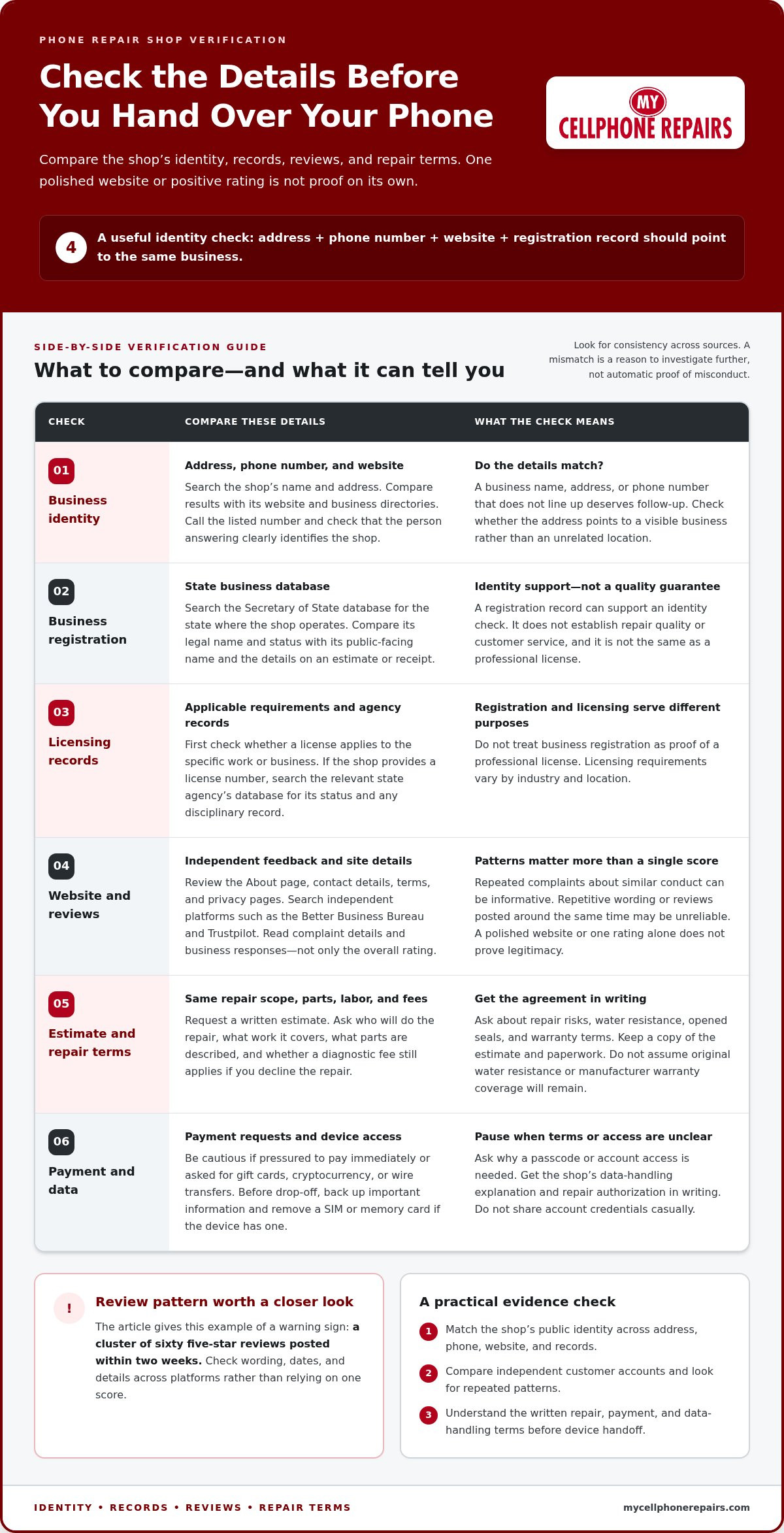
Quick visual check: Address + phone number + website + registration → compare for matching business details.
- Match the address and phone number. Search the shop’s name and address, then compare the results with its website and business directories. Check whether the address points to a visible business rather than an unrelated location. Call the listed number and confirm that the person answering identifies the shop clearly. A mismatch between the business name, address, and phone number deserves follow-up before you leave your device.
- Check the state registration record. Search the Secretary of State business database for the state where the shop operates. Compare the legal name and status with the shop’s public-facing name. Check that the filing details match the business on your estimate or receipt. A registration record supports an identity check, but it doesn’t establish repair quality or customer service.
- Check licensing and disciplinary records. License requirements vary by industry and location, so first find out whether a license applies to the specific work or business. If the shop provides a license number, search the relevant state agency’s database for its status and any disciplinary record. Don’t treat business registration as proof of a professional license; they serve different purposes.
- Ask for references and credentials. Request a written estimate and ask who will perform the repair, what work it covers, and what terms apply afterward. Compare estimates for the same repair scope, parts description, labor, and diagnostic fee. Ask whether the fee applies if you decline the repair. Price depends on the device, damage, parts, and labor, and is given after a quote request.
- Protect your data before drop-off. Back up important information, remove a SIM or memory card if your device has one, and ask why access to your passcode or account is needed. Don’t share account credentials casually. Get the shop’s data-handling explanation and repair authorization in writing, so the agreed work and access are clear.
- Ask about repair risks and terms. Ask whether the repair may affect water resistance and how the shop handles seals opened during the work. Don’t assume the device will retain its original water resistance or manufacturer warranty coverage. Review the device and shop’s written repair terms, then keep a copy of the estimate and paperwork before handing over your phone.
Is a company legit if it has a professional website?
No. A polished website can support a business’s claims, but it doesn’t prove them. Check the site’s registration details, then compare independent reviews, complaints, and relevant regulator warnings.
To check a phone repair business’s reviews and complaint history, search its name alongside terms such as “complaints,” “scam,” and “reviews.” Look for repeated patterns rather than relying on a single rating or isolated negative comment.
-
Review Website Quality and Registration Data
Review the website’s About page, contact details, social media presence, and terms and privacy pages. Note broken links, blank pages, suspicious stock photos, or inconsistent business names. None proves misconduct on its own, but several warning signs together merit closer scrutiny.
Check the domain’s registration data to see when the site was created and when its registration expires. A recently registered domain deserves a closer look if the site claims a long business history. A polished design alone can’t verify that history.
-
Search Independent Reviews and Complaints
Search the business name on the Better Business Bureau, Trustpilot, and review platforms relevant to electronics repair. On the Better Business Bureau, search by the company’s location or where it does business. Read complaint details and business responses, not just the overall rating.
Compare review dates, wording, and photos across platforms. Repeated complaints about similar conduct can be more informative than one unhappy customer. Few complaints don’t confirm that a shop is legitimate, and a single negative review doesn’t settle the question.
- Check review patterns, not just the score. Read recent and older reviews to see whether customers describe specific repairs, timelines, and outcomes. Very positive reviews with repetitive wording or reviews posted around the same time may be unreliable. For example, a cluster of sixty five-star reviews posted within two weeks can be a warning sign of manufactured feedback.
- Search for regulator warnings. Search the business name alongside terms such as “regulator warning” and “complaint.” A named entry on a relevant warning list, or repeated reports describing the same problem, calls for caution. Check that the listing refers to the same business, since companies can have similar names.
Consider these checks together. A website, rating, or business bureau listing is only one part of the picture. Matching details and consistent customer accounts offer more useful evidence than a polished homepage alone.
Identifying pressure tactics and suspicious payment requests
A legitimate repair discussion should give you time to understand the work and payment terms. A repair-parts-and-labor warranty of 90 days is described as the industry-standard period, so compare the written coverage and exclusions rather than relying on a verbal promise.
- Pause when someone creates urgency. A shop should explain the repair without pressuring you to pay immediately or accept an offer before you can review it. Treat demands like “pay now or lose the offer” as red flags, especially when paired with unusual payment methods. Stop and verify the business details before sending money or sharing personal information.
- Review the payment request. Be cautious if a shop asks you to pay with gift cards, cryptocurrency, or a wire transfer. Those requests are common scam warning signs, particularly when the business also insists on immediate payment. For a major purchase, be wary of demands for cash, a check, or access to your bank account. Choose a payment method that gives you a way to dispute a transaction if needed.
- Look up the owners and business details. Ask for a written statement identifying the business’s owners, locations, organizational structure, and what work it performs. Compare the company name with its public registration record and the name on its estimate or receipt. If an owner or representative gives details that conflict with the registration, pause and ask for a clear explanation before agreeing to the repair.
- Read every contract before signing. Get the repair scope, payment terms, cancellation policy, refund policy, and warranty coverage in writing. Check whether the warranty covers parts, labor, or both, and note any stated exclusions. Don’t sign a document you haven’t read or one with blank spaces that could be filled in later. Keep a copy of the signed estimate or agreement.
- Ask direct questions and keep the answers. Before authorizing work, ask what the diagnostic process includes, what could change the estimate, and whether payment is due before or after the repair. Ask how the 90-day parts-and-labor warranty applies to the specific repair, and request the answer in writing. A clear response gives you terms to review; evasive answers combined with payment pressure are a reason to stop.
- Protect your information if the request seems suspicious. Don’t send money or personal details to a contact whose identity or business information doesn’t match. Stop communicating if pressure tactics continue, and contact your bank or card issuer promptly if you already paid and suspect fraud. Save messages, estimates, and payment records so you can describe what happened clearly.
Examining company websites and contact information
Treat the website as a cross-check, not proof. Compare its contact details, business name, and repair terms with the information the shop gives you directly. Whether hiring an electronics technician or vetting an on-call vehicle specialist like keyskev.co.uk, verifying genuine contact channels and clear operational areas helps confirm you are dealing with a legitimate local provider.
- Compare contact details across the site. Check the Contact and About pages for a business name, phone number, physical address, and email. Compare those details with the shop’s directory listings and social media profiles. If the website names one company but its contact page or payment instructions name another, pause and ask for a clear explanation. Save or print the pages showing the mismatch.
- Call the listed phone number. Ask who you’ve reached and whether the person can explain the repair process. Notice whether the answer identifies the business clearly or redirects you to an unrelated company. A working phone number is useful, but it doesn’t prove the shop’s identity by itself. Compare the answer with the name and address shown on the website.
- Review how the website handles information. Check the privacy and terms pages before entering personal or financial details. If a site asks you to submit payment or sensitive information, stop if it lacks HTTPS protection. Look for broken links, blank pages, spelling errors, and contact forms that don’t explain where your information goes. Treat several problems together as a reason to investigate further.
- Check email and communication methods. Look for an email address using the company’s domain, then compare its wording with the website’s business name. Be cautious if a representative insists on messaging apps only and avoids ordinary company communication. You can ask for a video call or call the office phone number during business hours. Reluctance to share company details or speak directly is a warning sign.
- Read the written repair terms. Find the estimate, warranty, cancellation, and refund information before authorizing work. Check whether the terms identify the business, describe the repair, and explain what any guarantee covers. Don’t treat a general guarantee on the homepage as a promise about your specific repair. Ask for the relevant terms in writing and keep a copy with your receipt.
- Compare the site with the conversation. Check that the person’s answers match the listed address, phone number, business name, and policies. For example, if the website names one location but the representative requests payment under another business name, pause before proceeding. Consistent details make it easier to identify who is responsible for the repair and where to direct questions.
Verifying a shop’s address and business registration
Registration and location checks answer different questions: does the business appear in official records, and does it operate where it says it does? Compare both before leaving your phone or making a payment.
- Search the relevant state registry. Use the Secretary of State business search for the state where the shop operates. Compare the shop’s public name with its legal name, status, formation information, and registered agent. A different legal name can be legitimate, but the shop should explain the connection clearly. Confirm important details against the government registry, not just a directory listing.
- Match the registration to the repair paperwork. Compare the registry entry with the business name on the estimate or receipt. Check whether the registration is active and whether the listed address aligns with the shop’s stated location. Similar names can create errors, so compare multiple identifying details before treating a record as a match.
- Compare the physical address with the location. Search the address online and inspect available street imagery. Google Street View can show whether a repair shop’s address has a history spanning more than a year. Look for a storefront or business signage that fits the shop’s description. If imagery shows another business or an empty lot, ask for an explanation before visiting.
- Check company and tax identifiers. Ask for the company registration number and compare it with the relevant government record. A U.S. business’s Employer Identification Number can also help check identity. Treat a number that fails validation, or a refusal to provide a verifiable company or tax number, as a failed legitimacy check. Don’t rely on a number printed on a website alone.
- Check other official records where relevant. Search SEC EDGAR if the business claims to be a public filer. For a license or registration required by its industry, use the relevant government agency or industry organization to check status and disciplinary actions. Don’t assume every repair shop needs a professional license; check whether one applies to the specific business activity.
- Keep a record of what matches. Save the registry result and note the shop’s legal name, active status, physical address, and contact details. Compare those records with the repair paperwork and any credit card receipt. A consistent match across official records and documents is more useful than a single registration entry alone.
Once you’ve completed these checks, get help with your phone repair.
My Cellphone Repairs: Samsung Phone Repair
My Cellphone Repairs offers Samsung Phone Repair for customers whose device needs attention after a fault or damage. If your issue is a cracked iPhone screen, a MacBook problem, or a battery that needs replacing, the business also offers iPhone Screen Repair, MacBook Repair, and Battery Replacement.
Before approving work, describe the device problem and review the repair details and terms. Clear information helps you understand the proposed service and decide whether it suits your needs.
Contact My Cellphone Repairs to discuss your phone repair.
Take the Next Step With Confidence
Knowing how to verify a phone repair business is legitimate helps you make a more informed choice before authorizing work. Consider the repair your device needs, the written terms, and how clearly the shop explains the work. Then choose a next step that fits your situation.
My Cellphone Repairs offers Samsung Phone Repair, iPhone Screen Repair, and MacBook Repair. If one of these services fits your needs, discuss the issue with the team and review the next steps before proceeding.
Contact My Cellphone Repairs for help with your repair. A clear conversation is a practical place to start, and you can move forward at your own pace.
Frequently Asked Questions
How can I check if a company is legit for free?
Learning how to verify a phone repair business is legitimate starts with free public records and independent information. Search the appropriate state business registry and compare the legal name with the shop’s public name. Then check its address, website, and customer feedback across separate sources. Look for consistent details rather than relying on one polished page or a single listing.
How do I know if a company is legit before paying or sending money?
Before paying, get a written estimate that identifies the business, describes the repair, and explains the payment terms. Make sure the invoice names the shop you contacted. Use a payment method that provides a transaction record, and keep your receipt and messages. Don’t share bank account credentials or send money if the recipient’s identity doesn’t match the business paperwork.
How do I know if the shop actually replaced my part, or returned the same broken phone?
Ask the shop to identify any replaced part on your work order, and ask whether you can have the removed component returned. Photograph your phone before drop-off, then test the repaired function at the shop. After a screen repair, for example, check the touch response and display. Keep the paperwork to compare the agreed repair with the completed work.
Is a mall kiosk repair as reliable as a brick-and-mortar shop?
A kiosk’s format alone doesn’t show whether its repairs are reliable. Assess the specific business, its paperwork, contact details, and repair terms, whether it’s in a mall or a standalone location. When comparing options in Bowie or Harrisburg, check that each receipt identifies the responsible business and explains how to follow up after you leave.
What do BBB complaints actually reveal?
BBB complaints document issues consumers reported and may include business responses. They don’t automatically establish wrongdoing, and few complaints don’t prove legitimacy. Look for recurring themes, such as similar disputes about completed repairs or communication. Consider how the business responds and whether independent sources report the same pattern.
How do I verify a phone repair shop’s business license and credentials?
First, distinguish business registration from a professional license. Search the relevant state business registry using the company’s legal name and check its status. Then determine whether the specific work requires a license in that jurisdiction. If it does, verify the license with the relevant agency and review any disciplinary record. A business registration shows that a record exists, not that a technician holds every credential.
How do I confirm a phone repair technician is authorized by the phone manufacturer?
Ask what “authorized” means: does it refer to the shop, the technician, or a particular repair? Check the manufacturer’s repair-provider directory or contact its support team with the exact business name and location. General technician training or business registration doesn’t prove manufacturer authorization. Keep any written confirmation with your repair paperwork.
How do I spot phone repair scams, fake reviews, and suspicious payment requests?
Be alert to pressure to pay immediately, requests to pay under a different business name, and reviews with repetitive wording or unusual timing. Save messages, estimates, and payment records if something seems suspicious. Stop communicating rather than sending more money or personal details. If you’ve paid and suspect fraud, promptly notify your bank or card issuer and report the suspected scam to the FTC.