
Your phone can be repaired without giving a technician unrestricted access to your digital life. The main data privacy concerns with phone repair arise when the work requires access to personal information. Backing up your data, removing sensitive files, and using Samsung Maintenance Mode on supported Galaxy devices can help limit exposure.
It’s reasonable to feel uneasy about photos, messages, and accounts on a device that’s out of your hands. A little preparation can make the repair process more private and help protect your files if the phone is damaged. This guide explains what technicians may need to access, how repair services can protect customer data, and how to prepare your phone before handing it over. You’ll also learn when to keep your passcode private and how to check your device after the repair.
Key Takeaways
- Learn what privacy safeguards repair services may use, and why secure handling doesn’t always mean your data is encrypted during repair.
- Understand which repair tasks may require access to your phone, and how to discuss access and passcode needs with technicians.
- Prepare for repair by backing up important files and removing sensitive information you don’t need on the device.
- See how clear communication and checks before and after repair can support confidence in the process.
- Find out how Samsung Maintenance Mode can help limit access to personal information on supported Galaxy devices.
What Data Privacy Measures Do Repair Services Use?
Privacy during repair depends on what access the task requires and how the device is handled. Before service starts, clarify whether the phone needs to be powered on or unlocked.
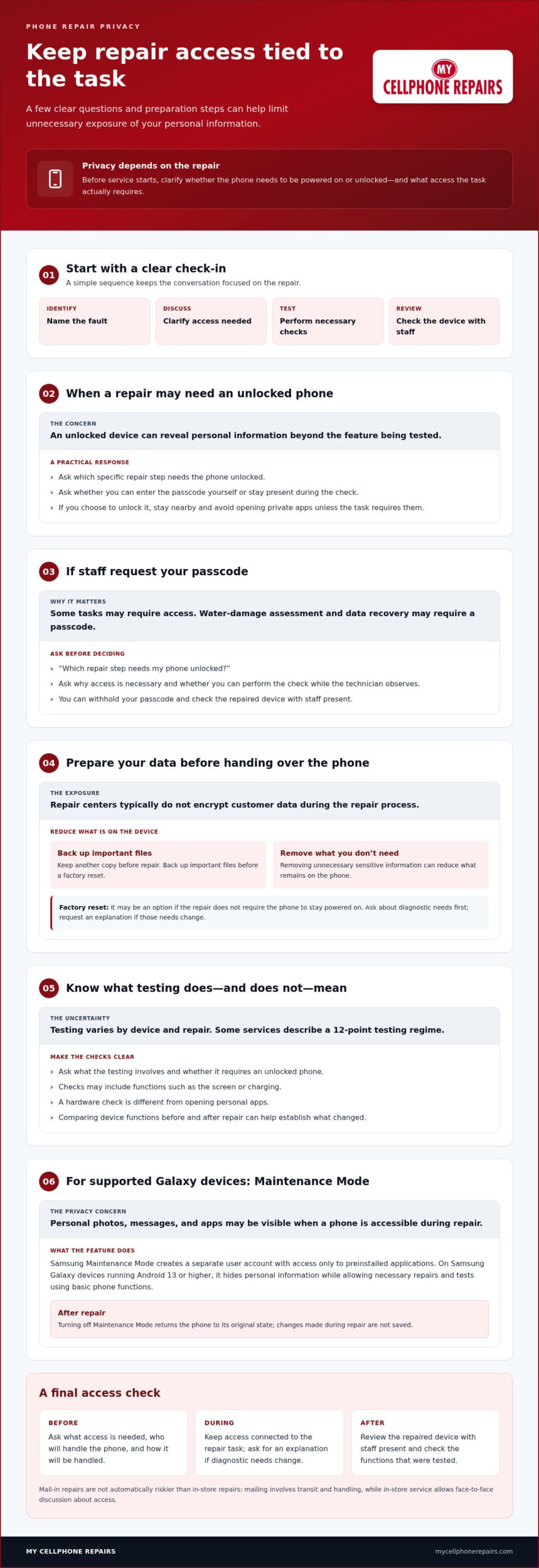
Repair privacy at a glance: Identify the fault → discuss access → perform necessary checks → review the device with staff.
Encryption and Secure Device Handling
Encryption makes stored information harder to read without the correct access, while careful handling can limit unnecessary exposure during repair. Both matter because phones can hold personal photos, messages, and account details alongside the hardware being fixed.
Repair centers typically do not encrypt customer data during the repair process. Mail-in repairs are not automatically riskier than in-store repairs. Mailing involves transit and handling; in-store service lets you discuss access face-to-face. In either case, consider what information the repair requires and how the device is handled.
Pre- and Post-Repair Testing
Pre- and post-repair testing checks device functions before and after the work. Comparing the results can help establish whether a feature worked before the repair and whether it works afterward.
Some repair services describe a 12-point testing regime. The checks depend on the device and repair, and may include functions such as the screen or charging. Ask what testing involves and whether it requires an unlocked phone. A hardware check should be distinguished from opening personal apps. You can check the repaired device with staff present.
Transparency at Device Check-In
At check-in, ask for an explanation of the repair, required access, and device handling before work begins. That conversation helps you decide how to manage your passcode and personal information.
Ask whether the phone must be powered on, which functions need testing, and whether a passcode is necessary. Water-damage assessment and data recovery may require one. A factory reset may be an option if the repair does not require the phone to stay powered on. Back up important files before resetting, and ask for an explanation if diagnostic needs change.
Built-In Repair Privacy Features
Samsung Maintenance Mode creates a separate user account that can access only preinstalled applications. On Samsung Galaxy devices running Android 13 or higher, it hides personal information such as photos, messages, and apps while allowing necessary repairs and tests using basic phone functions.
Turning off Samsung Maintenance Mode after repair returns the phone to its original state, and changes made during repair are not saved. For iPhone repairs, practical privacy steps include asking what access is needed, withholding your passcode when possible, and checking the device with staff present.
Can Technicians Access Your Personal Data During Repair?
Technicians may access personal data if a repair requires an unlocked, powered-on phone. Data privacy concerns with phone repair often center on what that access permits and whether it stays limited to the repair task.
There isn’t one blanket answer for every situation in the United States. Whether a shop may copy, keep, or disclose data depends on consent, purpose, and applicable law.
Technician Access to Personal Data
Technician access means being able to view or use information stored on your phone during repair. It matters because an unlocked device can reveal private material beyond the function being tested.
Access needs depend on the fault and diagnostic steps. A technician may need to check whether a screen responds, for example, but that doesn’t require opening your photo library. Ask which specific task needs access. You can also ask whether you can enter the passcode yourself or stay present during the check.
Discussing Privacy With Technicians
Discussing privacy means agreeing on the access needed before repair begins. It helps you set boundaries and understand any request for your passcode.
Ask directly, “Which repair step needs my phone unlocked?” Then ask whether you can perform the check while the technician observes. If you have data privacy concerns with phone repair, ask who will handle the device and how access stays tied to the repair. If you believe someone viewed or copied private information, document what you noticed, contact the shop, and secure affected accounts from another trusted device.
Certification and Data Handling
Technician certification can demonstrate repair training, but it doesn’t automatically explain how customer data is handled. Repair skills and privacy practices address separate issues.
Ask about data handling independently. Find out who may access the phone, whether access is limited to necessary repair tasks, and how staff communicate if diagnostic needs change. Repair services may restrict customer-data access to authorized personnel. A useful explanation identifies how that restriction works for your device, rather than relying on a certificate alone.
Reasons for Passcode Requests
A technician may request a passcode when a repair task requires the phone to be unlocked. Understanding the reason helps you decide whether that access is necessary for the work.
Ask the technician to name the task and explain why it requires access. Water-damage assessment and data recovery may require a passcode. You can withhold it and check the repaired device with staff present. If you choose to unlock the phone, stay nearby and avoid opening private apps unless the repair task requires them.
For hardware work, keep access connected to the fault being addressed. If you need phone repair support, discuss the repair task and access needs at check-in.
Backing up and removing sensitive data
A backup gives you another copy of important files before repair begins. Removing unnecessary sensitive information can also reduce what remains on the phone during service. Choose a backup method you can access without the device, then decide which personal items you can safely remove.
Choose a Backup That Fits Your Files
Cloud storage lets you reach backed-up files from another device if your phone is damaged. A personal computer is another option, while an external hard drive can hold large files or extensive data. For example, copy important photos and documents to a computer, or save large video folders to an external drive.
Automatic backups can help protect phone data between repairs. Set them up before a problem occurs, and check that the files you need appear in the chosen backup location. A backup is useful only if it contains the material you expect to restore, such as recent photos, contacts, and work documents.
Remove Sensitive Information Thoughtfully
Removing sensitive information means clearing or moving private material the repair does not need. Fewer exposed files can mean less personal information on the device during handling.
Start with files you can identify, such as downloaded documents or private images. Back up anything you want to keep before deleting it. Then review apps that store personal details, including financial or health information, and sign out or remove them if they aren’t needed for the repair. Deleting an app can affect locally stored data, so save any files you need first.
Don’t erase the whole phone automatically. Some repairs require the device to be powered on, and a reset removes local content. Match your preparation to the repair task, and keep a separate copy of anything you may need afterward.
Use a Simple Preparation Sequence
Work through a short sequence before handing over the phone:
- Back up essential files to cloud storage, a personal computer, or an external hard drive.
- Open the backup location from another device and check for key files, such as recent photos.
- Remove sensitive information that isn’t needed, only after saving anything you want to keep.
- Set up automatic backups for future protection, rather than waiting for another repair.
This sequence separates backing up from deleting. Removing a file before creating a usable copy can make it unavailable later.
Protect Data When Replacing a Phone
Preparing a phone for repair differs from getting rid of an old one. Before donating, reselling, or recycling a device through organizations like the Electronic Recycling Association (ERA), wipe its data so personal files aren’t left behind. If the phone is damaged, use another device to access cloud-stored copies when available. Security apps that support remote location and wiping can also help protect a missing phone.
For a repair, keep only necessary information on the device and maintain a separate backup. If the phone is leaving your possession, erase its stored data before it changes hands.
How privacy protection can build customer trust
Trust grows when a repair service explains how it handles personal information, not simply when it promises care. According to Assurant’s 2024 consumer survey, 60% of people were concerned about potential risks of new technology to their data and privacy. That concern makes clear answers about phone repairs especially useful.
A clear check-in conversation can help you feel more in control. For example, a technician can explain what needs testing, whether the phone must be unlocked, and who can access it. These details help you decide whether to share a passcode or keep the device locked.
Privacy practices also make the repair process easier to understand. Ask how access is limited to information needed for the repair, how changes to the diagnostic process are communicated, and how the phone is handled during testing. A clear explanation helps distinguish a hardware check from viewing unrelated personal content, such as private photos or messages.
Ask the repair service how it handles personal data. Keep your questions focused:
- Which repair steps require access to my phone?
- Can I enter the passcode myself or stay present during testing?
- Who is authorized to access the device?
- How will you tell me if the repair requires a different diagnostic step?
Specific answers help you understand the process before work begins. For example, a technician can explain that a function test needs the screen active without asking to open personal apps.
Consistent staff practices matter, too. Employee training can help technicians distinguish necessary diagnostics from unrelated personal information. Regular audits can review whether handling procedures are followed. Clear communication can explain what happened during the repair, including the checks performed and any access needed. These measures make the process easier to understand than a general assurance alone.
Trust also depends on respecting your choice. If you withhold a passcode, staff can explain which checks remain possible and which require access. This practical discussion sets expectations without pressuring you to expose more information than the repair needs.
Clear privacy communication benefits both sides. You can prepare the phone and make informed decisions, while the repair service can focus on the agreed work, explain its testing, and address concerns directly. For example, a written check-in summary can record the reported fault and the access discussed, giving both parties a shared reference throughout the repair.
Data protection measures during phone repair
Protecting data during repair takes more than setting a passcode. The practical goal is to limit access to what the repair requires, keep personal information out of unnecessary checks, and understand what happens before the phone is returned.
Limit Access to the Repair Task
Start by describing the fault clearly. “The charging connection is loose” gives the technician a specific problem to assess without inviting unrelated access to messages, photos, or accounts. Ask which diagnostic steps involve the phone’s operating system and which involve only its physical components.
Keep your passcode private unless a repair task requires access. If a function needs testing, ask whether you can unlock the device yourself and stay present. This keeps access tied to a clear purpose, such as checking whether the screen responds after repair.
Ask who may access your device and how access is limited in practice, especially if more than one person handles it. A clear explanation should distinguish the technician performing the repair from anyone who does not need access to complete it.
Keep Security Settings in Place
Don’t change your phone’s security settings just to make a repair easier. Disabling a passcode, for example, can remove a barrier that normally protects the device. Instead, discuss the exact test that requires access and whether you can perform it yourself.
On a supported Samsung Galaxy device, Maintenance Mode offers a separate repair environment. Use available privacy controls rather than weakening the device’s normal protections for convenience. Before changing a setting, understand how to restore it after the work is complete.
Make the Repair Process Understandable
At check-in, describe the problem and ask what information or device functions the repair requires. If diagnostic needs change, ask for an explanation before providing additional access. This keeps the scope clear, whether the phone needs to be powered on for a hardware check or an account screen appears during testing.
Before leaving, review the repair with the technician. Check that the agreed device functions work, ask whether any settings changed, and restore your usual security controls. If you used Maintenance Mode, turn it off when the repair is finished so the phone returns to its normal state.
Good data protection combines preparation with boundaries during service. Keep security settings intact, connect access to a specific repair task, and understand the checks being performed. For help with a device repair, arrange phone repair service and discuss the repair needs at check-in.
My Cellphone Repairs: Samsung Phone Repair
My Cellphone Repairs provides Samsung Phone Repair for hardware issues. If your phone needs service, prepare it using the privacy steps above, then explain the fault and discuss any access needed for testing.
For other devices, My Cellphone Repairs also offers iPhone Screen Repair, MacBook Repair, and Battery Replacement. Choose the repair that matches the device problem, and keep your questions focused on the work required. For example, ask which checks need the phone powered on and whether you can enter your passcode yourself.
Clear expectations help you understand the repair process before handing over your device. Contact My Cellphone Repairs to discuss Samsung Phone Repair or another listed repair service.
Make Your Next Repair Decision With Confidence
Make privacy part of your repair plan, not an afterthought. Decide what access you’re comfortable allowing, and keep the conversation centered on the work your device needs. That gives you a clearer starting point before service begins and helps you stay involved throughout the process.
Addressing data privacy concerns with phone repair also means choosing a practical next step for your device. My Cellphone Repairs offers Samsung Phone Repair, iPhone Screen Repair, and MacBook Repair. Share the issue and discuss the repair needs before handing over your device.
Ready to move forward? Contact My Cellphone Repairs today to discuss your repair. A clear plan can make the next step feel simpler, and you can approach service with greater confidence.
Frequently Asked Questions
What are the benefits of protecting data privacy?
Protecting privacy can reduce unnecessary exposure of personal information while your phone is being repaired. It also helps you keep control of photos, messages, and account access. For example, limiting access to the repair task can keep unrelated personal content from being opened during a device check. A backup adds another layer of resilience: if your phone becomes unavailable, you can still access saved files from another device.
How does prioritizing customer data privacy build trust?
You can make an informed choice when the repair service explains access needs in plain language. For example, ask why a specific test requires an unlocked phone rather than accepting a broad passcode request. Clear communication also helps you understand who may handle the device and what happens if diagnostic needs change. That gives you concrete information to consider instead of relying on a general promise of confidentiality.
What Are the Best Practices for Data Backup Before Repair?
Make a separate copy of important files, then confirm you can open it from another device. For example, check that recent photos appear in cloud storage or on your computer before removing them from the phone. Include documents and other files you would need if the device stayed unavailable. If you use an external drive for large files, keep it separate from the phone during service.
What Confidentiality Policies Ensure Secure Phone Repair Services?
A useful confidentiality policy explains who may access your device, how access is limited to repair needs, and how staff communicate about data handling. It can also describe how the service handles questions or concerns raised during the repair. Don’t assume a policy guarantees a particular outcome. Look for practical details, such as whether personal content is needed for testing and how the service handles access beyond that task.
What Happens to Your Data During Phone Repair?
Your data generally remains stored on the phone unless you remove it or reset the device. Depending on the fault and diagnostic steps, a repair may require a technician to use certain functions. For instance, a powered-on check may show notifications or app screens. Ask what the repair involves, and keep personal content out of any test that doesn’t need it. A backup helps preserve files if the repair requires a reset.
What sets a trusted repair network apart?
Consistent data-handling practices across repair locations make the process easier to understand. Look for clear explanations of staff access, diagnostic needs, and how to raise privacy concerns. Employee training and regular audits can support consistent handling, while direct communication helps you understand what is happening. A company’s name alone doesn’t explain its privacy process; useful details describe the steps technicians follow with a device in their care.
What personal data can a phone repair technician access?
Access depends on the repair and whether the phone is unlocked. Personal information may include photos, messages, and apps, especially when the device is available for use during testing. A technician checking a device function doesn’t automatically need to browse those areas. Keep the conversation focused on the specific task, and ask whether you can perform the check yourself while the technician observes the result.
What privacy risks come with handing over a phone for repair?
Handing over a phone can expose information if the device is unlocked, a diagnostic requires personal access, or the device is handled beyond the repair task. Mail-in service involves transit and handling, while in-store service allows a face-to-face discussion. Neither setting removes the need to understand access. Before service, consider what sensitive content remains, which functions need testing, and whether you can keep your passcode private.