
A repair can affect one part of your coverage without automatically wiping out the rest. If your iPhone needs attention, uncertainty about iPhone repair warranty coverage can make a cracked screen, weak battery, or charging issue harder to deal with. It’s reasonable to pause before booking: manufacturer warranty, AppleCare plans, and repair-service terms may each answer a different question.
The key is to identify which terms apply to your device and the specific problem. A third-party repair doesn’t automatically erase the entire Apple warranty, but Apple may not cover damage caused by that repair. Check your warranty status, plan documents, and any repair paperwork before deciding what to do next.
This guide explains which terms to review and what details can vary by device and repair. You’ll also find practical questions to help clarify active coverage, exclusions, and what happens after a repair. Then you can choose a next step based on the documents in front of you, not on assumptions about what a warranty will cover.
Key Takeaways
- Start with the repair issue, then identify which warranty or repair-service terms relate to it.
- Compare Apple warranty, AppleCare, and repair-service documents by their source, applicable device, and repair terms.
- Review prior repairs and existing damage as details that may matter when assessing iPhone repair warranty coverage.
- Use your device and repair documents to identify questions that still need a clear answer before service.
- My Cellphone Repairs offers iPhone screen, battery, charging-port, and water-damage repairs as practical options when your device needs attention.
What Does iPhone Repair Warranty Coverage Mean?
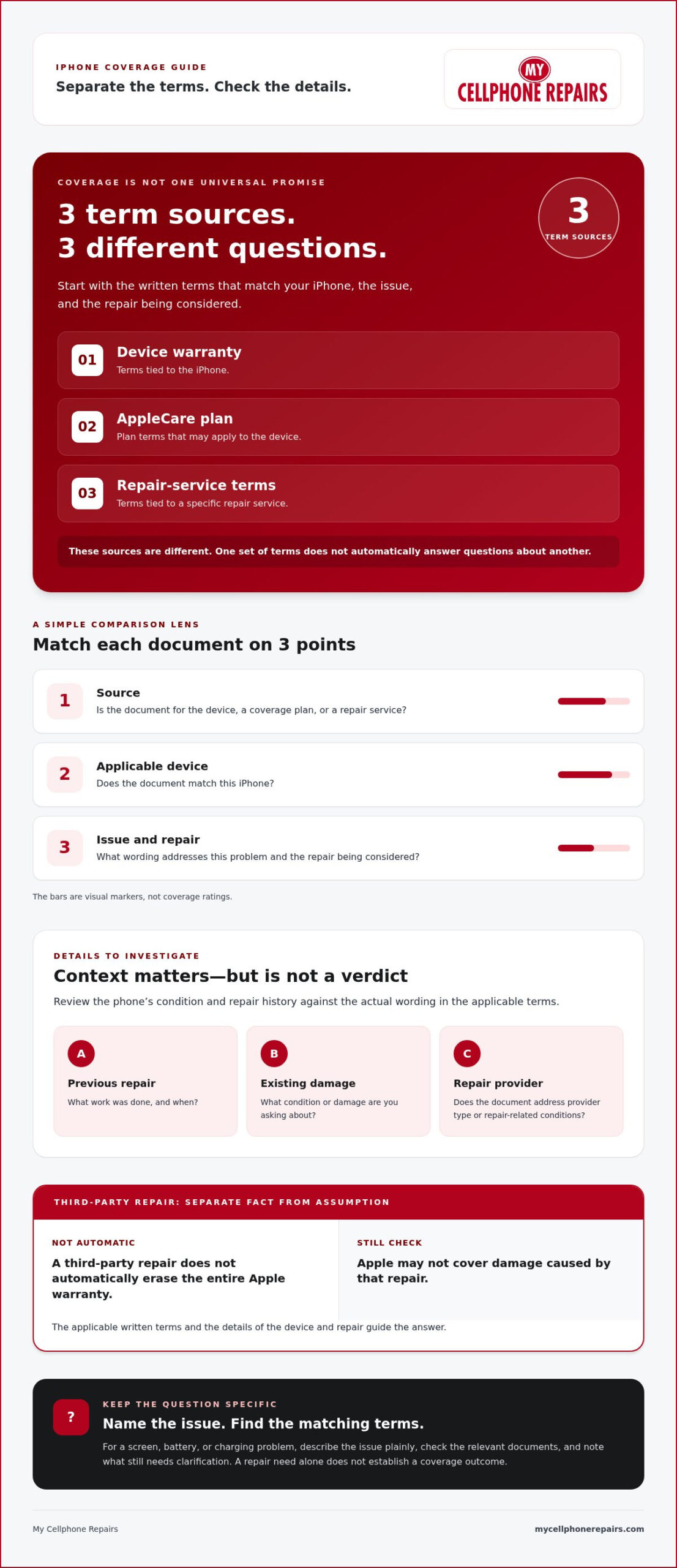
“Coverage” isn’t one universal promise for every iPhone or repair. It’s a question about the written terms that apply to a particular device, issue, or repair service. Start by identifying which document you mean, then check what that document says about your situation.
Quotable definition: iPhone repair warranty coverage is the protection, if any, described in the applicable written warranty terms for a specific device or repair.
That distinction keeps a broad question practical. A damaged screen, battery concern, or charging problem gives you a repair issue to investigate. It doesn’t, by itself, determine what a warranty or service agreement says. The document and the details of the repair matter.
Device warranty and repair warranty: two questions to separate
Think of two folders on a desk. One holds the terms tied to the iPhone or a plan for it. The other holds terms tied to a repair service. They come from different sources, so don’t treat one as a substitute for the other.
First identify the document you’re reading. Is it for the device, a coverage plan, or a repair service? Then check that it matches the iPhone and the issue you’re asking about. Avoid assuming that a statement in one set of terms answers a question about another.
What readers mean when they ask about coverage
Usually, the practical question is: “Do the terms for my device or repair apply to this particular problem?” To make that question answerable, name the issue and the repair under consideration. Then look for wording in the relevant document that addresses those details.
For example, if the screen is damaged, separate the fact that the phone needs a screen repair from the question of what a device warranty, plan, or repair-service document says about that situation. The same approach works for a battery or charging issue. These examples help you focus your review; they don’t establish an outcome.
Keep the questions distinct:
- Which device warranty or plan terms relate to this iPhone?
- Which repair-service terms relate to the repair being considered?
- What wording in those documents addresses this issue?
Broader conversations about repair access and repair terms are part of the Right to Repair movement. That context can help explain why repair options draw attention, but it doesn’t replace the terms that apply to your device or service.
Use “coverage” as a prompt to find the right document, not as a conclusion about whether a repair is included. Once you know which terms you’re reviewing, you can move to the next question: what details about the iPhone, its history, and the proposed repair may affect how those terms apply?
What Could Affect iPhone Warranty Coverage? Separate Questions from Assumptions
A repair can raise concerns about existing coverage, especially if the iPhone has been serviced before or has visible damage. But those details aren’t a verdict on their own. Treat prior repairs, the current condition of the phone, and the type of repair provider as points to investigate in the terms that apply to your device and situation.
The applicable written terms, not a blanket rule, must guide conclusions about warranty coverage. This keeps the question focused. Instead of asking whether every repair affects every warranty, ask what the specific document says about the iPhone, the issue, and the repair being considered.
Does third-party repair void an iPhone warranty?
That question doesn’t have a universal answer based on provider type alone. Don’t assume a third-party repair automatically removes all existing coverage, and don’t assume it leaves every term unchanged. The relevant answer depends on the applicable written terms and the details of the device and repair.
Look for language that addresses provider type and repair-related conditions. Note what work was done, when it happened, and which document you’re checking. These details help you frame the question without treating a general statement about third-party repairs as a promise about your iPhone.
What voids an iPhone warranty?
There isn’t a single list of causes that can be applied to every warranty or plan. The wording varies by document, so avoid relying on a broad online claim as a ruling for your device. Read the terms that apply and focus on the specific conditions they describe.
Use questions, not assumptions, to guide your review:
- Does the document address a previous repair, and does it specify how that repair relates to the current issue?
- Does it describe the kind of damage or condition you’re investigating?
- Does it distinguish between the device’s coverage and a repair provider’s terms?
- Does the wording apply to this iPhone and the repair you’re considering?
Write down the issue in plain language, such as “screen damage” or “charging problem.” Then compare that description with the document’s wording. If a term is unclear, keep the uncertainty visible rather than turning it into a yes-or-no conclusion. Your next step is to identify which document governs the question and what detail you still need clarified.
This approach makes iPhone repair warranty coverage easier to assess without guessing. If the phone needs hardware work, My Cellphone Repairs handles iPhone screen and hardware repairs, including battery, charging-port, and water-damage repairs. Keep the coverage question separate from the repair decision, and use the applicable terms to guide your next move.
Apple Warranty, AppleCare, and Repair-Service Warranties: How to Compare the Terms
These names point to different sources of written terms, not interchangeable promises. To compare them, match each document to the iPhone and repair you’re asking about. Then note what question the document answers and what remains uncertain. The goal isn’t to assume that one type of document applies. It’s to find the terms relevant to your situation.
Use this comparison as a reading guide. It doesn’t establish whether a particular repair is included or whether a warranty applies.
Term source
Device to identify
Repair to identify
Question to resolve
Apple warranty
Which iPhone the document refers to
The repair issue you’re reviewing
What does this document say about the device and issue?
AppleCare
Which iPhone or plan the document refers to
The repair you’re considering
Which written terms relate to this device and repair?
Repair-service warranty
Which iPhone the service document identifies
The repair work described in the document
Does the document state terms for this repair, and what do they say?
Questions to compare across warranty documents
Read each document with the same short checklist. Confirm the device it refers to, identify the repair or issue, and state the question you want answered. A document may address one part of your concern while leaving another unresolved, so keep those questions separate.
- Which iPhone does this document refer to?
- Which repair or issue does it discuss?
- What specific coverage question does its wording answer?
- What terms or details remain unclear?
How to discuss repair-warranty availability
Availability is a question to investigate, not an assumption to make. If you’re considering a repair, look for written service terms that relate to that work. Check whether the document describes the repair you’re asking about, and note any wording you need clarified. Don’t infer a warranty from the fact that a repair is offered, and don’t treat a general statement as a promise about a specific job.
Keep your notes simple. For example, write “AppleCare document, this iPhone, charging issue” or “repair-service document, screen repair.” These labels make it easier to see whether two documents address the same device and repair, or whether they answer different questions.
For iPhone repair warranty coverage, the terms that apply to your situation are the ones to review. Use the written document from the relevant source, rather than relying on a general description of Apple warranty, AppleCare, or repair-service warranties. If the document doesn’t clearly answer your question, keep that gap visible as you decide what to clarify before service.
How to Check iPhone Repair Warranty Coverage Before Service
Before arranging a repair, turn the coverage question into a short, organized review. Start with the problem your iPhone has, identify which warranty or service terms could relate to it, then record what those terms do and don’t answer.
Identify the issue, find the relevant written terms, and note any unanswered questions before choosing your next step.
A simple coverage-question checklist
Use this sequence to keep the review focused. It won’t determine coverage for you, but it can help you locate the right information and avoid mixing separate questions together.
- Describe the issue. Write down what isn’t working or what damage needs attention, such as a screen problem, battery concern, or charging issue. Note the repair you’re considering.
- Name the question. Decide whether you’re checking terms connected to the iPhone or a plan, or asking whether written terms apply to the repair service.
- Find the matching document. Use the document or account information associated with that specific device, plan, or repair. For Apple coverage status, Apple provides an online check at checkcoverage.apple.com and an iPhone option under Settings > General > AppleCare & Warranty.
- Compare the wording with your issue. Look for terms that address the device and repair you’ve identified. Record the relevant wording and any point you can’t resolve from the document.
Keep a simple note beside the document. For example: “Issue: charging problem. Question: device terms or repair-service terms? Unclear: whether the wording addresses this repair.” This makes it easier to keep the issue, the document, and the open question together.
What to do when the terms don’t answer your question
Don’t fill a gap with someone else’s repair story. Another iPhone, repair, or service document may not match your situation. Instead, describe precisely what the document leaves unanswered: the device it applies to, the repair involved, or the wording you can’t interpret.
Keep the uncertainty visible. A document that doesn’t answer one question isn’t a reason to assume either outcome. Use the applicable written information to clarify the point before relying on a conclusion. This is especially useful when you’re reviewing more than one document, since each may address a different part of the question.
Once you’ve organized the terms, you can make a practical repair decision with a clearer view of what’s known and what still needs clarification. If your iPhone needs hardware work, schedule an iPhone repair with My Cellphone Repairs for screen, battery, charging-port, or water-damage issues.
Need an iPhone Repair? Explore My Cellphone Repairs’ Local Services
Once you’ve reviewed the terms that apply to your situation, you can focus on the repair issue itself. My Cellphone Repairs provides iPhone hardware repairs for customers looking for help with a screen, battery, charging port, or water damage. These are repair services, separate from any decision about warranty coverage. A service description isn’t a promise that a warranty or plan will pay for the work.
Start with the problem you’re trying to address. If the screen is damaged, look at iPhone screen repair. For a battery concern, consider battery replacement. Charging-port repair and water-damage repair are also available. Identifying the repair category gives you a clear way to describe what your iPhone needs as you decide on a next step.
Which iPhone repair issues does the company handle?
My Cellphone Repairs handles these iPhone hardware repair needs:
- iPhone screen repair
- Battery replacement
- Charging-port repair
- Water-damage repair
Use the list to match the issue you’re facing with a repair category. It doesn’t determine whether your device warranty, plan, or another written agreement applies. Keep those questions separate as you consider service.
Local service areas for iPhone repair
My Cellphone Repairs serves local communities across Maryland, Pennsylvania, and Michigan. Service areas include Towson, Bowie, Hyattsville, and College Park in Maryland, Harrisburg in Pennsylvania, and Kentwood in Michigan. These places give readers a sense of the communities connected to the company’s repair services; they aren’t a statement that arrangements are identical in every location.
If you’re in Towson and dealing with a damaged screen, or in Bowie with a charging-port concern, the same starting point applies: identify the repair issue, then explore the service category that matches it. Readers in Hyattsville, College Park, Harrisburg, and Kentwood can also use the repair list to see which iPhone hardware needs the company handles.
Keep your warranty review and repair choice distinct. The terms you’ve checked help you understand your coverage question; the service categories help you identify the hardware repair you may need. Neither should be treated as a guarantee about the other.
For a practical next step, explore My Cellphone Repairs’ iPhone repair services for screen, battery, charging-port, and water-damage issues.
Move Forward With a Clear Repair Plan
You don’t need to settle every uncertainty at once. Choose the next step you can take with confidence: keep checking the terms that apply, or move ahead with a repair decision based on the information you have. Separating the repair need from the coverage question helps you avoid making promises to yourself that the documents don’t support.
If you’re still weighing iPhone repair warranty coverage, keep the relevant paperwork nearby as you plan. Then focus on getting the device issue addressed. My Cellphone Repairs offers iPhone hardware repair for common problems, with local service in communities across Maryland, Pennsylvania, and Michigan.
Explore iPhone repair services and take the next step toward getting your iPhone working again.
Frequently Asked Questions
Does third-party iPhone repair void the warranty?
A third-party repair alone doesn’t answer what happens to your particular coverage. The effect depends on the applicable written terms and the facts of the repair. Review the document for wording about provider type and the issue you’re dealing with. If the phone had earlier repair work, keep that detail in view as you read, rather than relying on another person’s experience as a ruling for your device.
What can void an iPhone warranty?
There isn’t one universal list that answers this for every warranty or plan. Check the terms tied to your device and look for wording that relates to the specific concern, such as a previous repair or existing damage. Don’t treat a general online claim as a decision about your phone. If the document doesn’t explain how a detail applies, record that question instead of assuming an outcome.
Does an iPhone repair come with a repair warranty?
Whether a repair has its own warranty depends on the written terms for that repair service. Don’t assume the answer from the fact that repair work is offered. Look for service terms that identify the work and the iPhone they relate to. If you’re reviewing paperwork, note whether it clearly addresses the repair you’re considering and what questions its wording leaves open.
How can I check whether my iPhone repair is covered?
Begin with the exact issue and repair being considered, then locate the terms connected to the iPhone, any plan, or the repair service. Compare the document’s wording with your situation and note what it doesn’t answer. For example, distinguish a question about a device plan from a question about the repair service itself. A clear note of the unresolved point can help you avoid guessing.
Is AppleCare the same as an iPhone repair warranty?
No. AppleCare is a plan with its own written terms, while a repair-service warranty refers to terms associated with repair work. They’re different sources of information, so one shouldn’t be treated as a substitute for the other. Check which document applies to the question you’re asking. For example, a question about an existing plan is distinct from asking whether a particular repair service has written warranty terms.
What should I compare before choosing an iPhone repair option?
Compare the written terms that apply to your device and the repair, and note which questions each document answers. Also consider whether the repair category matches the issue you need addressed. For local context, My Cellphone Repairs serves communities including Towson and Baltimore County, Bowie, Hyattsville, College Park, Cumberland, Vineland, Harrisburg, and Kentwood. Local service arrangements may differ, so use the information relevant to your location.