
A cracked screen doesn’t always mean the same repair. With a Samsung Galaxy screen replacement, the right fix depends on whether damage is limited to the outer glass or has affected the display or touch response. Lines, dark spots, flickering, or missed taps can point to a deeper screen issue. Problems beyond the screen may need a different repair.
A damaged display can make calls, messages, and everyday tasks harder. Before arranging repair, it helps to know what screen replacement can address, what it can’t, and how to protect your information. A professional assessment matches the repair to your Galaxy model and the symptoms you describe.
This guide explains what screen replacement involves, how glass, display, and touch damage differ, and how to prepare your phone for repair. My Cellphone Repairs provides professional Samsung phone repairs, including screen replacements. You’ll find practical steps for describing the problem, backing up data, and deciding what to do next.
Key Takeaways
- Learn how a Samsung Galaxy screen replacement can address screen damage and why a technician’s assessment helps identify the right repair.
- Understand what happens as your phone is assessed and the repair needed is determined.
- Compare professional repair, self-repair, and replacing your device based on your experience and the phone’s condition.
- Use a practical pre-repair checklist to back up important data and prepare your Galaxy phone.
- My Cellphone Repairs provides professional Samsung screen replacement to help restore everyday use.
Samsung Galaxy screen damage: when does a replacement make sense?
Galaxy screen damage can affect the phone in different ways. A crack may be limited to the outer glass, or it may come with picture problems or unreliable touch. What you can see is useful when describing the problem, but it doesn’t confirm which internal component has failed. The appropriate repair depends on the phone’s symptoms and condition, not just the appearance of the crack.
Cracked cover glass affects the protective surface; a malfunctioning display affects the picture or touch response. These problems can occur together, but one doesn’t automatically prove the other. A professional assessment helps determine whether screen replacement is the right repair.
Which Galaxy screen symptoms should you notice?
Look closely at what you can see and feel. Note where symptoms occur, whether they are constant, and whether they change as you use the phone. These observations can help explain the problem, but they aren’t a do-it-yourself diagnosis.
- Cracks or chips: Damage may look like a fine line, a web of cracks, or a chipped edge. Even if the picture looks normal, sharp edges or spreading cracks can make the phone uncomfortable to handle.
- Black areas: A dark patch that obscures part of the picture may point to a display problem. An assessment is needed to identify the cause.
- Flickering or lines: The screen may flash, show coloured or dark lines, or display uneven areas. These symptoms can have more than one possible cause.
- Unresponsive touch: Some parts of the screen may ignore taps or swipes while other areas still respond. A cracked surface alone doesn’t explain why touch is failing.
Record the symptoms you notice, including where they appear and whether they change. A crack with a clear picture is different from a crack accompanied by flickering or missed taps, even though only a technician’s assessment can identify the repair needed. The broader Right to Repair movement highlights public interest in repair options for electronics, but your Galaxy still needs an individual assessment to establish what is wrong.
When is screen replacement different from replacing the phone?
Consider the whole device, not just the glass. If your Galaxy otherwise meets your needs and the screen is the main problem, repair may be a practical way to restore everyday use. Also consider how comfortable you are continuing with the phone and whether its overall condition suits your daily routine.
Other damage can change the decision. A bent frame, battery trouble, charging problems, or signs of liquid exposure may mean the screen is only one part of the repair. Mention any issues beyond the display so they can be considered during assessment. A replacement screen won’t, by itself, resolve unrelated faults, and not every damaged phone will be suitable for repair. An assessment gives you a clearer basis for deciding whether to repair the Galaxy or replace it.
What happens during a Samsung Galaxy screen replacement?
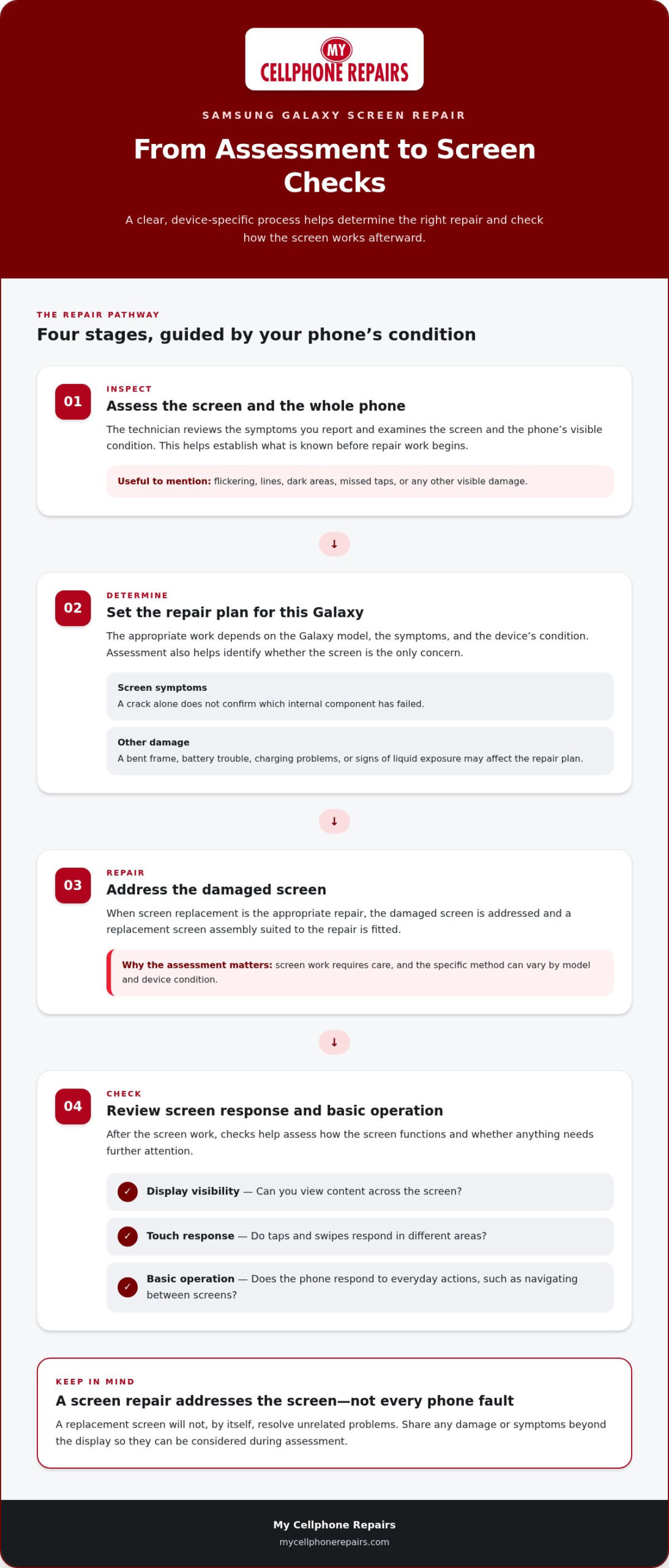
A professional repair starts with an assessment, followed by a decision about the work needed, the screen repair, and checks of basic functions. The assessment matters because a cracked surface doesn’t show the full condition of the screen or phone. It can also help distinguish a screen issue from other damage that may affect the repair plan.
Your Galaxy model and the phone’s condition shape the assessment and the work required. Different models can have different screen assemblies, and damage around the screen may affect what a technician finds. My Cellphone Repairs provides professional Samsung phone repairs, including screen replacements, with the device’s condition guiding the next steps.
From device assessment to screen replacement
The process begins with an inspection. The technician reviews the symptoms you report and examines the screen and the phone’s visible condition. This establishes what is known before repair work begins. If there is other apparent damage, it can be considered as part of the overall assessment.
Next, the technician determines the appropriate repair plan. A Samsung Galaxy screen replacement may be the focus, but the assessment helps clarify whether the screen is the only concern. The plan depends on the individual device, so don’t assume every Galaxy follows the same sequence or has the same repair needs.
Once the repair approach is established, the technician carries out the screen work. In broad terms, this involves addressing the damaged screen and fitting the replacement screen assembly appropriate to the repair. Screen work requires care because the display is a sensitive part of the phone. The specific method can vary by model and device condition.
After the screen work, the technician checks the phone. These checks help assess whether the screen is functioning as expected and whether anything needs further attention. A repair isn’t complete simply because the glass looks different: display visibility and touch response matter too.
What should work normally after the repair?
Post-repair checks focus on the repaired area and basic phone operation. They provide a practical way to see how the screen behaves after the work and help distinguish screen-related concerns from problems elsewhere in the device.
- Display visibility: Check that the picture is visible and content can be viewed across the screen.
- Touch response: Try taps and swipes in different areas to see whether the screen responds as expected.
- Basic operation: Confirm the phone responds to everyday actions, such as navigating between screens.
If a symptom remains, describe what you notice and where it happens. Further assessment may be needed to understand the cause. Screen repair addresses the screen-related work identified during assessment; it doesn’t guarantee that unrelated phone functions will be restored.
Sharing clear information about the original symptoms can make the repair process more straightforward. For professional help restoring everyday use, Samsung screen repair is available through My Cellphone Repairs.
Professional replacement, DIY repair, or a different fix?
Choose an option based on the phone’s overall condition, the type of damage, and your comfort working with delicate electronics. With professional repair, a technician handles the hands-on work. Self-repair gives you direct control but requires model-specific knowledge and care. Replacing the device may make more sense if it has several faults or no longer meets your needs. No option suits every Galaxy.
Use this comparison as a starting point. Then weigh what matters most: avoiding hands-on repair, reducing the risks of attempting a repair yourself, or moving on from a device with wider problems.
| Option | May suit you if | Key consideration |
|---|---|---|
| Professional screen replacement | You want a technician to handle the repair. | The device needs assessment before the repair plan is clear. |
| Self-repair | You have relevant experience and can work carefully. | Tools and disassembly needs vary by Galaxy model. |
| Replace the phone | There are multiple faults or you want a different device. | Consider the phone’s full condition and your priorities. |
When does professional screen replacement make sense?
Professional service can be a practical choice if you haven’t repaired electronics before, the screen damage is extensive, or you don’t want to take the phone apart yourself. Modern phones contain delicate components, and screen work involves more than putting a new surface over a crack. A technician can assess the device, determine the repair needed, and handle the physical work. This means you don’t have to take on the repair yourself, though the phone’s condition still determines what the repair can address.
My Cellphone Repairs provides professional Samsung phone repairs, including screen replacement. If you want expert help rather than attempting the repair yourself, professional service is a straightforward option.
What should you weigh before attempting DIY repair?
Be realistic about your experience. A Samsung Galaxy screen replacement can involve model-specific disassembly, and the approach for one Galaxy may not suit another. The tools and repair knowledge needed vary by model. Without suitable experience, opening the phone or handling fragile components can cause further damage. An unsuccessful repair attempt may also complicate assessment if another problem develops during the process.
Before choosing self-repair, consider whether you can identify the exact model, find suitable instructions and tools, and work patiently without forcing components. If any of those steps feel uncertain, pause. The aim is to restore everyday use, not add another fault.
Look at the whole phone before deciding. A Galaxy with screen damage as its main issue may be a candidate for professional repair. If it also has charging trouble, battery issues, or other damage, include those concerns in your decision. Screen replacement addresses screen-related work, not every possible phone fault.
Replacing the device is a separate choice, not an automatic response to a cracked display. Consider the phone’s overall condition, how well it serves your needs, and whether you want to keep using it. Matching the option to the device and your comfort level helps you choose a sensible next step.
How to prepare your Galaxy phone before screen repair
A little preparation can make the repair handoff clearer and help protect your information. Start with two priorities: save important data if the phone is accessible, then gather details about the device and its symptoms. If the screen is too damaged to use, don’t force it. Share what you remember instead.
Data preparation protects your information; physical preparation helps the technician assess the phone. These are separate steps, and both are useful before a Samsung Galaxy screen replacement.
Back up data and protect account access
If the phone still works, back up important photos, contacts, messages, and files using an available cloud or computer backup method. The steps depend on your device and accounts. Check that the backup has completed instead of assuming it started. If the display or touch is unreliable, prioritize the files you can access safely.
Repair doesn’t always erase data, but data isn’t guaranteed to remain untouched in every situation. A backup gives you another copy in case access changes during the repair process. Remember the account credentials you may need to use the phone afterward, but keep passwords private and don’t attach them to the device.
- Back up the data you care about while the phone is accessible.
- Make sure you can access the account associated with your backup.
- Keep passwords and verification details private.
Record the model and describe the damage
Write down the Galaxy model so the device can be identified accurately. If the phone is usable, open Settings and look for “About phone” or a similar device-information option. Menu wording can vary. If you can’t navigate the screen, check any packaging or purchase records you still have, or explain that the model is unknown.
Describe what you’ve observed rather than guessing what has failed. Include when the problem began and what has changed since then. For example, note whether the screen cracked after a drop, whether dark areas appeared later, or whether touch stopped responding in one part of the display.
- Note the model name or model number if visible.
- Record when the damage started and any event that preceded it.
- List affected functions, such as picture visibility, touch response, or flickering.
- Mention other visible damage or phone problems you’ve noticed.
This information gives the technician a useful starting point, but it doesn’t replace an in-person device assessment. My Cellphone Repairs provides Samsung phone repair services, including screen replacement, with the repair guided by the phone’s condition.
Before handing over the device, remove its case and accessories that aren’t part of the repair. Note existing marks or damage, and keep personal accessories with you. If you can’t power down the phone because the screen is unresponsive, don’t struggle with it. Mention this during the handoff.
When you’re ready, arrange professional Samsung screen repair with My Cellphone Repairs.
Get your Samsung Galaxy screen replacement with My Cellphone Repairs
A damaged screen can make simple tasks frustrating, from reading messages to using touch controls. My Cellphone Repairs provides professional Samsung screen replacement as part of its Samsung phone repair services. The process starts with assessing the phone, identifying the screen-related work needed, and determining the next steps based on its condition.
A clear assessment matters because each phone has its own model and condition. A visible crack may come with display changes, touch issues, or other damage. Share what you’ve noticed and how the problem affects your use. That information gives the technician useful context, while an assessment helps determine the appropriate repair. Screen replacement is not a promise to resolve unrelated phone problems.
What to expect from a professional repair service
Professional repair means you don’t have to take apart a delicate phone yourself. The service starts with the device and the problem you report. The Galaxy model helps identify the phone, while your description explains what has changed. For example, mention whether the picture is difficult to see, touch response is inconsistent, or the screen is cracked but still displays normally.
The repair plan depends on the phone’s condition and the assessment. The technician determines the screen work required rather than assuming every crack calls for the same repair. Describe other device issues you’ve noticed too. Screen replacement focuses on screen-related work; it doesn’t automatically address separate concerns elsewhere in the phone.
After repair, check everyday operation. Confirm that the display is visible and touch responds during basic tasks. If something still seems wrong, explain what you’re seeing so it can be assessed. These checks help you understand the result without assuming that unrelated functions are covered by screen work.
Take the next step toward a working screen
To get started, have your Galaxy model ready if you can access it. Note the main symptoms and any other damage you’ve observed. If the phone is usable, back up important information before service. These details make it easier to explain the issue and give the repair assessment a helpful starting point.
If you’re still weighing what screen repair involves, use a Samsung screen repair guide to review the symptoms and preparation steps. Then decide whether professional service fits your needs. My Cellphone Repairs handles Samsung phone repairs, including professional Samsung Galaxy screen replacement, with the phone’s model and condition guiding the repair.
Ready to move forward? Start a Samsung screen repair request through the My Cellphone Repairs website. Share what you know about the damage and take the next step toward restoring practical everyday use.
Get back to the everyday things your Galaxy helps you do
A damaged screen can interrupt routines you barely think about until they become difficult: checking a calendar, replying to a message, or finding a saved detail. Focus on getting a clear assessment and a repair plan that fits the phone’s condition. That gives you a practical basis for deciding what to do next.
Choosing a Samsung Galaxy screen replacement is about more than changing how the phone looks. It’s a way to address screen damage without guessing at the cause or attempting delicate repair work without experience. My Cellphone Repairs handles Samsung screen replacements alongside other Samsung phone hardware repairs.
When you’re ready, share what you’ve noticed about the screen and start a repair request with My Cellphone Repairs. Start your Samsung Galaxy screen repair and take the next step toward using your phone again.
Frequently Asked Questions
Can I use my Samsung Galaxy with a cracked screen?
A cracked Galaxy may still work, but use it carefully and avoid pressing damaged areas. If the glass is sharp, limit handling and keep the phone somewhere it won’t rub against other items. Normal operation doesn’t mean the damage is harmless. If dark patches, lines, or missed taps appear, avoid relying on the screen for tasks that require accurate input and arrange an assessment.
How long does Samsung Galaxy screen replacement take?
Repair time varies with the Galaxy model, the damage found, and the work required, so there isn’t one reliable duration for every device. If you depend on your phone for work, travel, or account access, plan for the possibility that you may need another way to handle those tasks during service. My Cellphone Repairs assesses the device and its symptoms rather than assuming every repair follows the same schedule.
Will I lose my data during a Samsung screen replacement?
Your data may remain accessible, but don’t assume it will always be preserved or erased during screen repair. If you can use the phone, back up important photos, contacts, and files before service. Check that the backup includes the items you care about, not just recent photos, and make sure you can access the accounts used for backups. If screen damage blocks access, explain that before the phone is assessed.
Is it worth replacing a Samsung Galaxy screen instead of the phone?
It depends on whether the Galaxy still suits your needs and whether the screen is the main issue. Consider how often you rely on the phone, whether it has other faults, and whether you planned to upgrade soon. A device that handles your daily tasks well may be worth assessing for repair, while repeated problems elsewhere could change the calculation. Base the decision on the whole phone, not the crack alone.
Can a Samsung Galaxy screen be replaced if the touchscreen does not respond?
Possibly, but an unresponsive touchscreen doesn’t identify the exact cause by itself. Note whether touch fails across the entire screen or only in a particular area, and whether the problem comes and goes. Avoid repeatedly tapping or pressing the affected spot. If you can still access the phone, back up important data before service. A technician can assess the device and determine whether screen replacement is appropriate.
How do I find my Samsung Galaxy model before arranging screen repair?
If the phone is usable, open Settings and look in the device details for its model information. Menu labels can differ, so focus on finding the model name or number rather than the phone’s customizable device name. If the screen prevents access, check the original box or purchase records. Sharing the model number, when available, helps distinguish similar-looking Galaxy devices during repair assessment.
Can I replace a Samsung Galaxy screen myself?
You can attempt self-repair, but it requires the right tools, model-specific guidance, and careful handling of delicate components. If you’ve never worked on electronics, a mistake during disassembly could cause more damage or make the original problem harder to assess. Don’t use instructions for a different Galaxy model. If you’re unsure how to proceed without forcing parts, professional Samsung screen replacement is a practical alternative.