
A lower-cost repair isn’t automatically a risky repair, and a non-genuine part isn’t automatically a poor one. The risks of using non-genuine phone parts depend on the component’s quality, its fit with your device, and how carefully the repair is done.
It’s reasonable to pause when a repair plan includes different part options. “Genuine,” “OEM,” “aftermarket,” and “refurbished” don’t mean the same thing, and labels alone don’t tell you how a part will perform. A poorly made battery or an incompatible screen can cause problems, but third-party parts vary in quality.
This guide explains common replacement-part types and the practical risks to consider, from performance issues to repair coverage. You’ll learn what to ask about compatibility, testing, and written terms before approving work. Use the answers to compare the complete repair plan, not just the part label.
Key Takeaways
- Learn what repair providers may mean by genuine, OEM, aftermarket, used, and refurbished parts.
- Understand how the risks of using non-genuine phone parts can vary with part quality, compatibility, and installation.
- Compare repair options by asking about sourcing, model fit, testing, expected functions, and written coverage.
- Use a practical checklist to get clear answers before authorizing an iPhone or Samsung screen or battery repair.
- Choose based on the full repair plan, not the part label alone.
What Are Non-Genuine Phone Parts, and Where Do the Risks Begin?
Part labels can be confusing when you compare phone repair options. One provider may use “OEM” to describe a part made to original specifications, while another may use it differently. Ask what the label means for the specific component, and don’t treat it as proof of quality.
Non-genuine describes a part’s relationship to the device manufacturer; by itself, it does not confirm that the part is defective or low quality. The risks of using non-genuine phone parts depend on details such as the part’s condition, compatibility, testing, and installation, not just the name used to describe it.
What do genuine, OEM, and aftermarket mean?
Genuine generally means a part supplied by or recognized through the device manufacturer, where such parts are available. OEM stands for original equipment manufacturer, but repair providers may use the term in different ways. Ask who made the part, how it was sourced, and whether “OEM” means manufacturer-supplied or simply built to claimed specifications.
Aftermarket parts are made by third parties rather than supplied as manufacturer parts. They aren’t the same as used parts, which have been removed from another device, or refurbished parts, which have been reconditioned or repaired for reuse. Terminology can vary, so ask for a plain-language explanation of the part you’ll receive.
Why does the label alone not tell the whole story?
A label speaks to a part’s claimed origin or category. It doesn’t tell you whether the component is new or previously used, how it was tested, how closely it matches your phone model, or how well it was installed. Parts in the same broad category can differ in materials, specifications, testing, and expected performance. A third-party screen, for example, shouldn’t be assumed to perform exactly like every other aftermarket screen.
That distinction matters in wider discussions about repair access. The Right to repair movement includes debate over access to manufacturer parts and the use of third-party components. But part origin alone doesn’t establish whether a repair is a good fit for your device.
Before approving work, ask for the exact part category and an explanation of its condition, compatibility, and testing. Clear answers make it easier to compare options without treating every non-genuine part as a problem or assuming every familiar label guarantees the same performance.
How Can Non-Genuine Parts Affect Phone Safety and Performance?
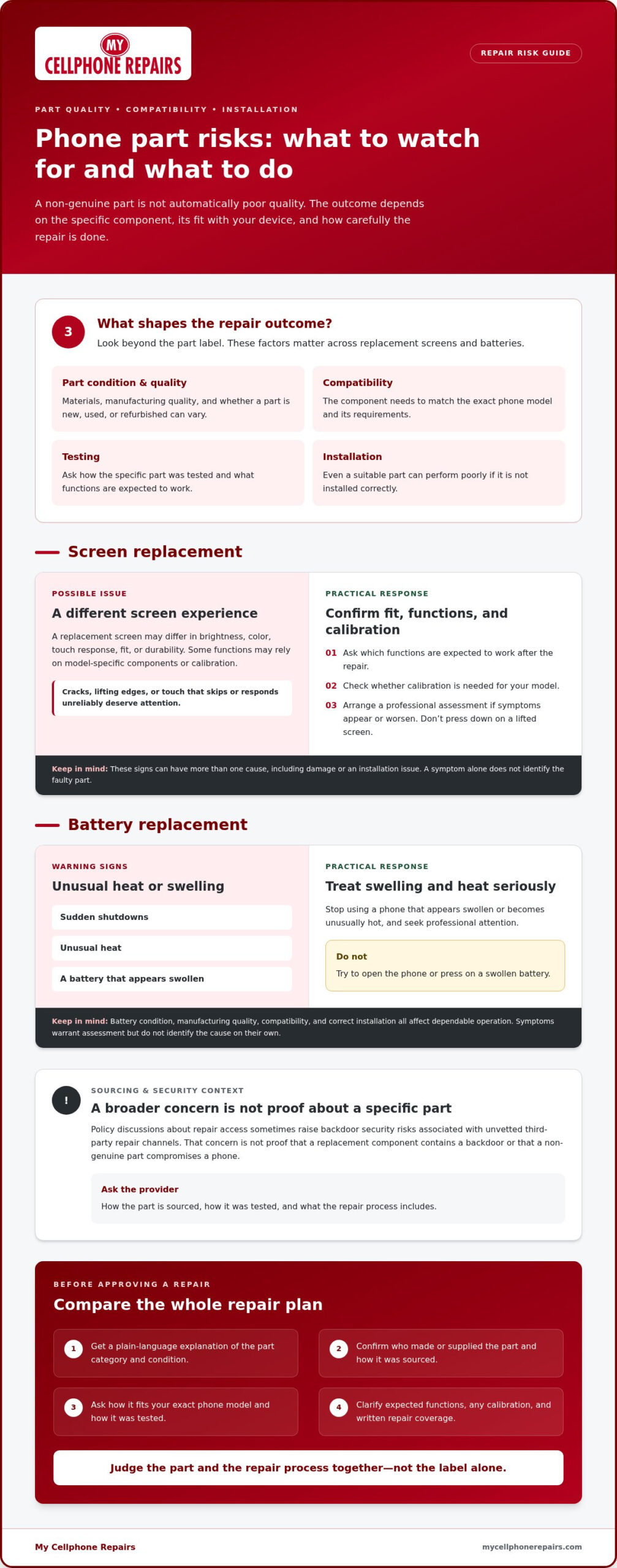
The risks of using non-genuine phone parts vary by component. Design, manufacturing quality, compatibility with the exact phone model, and installation all affect the result. Part quality and installation both influence how well a repair performs. A symptom can point to a problem, but it doesn’t prove which part caused it. Have a qualified repair professional assess the phone rather than diagnosing it from one sign alone.
What should you know about replacement screens?
A replacement screen may differ in brightness, color, touch response, fit, or durability. Those differences depend on the specific part and how it was installed, not simply whether it’s genuine or aftermarket. Some phone functions may rely on model-specific components or calibration, so ask which functions are expected to work after the repair and whether calibration is needed.
Cracks, lifting edges, or touch that skips or responds unreliably are signs to take seriously. They can have more than one cause, including damage or an installation issue. Don’t press down on a lifted screen or assume the replacement part is automatically at fault. Arrange a professional assessment, especially if the condition is worsening.
What should you know about replacement batteries?
Battery condition, manufacturing quality, compatibility, and correct installation all matter for dependable operation. Sudden shutdowns, unusual heat, or a battery that appears swollen are warning signs that need professional attention. Stop using a phone that appears swollen or becomes unusually hot, and don’t try to open or press on it yourself. These symptoms warrant an assessment, but they don’t identify the cause on their own.
Policy discussions about repair access sometimes raise backdoor security risks associated with unvetted third-party repair channels. That is a broader concern, not proof that a replacement component contains a backdoor or that a non-genuine part compromises a phone. Ask how the part is sourced and tested, and choose a repair provider that explains the process clearly.
For a closer look at battery replacement considerations, read this phone battery replacement guide. If you’re weighing a screen or battery repair, My Cellphone Repairs provides iPhone and Samsung repairs. A repair assessment can help identify the work that suits your phone.
Genuine vs. Non-Genuine Phone Parts: How Should You Compare the Trade-Offs?
A useful comparison looks beyond the label. Genuine, aftermarket, and used or refurbished parts can differ in sourcing, condition, testing, and compatibility. The risks of using non-genuine phone parts aren’t automatic, just as a genuine part can’t remove the risk of poor installation. Ask about the specific part and repair process together.
Use this table as a starting point. Terminology varies, so ask what each description means for the component being used in your repair.
| Option | Sourcing and condition | What to verify |
|---|---|---|
| Genuine | Supplied or recognized through the device manufacturer, where available. | Confirm the source, model compatibility, testing, expected feature support, and written repair coverage. |
| Aftermarket | Made by a third party. Specifications and testing can vary between suppliers. | Ask who made it, whether it’s new, how it was tested, and which functions are expected to work. |
| Used or refurbished | An original component removed from another device may be used as-is or reconditioned. “Refurbished” can mean different things. | Ask about the part’s history and condition, what work was done, how it was tested, and what coverage applies. |
Which questions reveal the difference between part options?
Get specific before approving a repair. Ask what the part label means and whether the component is new, used, or refurbished. Then confirm that it’s compatible with your exact phone model, which functions will be tested after installation, and whether calibration may be needed. Request the answers in writing, including coverage, exclusions, and what to do if an issue appears.
When might each repair option suit your priorities?
A manufacturer-sourced option may suit you if manufacturer-specified compatibility matters and that part is available. A documented third-party option may be worth comparing if you want to understand other sourcing choices and repair terms. A used or refurbished component may be relevant depending on its condition and your phone’s needs. No category is the right choice for everyone.
Factor in the phone’s current condition, how long you plan to keep it, and any features you rely on. Check the written repair terms and consult manufacturer guidance for device-specific warranty or feature information. Compare the part, its testing, expected functions, installation, and coverage as one repair plan rather than choosing by label alone.
How Can You Reduce the Risks Before Approving a Phone Repair?
A few clear questions can help you understand a repair before work begins. No checklist can eliminate every part or workmanship risk, but written details make it easier to compare options, confirm expectations, and know what to do if a problem appears.
What should you ask a repair provider before work begins?
- Identify the part. Ask whether it’s genuine, aftermarket, used, or refurbished, whether it’s new or previously used, and what the provider means by that label.
- Confirm compatibility. Check that the part is intended for your exact phone model. Ask about known limitations, including functions that may need calibration or extra verification.
- Clarify testing. Ask which functions will be tested after installation. Depending on the repair, that may include the display, touch response, cameras, biometric functions, charging, or battery operation.
- Get repair terms in writing. Ask what coverage applies to the part and labor, how long it applies, what exclusions matter, and what steps to take if an issue arises.
- Prepare your phone. Back up your data when practical, then follow the provider’s and manufacturer’s device-specific preparation instructions. Don’t assume every model requires the same steps.
Before authorizing work, check that the written explanation matches what you discussed. It should identify the part, expected functions, planned testing, and repair terms. If anything is unclear, ask for a direct explanation rather than relying on broad assurances. This helps you assess the risks of using non-genuine phone parts without treating the part label as the only factor.
What should you check after the repair?
Ask for an explanation of the relevant post-repair checks. If you can, test the functions connected to the repair while the phone is returned to you:
- For a screen repair, check touch response and look for display behavior that differs from what was explained.
- For a battery or charging repair, check that the phone charges and operates as expected.
- Check cameras, speakers, and buttons that were part of the repair assessment or may have been affected by the work.
Ask about any device warnings, calibration steps, or features that need additional verification. If new symptoms appear, contact the repairer promptly and describe what you noticed. Avoid opening the phone yourself, since that may complicate assessment of the issue.
My Cellphone Repairs provides iPhone and Samsung repairs, including screen and battery work. Review the repair details and written terms before approving a repair.
Choosing a Phone Repair Provider: Get Clear Answers Before You Decide
A sound repair decision accounts for more than the part label. Compare the proposed component, its compatibility with your phone, the work involved, post-repair testing, and written coverage together. That gives you a clearer basis for weighing the risks of using non-genuine phone parts without assuming that any one category guarantees a particular result.
Before approving an iPhone or Samsung screen or battery repair, ask what part the repair plan includes, which functions it is expected to support, and what will be tested. My Cellphone Repairs provides professional iPhone and Samsung repairs. A repair assessment can clarify the work and expectations for your device before you decide.
When is professional repair guidance especially useful?
Get an assessment if your phone has several symptoms or if a problem affects a function you rely on for safe, dependable use. A technician can inspect the device’s condition and discuss repair options based on what they find, rather than guessing from one symptom. For screen-specific information, see the iPhone screen repair guide.
Describe what changed, when it started, and whether the issue followed a drop, liquid exposure, or previous repair. Those details can help the technician assess the phone and explain which part or repair work may be relevant. Ask for the likely scope of work and any limitations before authorizing it.
What should a transparent repair conversation include?
A clear conversation should cover the proposed part and its condition, the repair steps, expected functions, and how those functions will be checked afterward. Ask which written terms apply to the part and labor, including exclusions and what to do if a new issue appears. If a feature may need calibration or separate verification, ask for an explanation before work begins.
For model-specific information, review the Samsung phone repair services page. Take time to understand the repair plan. A provider should be able to explain the trade-offs in plain language without claiming that a part label alone guarantees quality, compatibility, or a particular repair outcome.
To discuss repair options for your phone, talk with My Cellphone Repairs about your phone repair.
Make Your Repair Choice With Confidence
The risks of using non-genuine phone parts depend on more than the label. Part condition, compatibility, testing, and installation all matter. Ask what component the repair plan includes, which functions will be checked, and what written coverage applies before approving the work.
Compare the full repair plan against your phone’s condition, the features you rely on, and how long you expect to keep the device. Clear answers help you weigh the trade-offs without assuming that every third-party part is faulty or that a genuine part removes all repair risks.
My Cellphone Repairs provides professional hardware repairs for iPhones and Samsung phones, including screen replacements and battery swaps. The company also operates a hands-on technician training program. If you’re considering a repair, compare the repair plan, testing, and terms against what matters for your device.
To discuss an iPhone or Samsung repair with My Cellphone Repairs, get in touch about your phone repair.
Frequently Asked Questions
Is it safe to use non-genuine phone parts?
It can be safe, but the label alone can’t establish a part’s safety or quality. Risk depends on the component, its condition, compatibility with your phone, and how it’s installed. Ask how the part was sourced, what testing it received, and which functions will be checked after repair. If you notice unusual heat, swelling, or new malfunctions, stop using the device and seek professional advice.
Can non-genuine parts damage a phone?
A defective, poorly matched, or incorrectly installed part may contribute to performance problems or damage, but that isn’t inevitable with every third-party component. The risks of using non-genuine phone parts depend on the part and repair process together. Before approving work, ask which component will be installed, what limitations may apply, and whether the repairer will test the functions affected by the repair.
Will a non-genuine screen affect touch response or display quality?
It may, depending on the screen’s specifications, condition, compatibility, and installation. Possible differences include inconsistent touch response, brightness, color, or fit. Some features may also require calibration. These issues aren’t guaranteed with every replacement screen. Ask which display functions will be tested after installation and what the written repair terms say if the screen doesn’t perform as expected.
Can a non-genuine battery overheat or swell?
A damaged, defective, or improperly installed battery can present a concern, regardless of its label. Swelling, unusual heat, or sudden shutdowns are warning signs that need professional attention. If the phone is visibly swollen, stop charging it and don’t press or puncture the battery. Ask about battery sourcing, installation, post-repair checks, and written coverage before approving a replacement.
Does using a non-genuine part void a phone warranty?
Don’t assume that using a non-genuine part automatically voids every phone warranty. Coverage can depend on the manufacturer’s current terms, your device, the repair, and applicable consumer protections. Check the warranty language and ask the manufacturer or repair provider about your specific situation before authorizing work. Request written repair terms, and don’t rely on broad verbal claims that a repair will preserve or cancel warranty coverage.
Are aftermarket phone parts always lower quality than genuine parts?
No. Aftermarket parts vary in design, supplier, testing, and compatibility, so the category alone doesn’t rate quality. A genuine part may offer manufacturer-specified compatibility, while other options may differ in features or availability. Compare the exact component, its condition, the functions it supports, and the repair coverage. Ask for specific details instead of assuming every aftermarket part performs the same way.
How can I check whether a repair uses a non-genuine part?
Ask the repair provider to identify the part category and condition in writing. Clarify whether it’s manufacturer-sourced, aftermarket, used, or refurbished, and ask what post-repair tests are included. Request any known feature limitations and the written repair terms, including applicable coverage. If the explanation is unclear, pause before approving the work and consider getting another assessment. Clear answers make it easier to compare options.