
A MacBook that still turns on after a spill may not be safe to use. Can a MacBook water damage repair service restore it? Sometimes, but a technician needs to assess the device before anyone can say what may be possible.
If liquid has reached your MacBook, it’s understandable to worry about the device, your files, and the cost of repair. Don’t keep using or charging it. Power it off if you can do so safely, and don’t try to dry it with rice. The kind of liquid and how it reached the device can affect the damage, so careful action matters.
This guide explains what to do after a spill and what to expect from a professional assessment. You’ll learn how technicians evaluate possible damage, why repair and data access aren’t guaranteed, and what to ask before authorizing work. My Cellphone Repairs offers MacBook repair and water damage repairs. Use the information here to understand your options and decide on a next step.
Key Takeaways
- Visible symptoms don’t reveal the full extent of liquid damage. Don’t assume the MacBook is fine or beyond repair based only on how it behaves.
- A professional assessment considers the liquid involved, exposure, device condition, and timing to help identify possible repair needs.
- A MacBook water damage repair service can explain the assessment, possible options, and service terms before you decide whether to repair or replace the device.
- Before approving work, ask what the assessment covers, what findings you’ll receive, and when your authorization is required.
MacBook Water Damage Repair Service: Why the First Steps Matter
A liquid spill can disrupt work in seconds, but a MacBook that appears normal may still have damage you can’t see. It may also stop responding or behave unpredictably. Symptoms alone can’t show which components are affected or how extensive the damage is. Liquid can interfere with electrical systems through processes such as short-circuiting, as described in this overview of water’s destructive processes.
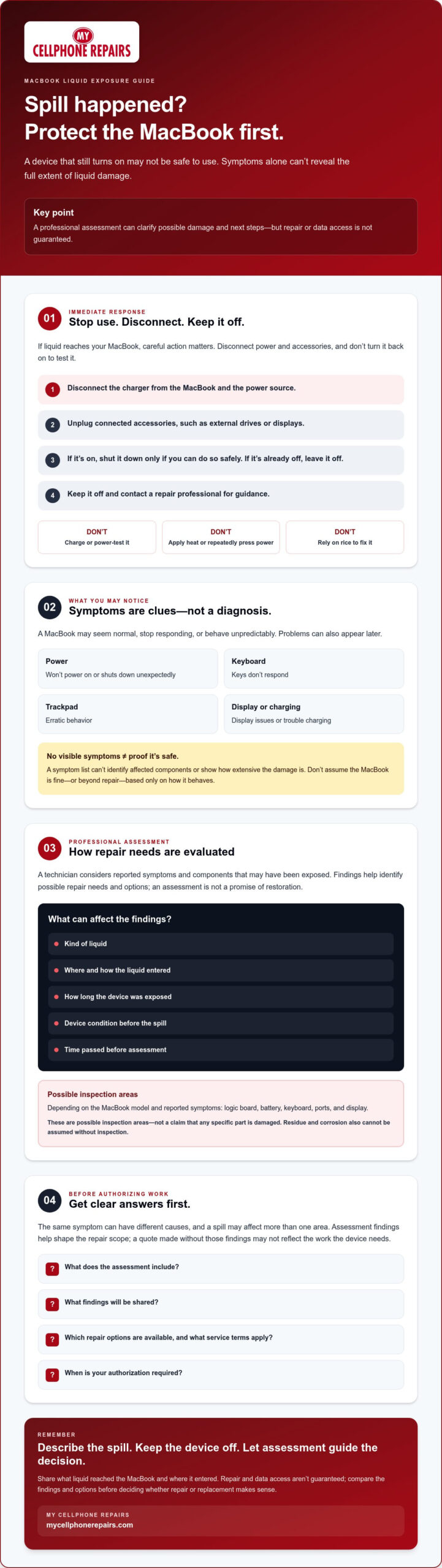
Act carefully. Don’t charge the MacBook, repeatedly press the power button to test it, apply heat, or rely on rice to fix it. These actions can’t confirm the condition of internal components and may add risk. Keep the device off until a repair professional advises otherwise.
What should you do immediately after liquid reaches a MacBook?
Stop using the MacBook and disconnect external power. If it’s already off, leave it off. If it’s on, shut it down only if you can do so safely.
- Disconnect the charger from the MacBook and power source.
- Unplug connected accessories, such as external drives or displays.
- Shut down the MacBook if it’s safe to do so. Don’t turn it back on to check whether it works.
- Keep it off and contact a repair professional for guidance.
For more urgent device-care guidance, read the MacBook liquid damage emergency and restoration guide.
Which symptoms may appear after MacBook liquid exposure?
Some problems are obvious. The MacBook may not power on or may shut down unexpectedly. Other signs include keys that don’t respond, erratic trackpad behavior, display issues, or trouble charging. A device might seem to work at first, then show inconsistent symptoms later.
Don’t treat a lack of symptoms as proof that the MacBook is safe to use. A symptom list can’t identify affected components or establish the extent of damage. That requires an assessment. Prompt professional assessment can clarify the damage and possible next steps, but it can’t guarantee recovery. A MacBook water damage repair service can help explain what may be feasible after evaluating the device.
How MacBook Liquid Damage Assessment Identifies Repair Needs
A liquid damage assessment is a technical evaluation of reported symptoms and components that may have been exposed. It helps a repair professional determine what needs further attention and which options may be appropriate. It isn’t a promise that the MacBook can be restored.
Findings can depend on the kind of liquid, where and how it entered, how long the device was exposed, its condition before the spill, and how much time passed before assessment. Spill residue may also contribute to corrosion, but its presence or extent in a particular MacBook can’t be assumed without inspection. The Electrical Safety Foundation International explains that water-damaged electrical equipment can pose a serious long-term safety and fire risk, which is another reason not to use the device until a professional advises you.
Observed symptoms are clues; a confirmed diagnosis identifies the repair need. For example, a MacBook that won’t charge could have more than one possible cause. A technician needs to assess the device before connecting a symptom to a particular component or recommending work.
What MacBook components may need inspection?
Depending on the model and reported symptoms, possible inspection areas include the logic board, battery, keyboard, ports, and display. This doesn’t mean any of these parts are damaged. The right inspection scope depends on the device and what happened. Describe the spill clearly, including the liquid and where it reached the MacBook, to give the repair professional useful context.
Why does a MacBook need assessment before repair is quoted?
The same symptom can point to different underlying issues, and a spill may affect more than one area. The model, component condition, and repair scope all help shape the recommended next step. Without those findings, a quote may not reflect the work the device actually needs.
Before approving service, ask what the assessment includes, what findings will be shared, which repair options are available, and when your approval is required. Request a clear explanation of the proposed work and any applicable service terms. My Cellphone Repairs offers MacBook repair and water damage repairs. You can review its MacBook and water damage repair services and confirm assessment details directly.
MacBook Water Damage Repair or Replacement: How to Compare Your Options
A diagnosis gives you information to weigh, not a guaranteed answer. Whether repair or replacement makes sense depends on the MacBook’s condition, the proposed work, and what matters most to you. A MacBook water damage repair service can clarify possible repair options, but an assessment can’t guarantee the device will work again or that stored files can be recovered.
Still reviewing what to do right after a spill? Engadget offers a practical guide on what to do when there’s a spill. Once the device has been assessed, focus on the findings and your priorities rather than assuming either path is automatically best.
| Path | Questions to ask | Possible advantage | What remains uncertain |
|---|---|---|---|
| Assess and consider repair | What damage was found? What work is proposed? What are the service terms? | May address the diagnosed issue while keeping the existing device in use. | Repair feasibility, final performance, and access to files depend on the findings and work involved. |
| Compare with replacement | How extensive is the damage? What condition is the MacBook in? What matters most for my next device? | Provides another option if the repair scope or uncertainty doesn’t fit your needs. | Replacement doesn’t itself resolve questions about data stored on the damaged MacBook. |
When might a repair assessment be worthwhile?
Consider how you use the MacBook, its condition before the spill, and whether important files are stored on it. An assessment can replace guesswork with specific findings and proposed work. Ask for that explanation before committing. Whether repair is worthwhile depends on the diagnosis and your priorities, not just the symptoms.
When should you compare repair with replacement?
Compare both paths if the assessment identifies extensive damage or leaves the outcome uncertain. Weigh the device’s condition, your need for its files, the proposed repair scope, and the provider’s stated terms. Ask what is known, what can’t be confirmed, and whether your approval is needed before work proceeds. You can then decide with clearer expectations, without assuming repair or replacement guarantees data access or device recovery.
How to Choose a MacBook Water Damage Repair Service
Choose a provider based on how clearly they explain the assessment and your options, not on promises made before the MacBook is checked. A useful conversation should help you understand what will be examined, what the findings mean, and what you’re being asked to approve.
What should you ask before authorizing MacBook repair?
Use this checklist when you contact a repair provider. Clear answers can help you compare service options and make an informed decision before work begins.
- Confirm model support. Share the MacBook model if you know it, and ask whether the provider can assess and service that model.
- Clarify the assessment. Ask which reported symptoms and potentially affected components it covers, and what findings you’ll receive.
- Request a clear proposal. Ask what the diagnosis indicates, what work is proposed, and what risks or uncertainties remain.
- Check the approval point. Find out when your authorization is required and whether any work could begin before you approve it.
- Ask about data and access. Confirm whether the provider needs device credentials. Ask how personal data is handled and whether access can be limited.
- Review service terms. Confirm applicable fees, repair terms, and whether any warranty applies. Don’t assume these details; ask directly.
A MacBook water damage repair service should be able to explain the assessment and proposed work in terms you understand. If an answer is unclear, ask for clarification before agreeing to service. Make sure you understand what’s known, what remains uncertain, and what the next step involves.
How can you prepare your MacBook for service?
Give a straightforward account of what happened. Note the liquid type, approximate exposure time, where it reached the device, and any symptoms you observed. If you know the model, share it. Describe changes in behavior, but don’t guess which internal components may be affected.
Keep the MacBook off. Don’t charge it or power it on just to collect more information. If you’re unsure what details to provide, ask the repair provider how to proceed safely and what to bring or share when arranging an assessment.
My Cellphone Repairs offers MacBook repair and water damage repairs. Ask My Cellphone Repairs about MacBook service, including supported models, assessment details, available options, and service terms before authorizing work.
What to Expect When You Contact My Cellphone Repairs
My Cellphone Repairs offers MacBook repair and water damage repair services. Contacting the business gives you an opportunity to explain what happened and ask what options may be available for your device. Don’t assume every MacBook model is supported or that a particular intake, assessment, or repair process applies. Confirm those details directly before arranging service.
A MacBook water damage repair service may begin by asking about the device and its symptoms, but confirm the next steps and terms with the provider. Repairability, timing, and the likely outcome depend on the findings and applicable service terms. No assessment can guarantee that the MacBook will be restored or that its data will be accessible.
What information should you share when requesting service?
Give a clear account of the exposure and what the MacBook has done since. Useful details include the model, if known, the type of liquid, where it reached the device, and when the incident occurred. Describe symptoms you observed, such as charging problems or unexpected shutdowns, without guessing which components are affected.
- Say whether the MacBook has been powered on or charged since the exposure.
- Mention any service or repair it has received after the incident.
- Ask whether the model can be assessed and what information or next steps the provider needs.
- Confirm applicable assessment, repair, data-handling, and other service terms directly.
Accurate details help the provider understand the situation. If you don’t know the exact model or exposure time, say so rather than estimating with false certainty.
How do you move forward after the assessment?
Before deciding, ask for the findings and proposed work in clear terms. Find out what remains uncertain, whether there are data considerations, and which service terms apply. Confirm when your authorization is needed and whether any work could begin before you approve it. Take time to review the information. An assessment informs your decision, but it doesn’t make it for you.
Then compare the proposed repair with replacement based on your priorities. Consider the MacBook’s condition, how important its files are, and whether the stated scope and terms fit your needs. If something is unclear, ask for an explanation before proceeding.
For a clear next step, contact My Cellphone Repairs and describe the liquid exposure, your MacBook model if known, and the symptoms you’ve noticed. Ask what assessment and service options may apply to your specific device before authorizing work.
Take the Next Step With Clear Expectations
After a liquid spill, don’t rely on symptoms alone to judge your MacBook’s condition. Keep it off and seek a professional assessment to understand what may be affected. The findings can help you compare repair with replacement, but they can’t guarantee device recovery or access to your files.
Before approving work, ask what the assessment covers, what repair options are available, and which service terms apply. A MacBook water damage repair service should give you information to make a considered decision, not pressure you to assume a particular outcome.
My Cellphone Repairs offers MacBook hardware repair and water damage repairs. Contact My Cellphone Repairs about your MacBook service and describe the liquid exposure and symptoms you’ve noticed. Ask what next steps may apply to your device. With clear information, you can choose the path that best fits your needs.
Frequently Asked Questions
Is a MacBook repairable after water damage?
Sometimes, but repairability can’t be confirmed before assessment. The kind of liquid, exposure, symptoms, affected components, and the MacBook’s condition all matter. A repair professional can inspect the device, explain the findings, and outline possible options. Keep it powered off and don’t charge it while arranging guidance. Even after assessment, a repair outcome or access to stored data can’t be guaranteed.
What should I do immediately after spilling liquid on my MacBook?
Disconnect the charger and accessories, then shut down the MacBook if you can do so safely. Don’t charge it, repeatedly test it, apply heat, or use rice as a fix. Leave it off and contact a repair professional for guidance. Share what spilled, where it reached the device if you know, and what symptoms appeared. Don’t turn it back on to gather more information.
How long does MacBook water damage repair take?
There’s no reliable timeframe to give before the device is assessed. Timing may depend on the MacBook model, the components involved, the repair scope, and any parts or service requirements. Ask the provider for an estimate after diagnosis and confirm what could affect it. A quick symptom check alone can’t establish how long repair may take or whether repair is feasible.
How much does MacBook water damage repair cost?
The cost depends on the model, the damage found, and the work recommended. An assessment is needed before a meaningful quote can be provided. Ask what the proposed work includes, whether an assessment fee applies, and whether you must approve additional work. Avoid relying on a generic estimate for another MacBook or spill. Confirm current pricing and service terms directly with the provider.
Is it worth repairing a water-damaged MacBook or should I replace it?
Compare the assessment findings, proposed work, the MacBook’s condition before the spill, and how important its stored data is to you. A repair professional can explain possible options, but the choice depends on your priorities and the confirmed service terms. Ask what remains uncertain before authorizing repair or choosing replacement. Symptoms alone can’t tell you which option is right for your device.
Can I turn on or charge my MacBook after it gets wet?
No. Don’t charge it or keep testing it after liquid exposure. If it’s still on, shut it down if safe, disconnect external power and accessories, and leave it off while you seek repair guidance. Powering or charging a wet device may increase the risk of additional damage. Repeated startup attempts won’t provide a reliable diagnosis. Ask a repair professional what to do next.
What happens during a MacBook liquid damage assessment?
The provider may ask about the model, liquid exposure, and symptoms, then explain what the assessment can examine. The exact process depends on the business and device. Ask which components may be checked, how findings will be shared, and whether you must approve repair work separately. An assessment doesn’t guarantee repairability, data recovery, or a particular outcome. Confirm the applicable service terms before proceeding.