
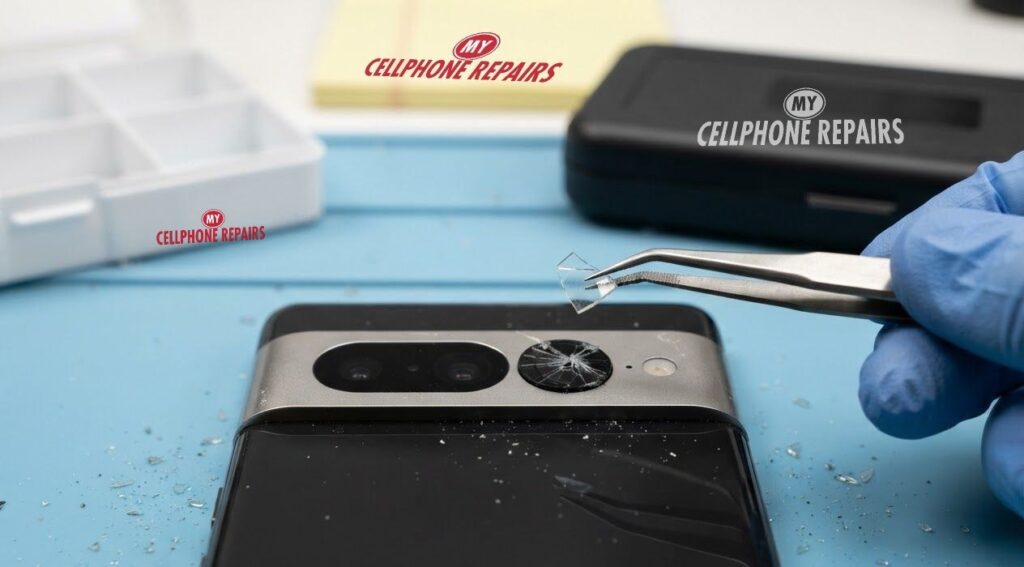
You pick up your Pixel and notice a hairline crack right over the camera lens. You never dropped it. A Pixel 7 Pro cracked camera glass problem is one owners have reported since early 2023, and the big question is always the same: can I keep using it, and who pays to fix it?
Here is what the reports say, what Google’s own camera help recommends, and how to decide your next step. If you need Google Pixel repair from a phone repair shop near me, we give a free diagnosis and an exact quote before we start.
Quick facts
- Price: camera-glass work: free diagnosis and an exact quote before we start. Other Pixel 7 Pro repairs: battery from $89, back glass from $89, screen from $269.99
- Turnaround: same day for most repairs
- Warranty: 30-day warranty on premium screens and other repairs; budget screens have no warranty and no refunds
- Diagnosis: always free, walk-ins welcome
Key takeaways
- 9to5Google reported in January 2023 that owners of the Pixel 7, and some Pixel 7 Pro owners, found the glass over the main camera shattering without an obvious drop.
- The damage usually leaves a hole with the lens exposed. The camera may still work, but the lens could be damaged quickly.
- The cause was unclear in that report. Some owners linked it to moving from a warm place to the cold, but that is a theory, not a confirmed cause.
- Owners reported mixed results with warranty claims, so ask Google first if your phone is covered.
- Google’s camera help says that if other apps also fail to use the camera, the problem is likely hardware and needs a repair.
In this article:
- What do owners report about Pixel 7 camera glass?
- Can I keep using a Pixel with cracked camera glass?
- Is it the glass or the software?
- Try this first: restart and Safe mode
- What does the repair involve?
- FAQ
What do owners report about Pixel 7 camera glass?
In January 2023, 9to5Google wrote about a growing number of Pixel 7 owners seeing the glass over the camera shatter without a clear cause. Some Pixel 7 Pro owners were included. In most cases the damage looked the same: a hole where the camera glass had been, leaving the lens exposed.
The article said the cause was unclear. It suggested a possible manufacturing defect or design flaw, and noted that some owners linked the damage to temperature changes, such as moving from a warm home to the cold outdoors. That is a theory from owners, not an official finding. The article reported no official statement from Google. Some owners said Google support told them the damage was their own problem and some paid hundreds of dollars, while others received free replacements.
That report is from 2023, so we do not have a current Google policy to quote. If your Pixel 7 Pro is still under warranty, contact Google first and ask what they cover. If it is not, or you want it fixed today, that is where an independent repair can help.
Can I keep using a Pixel with cracked camera glass?
9to5Google said the camera can still work in this state, but the lens could easily be damaged quickly. Our advice is to treat cracked camera glass as urgent rather than cosmetic. A crack means the lens is no longer fully protected, and small glass pieces can fall away. Avoid pressing on it, and do not use tape or glue over the lens.
Practical steps while you wait for a repair: keep the phone in a clean pocket or case that does not press on the camera bar, avoid sudden hot-to-cold changes, and do not try to pull loose glass off yourself. If you see a loose fragment, leave it for a technician.
Is it the glass or the software?
Not every camera problem is a glass problem. Google’s Pixel Camera help walks through the software checks in order, and testing after each step tells you where the problem is:
- Restart the phone. Power it off, then turn it on again.
- Clear the Camera app cache. Press and hold the Camera icon, tap App info, then Storage & cache, then Clear Cache.
- Update. Install any Pixel Camera update in the Play Store and any system update in Settings.
- Check for an app conflict. Restart into Safe mode by holding Volume down when the G logo appears. If the camera works there, uninstall your most recently downloaded app and test again.
Google’s page also says that if other apps crash when they access the camera, the problem is likely hardware, and the next step is a repair. It suggests testing the selfie camera too, and notes that a slight rattle when you shake a Pixel is normal and comes from the camera’s focusing parts. For a slow shutter, Google says to check that the phone is not hot, remove cases that block the lens, gently wipe the back glass, lens and sensors with a soft clean cloth, and look for permanent scratches near the lens.
Try this first: restart, force restart and Safe mode on your Google Pixel
- Restart: press and hold the Power button (on some models Power and Volume Up), then tap Restart.
- Force restart (frozen): press and hold the Power button for up to 60 seconds and let go when the “G” logo appears. Deletes nothing.
- Safe mode: open the power menu, touch and hold Restart until “Reboot to safe mode” appears, then tap OK.
- A factory reset will not fix damaged glass or a damaged camera. Only erase the phone for software problems, after a backup and with your Google account password ready.
When to stop and come in: the phone won’t turn on even after a force restart and 30 minutes on the charger, it vibrates or rings but the screen stays black, it restarts over and over, it gets hot or the screen or back is lifting (stop charging it), or it got wet. Free diagnosis at any of our stores, and most repairs are done the same day. Menu names may be slightly different on your model. Maker’s own steps: Google Pixel Help: fix a Pixel phone that freezes
Full step-by-step guide: How to restart and reset your Google Pixel → | All restart & reset guides →
What does the repair involve?
We look at the phone under magnification, test the camera in the app, and tell you whether the damage is limited to the glass or reaches the camera module or back panel. Because the camera-glass repair is not a standard listed price, you get a free diagnosis and an exact quote before we start. For reference, other Pixel 7 Pro prices are: battery from $89, back glass from $89 and screen from $269.99.
Back up your photos if the phone still lets you, bring your charger if the battery is low, and mention when you first saw the crack and whether the phone was dropped. That helps us advise you, and it helps if you decide to ask Google about warranty coverage.
Frequently asked questions
Why is my phone camera blurry?
A cracked glass cover, smudges, or a case blocking the lens can all blur photos. Gently wipe the glass, remove the case and test again. If it stays blurry, book a free diagnosis.
Why is my phone camera foggy inside after water?
Moisture inside the lens area needs a technician. Do not charge the phone, and bring it in for a free diagnosis as soon as you can.
How long does a repair take?
Most repairs are done the same day. Walk in or book online, and we will tell you the time after we examine the phone.
We also fix tablets and computers. Need tablet repair near me or MacBook repair near me? Our technicians handle those too.
Cracked Pixel camera glass? Book a free diagnosis today.
Sources
- 9to5Google: growing number of Pixel 7 owners seeing camera glass shatter
- Google Pixel Help: fix your Camera app on your Pixel phone or tablet
- Google Pixel Help: fix a Pixel phone that freezes
#MyCellphoneRepairs #GooglePixel #Pixel #PixelRepair #Pixel7Pro #CameraRepair #CrackedCameraGlass #BlurryCamera #PhoneRepair #SameDayRepair #AlexandriaVA #BowieMD
Get it fixed at My Cellphone Repairs: most repairs are done the same day. Walk in or book online.
Book NowPhone frozen or acting up? See our step-by-step restart & reset guides →
Our locations
- Towson Mall825 Dulaney Valley Rd, Second Level, Towson, MD 21204
(410) 828-4404 - Grand Rapids3077 28th St SE, Grand Rapids, MI 49512
(616) 799-6996 - PG Plaza Mall (Hyattsville)3500 East-West Hwy, Mall at Prince George's, Target Entrance, Hyattsville, MD 20782
(301) 559-1105 - Bowie Town Center15630 Emerald Way, Bowie, MD 20716
(240) 614-3600 - Capital City Mall (Camp Hill / Harrisburg area)3604 Capital City Mall Dr, Camp Hill, PA 17011
(717) 919-7868 - Cumberland Mall (Vineland)3849 S Delsea Dr, next to Boost Mobile, Dick's Sporting Goods entrance, Vineland, NJ 08360
(856) 765-5049 - Mondawmin Mall2401 Liberty Heights Ave, Lower Level, Baltimore, MD 21215
(443) 826-7711 - Baltimore Inner Harbor100 East Pratt St, Suite 101, Baltimore, MD 21202
(443) 838-8989 - St Charles Mall (Waldorf)11110 Mall Cir, Waldorf, MD 20603
(301) 645-7755 - Alexandria7650 Richmond Hwy, Alexandria, VA 22306
(703) 341-6789