
A MacBook Air that still turns on may still be a poor repair prospect. Whether it’s worth repairing a water-damaged MacBook depends on the extent of the damage, the repair estimate, and the computer’s age, condition, and value. A liquid-exposed MacBook can seem to work normally before corrosion causes problems, so its immediate performance is not the whole picture.
Weigh the cost of restoring it against the MacBook Air’s value in good working condition and how much useful life it may have left. An older model with existing issues may be harder to justify repairing than a newer computer in otherwise good shape. This guide explains how damage severity and parts affect the repair decision, and how to compare an estimate with your MacBook Air’s value.
Key Takeaways
- Don’t rely on a MacBook Air seeming fine after a spill; liquid damage can lead to problems later.
- Repair value depends on the damage and likely component work, not just whether the computer still turns on.
- Compare the repair estimate with the MacBook’s working condition, age, and usefulness to decide if the expense makes sense.
- Older models may be harder to repair as parts and repair options become more limited.
- A thorough inspection can reveal whether the damage is limited or affecting major hardware.
What happens inside my MacBook when the spill occurs?
Liquid can reach the keyboard, internal connectors, and logic board, even if the MacBook Air keeps running. Damage may appear later, so a working screen does not prove the inside is unaffected.
Standard service coverage and repair fees depend on the terms of the protection plan attached to the MacBook. There is no universal service fee for every device.
MacBook liquid-damage repair timelines depend on the liquid, affected components, and parts needed. The fault must be identified before a repair timeline can be estimated.
Liquid Types and Damage
The type of liquid affects the residue left behind and the damage it may cause. Water can reach circuits and connectors, while sugary drinks may leave sticky deposits on the keyboard and beneath keys. Acidic liquids can also affect exposed materials. The specific liquid matters because visible drying does not remove residue from internal components.
For example, plain water and soda can leave different cleanup challenges. A MacBook exposed to a sugary or acidic drink needs assessment for both liquid intrusion and residue. The affected area, amount spilled, and whether the computer was powered all influence what needs attention.
Act promptly after a spill. Disconnect the charger and accessories, then shut down the MacBook if it is still on. Do not restart it or connect power to test whether it works. Blot exterior liquid with a clean cloth, and avoid pressing keys that could push liquid farther inside. Keep the computer off until it can be inspected.
- Unplug connected power and accessories.
- Shut down the MacBook if it remains on.
- Keep it powered off rather than testing the keyboard or screen.
Delayed Failures and Repairability
A liquid-exposed MacBook may work normally for days or weeks before problems appear. Corrosion can develop after a spill, affecting connections and causing later system failure. A successful startup does not establish that the computer is safe to keep using or that internal damage is minor.
Yes, a MacBook may be repairable after liquid damage even if it still turns on. Repairability depends on which components were affected and whether corrosion has spread. A technician at My Cellphone Repairs needs to inspect the device to identify damage. Continued use can complicate diagnosis and put accessible data at risk.
Data recovery depends on the condition of the storage and the components that allow the MacBook to start and communicate. If important files are not backed up, avoid repeated startup attempts or connecting the computer to power. Tell the technician that your data matters before repair begins, so the assessment can account for files as well as hardware.
Some spills affect only a limited area, while others reach multiple components. An inspection can distinguish those cases and guide the repair plan. The key question is not whether the MacBook turns on today, but what the spill affected and whether the damaged parts can be restored.
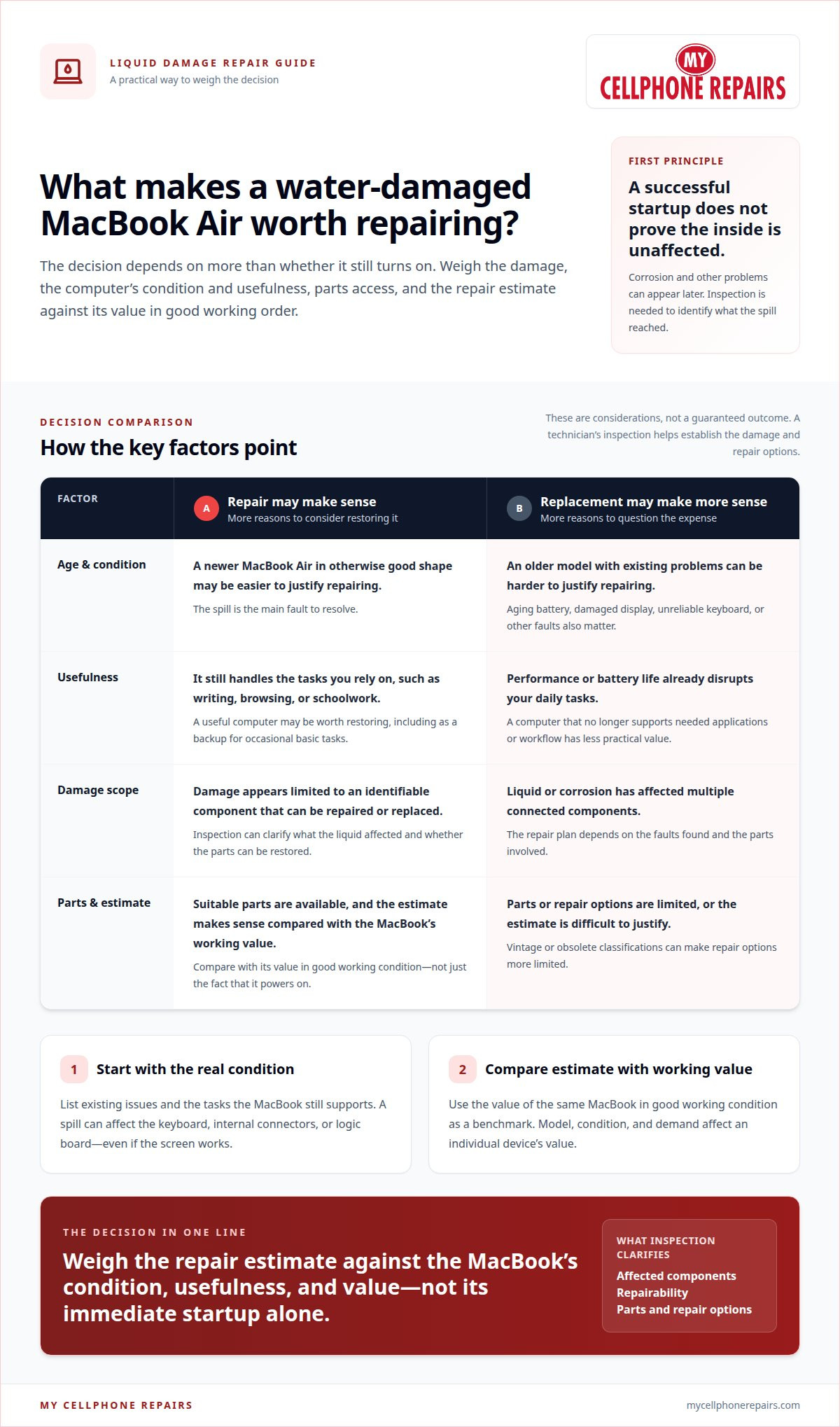
Age, usefulness, and parts availability
A liquid-damaged MacBook’s repairability depends on its age, affected components, parts access, and overall condition. Its usefulness after repair matters too: a working computer that still meets your daily needs may justify more effort than one already struggling with essential tasks.
Age and Ongoing Usefulness
A MacBook’s age can help you judge how much practical use you might get after repair. Consider a several-years-old Air with an aging battery: restoring liquid-damaged hardware may still leave a problem affecting everyday use. By contrast, a computer that handles your current work and remains reliable in other ways may be more useful after repair.
List the tasks your MacBook Air still handles, such as writing, browsing, or schoolwork. Then consider whether its performance and battery life already disrupt those tasks. If the spill is the only major issue, repair may preserve a useful computer. If several existing faults limit its role, replacement may make more sense.
Use the same test for a device kept as a backup. A MacBook that can handle occasional basic tasks may have value beyond its resale price. One that no longer supports your needed applications or daily workflow has less practical value, even if repair restores power.
Parts Availability and Repairability
Parts availability affects whether a damaged MacBook can be restored practically. As Apple products move into vintage and obsolete classifications, repair options can become more limited. A repair plan also depends on the affected component, the extent of damage, and whether suitable replacement parts can be obtained.
For example, damage limited to one replaceable component presents a different repair problem from damage affecting several connected parts. A technician needs to identify what failed and whether each affected part can be repaired or replaced. The faults and parts involved shape the repair’s feasibility.
Repairability also depends on the computer’s condition before the spill. A MacBook with a damaged display, unreliable keyboard, and weak battery already has several issues to weigh. If liquid damage adds another fault, restoring one component may not return the whole computer to dependable use.
Focus on these decision points:
- Whether the MacBook still supports your essential tasks.
- Which components the liquid affected and whether they can be restored.
- Whether parts are available for that model.
- What other problems already limit the computer.
These factors help explain why two MacBooks with liquid damage can have different repair outcomes. A MacBook liquid-damage assessment can clarify the affected components and repair options.
Assessing a MacBook’s current value
Start with the MacBook Air’s value in good working condition, then compare the damaged device with that benchmark. That figure is an illustration, not a current quote for every model. Model, condition, and demand all affect an individual computer’s value.
Identify the exact MacBook Air model before estimating its value. Two Air models with different release years or configurations may attract different interest. Compare like with like, then account for visible wear, prior faults, and whether the computer worked reliably before the spill.
Separate resale value from personal usefulness. A MacBook Air used daily for work may be worth more to its owner than its resale estimate suggests. Consider whether it still handles essential apps, files, and tasks. If it already struggles with those needs, restoring it may not provide enough practical value.
Use a simple comparison. First, estimate the Air’s value in working condition. Next, consider the repair estimate and any other known faults. Then decide whether the restored computer’s expected usefulness justifies the expense.
The comparison changes if the computer has an aging battery or several years of wear. A repair may resolve liquid damage but leave the battery, keyboard, or display as separate concerns. Include those issues in the decision rather than treating the spill as the only factor. A device with multiple existing faults may offer less value after repair.
Include personal data in your calculation. Files, project work, and familiar settings can make a MacBook Air valuable to its owner even when its resale value is limited. However, sentimental or data value does not establish that hardware repair is economical. Consider whether important files are backed up and whether the device can still meet your needs.
Before deciding, organize the comparison around these points:
- The model and configuration of the MacBook Air.
- Its working condition before liquid exposure.
- Its current value in fully functional condition.
- The repair estimate and any separate faults.
- The computer’s usefulness for your actual tasks.
In the first case, restoration may preserve a useful computer. In the second, the total cost and remaining usefulness matter more than the working-condition value alone.
Deciding whether it’s worth repairing a water-damaged MacBook means weighing its value, condition, and usefulness together. Do not treat one resale figure as the answer. Use it as a reference point, then judge whether the repaired Air would still serve you well.
Component repair and replacement costs
Whether repair or replacement costs less depends on the damaged components and the MacBook Air’s condition. A localized fault may need less work than damage affecting several parts. Compare the repair estimate with the cost of a suitable replacement, then factor in the computer’s remaining usefulness.
Repair pricing depends on the case and is provided after a quote request. The estimate reflects the affected components, repair method, and parts required.
The logic board often shapes the decision. Modern MacBooks integrate major hardware, which can make serious logic-board repairs costly. If the board has extensive liquid damage, the work may involve more than cleaning or replacing one small component. A technician must identify the faults before deciding whether board-level repair or replacement makes sense.
Other components can lead to different repair options. A damaged keyboard, trackpad, battery, or display may be handled separately, depending on the MacBook model and how far the liquid reached. If several components fail together, their combined repair needs matter more than any single part. A keyboard fault, for example, may be manageable alone but less appealing alongside board damage.
Parts availability also affects the estimate. A suitable replacement component may be easier to source for one MacBook Air model than another. Older models can have fewer repair options as Apple products move into vintage and obsolete classifications. This can affect feasibility and the repair timeline.
For a clear comparison, break the estimate into its practical parts:
- Diagnosis: Which components failed, and what testing identified them?
- Repair method: Can the affected part be repaired, or does it require replacement?
- Parts: Which components are needed, and are they available for this model?
- Additional faults: Does the MacBook also need work on its battery, display, or keyboard?
Then compare the full repair plan with replacement. If the estimate covers one isolated fault and the MacBook otherwise meets your needs, repair may preserve its value. If major board work and several component replacements are involved, a suitable replacement may be more economical.
Do not compare only the first repair item with the cost of a replacement. Include every identified fault, because a computer may need further work after its main issue is addressed. Compare the total repair plan with the replacement’s cost and the performance you need.
Ask what the diagnosis shows, which parts need work, and how each item affects function. A clear component breakdown makes the repair-versus-replace decision easier. It also helps distinguish essential repairs from problems that do not prevent the MacBook Air from meeting your daily needs.
Water-damage repair service for MacBook Air
MacBook Air liquid-damage repair starts with diagnosis, not a part swap. A technician needs to identify where liquid entered, which components are affected, and whether cleaning or replacement is appropriate. That assessment turns a vague spill concern into a repair plan you can weigh against your computer’s condition and everyday needs.
A useful inspection looks beyond the symptom. A MacBook Air that will not charge may have damage near its charging connection, but the fault could also involve internal circuitry. A keyboard problem may point to liquid beneath the keys. Testing helps distinguish the visible fault from other affected components before repair begins.
Cleaning and component repair address different problems. Cleaning can remove residue from affected areas, while a damaged part may need repair or replacement. If corrosion has reached the logic board, the work may be more involved because modern MacBook hardware is integrated. The right approach depends on inspection findings, not just how the spill looks.
A clear repair plan should explain the affected components, proposed work, and any parts required. It should also distinguish confirmed faults from symptoms that need further testing. For example, if the MacBook Air starts but its keyboard fails, the plan should identify whether the issue is limited to the keyboard or involves other hardware.
Before authorizing work, consider the outcome that matters most. You may prioritize getting the MacBook Air running, preserving access to files, or restoring specific functions such as charging and typing. Tell the technician which tasks and data matter. That context helps focus the assessment on useful outcomes rather than repairs that do not address your needs.
Do independent MacBook repair shops offer liquid-damage repair warranties? Some shops offer warranties, but coverage and terms vary. Read the written terms carefully, especially any exclusions related to liquid damage or later faults.
Repair timelines also depend on the diagnosis. The technician must identify affected parts, determine whether replacements are needed, and test the device after the work. A repair involving one accessible component differs from a case requiring logic-board work or parts sourcing. No single turnaround time applies to every MacBook Air spill.
After repair, testing should match the original problem. A keyboard issue calls for key checks; charging trouble calls for charging tests. The technician should also assess whether the MacBook starts and performs the functions addressed by the repair. A successful startup alone does not show that every affected feature works.
Choose a repair plan that connects each proposed task to a diagnosed fault. If liquid has reached your MacBook Air, request MacBook liquid-damage repair to have its condition assessed and repair options identified.
My Cellphone Repairs: Samsung Phone Repair
My Cellphone Repairs can assess your MacBook Air after liquid exposure. Its MacBook Repair service addresses hardware issues, including water damage, so you can understand the repair options before deciding whether to restore the computer.
Turn to the service if the MacBook shows symptoms such as charging trouble, keyboard faults, or startup problems after a spill. If an aging battery also affects everyday use, Battery Replacement may be relevant to the decision. The next step is an assessment of the affected hardware and the MacBook’s overall condition.
Contact My Cellphone Repairs to discuss your liquid-damaged MacBook Air.
Make your next repair decision with confidence
If you’re still weighing whether it’s worth repairing a water-damaged MacBook, focus on the outcome you need, not just the hope of getting it to turn on. A clear diagnosis can help you decide whether repair fits your budget and how you use the computer. If restoring it does not make practical sense, you can decide with a better understanding of why.
My Cellphone Repairs offers Samsung Phone Repair, iPhone Screen Repair, and MacBook Repair. For a liquid-damaged MacBook Air, its MacBook Repair service is the relevant next step. Share what happened and describe the problems you’re seeing so the repair team can assess the device and discuss the available options.
Contact My Cellphone Repairs today to discuss your MacBook Air. A clear next step can make a stressful repair decision easier to handle.
Frequently Asked Questions
How much does a MacBook Air water damage repair cost?
There is no fixed cost for every MacBook Air spill. The price depends on the model, affected components, repair method, and replacement parts required. A keyboard issue and a logic-board fault involve different work. The repair price is provided after a quote request. A component breakdown helps you understand the estimate and compare it with the computer’s usefulness.
Start With the Most Important Question: What Is the Mac Worth Right Now?
Estimate the MacBook’s value in good working condition using its exact model and configuration. Then account for wear, existing faults, and how well it meets your needs. For example, a computer with a damaged case and unreliable keyboard may have less practical value than a similar model in good condition. Use the working-condition value as a reference, not the sole reason to repair it.
What About Logic Board Problems?
Logic-board damage can make a repair more complex because major hardware in modern MacBooks is highly integrated. The key is finding out whether the board itself is affected or another component is causing similar symptoms. For example, a MacBook that will not charge needs diagnosis before assuming board failure. Weigh the confirmed repair scope against the device’s condition and usefulness before choosing repair or replacement.
What About Older MacBooks?
An older MacBook can still be a sensible repair if it performs the tasks you rely on and the needed parts are available. However, Apple products classified as vintage or obsolete can have more limited repair options. Consider whether the computer already has faults, such as a weak battery or unreliable keyboard. If it needs several fixes and no longer suits your daily work, repair may not restore enough practical value.
How much does it cost to repair a water-damaged MacBook in the US?
In the United States, the repair price depends on the specific MacBook, diagnosed damage, labor, and parts required. No single nationwide amount fits every spill. A liquid-damage assessment identifies which components need attention and what work is involved. The price depends on the case and is provided after a quote request. Use the estimate to compare repair with replacement.
What should you do immediately after spilling liquid on a MacBook?
Disconnect the charger and accessories, then shut down the MacBook if it is still on. Keep it powered off, and do not press keys or restart it to test the keyboard. Blot liquid from the exterior with a clean cloth without pushing it into openings. If the MacBook contains important files, tell the technician before repair starts. Repeated power attempts can complicate diagnosis after a spill.
What are the risks of using a MacBook after a liquid spill?
Using a MacBook after a spill can allow liquid-related corrosion to affect internal connections further. The computer may appear normal before problems show up days or weeks later. A later fault could affect startup, charging, or other functions. Continued use also risks losing access to files if the system fails. Keep the MacBook off until it can be inspected, especially if it holds important work.