
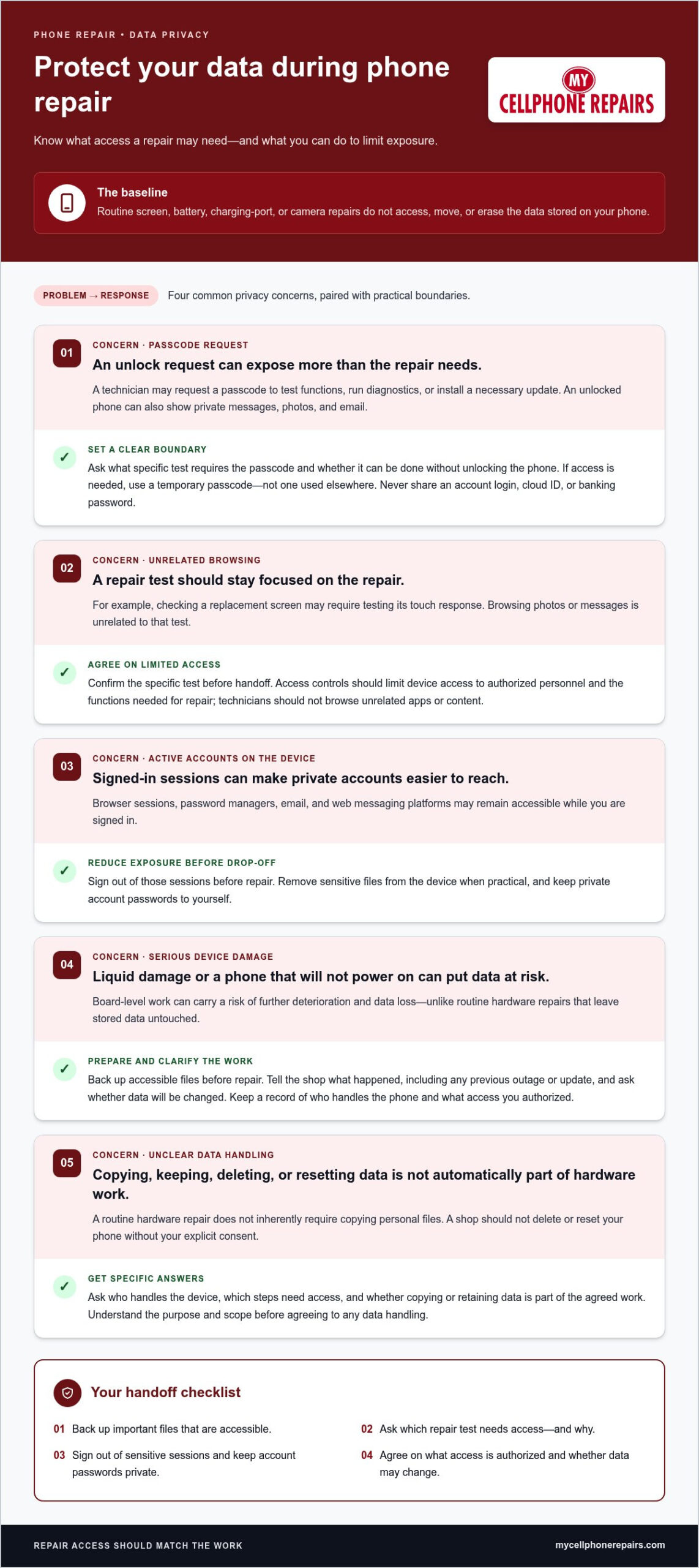
A routine screen, battery, charging-port, or camera repair doesn’t access, move, or erase the data stored on your phone. A phone repair data protection policy should also explain when a technician may need access and how you can reduce exposure before handing over your device.
It’s reasonable to be cautious: your phone holds private messages, photos, and account details. Technicians may be able to view information if a repair requires the phone to be unlocked, but hardware work often does not require your account passwords.
This guide explains how data may be affected during repair, what technicians may need to test, and how to prepare your phone. You’ll also learn what clear privacy practices look like, so you can make an informed decision and protect your personal information.
Key Takeaways
- Routine hardware repairs often leave stored data untouched, but the repair type and device condition can affect the risk.
- A technician may request a passcode to test functions or run diagnostics. Learn what access the repair requires before handing over an unlocked phone.
- Back up important files and sign out of sensitive accounts to reduce the impact of unexpected access or data loss.
- Temporarily changing screen-lock or device-finding settings can affect your security, so weigh the trade-offs before making changes.
- Clear privacy practices explain how device access is limited and how personal information is handled during repair.
What Happens to Your Data During Phone Repair?
A repair can involve more than replacing a part: technicians may test functions, and serious board damage can put stored data at risk. Carrier records and information on your device are handled through different channels, so use the appropriate privacy request process for each.
Technician Data-Handling Rules
Technician data-handling rules limit device access to functions needed for the repair. That boundary matters because an unlocked phone can expose customer information beyond the part being fixed.
For example, testing a replacement screen may require checking touch response, while browsing photos or messages is unrelated to that test. A clear phone repair data protection policy should explain who can access a device and why. Ask what testing requires access before handing over your phone. A shop should not delete or reset it without your explicit consent.
Privacy Laws for Repair Shops
In the United States, the Telecommunications Act governs specified customer service-related and billing information held by carriers, not every file stored on a phone. Its CPNI protections concern carrier information, so they should not be confused with rules for technicians handling device data.
The distinction matters: carrier records and repair-shop access involve different information and request channels. For a repair-related privacy request, describe the device, repair, information involved, and action you want. Keep a copy and note when you sent it. If someone submits a privacy request on your behalf, written permission signed by you can establish that authorization.
Response timing depends on the organization receiving the request and the process it uses. Keep the request and any reply together with your repair paperwork, and follow up through that same channel if needed. A carrier complaint about protected information is separate: consumers in the United States can report suspected carrier sales or sharing of protected location or other CPNI information to the Federal Communications Commission by calling 1-888-CALL-FCC (1-888-225-5322).
The Federal Communications Commission requires U.S. telecommunications carriers and interconnected VoIP providers to notify customers and federal law enforcement when a breach exposes CPNI data. That carrier notification requirement does not describe what happens to photos or messages during phone repair. If a device is damaged by liquid or cannot power on, board-level work can carry a risk of further deterioration and data loss. Back up accessible files before repair, and explain what happened to the device, including any previous outage or update.
Trust comes from specific boundaries, not a general promise to safeguard customer information. Ask which tests require an unlocked device, whether data will be changed, and who handles the phone during repair. A cracked-screen replacement and a no-power diagnosis may involve different access needs. Clear answers help you decide what to share, what to back up, and whether a requested action is relevant to the repair.
Can Technicians Access Your Personal Data During Repair?
Technicians may view data when a repair requires an unlocked device, but copying or keeping it is not automatically necessary for hardware work. Third-party repair can expose sensitive information if access isn’t limited, especially when several technicians handle one device.
Reasons Technicians Request a Passcode
A technician may request a passcode to test device functions, run diagnostics, or install a necessary update. For example, a repair may require checking that the screen responds after replacement. Access needs depend on the work, so ask what test requires the passcode and whether it can be done without unlocking the phone. Never share a personal account login, cloud ID, or banking password for phone repair.
Authorized Access Controls
Access controls should limit device access to authorized personnel and the functions needed for repair. That boundary matters because an unlocked phone can show sensitive information, including messages, photos, and email. A diagnostic tool may test functionality without opening personal files. Before handing over the device, agree on the specific test requiring access. Technicians should not browse unrelated apps or content.
Limiting Exposure of Personal Data
Reduce exposure by signing out of browser sessions, password managers, email, and web messaging platforms before drop-off. This can prevent an active account from opening alongside repair tests. Remove sensitive files from the device when practical, and keep private account passwords to yourself. If a passcode is needed for a specific test, use a temporary one rather than a password you use elsewhere.
Data Handling and Third-Party Risks
Technician certification describes training, but it does not by itself explain how a shop limits access to customer information. Ask who handles the device, which repair steps need access, and whether copying or retaining data is part of the agreed work. A routine hardware repair does not inherently require copying personal files.
Third-party privacy risks depend on access controls and how the device moves through the repair process. Several technicians may handle one phone, and each handoff can create another opportunity for unnecessary viewing. Keep a record of the repair and the access you authorized. If the shop proposes copying or keeping data, understand the purpose and scope before agreeing.
For a physical device fault, phone repair options can be the next step after you’ve decided what access is appropriate.
What Data Privacy Measures Do Repair Services Use?
Repair privacy measures can limit access, but a screen lock, device-finding feature, and data backup serve different purposes. Apple, Samsung, and Google repair-mode features are intended to give technicians a restricted environment, though their controls differ by device.
Locks and Device-Finding Features
A screen lock blocks ordinary access to stored contents, while device-finding tools can support location or remote wiping. Temporarily disabling a lock or biometrics may make testing easier, but it also removes a barrier to personal files. Keep location and wiping features enabled when possible. If a repair requires a change, understand which protection is affected and restore it after service.
Some repair shops suggest a temporary passcode, such as 000000. That code is easy to remember, but it is not a strong safeguard for sensitive data. Use a temporary code only when access is necessary, and change it after the repair. Don’t reuse your email, banking, or account password as a device passcode.
Encryption and Damaged-Device Recovery
Encryption protects stored data by making it harder to read without proper access. Repair centers typically do not encrypt data during repair, so don’t treat encryption as a substitute for limiting device access. Some data-recovery services copy files from one disk to another in controlled environments and operate under contracts or standards.
Some recovery services say they do not access recovered content and do not need customer passwords to do their work. A phone with liquid corrosion or no power presents a different concern: board-level work can carry a risk of further deterioration and data loss. Explain what happened before recovery begins.
Check-In Transparency and Factory Resets
At check-in, describe the fault and ask which tests require the device to be powered on or unlocked. For example, a phone that won’t start may not allow ordinary screen testing. Agree on whether any reset or data change is permitted. A shop should not delete or reset your phone without explicit consent.
A factory reset removes stored information, so consider it only when the repair doesn’t require the device to be powered on. Back up important files first, then confirm you can access the backup from another device. A reset may block useful diagnostics or remove information needed after service, so choose this step based on the repair rather than resetting automatically.
Before drop-off, write down the privacy steps you’ve agreed on: which settings to change, which tests need access, and whether the device must be unlocked. After pickup, restore any screen lock or biometric setting you disabled, enable device-finding features, and confirm the phone works. This helps ensure privacy settings aren’t left off after the repair.
Backing up a phone before repair
A backup gives you another copy of important personal data if a repair involves data loss or the phone stops working. Before drop-off, decide which files matter most, where to store them, and how you’ll verify the copy.
Start with the phone’s backup settings and review what the selected account includes. Check photos, contacts, messages, notes, and files separately. A backup may cover some information while other items remain only on the device. For example, confirm that recent photos appear in your chosen cloud storage instead of assuming they uploaded automatically.
Cloud storage is convenient when the phone can connect to the internet and finish syncing. Keep the phone connected to power and a reliable network during the process. Then sign in to the relevant account from another device and look for recent files. This check helps you distinguish a completed backup from one still waiting to upload.
An external hard drive can store a physical copy of larger files or an extensive photo library. Transfer the files using a computer, then open a few copied items to confirm they work. Keep the drive separate from the phone during repair. A backup stored beside the device won’t help if both are lost or damaged together.
Use a simple order to prepare:
- Choose what to protect. Identify important photos, documents, contacts, and account recovery details.
- Run a backup. Use cloud storage or copy files to an external drive.
- Verify the copy. Open selected files from another device or the drive itself.
- Review sensitive content. Remove personal data you don’t need on the phone during service.
Automatic backups can keep copies current, but check the settings before relying on them. Confirm that the correct account is active and syncing includes the folders you care about. If you share an account across devices, make sure the backup is associated with your profile, not someone else’s.
A phone that won’t turn on may not allow a new backup. In that situation, check whether earlier cloud syncing saved recent photos or files. If the phone powers on, back up what you can before repair. Don’t erase the device until you’ve verified the copy and can access it independently.
Once you’ve checked the backup, keep the phone’s account credentials private and note which backup method you used. After service, confirm essential information is available before removing the backup. This final check ensures the stored copy is a usable recovery point, not just an assumption.
Repair-service data protection practices
U.S. phone repair shops handle customer information through operational policies for device access, data retention, and staff procedures. A useful written policy explains who may handle a connected phone, what information is collected, why it is needed, and how long it is kept.
Start with intake. A clear record can identify the device, reported fault, requested work, and any access the customer has authorized. For example, a screen test may require checking touch response, while collecting account passwords is unnecessary for that task. The repair record should distinguish repair details from personal content stored on the phone.
Access controls make those boundaries practical. Shops can limit device access to authorized staff and restrict testing to the required functions. For example, a staff member checking a charging fault should focus on charging behavior rather than opening Google, photos, or messages. Repair teams can also train employees on privacy procedures, so expectations apply during intake, diagnosis, repair, and return.
Device custody matters too. A phone may pass between technicians, so a consistent handoff process helps track who has the device and why. Customers can ask how the shop handles handoffs, whether data is copied, and how personal information is protected. Removing a SIM card before drop-off can also keep the card and its mobile account separate from the device during work.
Retention rules should explain what happens to customer information after repair. A shop can define which records it needs, how long it keeps them, and how they are securely destroyed when no longer needed. The policy should distinguish repair records from customer files. A technician shouldn’t keep a copy of personal photos simply because the device was available.
Regular audits can assess whether staff follow the stated procedures. An audit might review repair records, access permissions, and how returned devices are handled. A written process is useful only if the actual work follows it. Clear explanations at check-in help customers understand what is collected and what remains on the phone.
Before handoff, protect your data by asking three direct questions: who can access the device, what tests require access, and whether any information is retained afterward. Note the answers with your repair record. If the phone cannot turn on, use another device to secure important accounts and sign out of active sessions where available.
Choose a repair path that fits the fault, then arrange a phone repair when your device needs hardware work.
My Cellphone Repairs: Samsung Phone Repair
My Cellphone Repairs offers Samsung Phone Repair for device faults that need hardware attention. If your Samsung has a damaged screen, battery issue, or another repair need, this service is a practical next step after you prepare your data.
Back up important files before bringing in your phone, and keep your account passwords private. Explain the fault clearly and discuss which checks are needed to confirm the repair. For other hardware needs, My Cellphone Repairs also offers iPhone Screen Repair, Battery Replacement, and MacBook Repair.
Choose a repair that matches your device and its problem. Contact My Cellphone Repairs to discuss Samsung Phone Repair.
Make your next repair decision with confidence
Your phone contains more than hardware. It connects you to work, family, accounts, and memories. Treat privacy preparation as part of the repair decision, not an afterthought. A clear phone repair data protection policy helps you understand what access a repair requires and what happens to your information. Set clear boundaries, too: share only the access needed for the agreed work.
When your device needs hardware attention, match the service to the problem. My Cellphone Repairs offers Samsung Phone Repair, iPhone Screen Repair, and MacBook Repair. Note your device’s fault and the privacy steps you’ve taken, so you can explain both clearly when arranging service.
Contact My Cellphone Repairs today to discuss your repair needs. A little preparation puts you in a better position to move forward with confidence.
Frequently Asked Questions
Can a repair shop see my photos and messages if I give them the passcode?
Yes, unlocking a phone can make photos, messages, and other visible content accessible on that device. What appears depends on its apps, settings, and active sessions. A passcode doesn’t automatically give access to separate cloud accounts, but an app you’re already signed into may display personal information. Before sharing access, agree on the repair test that needs it, and don’t share passwords for email, banking, or cloud accounts.
How does prioritizing customer data privacy build trust?
Privacy builds trust when customers understand the boundaries before handing over a device. For example, an intake record can identify the repair and explain whether testing requires an unlocked screen. Customers can then make an informed choice about access. Clear procedures also help staff handle similar situations consistently, rather than leaving each technician to decide whether opening an unrelated app is appropriate.
Is my data safe if the repair fails?
A failed repair alone doesn’t show whether stored data remains intact. The device’s original fault matters: a phone with liquid corrosion or no power can face further deterioration during board-level work, including data loss. If the phone still turns on, check whether recent files are backed up before further work. If it won’t power on, use another device to secure important accounts.
What Are the Best Practices for Data Backup Before Repair?
Prioritize files you couldn’t easily replace, such as recent photos, work documents, and contact details. Use cloud storage or copy larger collections to an external drive, then open selected files from another device. Check the backup account and folders, not just the completion message. Automatic backups can help keep copies current, but review the settings to ensure they include the files you care about.
What Confidentiality Policies Ensure Secure Phone Repair Services?
Useful confidentiality policies explain staff access, permitted repair-related use, record retention, and disposal of personal information. They should distinguish service records from personal files stored on a phone. Staff training and regular audits can help put those practices into operation. At check-in, ask how the shop records device access and what happens to information collected for the repair afterward.
Do phone repair technicians need access to a customer’s passcode or unlocked phone?
Not for every repair. A hardware fix may be completed without an account password, while a functional test, diagnostic, or necessary update can require an unlocked device. Ask which specific operation needs access, such as checking touch response after screen work. A technician shouldn’t need your Apple ID, Google, or banking password for phone repair, so keep those credentials private.
How can I protect my personal data before taking a phone in for repair?
Back up important files, sign out of active sessions, and remove the SIM card if you don’t need it left in the device. Record the phone’s IMEI by dialing *#06# and compare it with the device after service. If the phone won’t turn on, change important account passwords using another device and sign out of active sessions through account settings.
Should I back up, factory reset, or enable Repair Mode before phone repair?
Back up important files first whenever the device can still be used. A factory reset erases stored information, so consider it only when the repair doesn’t require the phone to be powered on, and only after verifying your backup. Repair Mode is a separate option intended to limit access during service when a device provides it. Follow the phone’s own instructions, and don’t assume every model offers that feature.