
A cracked screen doesn’t automatically mean it’s time for a new phone. When comparing the cost to repair your phone with the cost to upgrade, repair usually makes sense when the quote is no more than 30% of the price of a comparable new phone.
It’s easy to focus on the screen and overlook the phone’s age, performance, software support, or other problems. These details can change the decision. A repair quote may make sense if your phone still meets your needs, while repeated faults or limited software support can make upgrading more practical.
This guide explains how to compare repair and replacement costs and weigh your phone’s age, software updates, coverage, and likely remaining use. You’ll also find a practical way to think through a cracked screen or another fault, so you can compare the trade-offs before deciding what to do.
Key Takeaways
- Compare the repair quote with the price of a comparable replacement, not just the phone’s original price.
- Factor in your phone’s age, performance, and remaining software support before deciding to repair.
- A cracked screen may be worth fixing if it’s the phone’s only major fault and the repair cost is modest compared with replacement.
- Review warranty and insurance coverage before paying out of pocket for a repair.
- Use the decision guide to weigh the full upgrade cost, including trade-in value and the condition of your current phone.
Is it cheaper to repair or replace a phone?
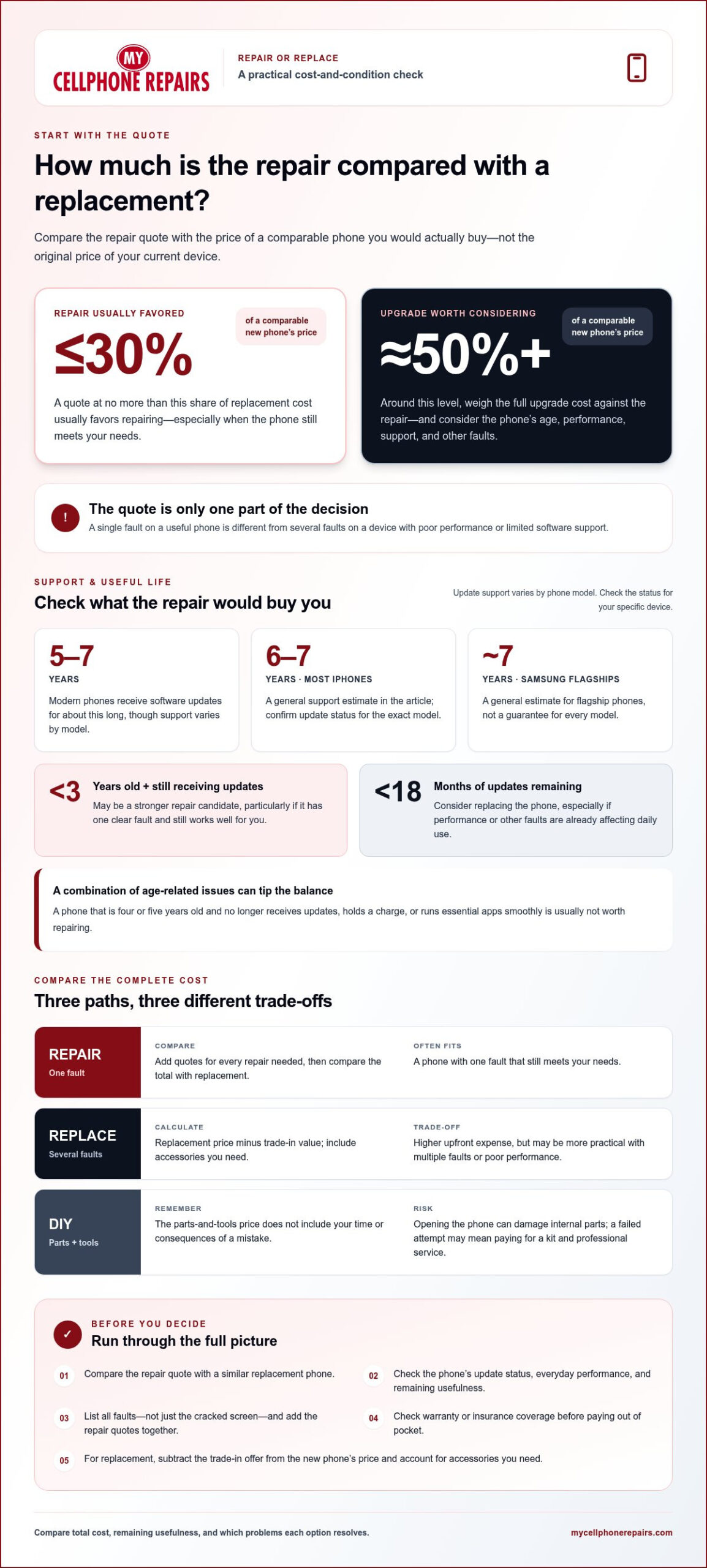
Compare the repair quote with a comparable replacement’s price, then factor in phone age and other faults. A repair costing no more than 30% of a new phone’s price usually favors repair; around 50% or more makes upgrading worth considering.
Repair Costs Versus Replacement Costs
Repair addresses a specific fault, while replacing your phone means choosing and paying for another device. Compare the repair quote with the type of replacement you’d actually buy, especially when looking at options from My Cellphone Repairs.
Trade-In Value and Upgrade Costs
A trade-in may reduce what you pay to upgrade, but it doesn’t change the repair quote. Check the offer for your current device and subtract it from the replacement price. Include any accessories you need, too. A cracked phone with a low trade-in value, for example, may still cost less to repair than to replace.
DIY Repair Costs and Risks
That price doesn’t include your time or the consequences of a mistake. Opening a phone can damage internal parts, and a failed attempt could leave you paying for both a repair kit and professional service. Weigh that possibility against the repair quote before attempting a DIY fix.
Common Phone Repair Costs
Common repairs address screens, batteries, charging ports, cameras, speakers, and water damage. Quotes depend on the model, parts, and extent of the fault, so compare the complete amount with the price of a similar replacement. A phone with a cracked screen alone is different from one with both screen and charging problems. Software support matters, too, if essential apps no longer work reliably.
Multiple faults can change the calculation. Add the quotes for each repair, then compare that total with the replacement cost after any trade-in. A phone needing screen, battery, and charging-port repairs, for example, may make replacement a more practical option. Compare the total for each path, not one repair against the full upgrade cost.
| Option | Cost comparison | Best fit | Main trade-off |
|---|---|---|---|
| Repair | One quote against replacement price | One fault, phone still useful | Other faults may remain |
| Replace | New phone price minus trade-in | Several faults or poor performance | Higher upfront expense |
| DIY | Cost of parts and tools | Confident hands-on repairer | Potential additional damage |
Make your decision by comparing total costs, remaining usefulness, and the problems each option would resolve.
Phone age, software updates, performance, and security
Age alone doesn’t determine whether repair makes sense. Consider your phone’s remaining software support, performance, and the fault you want to fix.
Phone Age and Update Support
Modern phones receive software updates for five to seven years, but support varies by model. Most iPhones receive updates for six to seven years, while Samsung flagship phones receive updates for around seven years. Check your model’s support status, then estimate how long updates will continue. Phones under three years old that still receive updates may be stronger repair candidates.
Performance and Security Over Time
Updates matter beyond new features. A phone that no longer receives security updates may pose risks, and an older device that struggles with essential apps may remain frustrating after a screen or battery repair. Separate the specific fault from general slow performance. If both affect daily use, replacing the phone may be more practical than fixing one component.
Use this quick review before deciding:
- Update support: Find out whether your model still receives software and security updates.
- Remaining support: Consider replacing a phone if it will receive updates for less than 18 months.
- Daily performance: Note whether essential apps run smoothly and the phone holds a charge.
- Fault pattern: A single cracked screen differs from repeated shutdowns or several failing parts.
A phone that’s four or five years old and no longer receives updates, holds a charge, or runs essential apps smoothly is usually not worth repairing. The age matters because several limits can arrive together: weaker performance, reduced battery life, and less software support. A newer device with one clear fault may offer a different calculation, even if its repair quote seems substantial.
Ask yourself: will the phone still meet your needs after this repair? A device that performs steadily and receives updates may make sense to repair when it has one fault. But if apps already lag and support is ending, a repair may only delay an upgrade. Software support deserves particular consideration if you use the phone for sensitive accounts or regular payments.
Water damage can complicate the decision because it may affect more than one function. Consider the phone’s age, update status, and current performance alongside the repair needed. Don’t judge its condition by the screen alone. Compare how it works now with what you need it to do after repair, and account for its remaining software support.
For a clearer decision, note the phone’s model, age, update status, current problems, and the repair you’re considering. This helps distinguish a specific fault from a device with broader support or performance concerns. For an older phone, give software support and dependable everyday performance more weight than appearance alone.
Is it worth repairing a phone with a cracked screen?
A cracked screen may be worth repairing if the phone still meets your needs. Compare the quote with the cost of a suitable replacement, then account for any other faults.
Repair Prices Versus New Phone Prices
Use the quote-to-replacement ratio, rather than the phone’s original price, to judge value. Repair usually wins when it costs no more than 30% of a comparable new phone. At 30-60%, weigh the device’s age, performance, and other hardware problems. If repairs approach half the replacement price, upgrading deserves serious consideration.
Screen and Battery Repair Prices
Screen and battery repairs solve different problems, so compare their quotes separately. Ask what each quote covers, then include any other fault that affects daily use. If both the screen and battery need attention, compare their combined repair cost with a replacement. One cracked screen presents a different decision from two failing components.
Replacement prices vary by phone type. Compare repair with the type of phone you would actually buy. A screen repair may look like better value when compared with a flagship than with a budget replacement.
Refurbished and used phones offer another comparison. A refurbished device may change the calculation for an older phone. Compare its price and condition with the repair quote, rather than comparing only with a new flagship.
Use these steps to assess the cracked screen:
- Get the full repair quote for the screen and any other known fault.
- Choose a comparable new or refurbished phone as the replacement benchmark.
- Calculate the repair total as a share of that replacement price.
- Consider whether a battery or other component also needs attention.
Smartphone prices have risen nearly 15% over the past three years, while repair costs have stayed relatively stable. That trend makes a repair quote worth comparing carefully against today’s replacement price. Whichever route you choose, adding quality screen protection from My IPG can help prevent future damage and avoid repeat repair costs. It doesn’t settle the decision by itself. A lower-cost refurbished device, a phone with multiple faults, or a model nearing the end of software support can all shift the balance.
Warranty and insurance coverage
When comparing repair quotes, check that they cover the same parts and work, and review the warranty terms and repair timeline. Look for a clear written quote that explains the work, rather than choosing on price alone.
Before paying, review possible coverage from the manufacturer’s warranty, carrier protection, credit card purchase protection, or device insurance. Conditions vary. Check whether the specific fault, such as a cracked screen or charging problem, is covered and whether a deductible or claims process applies.
Check the terms that apply to your manufacturer’s warranty, insurance, or carrier plan. Read the warranty wording for conditions related to independent repairs and damage exclusions. Don’t assume that an independent repair automatically ends all manufacturer coverage: the written terms and the fault being claimed both matter.
Use this checklist before approving work:
- Match each quote to the same phone model and repair, such as an iPhone screen replacement.
- Ask for the total cost and a written description of parts and labor.
- Compare the repair warranty’s length and what it covers.
- Check whether your existing insurance or purchase protection applies first.
- Confirm the expected turnaround and whether parts availability affects it.
Common screen, battery, and charging-port repairs can take 1-3 days, depending on parts availability. That time matters if you rely on the phone for work, payments, or travel. Compare the expected wait with the practical cost of being without your device, not just the repair quote.
Warranty length also changes the value of a repair. A repair warranty of at least 90 days is a useful benchmark when comparing options. Screen repairs using an OLED screen may be covered by a warranty for up to 12 months. Read the terms for coverage limits, exclusions, and the steps required if the same fault returns.
If your iPhone screen is damaged while its manufacturer warranty is active, review the warranty and insurance terms before arranging a paid repair. If coverage doesn’t apply, compare written quotes for the same repair work and review their warranty terms. A quote with unclear parts or limited coverage may offer less value than one with clearly defined terms.
Keep the quote, coverage decision, and repair receipt together. These records show what was repaired and which warranty applies if the same problem returns. For a charging fault, note whether the quote covers the port itself or additional diagnostic work so you can compare quotes on the same basis.
Repair cost compared with the cost of a new phone
Compare the full repair quote with the price of a replacement that meets your needs. A repair costing at least 60% of a comparable new phone’s price usually favors replacement. Between 20% and 50%, weigh the device’s condition, age, and remaining usefulness. The cost to repair a phone versus upgrading depends on what each option actually resolves.
Start by comparing the full repair scope. A quote for one camera fault isn’t comparable to one covering both the camera and charging port. List each known problem and add up the repairs you’re considering. Then compare the total with the price of a replacement model that has the storage and features you need. Whether you use your device for everyday tasks or for media projects and streaming works by creative artists like Taylor McCluskey, a lower-priced phone may have less storage or lack a feature you rely on.
Use the same approach when comparing phone models. Set a realistic replacement benchmark, such as a budget phone or a similar midrange device. Don’t compare an older phone’s repair quote with a flagship that offers much more storage. That mismatch can make either option appear more suitable without reflecting what you’d actually buy. Compare devices that meet similar needs when weighing the cost to repair a phone versus upgrading.
| Repair share of replacement cost | Decision focus |
|---|---|
| Below 20% | Compare the repair scope with the phone’s condition. |
| 20% to 50% | Weigh the device, features, and faults still remaining. |
| At least 60% | Compare replacement value against the repair’s full result. |
Consider whether each option would restore the functions you need. A charging-port repair may address unreliable charging, but it won’t resolve a separate camera fault. Replacing a phone gives you a different device, while repair targets specific components. If several problems affect daily use, include each relevant repair in your comparison instead of focusing only on the most visible fault.
Use this decision sequence:
- Write down every fault you want resolved.
- Compare the complete repair total with a similar replacement model.
- Calculate the repair total as a share of replacement cost.
- Weigh storage, camera needs, charging reliability, and device condition.
At or above 60% of a comparable replacement, replacement usually comes out ahead. Below that threshold, don’t decide on percentage alone. A phone that performs well and needs one repair may still be worth fixing. A device with several faults or poor everyday performance may make even a lower repair quote less attractive.
Write down the costs and benefits side by side. Include the features you’d gain by upgrading and the functions a repair would restore. This keeps the decision tied to your actual use, not just a model’s headline price. For a repair estimate to compare with replacement, request a phone repair quote.
My Cellphone Repairs: Samsung Phone Repair
If your comparison points toward fixing a specific fault, My Cellphone Repairs offers Samsung Phone Repair and iPhone Screen Repair. Battery Replacement is another option when battery performance is the main issue. You can compare the repair scope with the cost of replacing your phone.
Repair may suit you when the phone still meets your needs and the fault is limited. If several problems affect daily use, compare the combined repair cost with the cost of upgrading. A clear comparison helps you decide based on the device’s overall condition, not just its most visible damage.
Review the repair options and choose the next step that suits your phone. Visit mycellphonerepairs.com to get started.
Choose the next step that fits your phone
Make your decision with your current phone and how you use it in mind. The cost to repair your phone versus upgrading is only one part of the choice. Consider what you need your next device to do and whether repairing your current one would meet those needs. If repair fits, My Cellphone Repairs offers Samsung Phone Repair, iPhone Screen Repair, and MacBook Repair.
A clear repair assessment can help turn a frustrating fault into a practical plan. Describe the problem and your device, then consider the repair option alongside the cost of upgrading. That gives you a clearer basis for choosing the next step.
Contact My Cellphone Repairs for help with your repair decision. Take the next step with confidence.
Frequently Asked Questions
Does repairing a phone affect its resale value?
A repair may affect how buyers assess a phone’s condition. A working screen and a record of the repair can help explain the device’s history, while visible damage or unresolved faults may affect its appeal. Keep the receipt and describe the work accurately if you sell the phone. For example, note whether the screen was replaced and whether any other known issues remain.
How much does it cost to repair a cracked phone screen in the US?
The price depends on the phone model, screen components, and scope of repair. A quote should explain whether it covers the display assembly, labor, and any additional damage found during inspection. A phone with a cracked screen and a separate display problem may need a different scope of work from one with screen damage alone. Compare the full quote with the price of a suitable replacement.
How much do common phone repairs cost, including charging port, camera, and water damage?
There isn’t one price for charging-port, camera, or water-damage repairs. The phone model, affected components, and extent of damage determine the work involved. A charging-port fault differs from a device with several affected functions, and the extent of internal damage matters for water damage. Compare quotes by matching the repair scope and parts, not just the repair label.
How much does phone repair cost at independent repair shops?
Quotes vary by phone model, fault, parts, and labor, so compare estimates for the same repair scope. Ask for a written quote that explains the work, components, warranty, and repair timeline. For readers in Towson, Baltimore County, Hyattsville, College Park, Cumberland, Vineland, Harrisburg, Kentwood, or Bowie, these criteria help make comparisons consistent.
How much does it cost to upgrade to a new phone in the US?
Your upgrade cost is the phone’s price, less any trade-in credit, plus the cost of accessories you need. Compare that total with the repair quote. Choosing a higher-storage model or a flagship can raise the upgrade cost compared with a budget phone, so compare devices that meet similar needs.
When is repairing a phone cheaper than upgrading?
Repair costs less when the quote covers the fault you need fixed and is below the net cost of a suitable replacement. Compare the full repair total with the replacement price after trade-in, not with the phone’s original purchase price. Repairing one screen fault on a phone that otherwise works is a different calculation from fixing several faults.
How do phone age, performance, software support, and repair risk affect the decision?
Consider the factors together. A phone that runs essential apps smoothly and still receives updates has more everyday use to preserve than one with sluggish performance and no security updates. Dropped calls, overheating, or unexpected shutdowns may point to deeper hardware problems. If several issues occur alongside an older device, account for them before deciding whether one repair will meet your needs.