
Your MacBook powers off without warning, won’t charge, or shows a problem you can’t explain. A MacBook repair diagnostic helps organize what’s known about the issue and what still needs to be understood before you decide on a repair.
It helps to separate the symptom from its possible cause. For example, “it won’t charge” describes what you notice. An assessment can help clarify what may be behind that problem and what repair options to consider. The exact cause and repair cost depend on the assessment.
This guide explains what a diagnostic can help you understand, how it differs from Apple Diagnostics, and what to ask when reviewing a possible repair. You’ll also find practical ways to prepare and compare repair with replacement without assuming cost or timing in advance.
My Cellphone Repairs provides MacBook repair for customers in Towson, Baltimore County, Hyattsville, College Park, Cumberland, Vineland, Harrisburg, Kentwood, and Bowie. Bringing a clear description of the problem can make the repair conversation more focused.
Key Takeaways
- A MacBook repair diagnostic is an assessment step that helps clarify a problem and inform a repair decision.
- Apple Diagnostics and a repair assessment serve different purposes. A self-test result is useful information, not a repair decision.
- Record what your MacBook is doing and prepare questions about the proposed repair, cost, and timing.
- Review the findings and available options before deciding whether to repair or replace the device.
- My Cellphone Repairs provides MacBook repair for customers in Towson, Bowie, Hyattsville, and other local communities.
What Does a MacBook Repair Diagnostic Help You Understand?
A MacBook problem can leave you unsure about its cause and what to do next. A MacBook repair diagnostic gives the problem a structured assessment. It can help clarify what may be wrong and inform a discussion about possible repairs, rather than treating an early guess as a confirmed cause.
A repair diagnostic is an assessment of a device problem that helps inform the next repair decision. It provides information to consider, not a commitment to proceed with a particular repair.
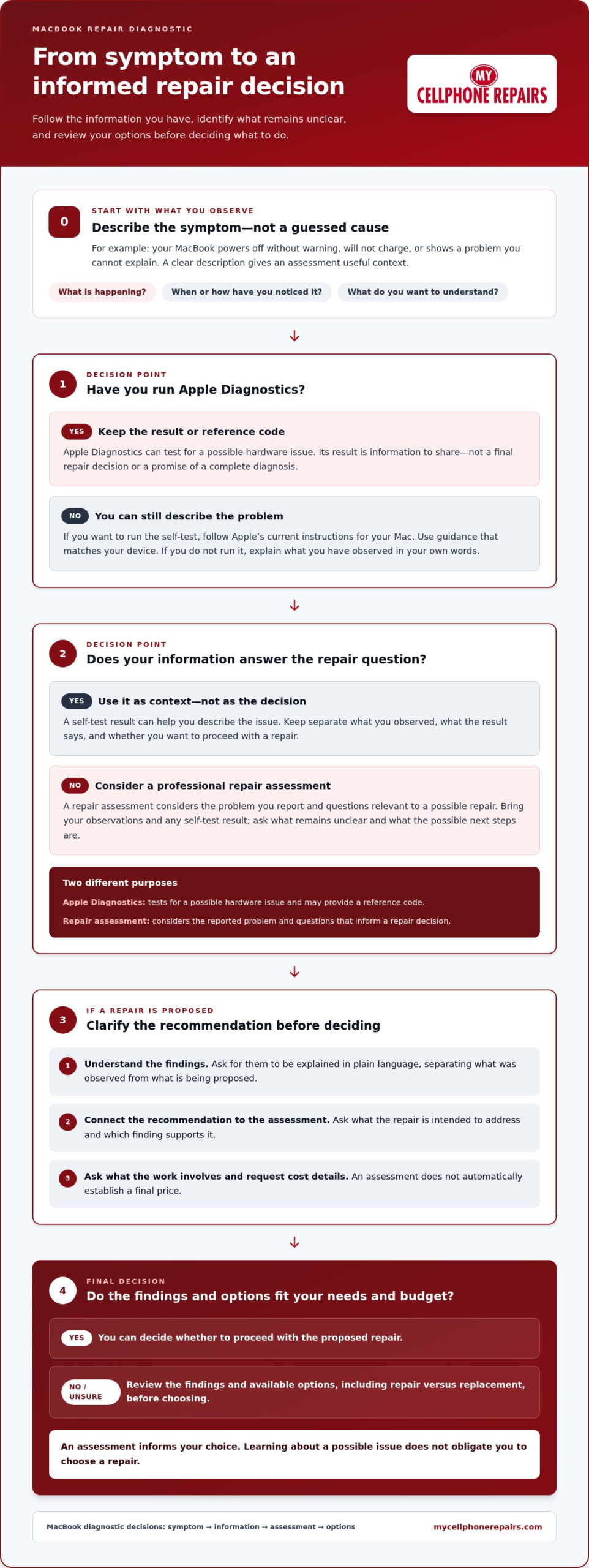
Keep two questions separate: What might be causing the problem? and Do I want to proceed with a repair? An assessment can help address the first. Your repair decision depends on what the assessment finds, the options available, and what suits your needs. Learning about a possible issue does not obligate you to choose a repair.
This measured approach follows general troubleshooting principles: describe the problem as observed, gather relevant information, and use it to guide the next step. A clear account of what your MacBook is doing gives the assessment useful context without turning a guess into a diagnosis.
What questions can a MacBook diagnostic address?
Start with what you’ve observed and what you want to understand. Is the problem consistent, or have you noticed a pattern? What information would help you decide whether to repair the MacBook? An assessment can consider your description alongside the information available from the device. Keep the terms distinct: your observation describes the symptom, while an assessment helps explore its possible cause and next steps.
Is a self-test the same as a repair diagnostic?
No. Apple Diagnostics is a self-test option for Mac owners. It can help check for basic hardware faults and provide a reference code. That result gives you information to consider, but it does not make the repair decision for you. A repair assessment focuses on the reported problem and possible next steps. Use both as sources of information, not as promises of a complete diagnosis or a particular repair outcome.
If you run a self-test, keep the result or reference code with your notes. If you don’t, you can still explain the problem in your own words. In either case, focus on what the assessment can clarify, what remains uncertain, and what you want to know before choosing whether to proceed with a repair.
MacBook Repair Diagnostic Options: Self-Test or Professional Assessment?
A self-test and a repair-focused assessment answer different questions. Apple Diagnostics is intended to test for a possible hardware issue. A professional repair assessment considers the problem you report and the repair questions you want answered. Neither should be treated as a guaranteed explanation or a promised outcome.
Think of them as separate checkpoints. A self-test may give you information to share during a repair conversation. An assessment can help you discuss the reported issue and possible repair considerations. The broader role of technology offers context for why a test result and a repair decision are separate matters.
| Route | Question it helps address | What it is intended to clarify |
|---|---|---|
| Self-test | Can Apple Diagnostics test for a possible hardware issue? | Information from the test that may help you describe the problem. |
| Professional repair assessment | What should I consider about this problem and a possible repair? | The issue you’ve reported and questions relevant to a repair decision. |
What does Apple Diagnostics cover?
Apple describes Apple Diagnostics as a way to test for a possible hardware issue. Treat the result as information, not a final repair decision. If you want to run the test, follow Apple’s current instructions for your Mac. Use guidance that matches your device rather than relying on a generic walkthrough.
When might a professional repair assessment be the next question?
A professional assessment can help when you still need to understand what your reported problem could mean for a repair decision. A self-test result may be useful context, but you may also want to discuss the issue, possible next steps, and what remains unclear. Bring your observations and any test result you have. Focus on the question you need answered rather than assuming a cause in advance.
My Cellphone Repairs provides MacBook repair to help you move from an unclear device problem toward a practical repair decision. Bring a clear account of what’s happening and the questions that matter to you. You can learn more about My Cellphone Repairs’ MacBook repair service.
MacBook Diagnostic Results, Repair Costs, and Repair-versus-Replacement Questions
After an assessment, focus on what the findings mean for your next decision. Ask for the findings to be explained in plain language, and separate what has been observed from what is being proposed. A MacBook repair diagnostic can inform your choices, but it cannot decide for you whether to repair or replace the device.
A diagnostic finding and a purchase decision are separate questions. First, understand what the assessment indicates. Then consider whether the proposed next step fits your needs and budget.
What should you ask about a MacBook repair estimate?
If a repair is proposed, ask what it is intended to address and which assessment finding supports the recommendation. Ask what the suggested work involves, then request the cost information for that repair. An assessment does not automatically establish a final price, so get the details you need before deciding whether to proceed.
Keep your questions together rather than relying on memory. For example, ask:
- What problem is the proposed repair meant to address?
- What information from the assessment supports this recommendation?
- What would the cost be for the proposed repair?
- Is there anything about the expected timing I should consider?
These questions help you understand the recommendation without assuming what an estimate includes or how it will be presented. If an answer is unclear, ask for a plain-language explanation. Asking for information does not commit you to the repair.
How do you think through repair versus replacement?
There isn’t one right choice for every MacBook owner. Consider how you use the device, what you need it to do, and how the repair information fits those needs. Age alone does not determine whether repair makes sense, and a diagnostic result by itself cannot decide what you should buy.
Compare the options using questions that matter to you:
- Does the proposed repair address the issue that led you to seek an assessment?
- Is the cost information clear enough for you to weigh against your budget?
- Would repairing the MacBook fit how you need to use it?
- Would replacing it better suit your plans and priorities?
Write down your answers before making a decision. If key information is missing, note what you still need clarified instead of filling the gap with assumptions. You can pause to review the recommendation before choosing either option. Repair and replacement are personal decisions shaped by your circumstances, the information available, and what works for you. Aim for a considered choice, not a rushed one.
How to Prepare for a MacBook Repair Diagnostic
A little preparation makes it easier to describe what’s happening and get useful answers. You don’t need to identify the cause or use technical terms. For a MacBook repair diagnostic, focus on what you’ve noticed, what you want clarified, and what you need to know before deciding about a repair.
What information should you have ready?
Write a short description in your own words. Stick to what you observed rather than guessing why it happened. Note any pattern you’ve noticed, such as whether the issue happens consistently or only in certain circumstances. If you’re unsure how to describe it, say so. The goal is to communicate your experience, not to arrive with a technical diagnosis.
Use this checklist to organize your notes:
- Describe the problem as you experience it.
- Note when you first noticed it, if you remember.
- Record whether it happens consistently or only in certain circumstances, if you’ve observed a pattern.
- Write down what you most want to understand about a possible repair.
- Keep any information from a self-test with your notes, if you ran one.
These details help you explain the issue clearly. They do not guarantee a particular diagnostic result, and you don’t need to make assumptions about the cause. A concise, accurate account is more useful than a list of guesses.
Which questions should you ask before deciding?
Before agreeing to a proposed repair, make sure you understand what is being suggested and what information you still need. Keep your questions in one place so you can refer to them during the conversation. Ask for a plain-language explanation if anything is unclear.
- What is the proposed repair intended to address?
- What cost information is available for the proposed work?
- What timeline should I consider?
- Is warranty coverage available for the repair, and what would it apply to?
These are questions, not assumptions about the answers. Raise cost, timing, and warranty terms directly, then use the information provided to decide what to do. You don’t need to resolve every point before starting a conversation. The aim is to understand the proposed work and any terms that matter to you.
Bring your notes and questions to My Cellphone Repairs to discuss MacBook repair. A clear description gives the conversation a practical starting point and keeps the focus on the issue you want addressed.
MacBook Repair Diagnostic and Local Repair Next Steps
Once you’ve gathered your observations and questions, a repair conversation can help you consider the next step. My Cellphone Repairs provides MacBook repair for customers with device problems they want assessed. Bring the information you’ve collected and explain what you want to understand.
A MacBook repair diagnostic helps you approach the decision with relevant information. It does not promise a particular finding or result. Use your notes to explain the issue, then discuss the repair question that matters most to you, whether it concerns the proposed work, cost, timing, or warranty terms. For readers seeking support in other regions, such as Jamaica, dedicated specialists like Stealth PC Technology offer expert Mac and PC diagnostics and repairs.
Where does My Cellphone Repairs serve MacBook customers?
My Cellphone Repairs serves customers in Towson, Baltimore County, Hyattsville, College Park, Cumberland, Vineland, Harrisburg, Kentwood, and Bowie. For a local MacBook repair conversation, have your description and questions ready. That helps you explain what you need clarified without guessing at the cause.
What is a practical next step after reading?
Use your prepared questions to start a focused conversation about your MacBook. You don’t need to decide on a repair before you understand the available information. When you’re ready, visit My Cellphone Repairs for MacBook repair.
If your concern involves liquid exposure, see the separate MacBook liquid damage repair guide for topic-specific guidance. This article focuses on approaching diagnosis and a repair decision, while that guide addresses liquid damage.
Keep the next step straightforward: describe what you’ve noticed, share the questions you want answered, and review the information before deciding what to do. A clear conversation can help you understand the repair options without assuming the cause or outcome in advance.
Take Your Next Step With Clarity
You don’t need every answer before moving forward. Start with what you’ve observed and the questions that will help you understand your options. A MacBook repair diagnostic can inform your decision, while the choice to proceed remains yours.
My Cellphone Repairs provides MacBook repair for customers in Towson, Baltimore County, Hyattsville, College Park, Cumberland, Vineland, Harrisburg, Kentwood, and Bowie. Explore MacBook repair with My Cellphone Repairs and bring your questions to start the conversation.
Frequently Asked Questions
How much does a MacBook repair diagnostic cost?
The diagnostic cost is a separate question from the cost of any proposed repair. Ask what an assessment costs and what pricing information is available after the MacBook has been reviewed. A MacBook repair diagnostic can help clarify the issue, but it does not establish the price of repair work.
How long does a MacBook repair diagnostic take?
Ask what timeline to plan around for the assessment and any proposed repair. The diagnostic and repair are separate steps, so don’t assume they take the same amount of time. If you have a deadline, mention it early in the conversation.
Can Apple Diagnostics identify what is wrong with a MacBook?
Apple Diagnostics can test for a possible hardware issue, but treat the result as information rather than a guaranteed explanation of the exact cause. Describe the problem you’ve observed and ask how the result relates to it. If you’re unsure how to use the tool, consult the instructions provided for your Mac. A test result alone does not determine a repair.
What should I do after receiving a MacBook diagnostic result?
Consider the result alongside the problem you noticed rather than treating it as an automatic repair instruction. Ask what the finding means in plain language, whether it supports a proposed repair, and what remains uncertain. Keep a copy of the result with your notes for the repair discussion.
How do I decide between repairing a MacBook and replacing it?
Base the decision on your needs and the repair information available, not on the diagnostic result alone. Consider whether the proposed work addresses the problem and whether the cost information fits your budget. You may also want to think about how you use the MacBook for work, school, or everyday tasks. There’s no single answer for every owner, so take time to weigh what matters to you.
Can a MacBook with liquid damage be repaired?
A MacBook with liquid damage needs an assessment to clarify the issue and possible next steps. My Cellphone Repairs provides MacBook repair and water damage repairs. Customers in Cumberland, Vineland, Harrisburg, and Kentwood are among the communities served. Describe what happened as accurately as you can, without assuming the cause, extent of damage, or repair outcome before the device is assessed.
Does a MacBook repair come with a warranty?
Ask whether warranty coverage applies to the proposed repair and what its terms cover before deciding. Keep the answer with your repair details for reference. This helps you understand the arrangement without making assumptions about coverage.