
An older MacBook isn’t automatically a lost cause, and a newer one isn’t always worth repairing. If you’re asking, “is my macbook too old to fix,” age alone won’t answer the question. A damaged screen or worn battery may be repairable, while another fault could make replacement the more practical choice.
It’s reasonable to worry that a repair might not solve the underlying problem, or that you’ll spend time and money on a MacBook that still falls short. Make the decision by considering its condition, the specific fault, available repair options, software support, and the value of a suitable replacement.
This guide explains how those factors fit together. You’ll learn which details about your MacBook can help assess repairability, how a professional diagnosis can clarify the problem, and how to compare repair with replacement. By the end, you’ll have a clearer basis for deciding what makes sense for your MacBook.
Key Takeaways
- To answer “is my macbook too old to fix,” consider the specific fault, overall condition, software support, and practical value, not age alone.
- Check your MacBook’s model and macOS compatibility to see whether it still meets your security, app, and everyday needs.
- Compare the likely repair scope with the device’s condition and the value of a suitable replacement before deciding.
- Record the model and symptoms, and back up important files if your MacBook is accessible before hardware work.
- A professional assessment can help identify the fault, explain relevant repair options, and clarify what remains uncertain.
Is My MacBook Too Old to Fix? Start With the Fault, Not the Age
Age alone can’t tell you whether a MacBook is worth fixing. If you’re asking, “is my macbook too old to fix,” start with the fault, then consider the computer’s overall condition, software support, parts availability, and usefulness after repair. A diagnosis can identify the problem and clarify relevant options before you commit to repair or replacement.
Separate two questions: Can it be repaired? and Is repair worthwhile for me? A MacBook may have a repairable component but still no longer meet your work or everyday needs. Conversely, an older laptop might remain useful if its main problem is limited and the rest of the device is in good shape. Ideas such as planned obsolescence describe products designed with a limited lifespan, but a device’s age alone doesn’t establish why it has failed or whether it can be repaired.
A MacBook is repairable if its fault can be addressed; it’s worth repairing if the result will meet your needs and make practical sense. That judgment depends on the specific model and fault, so don’t treat a model year as a repair verdict.
What does “too old to fix” actually mean?
Physical repairability is about whether a fault can be diagnosed and addressed. Practical value is about whether the MacBook will be useful to you afterward. Those aren’t the same thing. A screen problem, for example, may be limited to one component. Charging trouble alongside unexpected shutdowns could point to a broader issue. Neither example confirms the cause, so an assessment is needed. Parts availability and repair options also vary by model. Don’t assume an older MacBook is either repairable or unrepairable without considering its specifics.
Which details should you identify first?
Gather a few basics before making a repair decision. They help narrow down the problem without guessing:
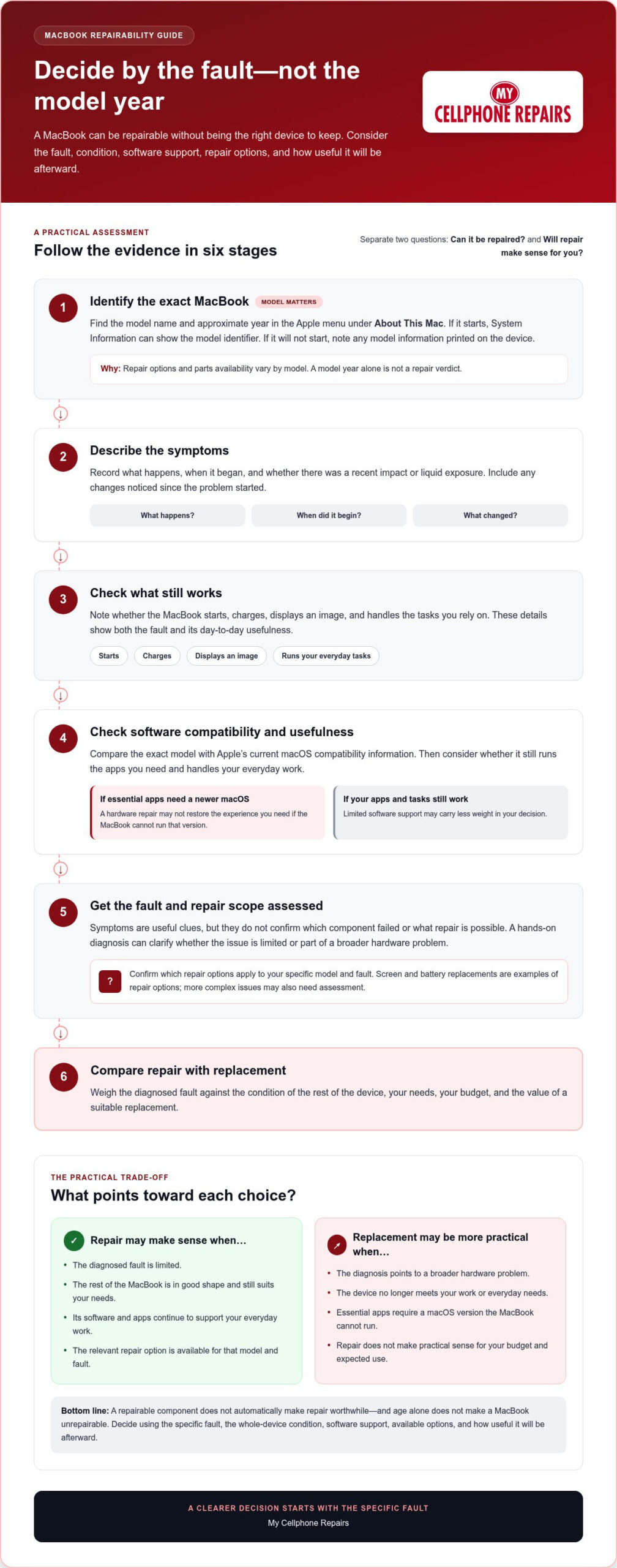
- Identify the MacBook: Find its model name and approximate year in the Apple menu under “About This Mac.” If it starts, System Information can show the model identifier. If it won’t start, note any model information printed on the device.
- Describe the symptoms: Record what happens, when it began, and whether there was a recent impact or liquid exposure. Include any changes you’ve noticed since the problem started.
- Check what still works: Note whether it starts, charges, displays an image, and handles the tasks you rely on. This helps show both the fault and the MacBook’s day-to-day usefulness.
How MacBook Age, macOS Support, and Hardware Condition Affect Repair
A model year helps identify a MacBook’s generation, but it can’t tell you on its own whether repair makes sense. Two laptops from the same year may have different faults, wear, and repair needs. Software support matters too: an older MacBook may still handle your daily tasks, or it may no longer support the macOS version and apps you rely on.
Before calling a MacBook too old, weigh four things: its fault and condition, software support, model-specific repair options, and usefulness after repair. Parts and service options vary by model and fault, so don’t assume a particular component can be repaired based only on the year. The FTC’s report on repair restrictions examines broader barriers to repair, but it can’t determine what’s available for an individual MacBook.
How to check macOS compatibility for your MacBook
First, find the exact model name and identifier. If the MacBook starts, check “About This Mac” in the Apple menu. Then compare that model with Apple’s current macOS compatibility information. Support can vary between models with similar names, so verify the exact model instead of relying on a general year range.
Compatibility is only part of the decision. Consider whether the MacBook still runs the apps you need and handles your everyday work. If essential software requires a newer macOS version that the device can’t run, a successful hardware repair may not restore the experience you need. If your apps and tasks still work, limited software support may carry less weight.
How condition and repair scope change the decision
An isolated screen or battery issue is different from several unrelated problems appearing together. Visible damage, charging behavior, startup trouble, and any history of liquid exposure are useful clues to share during an assessment. These details can guide diagnosis, but symptoms alone don’t confirm which component has failed or what repair is possible.
A hands-on diagnosis can clarify whether the fault is limited or part of a broader hardware problem. It can also establish which repair options apply to that model. My Cellphone Repairs provides professional MacBook hardware repair, including screen and battery replacements and support for more complex issues. If you’re weighing repair against replacement, a professional MacBook repair assessment can help you decide with a clearer picture of the fault.
Repair or Replace an Older MacBook? Compare the Practical Trade-Offs
An older MacBook isn’t automatically a poor repair candidate. Ask whether the diagnosed fault is limited, the rest of the device still suits your needs, and repair makes sense for your budget and expected use. If you’re asking, “is my macbook too old to fix,” compare the whole situation rather than relying on an age cutoff.
Use this framework to weigh the main trade-offs. A professional assessment can clarify the fault and relevant repair options. Then consider how the repaired MacBook would fit into your plans compared with a replacement.
| Factor | Repair may make sense when… | Consider replacement when… |
|---|---|---|
| Fault scope | The assessment identifies one specific issue. | Several significant or recurring faults affect the device. |
| Device condition | The rest of the MacBook works reliably for your needs. | Other problems or deterioration limit its usefulness. |
| Software needs | Your essential apps and tasks remain supported. | You rely on software or capabilities the MacBook can’t provide. |
| Replacement value | Repair fits your budget and expected period of use. | A replacement better matches your needs and future use. |
When repairing an older MacBook may make sense
Repair can be practical if there’s one clearly identified fault and the MacBook otherwise performs well for your everyday tasks. A screen replacement may address a damaged display, while a battery replacement may help if battery condition is the main problem. The right option depends on the model and diagnosis.
Consider whether your apps still work, whether the computer meets your needs, and whether you prefer to keep using it. A focused repair may make more sense than replacing a device that remains useful in every other way.
When replacement deserves serious consideration
Compare the assessed repair scope with what a replacement would offer, including the features you need and how long you expect to use it. Broader debates about repair access, such as this academic argument for Right to Repair, provide context. Your decision still comes down to your MacBook’s condition, available options, and value to you.
How to Prepare Your MacBook for a Repairability Assessment
A few clear details can help a technician understand what’s happening and assess repair options. Before arranging an assessment, work through these steps. Don’t try a risky DIY fix or keep testing a MacBook that may have liquid damage.
Document the symptoms and device history
- Identify the MacBook. If it starts, open the Apple menu and select “About This Mac” to note the model name. System Information may show the model identifier. If it won’t start, record any identifying information printed on the device.
- Write down what happens. Note when the problem began and whether it’s constant, intermittent, or getting worse. Include relevant details about startup, the display, battery, charging, sound, and ports. For example, say whether it won’t start at all or starts but shows no image.
- Share the device’s history. Record any recent drop, liquid exposure, previous repair, or change in charging behavior. Be specific and straightforward. These details can guide diagnosis, but they don’t prove the cause of the fault.
If liquid has reached your MacBook, don’t attempt to open it or fix it yourself. Read the MacBook liquid damage repair guidance for practical next steps.
Protect your files before hardware work
- 4. Back up accessible files. If the MacBook starts and you can use it safely, save important documents and other files before service. If it won’t start or isn’t accessible, don’t assume the data can be recovered. A backup is a precaution, not a promise of recovery.
- 5. Bring your notes together. Keep the model details, symptom timeline, and repair or damage history in one place. This makes it easier to explain what you’ve observed without guessing about the underlying fault.
These steps won’t diagnose the problem, but they give a technician useful context to assess the MacBook and explain relevant repair options. If you’re still asking “is my macbook too old to fix,” a focused assessment can help you decide based on the fault and device, not age alone.
Arrange a MacBook repair assessment to get a clearer picture of the issue before choosing repair or replacement.
Get a Clear MacBook Repair Recommendation Before Replacing Your Device
Before replacing an older MacBook, get a clear picture of what’s wrong. A useful assessment should explain the diagnosed fault, relevant repair options for that model, and any uncertainty that still needs investigation. It should also help you understand whether the issue appears limited to one component or may involve a more complex hardware problem.
What a diagnosis should help you understand
A symptom can point toward an area to investigate, but it doesn’t confirm the failed part. A cracked display, for example, may suggest a screen issue, while charging trouble could have more than one cause. Diagnosis connects what the MacBook is doing with what can be established about its condition. The repair recommendation should reflect the specific model, assessed fault, and any other relevant wear or damage.
Consider what the findings mean for your next step: Which repair options apply? What remains uncertain? Would the MacBook still meet your needs afterward? Use those answers to compare the assessed repair scope with the practical value of replacing the device. If a fault can’t yet be fully established, factor that uncertainty into your decision rather than treating a possible cause as a confirmed diagnosis.
Make the decision that fits your needs
There’s no single answer to “is my macbook too old to fix.” Weigh its condition, software needs, repair scope, and the tasks you expect it to handle. A screen or battery problem may call for a focused repair, while a more complex hardware fault calls for a closer look at the overall device and its future usefulness.
An assessment gives you information to make the choice; it doesn’t commit you to repair. My Cellphone Repairs provides MacBook hardware service for screen and battery issues, as well as more complex hardware problems. The goal is to understand the fault and relevant options before deciding whether repair fits your needs.
Ready for a clearer recommendation? Get help with your MacBook repair.
Make Your Next MacBook Decision With Confidence
Age alone can’t answer “is my macbook too old to fix.” The right choice depends on the diagnosed fault, the MacBook’s overall condition, current software support, and whether it will still meet your needs after repair.
Compare repair options with the value and usefulness of a replacement. A clear assessment can help you understand what’s wrong, what may be repairable, and what uncertainty remains before you decide. Screen or battery problems may call for a different approach than more complex hardware issues.
My Cellphone Repairs provides MacBook hardware repair, including screen and battery replacements and support for complex hardware issues. Get a professional assessment before making a replacement decision, then choose the option that fits your device and plans.
Get help with your MacBook repair. With the right information, you can move forward with confidence.
Frequently Asked Questions
Is my MacBook too old to fix?
Not necessarily. Age alone can’t determine whether a MacBook can be repaired or whether repair makes practical sense. Consider the specific fault, overall condition, software support, model-specific repair options, and how well it will meet your needs afterward. A professional diagnosis can clarify the fault and relevant options. Then compare the repair recommendation with the value and usefulness of a replacement before deciding.
Can Apple still repair an older MacBook?
Possibly, depending on the MacBook’s service classification and parts availability. Apple generally classifies products as vintage when they were last sold between five and seven years ago; hardware service may still be available, subject to parts. Products discontinued more than seven years ago are generally classified as obsolete, and Apple discontinues hardware service for them. Check Apple’s current service information for your exact model, since classifications can change.
How do I find out how old my MacBook is?
If your MacBook starts, open the Apple menu and select “About This Mac.” Note the model name and year shown. You can also find its model identifier in System Information. If it won’t start, look for identifying information printed on the device. The exact model is more useful than age alone when checking macOS compatibility and discussing repair options, since similar model names can cover different versions.
Is it worth replacing the battery in an old MacBook?
It can be worthwhile if the battery is the main problem and the MacBook still meets your needs. Consider whether its other hardware works reliably, whether your essential apps remain compatible, and how long you expect to keep using it. A diagnosis can determine whether the battery is the fault and clarify model-specific options. Compare that assessment with the value and usefulness of replacing the device before choosing.
What happens if my MacBook no longer supports the latest macOS?
Your MacBook may miss newer macOS features and updates, and some apps may eventually require a version it can’t run. Check Apple’s current compatibility list for your exact model and confirm that the apps and tasks you depend on still work. Lack of support doesn’t automatically mean the MacBook needs replacing, but it matters if security updates or software compatibility are important to your daily use.
Should I repair or replace a MacBook with liquid damage?
Get the MacBook assessed before deciding. Liquid exposure can affect different components, and symptoms alone can’t show the full extent of damage. If liquid has reached the device, disconnect power and don’t try to charge or restart it. A professional diagnosis can clarify the fault and repair options. Weigh those findings against the MacBook’s condition, software needs, and replacement value. My Cellphone Repairs handles MacBook hardware and water damage repairs.