
A phone still broken after screen replacement may have a loose display connection, a faulty replacement part, or damage elsewhere in the device. If the original problem remains, or flickering, touch issues, or a black display has appeared, the symptom alone cannot show whether the screen was fitted incorrectly or another fault is involved.
A display problem can involve the screen assembly, while battery or other internal damage may need a different repair. Replacing parts before identifying the fault can waste time and risk further damage.
This guide covers common reasons a phone may still have problems after a screen replacement and safe checks you can make before seeking help. Learn what to observe, when to stop troubleshooting, and how a professional diagnosis can help avoid another blind repair. My Cellphone Repairs works on iPhone and Samsung hardware issues, assessing persistent symptoms as part of the whole device rather than focusing only on the new screen.
Key Takeaways
- A phone still broken after screen replacement may have a display, connection, or separate hardware fault. The symptom alone may not reveal the cause.
- Note what you see, such as a black display, failed touch, flickering, or charging trouble, to help narrow down what needs attention.
- Record when the problem happens, the phone model, the original fault, the repair date, and when any new symptom began.
- A professional diagnosis can assess the display and relevant device functions before the next repair is chosen.
Phone still broken after screen replacement? Start with the symptom
A screen replacement doesn’t always resolve every fault, so it’s frustrating when your phone still won’t work as expected. Before assuming the new screen is defective, note exactly what the phone does and whether the issue is constant or intermittent. A symptom is a useful clue, but it can’t confirm which part has failed.
Which symptoms remain after a phone screen replacement?
A black display means the phone isn’t showing an image, but the cause could involve the screen or another part of the device. Flicker, lines, or uneven brightness can also indicate a display problem, but they don’t identify its source on their own.
Test touch gently across the screen. Dead zones are areas that don’t respond, while phantom touches happen when the phone reacts as if you’ve tapped it. Note whether symptoms appear after movement or while charging, but don’t press, twist, or open the phone to try to trigger them.
- No image: Is the display always black, or does an image return sometimes?
- Flicker, lines, or uneven brightness: Do they stay in one place or change over time?
- Touch issues: Are certain areas unresponsive, or does the phone register taps you didn’t make?
- Intermittent display: Does the issue appear after movement or during charging?
Post-repair diagnosis means checking the screen and related device systems to identify what may be causing the symptom.
Did the original fault remain, or did a new one appear?
Compare the phone’s behavior before and after the repair. If the same black screen, touch failure, or flicker was present beforehand, the original fault may not have been fully resolved. If the display worked after repair but a new issue appeared later, record when you first noticed it and what was happening at the time.
Photos or video taken before the repair can make the comparison clearer. Note whether a symptom appeared immediately after the phone was reassembled or developed later. This timeline helps distinguish a persistent problem from a newly noticed one, but it does not prove what caused either.
Replacement parts and repair processes are part of wider conversations about access to phone repairs. The Right to Repair movement offers background on those issues, but the practical next step for a faulty device is to identify its specific symptoms. For more context on the repair itself, read this iPhone screen repair guide.
Why a phone may still malfunction after screen replacement
A phone still broken after screen replacement can have several explanations. The replacement display may have an issue, its connection may need inspection, or the original impact may have affected another part of the phone. Software behavior can sometimes resemble a hardware fault. The symptom helps guide testing, but cannot confirm the cause by itself.
Could the replacement screen or its connection be the problem?
A continuing black display, flicker, lines, or touch trouble may lead a technician to inspect the replacement screen and its connection. A display part can be faulty, damaged, or not communicating as expected with the phone. However, a problem that appears after repair doesn’t automatically prove the part or workmanship is at fault. Inspection and testing are needed to narrow down the cause.
A display symptom describes what you see; it doesn’t identify the component causing it. A technician can check whether the screen responds consistently and whether the reported issue points elsewhere. Don’t open the phone or try to reseat internal connections yourself. Delicate parts can be damaged during disassembly.
Could another phone fault explain the same symptom?
The original impact may be relevant beyond the visible glass. Depending on the device and the damage, other internal hardware may also be involved. That’s one reason a screen replacement may not resolve every issue. The whole device needs assessment rather than another screen being fitted based on symptoms alone.
Look for clues beyond the display. Battery drain or unexpected shutdowns may justify checking the battery. Charging trouble can point to a charging-related fault, while a history of moisture exposure may make water damage relevant. These are possibilities, not remote diagnoses. If battery behavior is part of the problem, see this phone battery replacement guide.
Software behavior can also resemble a hardware issue, such as an intermittent display problem. A technician should test the phone before identifying the cause or recommending a repair. My Cellphone Repairs diagnoses iPhone and Samsung hardware issues, including screen, battery, and charging concerns.
Repair access is part of a wider public discussion. The University of Virginia explains consumer issues behind right to repair laws, but those broader issues don’t establish what’s wrong with an individual phone. If the fault persists, a hands-on assessment is the practical next step. Explore iPhone and Samsung phone repair for help with device hardware problems.
How to compare the likely causes of a phone repair problem
Use the symptom to organize what you’ve noticed, not to diagnose the phone yourself. If your phone is still broken after screen replacement, the pattern can help a technician decide what to test first. It cannot confirm that the replacement screen is at fault.
| Symptom | Possible fault category | Useful observation | Recommended next step |
|---|---|---|---|
| Black display | Display, connection, or another device issue | Does the phone otherwise appear to power on or respond? | Arrange an assessment of the display and device. |
| Image appears, but touch fails | Touch function, display connection, or software behavior | Does touch fail everywhere or only in certain areas? | Record the affected areas and have the touch function tested. |
| Flicker or lines | Display-related issue or another internal fault | Are the lines constant, or does the image change? | Have the display inspected rather than assuming another screen is needed. |
| Charging-related symptoms | Charging, battery, or broader device issue | Does the display problem occur alongside charging or power trouble? | Ask for the phone’s relevant functions to be assessed, not only the screen. |
What can touch and display symptoms suggest?
A visible image with unresponsive touch differs from a completely blank display, but neither points to one confirmed part. Flicker, lines, or an image that cuts in and out also need inspection. Note what the screen shows and whether touch still works. Don’t request another screen replacement based on a single symptom before the phone is tested.
When might the problem extend beyond the screen?
Charging trouble, power changes, or other functions failing alongside a display symptom mean the assessment should cover more than the screen. A hard impact or water exposure can affect multiple parts, though only testing can establish whether that happened. Samsung owners can learn more about broader Samsung phone repair services.
A technician should check the complete device and reproduce the reported issue where possible. This helps distinguish a display or connection concern from a separate fault and avoids recommending another screen based on guesswork. Share your observations, including when the issue occurs, so the assessment can focus on the relevant functions.
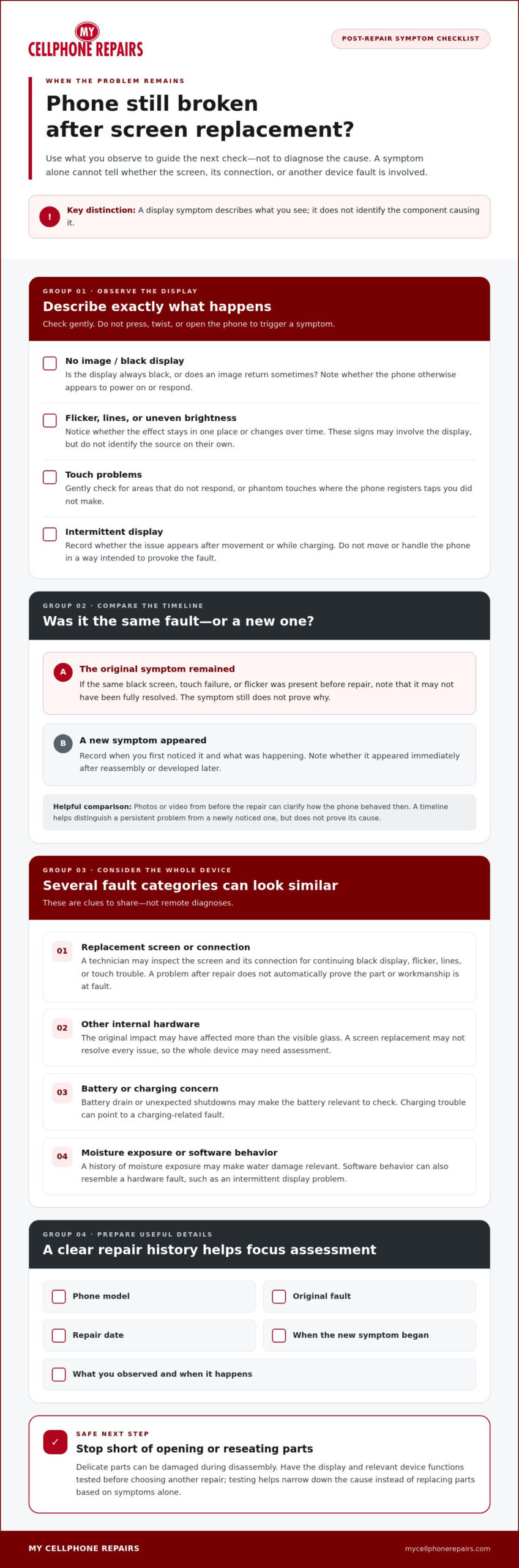
Phone still broken after screen replacement? Next steps
If your phone is still broken after screen replacement, keep the next steps simple. Record what’s happening, protect your data if you can, and arrange a professional diagnosis. Don’t try to test an internal connection yourself. Pressing, twisting, heating, or opening the phone can cause further damage.
What can you safely check before arranging a repair?
Make basic observations without forcing the device. Does it power on? Is there an image? Does touch respond across the screen? Does it charge as expected? Note the answers, even if the phone works only intermittently.
If a case or screen protector might be affecting the display or touch, remove it only if it comes away easily. Don’t pry or pull at anything stuck in place. Avoid a factory reset unless your data is backed up and there’s a clear reason to investigate a software issue. A reset can erase information and won’t fix a hardware fault.
Limit use and seek prompt assessment if the phone becomes unusually hot or the battery appears swollen. Don’t press on a swollen area or attempt to open the device.
What information helps a technician assess the problem?
Write down the device model, the original fault, and the screen repair date. Add when any new symptom began and whether it has changed. If the issue comes and goes, note what you were doing when it happened, such as charging or using the touchscreen. Mention any relevant impact, liquid exposure, or charging trouble.
Before the assessment, record the model, original fault, repair date, current symptoms, when they occur, and any relevant impact or liquid exposure.
These details give the technician a clearer starting point and help distinguish an issue that remained from one that appeared after the repair. If the phone is usable, back up important photos, contacts, and files before arranging service. If it won’t stay on or respond reliably, don’t keep repeating tests to force it to work.
Once you’ve documented the symptoms, get professional phone repair help. An assessment can check the reported problem and relevant device functions before a repair is recommended.
How professional diagnosis can get a broken phone back on track
If your phone still has problems after a screen replacement, a focused diagnosis can help identify what needs attention before another part is replaced. The technician starts with the symptom you report, then checks the display and relevant device functions. That matters because a black screen, touch failure, or flicker can have more than one possible cause.
What happens during a focused repair assessment?
Tell the technician what changed after the repair and when the problem occurs. That information can guide checks of the screen, touch response, power, and other functions related to your symptoms. The assessment aims to distinguish a display-related concern from a separate hardware issue or a possible software concern.
The findings guide the next step. The repair may involve correcting a display-related issue, addressing another hardware fault, or investigating a software concern. A technician should base the recommendation on testing, not assume that another screen replacement is the answer. If the evidence points beyond the display, assessing the whole phone can help avoid an unsuitable repair.
When should you seek professional phone repair?
Arrange an assessment if the screen remains unusable or the symptoms continue after basic, safe observations. Seek prompt attention if the problem worsens or you notice signs of battery damage, such as swelling or unusual heat. Don’t press on the phone, open it, or keep using it if it seems unsafe.
Bring your symptom notes and share the repair timeline. A clear description helps direct the assessment, whether the issue affects the display alone or other phone functions. My Cellphone Repairs provides iPhone and Samsung repairs, including screen and other hardware work, so persistent problems can be assessed beyond the replacement screen.
Get a professional assessment based on what your phone is doing. Explore professional iPhone and Samsung phone repair.
Choose the right repair with confidence
If your phone is still broken after screen replacement, the symptom is a starting point, not a diagnosis. Note what’s happening, when it occurs, and whether it’s the original problem or a new one. Then have a technician assess the screen and relevant parts of the device before recommending the next repair.
A focused diagnosis can help distinguish a display concern from another hardware fault or a possible software issue. My Cellphone Repairs provides professional iPhone and Samsung phone repair, including work on screens, batteries, charging ports, and water damage.
Get professional phone repair help and take the next step toward a clear answer. With the right assessment, you can move forward without guessing at the cause.
Frequently Asked Questions
Can a phone still be broken after a screen replacement?
Yes, a phone can still have problems after a screen replacement. The original fault may involve another component, or the replacement display or its connection may need inspection. A symptom alone can’t confirm the cause. Note what still happens, when it occurs, and whether anything changed after the repair. A technician can assess the phone before recommending a fix, rather than assuming another screen is automatically needed.
Why is my phone screen black after a screen replacement?
A black display can have several possible causes, including a display issue, a connection problem, or other impact damage. The symptom alone can’t show which one is responsible. Don’t open or press the phone to test it. Instead, note whether it appears to power on, makes sounds, or responds when connected to a charger. Share these observations during a professional repair assessment so the device can be tested safely.
Why does my touchscreen not work after a screen replacement?
Unresponsive touch may involve the replacement display, its connection, or another device fault. Check whether touch fails across the whole screen or only in specific areas, and note whether the image appears normally. Avoid pressing hard or opening the phone, as this could cause further damage. A technician can inspect the display and test the device to determine whether the issue appears limited to touch or may have another cause.
Can a bad screen replacement cause flickering or lines?
Flicker or lines may be related to the display or its connection, but they can also follow other damage. Their appearance after a repair is useful timing information, not proof of what failed. Note whether the lines stay in place, come and go, or change during normal use. Don’t try to reseat internal parts yourself. Arrange an assessment so the display and relevant device functions can be checked before another repair is chosen.
Should I take my phone back if it is still broken after a screen replacement?
If the original problem remains or a new fault appeared after the repair, document what’s happening and arrange a follow-up assessment. Keep the repair details and note when the symptoms began. The next step should depend on testing, since another screen replacement may not resolve a separate fault. Describe the phone’s behavior clearly and avoid assuming what caused the problem before the device has been examined.
Can software cause problems after a phone screen replacement?
Yes, software behavior can sometimes resemble a hardware problem, though a symptom that appears around the time of repair may also have a hardware cause. Note what the phone does and whether the issue affects particular apps or functions. Back up important data when possible. Don’t start with a factory reset unless your data is protected and there’s a clear reason to investigate software, since a reset can erase information and won’t fix hardware damage.
Is it safe to keep using a phone that is still broken after screen repair?
It depends on the symptoms. Display or touch problems can make a phone difficult to use, while unusual heat or a swollen battery calls for greater caution. If the battery appears swollen, stop using and charging the device. Don’t press or puncture it. Arrange a professional assessment and describe any safety concerns or changes you’ve noticed. If the phone’s behavior is worsening, avoid repeated tests and have it checked promptly.