
A MacBook Pro that won’t turn on doesn’t automatically need a new logic board. Charging faults, battery problems, display issues, and board damage can produce similar symptoms, so MacBook Pro logic board repair should start with diagnosis, not assumptions.
If your MacBook won’t power on, charge, or run reliably, it’s understandable to worry about the repair and your data. The next step depends on what’s failing, your model, and how you use the device. A technician can inspect and test the hardware before recommending a repair path.
This guide explains what the logic board does, which symptoms need professional diagnosis, and how technicians narrow down the cause. You’ll also learn what to do before service, why liquid exposure needs prompt attention, and what to consider when comparing component-level repair with board or device replacement. My Cellphone Repairs provides professional MacBook hardware repair, including support for complex issues such as water damage, to help you make an informed decision about your device.
Key Takeaways
- Power, charging, and startup problems can have several causes, so symptoms alone can’t confirm a logic board fault.
- MacBook Pro logic board repair starts with gathering symptom details, inspecting the device, and testing likely causes.
- Repair or replacement depends on the diagnosed fault, your MacBook’s model and condition, and your priorities for the device and its data.
- Before service, disconnect accessories and note what’s happening. After liquid exposure, shut down the MacBook and avoid repeated restart attempts.
- Professional MacBook hardware repair can help you assess a sensible next step for your device.
MacBook Pro Logic Board Repair: What the Board Does and Which Symptoms Matter
A MacBook Pro that won’t turn on or charge can make a logic board failure seem like the obvious answer. It’s one possibility, but not the only one. The battery, display, charging connection, or an attached peripheral can cause similar trouble. That’s why MacBook Pro logic board repair should follow diagnosis rather than a guess based on one symptom.
What does a MacBook Pro logic board control?
The logic board is the main circuit board that connects and coordinates key parts of a computer. It lets components communicate so the MacBook can start up, process tasks, and work with connected hardware. For a foundational explanation of a motherboard (or logic board), see Wikipedia’s overview. MacBook Pro designs vary by model, so the board and connected components aren’t identical across every generation.
Because the board supports multiple functions, a fault can affect more than one part of the MacBook. You might see startup trouble along with charging issues, for example. But even problems affecting several functions need testing to identify their source.
Which symptoms can point to a logic board problem?
Watch for patterns such as:
- The MacBook doesn’t power on or repeatedly fails during startup.
- It shuts down unexpectedly or behaves inconsistently.
- The battery doesn’t charge, or charging works unreliably.
- Several functions fail around the same time.
These signs can point to a board issue, but they can also come from a failing battery, display fault, charging problem, or peripheral interfering with normal operation. For example, a black screen doesn’t necessarily mean the whole computer has failed. The display may be the issue while the MacBook itself is running. A charging problem may also originate outside the logic board.
Liquid exposure or an impact can be followed by multiple hardware symptoms. Even if the MacBook seems to work at first, new or worsening problems afterward deserve attention. The event and its timing can help a technician decide what to inspect, but they don’t identify the damaged component on their own.
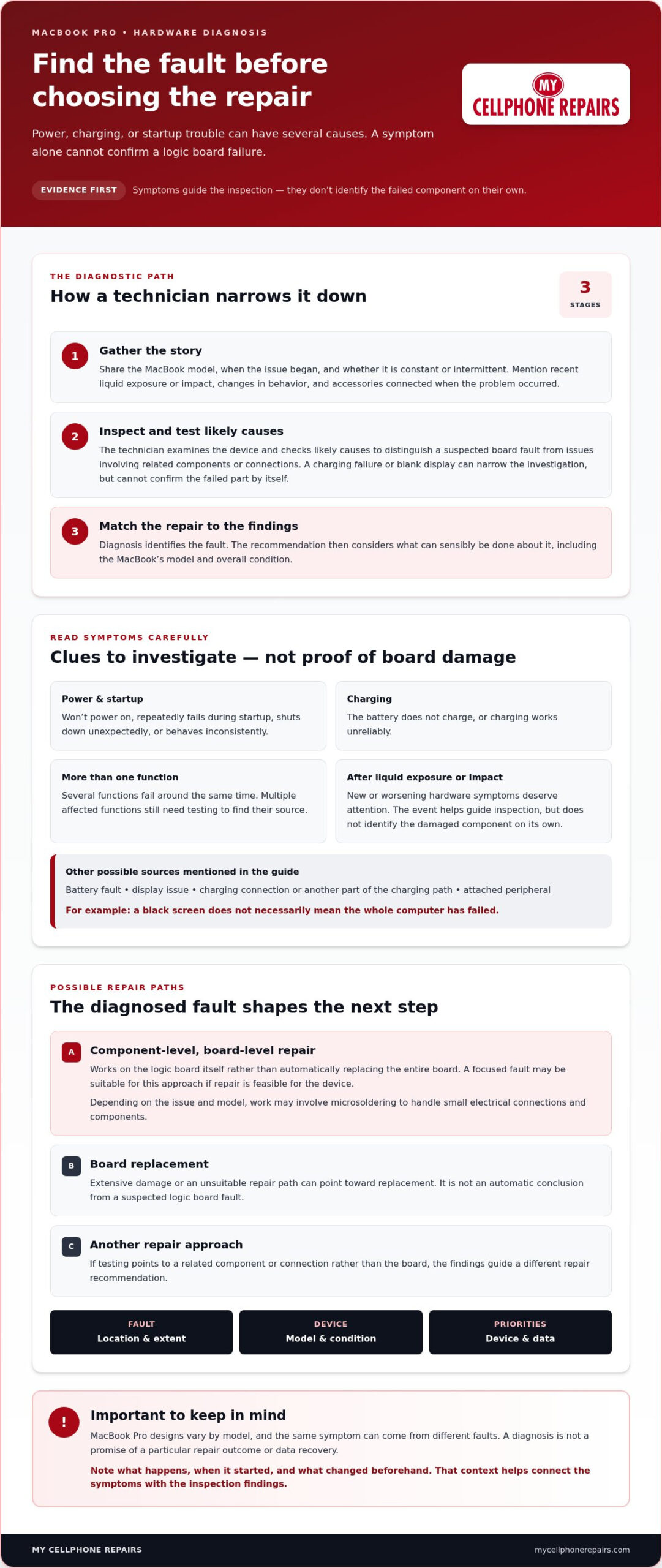
One symptom can raise suspicion, but only diagnosis can show whether the logic board is actually at fault. Note what happens, when it started, and whether anything changed beforehand. Those details help distinguish a board fault from a problem with another component and guide the next step.
How Technicians Diagnose and Repair a MacBook Pro Logic Board
Good repair starts by finding the cause, not guessing from the symptom. A MacBook that won’t charge, for example, could have a board fault or an issue elsewhere in its charging path. Technicians work through the evidence so the repair recommendation reflects the problem they find.
What happens during a logic board diagnosis?
The process begins with your account of what the MacBook is doing. The model, when the problem started, recent liquid exposure or impact, and changes in behavior can all help shape the inspection. Explain whether the issue is constant or intermittent, and mention any accessories connected when it occurred.
Next, the technician inspects the device and tests likely causes. The goal is to distinguish a suspected board fault from problems involving related components or connections. An exterior sign, such as a charging failure or blank display, can narrow the investigation but can’t identify a failed component with certainty.
The findings guide the repair options. A fault limited to a repairable area may call for a different approach than extensive damage or a problem affecting other parts. The MacBook’s model and condition also matter. Diagnosis identifies the fault; the repair recommendation weighs what can sensibly be done about it.
What does board-level repair involve?
Board-level repair means working on the logic board itself rather than automatically replacing the entire board. A technician assesses the affected circuitry, the location and extent of the fault, and whether repair is feasible for that device. Depending on the issue and model, the work may involve microsoldering, a technique for handling small electrical connections and components.
There isn’t one repair method for every MacBook Pro. Board design varies across models, and the same symptom can come from different faults. The device’s overall condition and diagnostic findings help determine whether component-level repair, board replacement, or another repair is the more appropriate path. A diagnosis also shouldn’t be treated as a promise of a particular repair outcome or data recovery.
For a useful assessment, describe the problem clearly and share any history of liquid exposure or impact. That context helps connect the symptoms with what the inspection reveals. MacBook Pro logic board repair is one possible outcome, but it should follow evidence that points to a board fault.
My Cellphone Repairs provides professional MacBook hardware repair for owners dealing with complex device problems. Explore MacBook repair from My Cellphone Repairs as a practical next step.
MacBook Pro Logic Board: Repair vs. Replacement
A suspected logic board fault doesn’t automatically mean the entire board must be replaced. A focused fault may be suitable for component-level repair, while extensive damage or an unsuitable repair path can point toward replacement. The right choice depends on the inspection findings, the MacBook’s condition and model, and what matters most to you.
Use these factors to understand the recommendation:
| Factor | Board-level repair may be considered when… | Replacement may be considered when… |
|---|---|---|
| Fault scope | The fault is localized and the affected circuitry can feasibly be repaired. | Damage is extensive or the affected area isn’t a suitable candidate for repair. |
| Device condition | The rest of the MacBook is in usable condition and repair fits your needs. | Other hardware problems or the device’s overall condition change the value of further repair. |
| Data priorities | Keeping the original board in consideration matters to your data plan. | You understand and have accounted for the data implications of replacing the board. |
| Model factors | The exact model’s design allows a suitable repair approach. | Model-specific design, parts, or repair requirements make replacement the more appropriate path. |
When may logic board repair be considered?
If inspection identifies a localized fault, a technician may assess whether repairing the affected circuitry is practical. This avoids assuming that every board problem calls for complete replacement. Feasibility depends on the exact fault, the MacBook Pro model, and the board’s condition. An assessment doesn’t guarantee that the original board can be restored.
When might board replacement be considered instead?
Extensive damage, multiple affected areas, or a repair path that isn’t suitable for the device may lead to a replacement recommendation. That decision should account for the computer’s overall condition and your plans for continued use, not just its age or a single symptom.
Data deserves separate consideration. Storage and security arrangements vary across MacBook Pro models, so don’t assume replacement has the same data outcome for every device. Have the exact model and its implications considered as part of the repair assessment. If the MacBook still works, back up important files before service.
MacBook Pro logic board repair is one possible path, not an automatic answer. The confirmed fault determines what work is needed, and exact repair costs depend on that fault and the required work. Compare the recommendation with your device’s condition, data priorities, and intended use before deciding.
What to Do Before MacBook Pro Logic Board Repair
A few practical steps can help protect your MacBook and make its symptoms easier to assess. Don’t open the computer or attempt board-level work yourself. If you suspect liquid exposure or abnormal heat, stop using it and note what happened before the problem began.
How should you protect your MacBook Pro and data?
If liquid has reached the MacBook, shut it down and disconnect its power source if you can do so safely. Don’t try to turn it back on or repeatedly test whether it works. Continued power can worsen damage. For spill-specific guidance, read the MacBook Liquid Damage Repair guide.
If the device is operating normally and there’s no sign of liquid exposure or overheating, back up important files before service. If it isn’t safe or possible to use, don’t force a startup just to make a backup. Data access and recovery depend on the MacBook model and the fault, so don’t assume an outcome before assessment. Tell the technician how important the data is and whether you have a recent backup.
What information helps technicians assess the fault?
Write down the exact model or any identifying information available to you. Record when the trouble started, what happens when you press the power button, and whether charging or startup behavior changes over time. Include warning signs such as unusual heat, unexpected shutdowns, or a display that stays blank.
- Disconnect accessories and note whether the problem changes without them.
- Describe any recent liquid contact, impact, or other damage, even if the MacBook seemed fine afterward.
- Share details of previous repair attempts or changes made before the fault appeared.
- State your data priorities and whether you have a current backup.
These details don’t diagnose the fault on their own, but they give the technician a clearer starting point. A MacBook that won’t start after a spill, for example, calls for different context than one that fails only when a particular accessory is connected.
Preparing this information helps make a MacBook Pro logic board repair assessment more focused. For professional MacBook hardware repair, explore MacBook repair from My Cellphone Repairs.
Get Professional MacBook Pro Logic Board Repair from My Cellphone Repairs
If your MacBook Pro is still unreliable after basic checks, the next step is a professional assessment. Symptoms describe the problem, but they don’t confirm which component has failed. Inspection and diagnostic findings help determine whether board-level repair, replacement, or another hardware remedy makes sense for your device.
What should you expect from a repair decision?
A useful repair decision connects three things: what you’ve observed, what inspection reveals, and what you need from the MacBook. A power issue might be linked to the logic board, but it could also involve another component. The technician’s findings, rather than a symptom checklist alone, determine which repair path is appropriate.
Share details that can shape the assessment. Explain whether the MacBook fails to start, shuts down unexpectedly, or has trouble charging. Mention when the issue began and whether the device experienced liquid exposure, impact, or previous repair work. Be clear about data access and recovery priorities, especially if you don’t have a recent backup. Data outcomes depend on the model and fault, so they can’t be assumed before diagnosis.
Once the fault is assessed, consider the options in context. A localized issue may lead to a different recommendation than extensive damage. The MacBook’s model, overall condition, repair scope, and your plans for continued use all matter. A symptom list helps start the conversation, but diagnosis determines what repair is sensible.
How to take the next step with My Cellphone Repairs
My Cellphone Repairs provides professional MacBook hardware repair, including support for complex problems such as water damage. A clear account of the symptoms and any recent damage helps inform the assessment. If your MacBook is still working and safe to use, back up important files before service. If liquid exposure or abnormal heat is involved, power it down and avoid repeated restart attempts.
There’s no need to decide in advance that the logic board must be repaired or replaced. The appropriate option depends on the device and diagnostic findings. That applies to MacBook Pro logic board repair just as it does to other hardware faults: identify the cause, understand the available path, then make an informed decision.
For professional help with your MacBook, Explore MacBook repair services.
Choose Your Next Repair Step with Confidence
A MacBook Pro that won’t power on, charge, or run reliably may have a logic board fault, but those symptoms can also point to other components. A technician’s diagnosis helps identify the cause before you weigh repair against replacement. The right recommendation depends on the confirmed fault, the MacBook’s condition and model, and your data priorities.
Before service, note what the device is doing, share any history of impact or liquid exposure, and explain what matters most to you. If liquid exposure is suspected, shut the MacBook down and avoid trying to restart it. These details give the assessment a useful starting point, but they can’t replace hands-on diagnosis.
My Cellphone Repairs provides professional MacBook hardware repair, including help with complex issues such as water damage. For a practical next step, explore MacBook repair services.
Frequently Asked Questions
Is a MacBook Pro logic board repair possible?
Yes, a MacBook Pro logic board can sometimes be repaired, but the right option depends on the fault, model, and board condition. A localized fault may be repairable, while other problems may call for a different component repair or board replacement. Symptoms alone can’t determine the solution. A technician needs to assess the device before recommending a path, and the assessment can’t guarantee a particular repair outcome.
Can a MacBook Pro work with a damaged logic board?
Yes, depending on the fault, a MacBook Pro may still start or work intermittently with a damaged logic board. It might also have charging problems, startup failures, or unexpected shutdowns. Continued use won’t reliably show how serious the fault is, and repeated power attempts may complicate some failures. Record what the MacBook does, stop using it if liquid exposure is suspected, and arrange a professional hardware assessment.
How much does MacBook Pro logic board repair cost?
The cost depends on the MacBook Pro model, confirmed fault, extent of damage, and repair work required. A symptom alone can’t show whether the device needs board-level work, another component repair, or board replacement. Have the MacBook assessed before comparing options, since a general price range can’t accurately represent every model and fault. Ask for the recommended scope of work so you can weigh it against your device’s condition and needs.
What happens if a MacBook Pro logic board fails?
A failing logic board can prevent a MacBook Pro from powering on, charging, starting reliably, or operating normally. The symptoms depend on the affected circuitry, but similar behavior can also come from a battery, display, charger, or other hardware issue. A technician uses inspection and testing to narrow down the cause. The findings help determine whether the appropriate next step is board repair, another component repair, or replacement.
Will logic board repair erase my MacBook Pro data?
Data impact depends on the MacBook Pro model, the fault, and the repair method. A board problem doesn’t automatically mean your files are lost, but access or recovery can’t be guaranteed. Tell the technician that your data is a priority before work begins, and back up files first if the MacBook is safe and functional. Storage and security features vary by generation, so don’t assume the same data outcome for every model.
Should I replace the logic board or repair it?
Choose based on diagnostic findings, board condition, MacBook model, and your priorities for the device and its data. A technician may consider board-level repair for a specific fault that appears repairable; extensive damage may point to replacement or another remedy. Neither option is automatically right based on age or symptoms alone. Compare the recommended work and expected outcome after the fault has been identified, then weigh that against the MacBook’s overall condition and your needs.
What should I do if my MacBook Pro gets liquid on it?
Power the MacBook down if possible, disconnect the charger and accessories, and don’t try to restart it repeatedly. Avoid applying heat or opening the device yourself. Liquid exposure can affect multiple components, and the visible symptoms may not show the full extent of damage. Note what happened and when, then arrange a professional assessment. For more focused steps, read the MacBook liquid damage guide.