
What if a MacBook that charges only when the cable sits at a certain angle doesn’t need a new port at all? Intermittent charging can point to a damaged port, but a faulty cable, adapter, battery, or internal hardware can cause similar symptoms. Guessing can lead to unnecessary work, and probing the port may cause more damage. A reliable MacBook charging port replacement starts by confirming the fault, not guessing from symptoms.
If charging keeps disconnecting, it’s understandable to suspect the port. This guide covers safe checks to try before arranging service, how a technician can distinguish port trouble from other power issues, and what to ask before approving a repair. You’ll learn which symptoms are useful clues, when professional diagnosis makes sense, and how to check that the proposed work matches your MacBook model.
Key Takeaways
- Intermittent charging or a loose connection can signal port trouble, but symptoms alone don’t confirm the cause.
- Rule out accessory problems first, then have a technician assess whether the issue involves the port or internal hardware.
- MacBook charging port replacement may not be necessary if inspection points to debris or a faulty cable instead.
- Before arranging repair, note your MacBook model and symptoms, and back up important files if you can do so safely.
- Ask My Cellphone Repairs about model coverage, repair scope, and service details before proceeding.
MacBook charging port replacement: what the symptoms can, and cannot, tell you
An unreliable charge can interrupt work, drain your battery, and make it hard to know what to fix first. Start by noting exactly what happens: does charging stop and start, fail to begin, or work only when the cable is positioned a certain way? Any of these can point to a port problem, but the cable, adapter, or another component could also be responsible. Treat symptoms as clues, not a diagnosis.
Charging-port replacement means replacing a charging connector or related assembly that a technician has confirmed is faulty. The part and repair scope can vary by MacBook model and port configuration, so confirm what the proposed work covers before approving it.
Which MacBook charging problems may point to a port fault?
Recurring interruptions, charging that stops unexpectedly, or a connector that won’t sit securely are reasons to have the port checked. With USB-C models, the USB-C standard describes the connector used for power and other connections. However, charging symptoms alone can’t show whether the connector or another component is at fault.
A loose-feeling connection deserves inspection. Don’t wiggle, bend, or hold the cable at an angle to keep power flowing, because doing so can put extra strain on the connector. Stop using the setup if the port, cable, or adapter is visibly damaged, unusually hot, or otherwise seems unsafe.
Could the charger, battery, or another component be responsible?
Check the simpler possibilities first, without forcing the connector:
- Try a compatible, known-working power adapter and cable, if available.
- Check the cable and adapter for visible damage.
- Notice whether charging changes with a different outlet or accessory.
If the issue continues, the battery, power-management hardware, or logic board may be involved. These faults can resemble a failed port, and the right checks depend on the MacBook model. Charging symptoms do not identify the failed component by themselves.
That’s why MacBook charging port replacement should follow confirmation of the fault, not just a frustrating charging pattern. If basic accessory checks don’t help, professional diagnosis can narrow down whether the connector needs attention or another part of the power system is responsible. Tell the technician what you tried and when the problem occurs, such as whether it happens with more than one accessory. Those details help focus the assessment.
How a technician confirms whether MacBook charging port replacement is needed
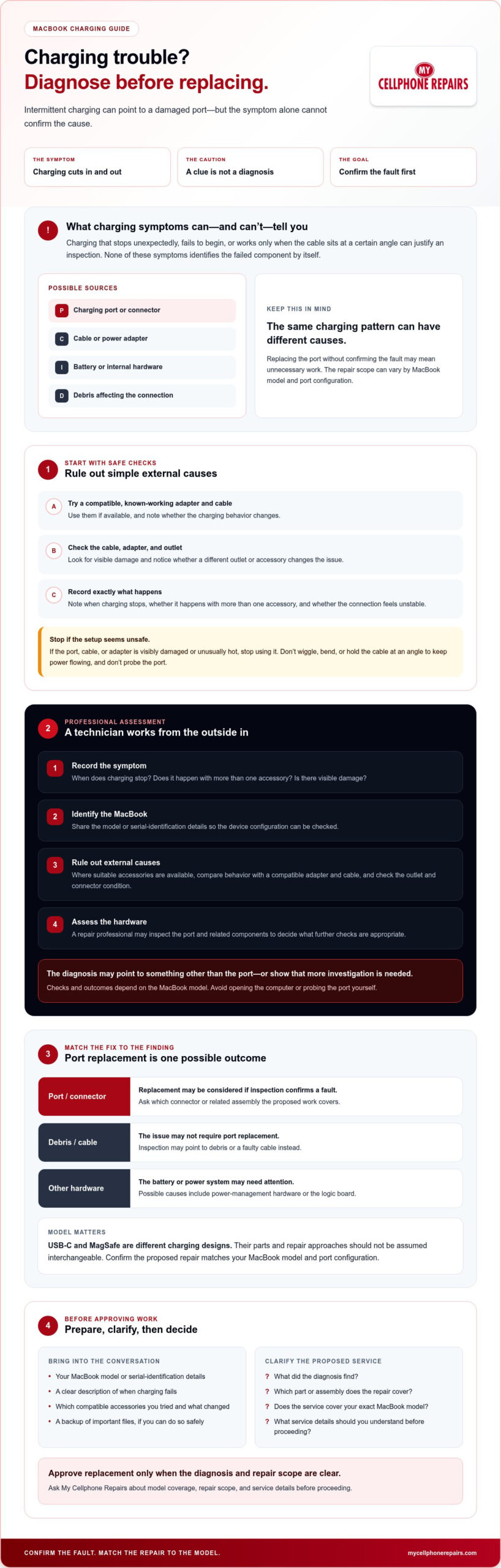
A sound diagnosis works from the outside in. The precise checks depend on the MacBook model and its charging design, so a symptom that points to one repair on one device may call for a different investigation on another. The aim is to identify the likely fault before recommending work, rather than assuming the port is responsible.
- Record the symptom. Note when charging stops, whether it happens with more than one accessory, and any visible damage.
- Identify the MacBook. Share the model or serial-identification details so the technician can check the device’s configuration.
- Rule out external causes. Where suitable accessories are available, compare behavior with a compatible adapter and cable, and check the outlet and connector condition.
- Assess the hardware. A repair professional may inspect the port and related components to decide what further checks are appropriate.
Don’t open the MacBook or probe the port yourself to speed up the process. Internal inspection requires appropriate repair experience and tools. Ask what the diagnosis found, what repair is being proposed, and which components the work covers. Approve replacement only after you understand the diagnosis and scope. The assessment may point to another cause or show that further investigation is needed.
What happens during an initial charging assessment?
Describe the fault in specific terms, such as charging that cuts out or a connection that feels unstable. The technician can consider your account, the exact model, and tests with compatible charging accessories to narrow down external causes. If needed, a professional may then inspect the connector and related components. The checks and outcome can vary by device.
Why do USB-C and MagSafe models need model-specific diagnosis?
MacBook charging designs differ across models and generations. USB-C uses a compact connector, while MagSafe uses a separate magnetic charging connection. Their parts and repair approaches aren’t interchangeable by assumption. Give the technician your model or serial-identification details when asking about service. Charging trouble can also involve a more complex fault, so review the warning signs of logic board failure as context, not as a remote diagnosis.
Before authorizing MacBook charging port replacement, confirm that the proposed work matches your device and ask what the assessment supports. You can ask about MacBook repair options, model coverage, and repair scope.
MacBook charging port replacement vs. cleaning, cable repair, or board-level service
A charging problem doesn’t automatically mean the port needs replacing. A damaged cable, debris near the connector, a worn port, or an internal fault can cause similar symptoms. The right repair depends on what an assessment confirms. Use this comparison to understand possible next steps, not to diagnose your MacBook from symptoms alone.
Option
What it addresses
Why confirmation matters
Accessory checks
A faulty adapter, cable, or outlet.
A change with another compatible accessory can help narrow down the cause, but doesn’t prove the port is faulty.
Professional port inspection
Visible damage, a loose connection, or another concern at the connector.
Inspection helps determine whether the port itself needs attention or further diagnosis is appropriate.
Port replacement
A charging connector or assembly confirmed to be faulty.
The required repair depends on the MacBook model and diagnosis.
Further internal diagnosis
Possible battery, power-management, or logic-board issues.
These faults can resemble a port problem, so a technician should identify supporting evidence before recommending repair.
When is cleaning or an accessory check enough?
Start with observation. Look for visible debris or damage around the port, cable, and adapter, but don’t insert metal tools or put liquids into the connector. Debris may affect the connection, while a damaged cable may interrupt charging. Neither finding confirms that the port itself has failed. If charging remains unreliable or the port looks damaged, arrange a professional assessment instead of forcing or trying to clean the connection.
When might a technician investigate the battery or logic board?
If charging still fails after compatible accessories have been checked, the technician may need to investigate beyond the port. Battery or logic-board faults are possibilities, not conclusions you can draw from charging behavior alone. Before approving work, ask what the assessment found, which component the proposed repair addresses, and whether additional diagnosis is needed. That helps you understand why MacBook charging port replacement is recommended, or why another repair path better fits the findings.
How to prepare for MacBook charging port replacement or repair
A little preparation helps the technician understand what your MacBook is doing and gives you a clearer basis for deciding on repair. You don’t need to diagnose the fault yourself. Gather the details you know, protect your files if you can, and ask what the assessment supports before authorizing work.
What information should you share with the repair technician?
Describe the charging issue as precisely as you can. Note when it started, whether charging stops intermittently or fails completely, and whether the behavior changes with another compatible cable or adapter. Share your MacBook’s model identification, along with any recent drop, liquid exposure, or previous repair. Mention warning messages or unusual heat. Don’t repeat a test if the setup appears damaged or unsafe.
Use this short checklist before arranging service:
- Identify the model. Find the model or serial-identification details so you can ask whether the charging configuration is supported.
- Record the symptoms. Write down what happens and which accessories you’ve already tried.
- Bring accessories if requested. Ask whether the technician needs to inspect your adapter or cable as part of the assessment.
- Back up important files. If the MacBook works safely and you’re able to do so, save important data before service.
Be straightforward about impacts, liquid exposure, and heat, even if you’re unsure whether they’re connected to the charging problem. Accurate details can help inform the assessment.
What should you confirm before approving the repair?
Ask whether the diagnosis confirms a faulty port or points to another component. Then request the proposed repair scope, price, expected timing, and applicable service terms before approving work. Ask what the assessment found and whether the recommendation could change if further diagnosis is needed. Don’t assume MacBook charging port replacement is the right answer until the fault and proposed work have been explained.
If liquid exposure is part of the device’s history, share that information before proceeding. You can also read this MacBook liquid damage repair guide for related context.
For professional MacBook repair, ask about MacBook model coverage and repair details before booking. Confirm the diagnostic process, scope, and terms that apply to your device.
Choose a professional MacBook charging port repair path with My Cellphone Repairs
If basic checks haven’t resolved the charging issue, professional MacBook hardware repair is a practical next step. My Cellphone Repairs offers MacBook repair and charging-port repair. Model coverage and repair requirements can vary, so confirm that your specific MacBook and charging-port configuration are supported before proceeding.
A useful inquiry gives the repair team clear information to work with. You don’t need to identify the faulty component yourself. Share what you’ve observed and ask what information or checks are needed to assess the problem. This keeps the conversation focused on diagnosis, repair scope, and the terms you’ll need to review before approving work.
What to include when you request repair information
Keep your first message or call concise, but include details that can help clarify the issue:
- Your MacBook model, or available model-identification details.
- The charging behavior, such as power cutting out, charging only intermittently, or not starting.
- Relevant history, including liquid exposure, an impact, or previous repair.
- Checks already completed, such as trying another compatible cable or adapter, if you’ve done so safely.
Then ask directly whether the reported model and charging-port repair are currently supported. Don’t assume that a part or repair approach used for one MacBook applies to another.
What a clear repair decision should give you
Before authorizing a MacBook charging port replacement, ask what the assessment indicates. Does the evidence point to the port, or could another component be involved? Request a clear description of the proposed repair scope, the price, expected timing, and applicable service terms. These details help you make an informed decision without assuming the repair outcome in advance.
If the diagnosis points elsewhere, ask what further assessment or repair is being proposed and why. A clear explanation should connect the reported symptoms to the recommended work. You can also ask what happens if the initial diagnosis changes as the device is assessed.
My Cellphone Repairs provides MacBook repair and charging-port repair. Contact My Cellphone Repairs about MacBook repair to ask about your model, diagnosis, and next steps.
Take the next step with confidence
Unreliable charging can point to a port issue, but the symptom alone can’t confirm the cause. Check compatible accessories if you can do so safely, note what changes, and share those details during a professional assessment. The right MacBook charging port replacement decision depends on confirming whether the port is faulty or another component needs attention.
Before approving repair, ask what the diagnosis indicates, what work is included, and which terms apply. My Cellphone Repairs offers MacBook hardware repair and charging-port repair. Confirm that your MacBook model and charging-port configuration are supported, then get clear information about the proposed repair.
Contact My Cellphone Repairs about MacBook repair to discuss your device and possible next steps. A clear diagnosis can help you move forward without guessing.
Frequently Asked Questions
Is a MacBook charging port replaceable?
Yes, a charging port or related assembly may be repairable, depending on the MacBook model and its design. A technician should identify the model and inspect the fault before confirming whether replacement is appropriate. Similar charging problems can come from a cable, adapter, battery, or another internal component. Symptoms alone can’t confirm a failed port, so ask for a diagnosis before approving a MacBook charging port replacement.
How do I know if my MacBook charging port is broken?
Intermittent charging, an unreliable connection, or visible connector damage are reasons to arrange an inspection, but they don’t prove the port is faulty. If it’s safe, try a compatible, known-working cable and adapter to check for an accessory issue. Don’t force or repeatedly move a loose connector. If charging remains unreliable or the port appears damaged, ask a repair professional to assess the port and other possible causes.
Can I clean my MacBook charging port myself?
Use visual inspection only, and don’t put liquids, metal objects, or force into the port. These can damage the connector or create a safety risk. If you notice debris, don’t dig it out with a tool. Stop troubleshooting if the port looks damaged or charging remains unreliable, and ask a qualified repair professional to examine the device before attempting further cleaning or repair.
How long does MacBook charging port replacement take?
Repair time depends on the MacBook model, the confirmed fault, parts availability, and the repair provider’s process. The issue may need diagnosis beyond the charging port, which can affect the expected timing. Ask the provider for an estimate after assessment. Check whether that estimate could change if testing identifies a problem with another component or requires additional work.
Is a MacBook charging problem always caused by the port?
No. A damaged or incompatible cable, power adapter, or outlet can cause charging trouble, as can the battery or another internal component. If it’s safe, test with compatible accessories, but treat the result as a clue rather than a final diagnosis. If the problem continues, have a technician assess the MacBook and explain whether port replacement or another repair is supported by the findings.
Should I back up my MacBook before charging port repair?
Back up important files before service if the MacBook can be used safely and you’re able to complete a backup. A charging fault can make it difficult to keep the device powered, so don’t keep using a setup that’s damaged or unusually hot. Before service, ask the repair provider about its intake process and data-handling expectations. Don’t risk further damage just to complete a backup.
What should I ask before approving MacBook charging port replacement?
Ask what testing supports the port diagnosis and whether another component could be responsible. Confirm exactly what the proposed repair includes, then request the price, expected timing, and applicable service terms before authorizing work. Also verify that the provider supports your specific MacBook model and charging configuration. Clear answers help you understand the recommendation and decide whether to proceed.