
A single accident shouldn’t force you to choose between an empty bank account and a broken laptop. Many users assume the only path to a functional display is through an expensive, weeks-long process at a manufacturer’s flagship store. When you’re facing a cracked display, the “Apple Tax” often feels like a mandatory penalty for a simple mistake. It’s frustrating to deal with exorbitant quotes and the fear of losing your sensitive data during a routine MacBook Pro M1 screen repair.
You need your device back in perfect working order so you can return to your professional life. We understand that your time is valuable and your budget has limits. This guide highlights the most efficient ways to restore your Retina display without the unnecessary risks of DIY attempts. We’ll explore transparent pricing structures for 2026, compare professional service alternatives, and show you how to achieve a fast turnaround. You’ll learn exactly what to look for in a technician to ensure your hardware is handled with expert care.
Key Takeaways
- Learn to distinguish between surface-level glass cracks and internal LCD bleeding to accurately assess the scope of your display damage.
- Discover why the fused design of the M1 Retina display makes professional MacBook Pro M1 screen repair the only reliable way to maintain hardware integrity.
- Compare repair timelines and costs to see how independent experts can reduce your downtime to 24-48 hours while avoiding the standard “Apple Tax.”
- Follow a simple protocol to back up your data and verify logic board health using an external monitor before you begin the restoration process.
- Identify the technical standards required to ensure your replacement screen maintains the high-grade color accuracy and brightness of the original M1 hardware.
Identifying MacBook Pro M1 Screen Damage
Diagnosing your laptop’s problem is the first step toward a resolution. You need to know if you’re looking at a software glitch or a hardware failure. The Apple M1 chip architecture integrates several components that change how we approach troubleshooting. Unlike older Intel models, the display system is tightly coupled with the system-on-a-chip (SoC) logic. This integration means a display issue can sometimes stem from the underlying architecture rather than the panel itself.
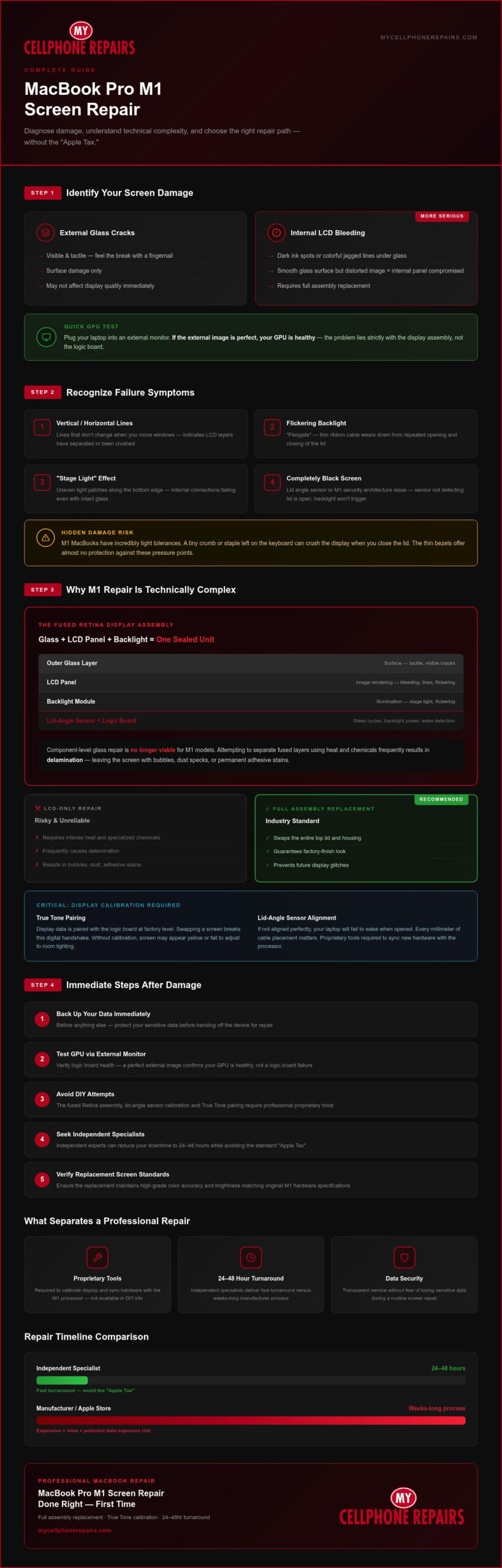
Start by differentiating between external glass cracks and internal LCD bleeding. External cracks are usually visible and tactile. You can feel the break with a fingernail. Internal LCD bleeding looks like dark ink spots or colorful, jagged lines under the glass. If the glass surface is smooth but the image is distorted, the internal panel is compromised. You should also check if the issue is the GPU or the screen. Plug your laptop into an external monitor. If the external image is perfect, your GPU is healthy. The problem lies strictly with the display assembly. This is a common relief for those seeking MacBook Pro M1 screen repair, as a logic board failure is far more complex.
Common Symptoms of M1 Display Failure
Watch for vertical or horizontal lines that don’t change when you move windows. These usually mean the delicate layers of the LCD have separated or been crushed. Flickering backlight issues often point to “Flexgate,” where the thin ribbon cable wears down from opening and closing the lid. You might also notice a “Stage Light” effect. This appears as uneven patches of light along the bottom edge of the screen. These symptoms indicate that the internal connections are failing even if the glass remains perfectly intact.
When It Is More Than Just a Crack
M1 MacBooks have incredibly tight tolerances. A tiny crumb or staple left on the keyboard can crush the display when you close the lid. The thin bezels offer almost no protection against these pressure points. Sometimes your screen stays completely black even if the computer is on. This might involve the lid angle sensor or the M1 security architecture. If the sensor doesn’t detect that the lid is open, the backlight won’t trigger. It’s a mechanical failure that requires a professional MacBook Pro M1 screen repair specialist to resolve. Don’t assume the motherboard is dead until you’ve ruled out these sensor-related issues.
The Technical Complexity of M1 Screen Replacement
M1 MacBooks represent a massive shift in hardware design. The display is no longer a collection of separate parts. It’s a precision-engineered Retina Display Assembly. This means the glass, LCD panel, and backlight are fused into one thin unit. You can’t simply peel off the glass and replace it. This design choice maximizes color accuracy and minimizes weight, but it makes MacBook Pro M1 screen repair a task for experts. You can learn more about My Cellphone Repairs to see how dedicated specialists approach precision hardware fixes for these machines. Component-level glass repair is no longer a viable option for these models.
The integration goes deeper than the physical layers. Modern models include a lid-angle sensor that communicates directly with the logic board. This component tracks the exact degree of the lid opening. It manages system sleep cycles and backlight power. If a technician doesn’t align this sensor perfectly, your laptop will fail to wake up when opened. It’s a high-stakes calibration that separates amateur fixes from professional restoration. Every millimeter of cable placement matters for long-term reliability.
Full Assembly vs. LCD-Only Repair
Replacing just the LCD panel is often a recipe for failure. This method requires intense heat and specialized chemicals to separate the fused layers. It frequently results in “delamination.” This leaves your screen with bubbles, dust specks, or permanent adhesive stains. Replacing the full assembly is the industry standard for a reason. It involves swapping the entire top lid, housing and all. This approach guarantees a factory-finish look and prevents future display glitches. It’s the only way to ensure your laptop feels brand new again.
Calibration and True Tone Support
Display data is paired with the logic board at the factory level. This digital handshake ensures that True Tone and auto-brightness work correctly. When you swap a screen, that pairing is broken. Professional technicians use proprietary tools to sync the new hardware with the processor. Without this calibration, your screen might look yellow or fail to adjust to room lighting. If you value these premium features, it’s worth seeking a professional MacBook repair to ensure a successful MacBook Pro M1 screen repair without losing functionality. Professional tools are necessary to retain the ambient light sensor functions that users rely on daily.
Repair Options: Apple Store vs. Independent Specialists
The Reality of Out-of-Warranty Costs
Apple typically categorizes screen damage as “Tier 4” accidental damage. This is their most expensive repair bracket. If you don’t have an active AppleCare+ subscription, the quote can be shocking. Choosing a professional independent shop typically saves you 30% to 50% on the total bill. These savings don’t come from cutting corners. We focus on high-grade display assemblies that match factory specifications for color and brightness. You don’t have to worry about the “refurbished vs. new” confusion either. A reputable shop will be transparent about their sourcing. They use parts that maintain the integrity of your M1 hardware. All repairs come with a warranty; coverage depends on the part used. Ask your store for details. This ensures your investment is protected without the bloated manufacturer fees.
Speed and Accessibility
With stores across Maryland, Pennsylvania, New Jersey, Virginia and Michigan, expert service is more accessible than you might think. You don’t need to live near a flagship store to get premium care. Expert technicians who also run training programs handle these repairs with precision. They understand the nuances of the M1 architecture better than a generalist. This level of specialized technical support ensures your device returns in perfect working order. It’s about getting back to work quickly with a display that looks and functions like the day you bought it.
Immediate Steps After Breaking Your M1 Screen
Panic is the enemy of a successful MacBook Pro M1 screen repair. Your first priority is your data, not the glass. Connect your laptop to an external monitor using a USB-C or HDMI cable immediately. If the desktop appears on the second screen, your M1 logic board is intact. This is the perfect time to run a full Time Machine backup. Don’t wait for the display to fail completely. Digital restoration is much harder once the backlight dies for good.
Avoid common myths like the “rice trick” or applying packing tape to the glass surface. Rice does nothing for mechanical screen damage. Tape leaves a sticky residue that can permanently damage the anti-reflective coating on the remaining good parts of the panel. Focus your energy on researching repair providers that stand behind their work with a warranty. This ensures your restoration is backed by a professional standard.
Maintaining Productivity During the Repair
Your workflow doesn’t have to stop just because the lid is damaged. Use Sidecar to turn an iPad into a temporary primary display if you’re on the move. You can also trigger Clamshell Mode by connecting a power adapter, an external monitor, and a Bluetooth keyboard. This setup lets you use the MacBook as a high-performance desktop while you wait for your MacBook Pro M1 screen repair. It’s a simple way to verify that the M1 chip is still processing data normally without needing the built-in Retina display.
Evaluating Repair vs. Replacement
Deciding whether to fix or replace your device requires a cold look at the numbers. Use the 50% rule. If the professional repair cost is more than half the current market value of a new M1 model, replacement might be an option. However, MacBook Pro M1 models still command high resale values in 2026. Choosing to repair is almost always the more sustainable and cost-effective choice. Restoration keeps a powerful machine out of the landfill and saves you the hassle of a full system migration. If you’re ready to get back to work, you can book your MacBook repair with a team that understands these specific hardware needs.
Professional MacBook Repair at My Cellphone Repairs
Restoration is about precision. We don’t just swap parts; we restore the original user experience. Our approach to MacBook Pro M1 screen repair focuses on technical accuracy and component longevity. We use high-grade display assemblies that meet strict performance standards for brightness and color gamut. These parts are selected to match the original Retina specifications, ensuring you don’t lose that crisp visual quality you rely on for work. Every device undergoes a rigorous testing phase after the hardware is installed. We check the backlight uniformity, lid sensor response, and True Tone functionality to ensure the device leaves our bench in peak condition. This methodical testing prevents the common post-repair glitches that plague amateur fixes.
Why Our Technicians Are Different
Our team consists of experts who do more than just fix devices. Our technicians are trained in the same advanced programs we offer to the wider repair industry. This means we aren’t just following a manual; we understand the “why” behind every connection. This deep knowledge gives us a unique perspective on the internal architecture of your laptop. We’ve seen every M1-specific hardware quirk, from fragile ribbon cables to complex sensor calibrations. We maintain fast and transparent communication throughout the entire process. You’ll always know the status of your repair and the expected timeline for completion. We treat your device with the respect that a professional-grade tool deserves.
Multi-State Service with a Local Feel
Our stores across Maryland, Pennsylvania, New Jersey, Virginia and Michigan bring our specialized technical support to customers in those states. Our mail-in program extends that support further. The process is simple and methodical. You send your device to our central facility, and we handle the rest with extreme care. We prioritize safe shipping and handling to ensure your MacBook arrives and returns without a scratch. It’s the reliability of a local specialist with the reach of a multi-state team. We know that your laptop is essential for your livelihood. If your display is failing, don’t wait for the problem to get worse. Get a MacBook repair quote today and let our experts handle your MacBook Pro M1 screen repair with the precision it requires.
Restore Your Professional Edge
A damaged display is a major disruption, but it doesn’t have to be a permanent setback. You’ve learned that the fused Retina assembly requires a specialized touch to maintain your laptop’s high-grade visuals and sensor functions. By choosing a professional independent specialist, you bypass excessive manufacturer fees and long wait times. We provide expert MacBook hardware repair with a focus on speed and reliability. Our technician-led service ensures that your MacBook Pro M1 screen repair is handled with the precision your work requires. We offer fast turnaround times to minimize your downtime and get you back to your projects. Don’t let a cracked screen stall your productivity for another day. Take the next step to revive your hardware and protect your investment. Get Your MacBook Pro M1 Screen Fixed Fast with a team that values your time. Your perfectly functioning Retina display is just a few clicks away.
Frequently Asked Questions
How much does a MacBook Pro M1 screen repair cost in 2026?
Repair costs are determined by the specific display assembly needed and the service provider you select. Independent specialists offer a way to avoid the manufacturer’s brand markup while using high-grade parts. You’ll find that professional shops provide transparent pricing based on the current market availability of precision components. Always ensure your chosen provider offers a warranty on the new hardware to protect against any unexpected manufacturing defects after the installation.
Will I lose my data if I get my MacBook screen replaced?
Screen replacement is a hardware procedure that doesn’t involve your internal SSD or logic board. Your files remain safe on the drive throughout the process. We still recommend performing a full Time Machine backup before any repair as a standard safety precaution. This protects your work in the unlikely event of a secondary hardware failure. Our technicians prioritize data integrity during every MacBook Pro M1 screen repair.
Does a third-party screen repair void my Apple warranty?
Third-party repairs don’t automatically void your entire warranty under federal law, but the manufacturer might refuse to service the specific display assembly you replaced. If a technician damages other components during the process, that damage won’t be covered by the original warranty. Choosing a reputable specialist that offers its own warranty provides a reliable safety net. At My Cellphone Repairs, all repairs come with a warranty; coverage depends on the part used. Ask your store for details.
How long does it take to fix a MacBook Pro M1 screen?
Turnaround times depend on part availability and the service provider’s current queue. Most professional independent shops complete the work within 24 to 48 hours if the parts are in stock. This is significantly faster than the 5 to 10 business days often required by manufacturer mail-in centers. Our mail-in program is designed for speed to help you get back to your professional tasks as quickly as possible.
Can I fix my M1 MacBook screen myself?
DIY repair is extremely difficult due to the fused Retina assembly and delicate internal sensors. You risk damaging the lid-angle sensor or the logic board connectors if you don’t have specialized tools and experience. M1 models also require specific calibration to maintain features like auto-brightness. Professional MacBook Pro M1 screen repair is the safest way to ensure your laptop functions correctly without creating more expensive hardware problems.
Why is my MacBook Pro M1 screen black but the keyboard is lit?
A black screen with a lit keyboard often indicates a backlight failure or a faulty lid-angle sensor. The computer is running, but the display isn’t receiving power or a signal. You can verify this by connecting an external monitor to see if your desktop appears. If the external image works, the issue is strictly with the display hardware. This usually requires a full assembly replacement to restore your laptop’s functionality.
Will True Tone still work after a screen replacement?
True Tone functionality requires a digital handshake between the display and the logic board. If you swap the screen without the proper calibration tools, this feature will likely be disabled. Professional technicians use specialized equipment to transfer the necessary data to the new assembly. This ensures your screen maintains its color accuracy and ambient light adjustments. Always ask your repair provider if they have the tools to retain these premium features.
Is it worth fixing a cracked screen on an older M1 MacBook?
Fixing an M1 MacBook is a smart investment because the M1 chip remains powerful enough for most professional workflows in 2026. These laptops maintain high resale values, making a repair much cheaper than purchasing a new machine. It’s a sustainable choice that extends the life of a high-performance device. Unless the logic board is also damaged, restoring the display is the most cost-effective path forward for your hardware.