
The bowl of dry rice in your pantry is actually the worst place for your wet device. While the internet claims it’s a miracle cure, rice traps moisture and introduces dust that accelerates internal corrosion. Stop reaching for the rice and start focusing on the internal hardware. You’re likely worried about losing years of photos or facing a massive repair bill. We understand that frustration. Knowing how to fix water damaged iPhone units starts with ignoring the myths and acting before the liquid destroys the logic board.
Liquid damage is a chemical race against time, not just a drying problem. Don’t wait for the device to dry on its own. You can save your device and your data if you follow the right protocol immediately. This guide provides the critical emergency steps to take right now to stabilize your iPhone. We’ll also explain the professional restoration process required to remove minerals and prevent failure. From power-down procedures to expert hardware diagnostics, you’ll learn the clear path to a working phone. Follow these steps to maximize your chances of a total recovery.
Key Takeaways
- Power off your device immediately and remove all accessories to prevent permanent electrical shorts.
- Discover the essential steps for how to fix water damaged iPhone hardware through proper airflow instead of using harmful DIY methods like rice.
- Understand why liquid damage is a chemical reaction that causes rapid corrosion on the logic board even if the phone seems dry.
- Learn how to use consistent, cool airflow to safely stabilize your device before seeking professional help.
- Identify when professional diagnostics and ultrasonic cleaning are necessary to salvage your data and restore internal components.
Immediate Emergency Steps for a Water Damaged iPhone
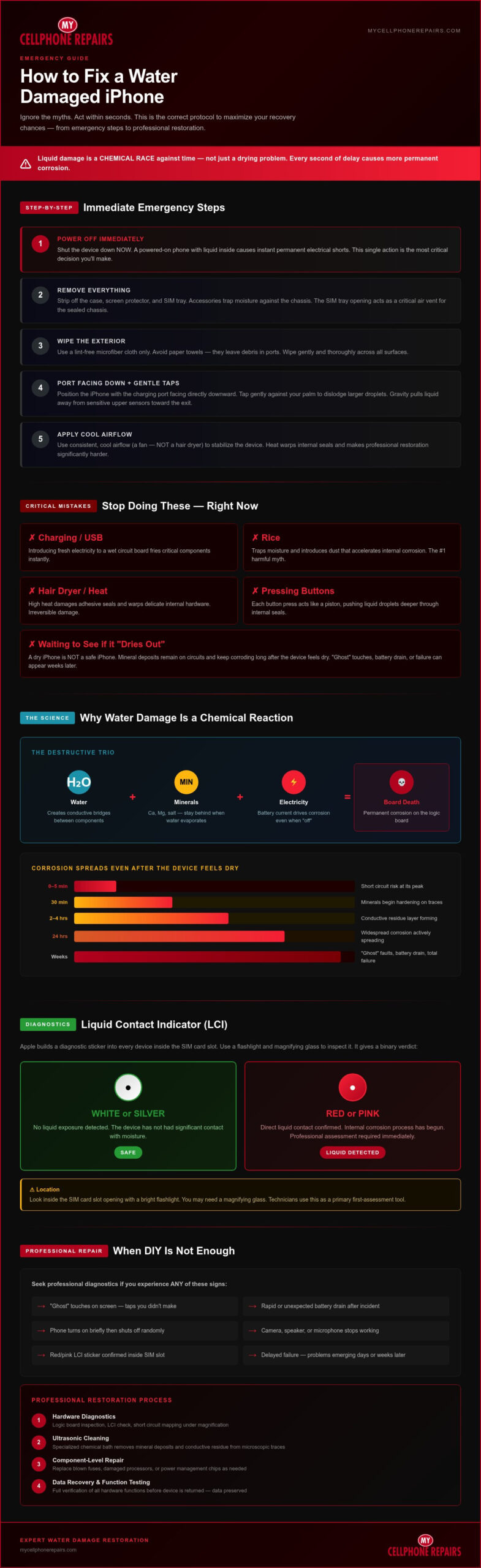
The moment your iPhone hits the water, the clock starts ticking. You need to act within seconds to minimize internal damage. Your first and most important step is to power the device off immediately. If the screen is still on, shut it down. Keeping the power running while liquid is inside is the fastest way to cause a permanent electrical short. This simple action can be the difference between a quick repair and a total loss. Learning how to fix water damaged iPhone issues starts with these immediate physical interventions.
Once the power is off, strip the device of everything. Remove the case, peel off the screen protector, and pop out the SIM tray. Accessories trap moisture against the chassis and prevent evaporation. Use a lint-free cloth or a microfiber towel to wipe the exterior thoroughly. Don’t use paper towels or tissues that can leave behind debris in the ports. After wiping it down, position the iPhone with the charging port facing directly downward. This encourages any trapped liquid to move toward the largest opening instead of deeper into the logic board.
What to Stop Doing Immediately
Panic often leads to mistakes that make the damage worse. Don’t plug your iPhone into a charger or a computer to see if it still works. Introducing a fresh electrical current to a wet circuit board will likely fry critical components instantly. You should also avoid pressing the volume or power buttons excessively. Each click can act like a piston, pushing droplets further into the internal seals. Never use a hair dryer, microwave, or any external heat source. High heat can damage the adhesive seals and warp the delicate internal hardware, making a professional restoration much harder.
The SIM Tray Removal Technique
Removing the SIM tray is a vital step in learning how to fix water damaged iPhone internals. This opening acts as a crucial air vent for the sealed chassis, allowing trapped moisture a path to escape. Once the tray is removed, hold the phone firmly and tap it gently against the palm of your hand with the port facing down. This creates enough vibration to dislodge larger droplets without causing physical shock to the components. Gravity is your best tool for initial drainage because it pulls liquid away from the sensitive upper sensors and toward the exit points.
The Reality of Liquid Damage: Corrosion and Short Circuits
Many users assume that a dry iPhone is a safe iPhone. This is a dangerous misconception. When you’re looking for how to fix water damaged iPhone hardware, you aren’t just fighting moisture. You’re fighting chemistry. Liquid damage involves a destructive trio: water, minerals, and electricity. When liquid enters the device, it creates conductive bridges between components that should never touch. This results in an immediate short circuit that can blow fuses or destroy processors instantly. Even a single drop in the wrong place can disable the entire power management system.
Even if your phone escapes an immediate short, the long-term threat is corrosion. Most water isn’t pure. It contains minerals like calcium, magnesium, and salt. As the water evaporates, these minerals stay behind and harden. They form a crusty, conductive layer on your internal circuits that acts as a bridge for stray electricity. This residue continues to eat away at the delicate metal traces long after the device feels dry to the touch. This is why invisible damage often manifests as “ghost” touches, rapid battery drain, or total failure weeks after the initial splash. The process is similar to rust on a car; once it starts, it doesn’t stop just because the rain ended.
Understanding the Logic Board Impact
Think of the logic board as the brain of your iPhone. It’s a complex, multilayered circuit board packed with thousands of microscopic components. When mineral deposits settle here, they create permanent paths for electricity to leak. This is why a phone that “turned back on” provides a false sense of security. It may work for a few hours or days, but the corrosion is still spreading underneath the shields. Understanding how to fix water damaged iPhone components means removing these microscopic threats using specialized chemicals before the damage becomes fatal. Professional water damage repairs are often the only way to stop this chemical decay.
How to Check Liquid Contact Indicators (LCI)
Apple builds a “tattletale” into every device to help identify exposure. This is the Liquid Contact Indicator (LCI). For most modern models, you can find this small sticker inside the SIM card slot. You’ll need a flashlight and perhaps a magnifying glass to see it clearly. A healthy, dry iPhone will show a white or silver indicator. If the LCI has turned bright red or pink, it has made direct contact with liquid. Technicians use this as a primary tool for initial assessment. It’s a binary test: white means safe, red means trouble. If yours is red, your internal components have likely been compromised. You should seek a hardware diagnostic immediately to prevent further decay.
Debunking the Rice Myth and Ineffective DIY Methods
Stop reaching for the bag of rice. It’s a persistent myth that does more harm than good. Rice is an ineffective desiccant that cannot pull moisture from the deep recesses of your device. In fact, rice introduces fine starch dust into your charging port and speaker grilles. When this dust mixes with the liquid inside, it forms a thick, corrosive paste that accelerates hardware failure. Every hour your phone sits in a bowl of rice is an hour that minerals are eating away at your logic board. Learning how to fix water damaged iPhone hardware involves using science, not pantry staples.
The chemical reaction between rice starch and water is particularly aggressive. This paste hardens as it dries, making it nearly impossible to remove without professional ultrasonic cleaning. It can jam buttons and block the charging port entirely. If you have silica gel packets, you can place them near the device, but don’t expect a miracle. They are designed to keep shoes or cameras dry in humid environments, not to extract liquid from a submerged motherboard. Effective restoration requires addressing the source of the problem directly rather than waiting for a miracle in the pantry.
The Problem with External Heat
High heat is a silent killer for electronics. A hair dryer might seem like a quick fix, but it often reaches temperatures that melt the internal adhesives holding your phone together. This can compromise the very seals designed to keep water out. Excessive heat can also cause permanent discoloration or “burn-in” on your OLED display. Compressed air is equally dangerous. The high-pressure blast often forces standing water deeper into sensitive areas like the Face ID sensors or camera modules. Stick to room-temperature airflow from a standard fan. It’s slower, but it’s the only safe way to encourage evaporation without causing secondary damage.
Why “Waterproof” iPhones Still Get Damaged
Don’t let the “waterproof” label fool you. Most modern iPhones carry an IP68 rating, which suggests they can survive depths of up to 6 meters for 30 minutes. However, these tests are conducted in controlled laboratory settings using fresh water. Real-world conditions like saltwater, chlorine, or soapy dishwater are much more aggressive. Also, these protective seals are not permanent. They degrade over time due to daily wear, exposure to high temperatures, or physical drops. Once a seal is compromised, liquid enters easily. Understanding how to fix water damaged iPhone issues means recognizing that your warranty likely won’t help. Apple and most third-party providers explicitly exclude liquid damage from their standard coverage.
Safe Ways to Dry Your iPhone at Home
If you find yourself without coverage and need to consider your options for a new or pre-owned device, you can explore Electronics Retail and Technical Services for a wide selection of mobile hardware and expert support.
While managing hardware issues like liquid damage is critical, staying on top of routine maintenance for all your gear is equally important. If you need professional support for your cycling equipment, you can explore Mobile Bicycle Repair and Maintenance Services from BrightRide Bike Shop LLC to get expert on-site care delivered directly to you.
Once you’ve stabilized the device, focus on controlled evaporation. Place your iPhone in a dry area with consistent, steady airflow. This is the most effective way to address how to fix water damaged iPhone internals without opening the chassis. Aim for a room with low humidity and a stable temperature. Avoid bathrooms or kitchens where steam might linger. Instead, choose a workspace with plenty of ventilation to help moisture escape from the ports.
Positioning is critical during this phase. Prop the phone up at a slight angle with the charging port facing downward. This allows gravity to assist while air moves across the opening. If you have silica gel packets, place them and the phone inside a small, sealed container. These packets are far superior to rice because they don’t create dust or debris. However, they still require time to work. You must allow at least 48 to 72 hours for the internal components to dry completely. Resist the urge to press buttons or check the screen during this window. Patience is your best defense against a short circuit.
The Airflow Method
Use a standard room fan to blow cool air directly into the Lightning or USB-C port. If you live in a high-humidity climate, a cool-mist dehumidifier in the same room can help lower the ambient moisture levels. Constant airflow is more effective than passive absorption because it actively carries moisture away from the device. This method works best when the device is stripped of its SIM tray to allow air to circulate through the internal cavity. Keep the fan on a medium setting to maintain a steady stream without causing the device to vibrate or move.
Monitoring for Battery Swelling
Liquid exposure often compromises the chemical stability of the lithium-ion battery. Watch for signs of physical change during the drying process. If the screen appears to be lifting from the frame or if the back glass feels warped, the battery may be expanding. This is a serious safety risk. You may need a professional swollen phone battery replacement to prevent a fire or further hardware damage. Never attempt to charge a battery that has been submerged. Charging a compromised battery can cause an immediate thermal failure or even an explosion.
While home drying can help, it doesn’t remove the minerals that cause long-term corrosion. If your phone still won’t power on after 72 hours, it’s time for a professional intervention. Our team provides specialized water damage repairs to clean the logic board and salvage your data.
When to Seek Professional Water Damage Restoration
If your device remains unresponsive after 72 hours of drying, you need a professional diagnostic. At-home methods can only address surface moisture. They cannot remove the microscopic mineral deposits that cause long-term decay. Professional technicians use specialized tools like thermal cameras and multimeters to pinpoint exactly which components have failed. This is the most effective way to determine how to fix water damaged iPhone hardware when DIY steps aren’t enough. Don’t keep trying to power it on. Each attempt can send electricity through a shorted circuit and cause irreversible damage.
The Ultrasonic Cleaning Process
Ultrasonic cleaning is the only true cure for internal liquid damage. This process involves placing the stripped logic board into a specialized machine filled with a chemical cleaning solution. The machine generates high-frequency sound waves that create millions of microscopic bubbles. These bubbles implode with enough force to scrub away corrosion and mineral deposits from under the metal shields where a brush can’t reach. This neutralized bath removes the conductive residue that causes “ghost” touches and battery drain. It’s a methodical, scientific approach that restores the board to a clean state and prevents future failure. Our expertise in this area comes from our deep hardware knowledge, which we also share through our technician training program.
Data recovery is often the primary goal for users with submerged devices. Even if the iPhone is physically unsalvageable, the data on the NAND flash chip might still be intact. Specialists can perform board-level micro-soldering to bypass damaged power lines. This creates a temporary connection to extract your photos, messages, and contacts. This is a delicate process that requires surgical precision. Choosing a professional service ensures you have the best possible chance of retrieving your digital life from a “dead” device.
Choosing Between Repair and Replacement
Deciding whether to fix or replace your iPhone depends on the extent of the damage and the age of the model. If the repair requires a new screen, a new battery, and extensive logic board work, the costs can add up quickly. We provide a transparent cost-benefit analysis after every diagnostic. If your original device is beyond saving, you don’t have to pay full price for a brand-new replacement. We offer high-quality refurbished iPhones that provide a cost-effective way to get back online. These devices are fully tested and certified for reliability. Schedule your professional water damage diagnostic today to get a clear answer on the status of your iPhone.
Restore Your iPhone and Protect Your Data
Speed is your greatest ally when dealing with liquid exposure. By powering down immediately and avoiding harmful DIY myths like rice, you’ve already improved your device’s chances of survival. Remember that drying isn’t the same as cleaning. Microscopic minerals continue to cause corrosion long after the water has evaporated. Knowing how to fix water damaged iPhone hardware requires addressing these internal chemical reactions before they lead to permanent failure.
If your device still isn’t functioning or you’re worried about long-term stability, professional intervention is the safest path forward. We use professional ultrasonic cleaning technology to neutralize corrosion and have expert data recovery specialists on hand to salvage your most important files. Even if your current device is unsalvageable, we offer certified refurbished iPhone options to get you back on your feet quickly. Get Expert iPhone Water Damage Repair at My Cellphone Repairs today. Don’t let a splash turn into a total loss; most devices can be saved with the right expertise.
Frequently Asked Questions
Can a water damaged iPhone be fixed?
Yes, many devices are salvageable if you act quickly. Success depends on the type of liquid and how soon you power off the device. Freshwater is easier to manage than saltwater or soda, which cause rapid corrosion. Professional technicians use ultrasonic cleaning and micro-soldering to restore components. Even if the screen is dead, the logic board can often be repaired to a functional state.
How long should I leave my iPhone in rice?
You shouldn’t use rice at all. It’s an ineffective desiccant that introduces dust and starch into your device’s ports. This debris can mix with moisture to create a corrosive paste that destroys internal circuits. Instead of rice, use consistent airflow from a fan for 48 to 72 hours. This is a much safer approach when considering how to fix water damaged iPhone hardware at home.
Is my iPhone still waterproof after a screen repair?
Repaired iPhones are rarely as water-resistant as they were when they left the factory. While technicians apply a new adhesive seal during the repair, the original factory pressure seal is broken. You should treat any repaired device as vulnerable to liquid. Avoid submerging it or using it in high-humidity environments like a shower. Heat and age also naturally degrade these seals over time. If you need to restore your display after water exposure, our complete guide to iPhone screen repair explains the technical differences between replacement options and how to choose the right service for your device.
Will Apple fix my water damaged iPhone for free?
No, Apple’s standard one-year warranty explicitly excludes liquid damage. Even if your phone has a high IP68 water resistance rating, liquid ingress is considered accidental damage. If you have AppleCare+, you can receive a replacement device for a fixed deductible. Without insurance, you’ll pay out-of-warranty prices. Independent repair shops are often a better value for restoring your original hardware and retrieving your data.
What happens if I charge a wet iPhone?
Charging a wet device can cause an immediate and permanent electrical short. Water conducts electricity across the logic board, bridging connections that should never touch. This can fry the power management chips or cause the battery to swell and catch fire. Never plug your iPhone into a wall outlet or computer until a professional confirms the internal components are dry and free of mineral residue.
How do I know if my iPhone has internal water damage?
Check for physical signs like a foggy camera lens or muffled speaker audio. You might also notice the screen flickering or “ghosting,” where the phone acts as if you’re touching it. Liquid exposure can also trigger an iPhone touchscreen not responding issue, which may appear days after the initial incident as corrosion spreads to the display connectors. The most definitive proof is the Liquid Contact Indicator (LCI) located inside the SIM tray slot. If that sticker has turned red or pink, liquid has breached the internal seals and reached the hardware. Water exposure can also compromise your display, so understanding the full scope of iPhone screen repair options can help you assess whether your display damage stems from the liquid intrusion itself or requires a separate restoration.
Can I recover photos from a water damaged iPhone that won’t turn on?
Yes, data recovery is possible even on devices that seem completely dead. Specialists use micro-soldering to repair the specific power lines on the motherboard required for a temporary boot. This allows them to bypass the damage and pull your photos directly from the memory chip. Learning how to fix water damaged iPhone data requires specialized equipment and expertise that goes beyond a standard screen replacement.
What is the liquid contact indicator on an iPhone?
The Liquid Contact Indicator (LCI) is a small sticker that changes color when it touches water. It’s normally white or silver, but it turns bright red upon contact with liquid. Apple places these in specific locations, usually inside the SIM card slot, to help technicians verify liquid exposure. It serves as a primary diagnostic tool to determine if hardware failure was caused by environmental factors or manufacturing defects.